Changelog

Stedi launches Mappings

Mappings is a powerful, highly-available service built to create, test and run mappings between various JSON documents – from simple value-to-value data mapping to highly complex data transformations.

For the last 50 years, businesses across all industries have been utilizing EDI to send and receive commercial transactions like purchase orders and invoices with their trading partners. Given the immense range of available standards, data formats, and API shapes, mappings between input and output files are necessary. However, existing mapping tools are lagging behind modern software tooling in terms of API-driven accessibility, scalability, high-availability, and user experience. A large portion of these systems live on-prem, and are only accessible via legacy interfaces and protocols – making it hard to integrate with today’s software solutions.

For example, let's say you have a document that looks like this

{ "product": { "id": "QL-5490S", "price": "USD 500" } }

but you need it to look like this

{ "product_number": "QL-5490S", "price": { "currency": "USD", "amount": 500 } }

then Mappings can help you. Once you've created the proper mapping rules, Mappings can turn any document with the first structure into a document with the second structure. There are many situations where this is helpful, including:

  • You receive data from a trading partner, but it's not in the format that your own software system can handle.

  • You need to call an API and it expects data in a format that's different than what your own software system uses.

  • You want to map the data on a purchase order directly onto an invoice.

There are no minimums, monthly fees, or setup fees to use Mappings – customers only pay for the number of times their mapping is executed, starting at $0.05 per request. The first 100 requests per month are free.

To get started building Mappings, please visit terminal.stedi.com/mappings.
JEDI 2.0-beta

We released the second major revision of the JEDI format as a beta this week. This gives us some major readability gains over the original JEDI format, including:

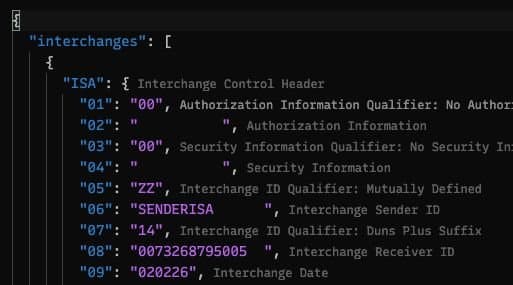
  • We present the names of segments in addition to their IDs, so you have some context as to what each segment is representing

  • Similarly, we have added element descriptions along with their position in the segment

  • We also have updated how code values are provided/returned, with the codes being expanded to their representative text. We call out structural pieces of the document as well - loops are identified by the first segment of the loop (where jedi@1.0 sometimes had reference names that were just a numerical string), and each loop is designated with a _loop suffix.

  • We've added a couple of convenience attributes to the documents, so now you have an easier property on which to identify release and transaction set for a given document (at interchanges.*.release and interchanges.*.groups.*.transaction_set)

  • By default, we are trimming ISA header whitespace, but by supplying the clean_envelope_whitespace: false flag, this can be disabled. This differs from JEDi@1.0 which has this feature off by default. We're also still in beta, so we may make further tweaks and adjustments as time goes on, based on customer input and how people are using the documents. Please send us your feedback!

Compressed Response

Translating EDI to JEDI2.0 results in a much larger payload than the original request (and larger than the existing JEDI1.0 format). Now we compress all responses (larger than 5.5 kb) from the API. This compression is transparent to the customer as most http request clients and all browsers will decompress the response for them.

Sorted JSON

In order to make JEDI easier to read when it returns from our /translate endpoint, we have applied a custom sorting to the JSON renderer. JEDI will now order JEDI as the segments and elements are ordered in EDI. The order be will be preserved in node or browser applications. Other platforms may not keep the key ordering.

{ "interchanges": [ { "ISA": { "01": "00", "02": " " }, "groups": [ { "GS": { "01": "PO", "02": "SENDERGS", "08": "004010" }, "transaction_sets": [ { "heading": { "010_ST": { "01": "850", "02": "000000001" }, "020_BEG": { "01": "00", "02": "SA", "03": "A99999-01", "05": "19970214" } }, "detail": {}, "summary": {} } ], "GE": { "01": "1", "02": "1" } } ], "IEA": { "01": "1", "02": "000000001" }, "delimiters": { "element": "*", "segment": "~", "sub_element": ">" } } ] }

__version field in JEDI documents

To distinguish between versions of JEDI documents, we've added an attribute called __version to the response of /translate.

{ "code": "valid", "output": { "__version": "jedi@1.0", "interchanges": {...}, "meta": {...}, }, }

Trimmed ISA white space in JEDI documents

Added new output option to trim the ISA whitespace if enabled. Today, the ISA in JEDI format looks like

"ISA": { "01": "00", "02": " ", "03": "00", "04": " ", "05": "ZZ", "06": "TCWDEPOT ", "07": "ZZ", "08": "FVLI0006 ", "09": "210202", "10": "0235", "11": "U", "12": "00200", "13": "005787399", "14": "0", "15": "P", "16": ":" }

If clean_envelope_whitespace is set to true, it instead outputs as:

"ISA": { "01": "00", "02": "", "03": "00", "04": "", "05": "ZZ", "06": "TCWDEPOT", "07": "ZZ", "08": "FVLI0006", "09": "210202", "10": "0235", "11": "U", "12": "00200", "13": "005787399", "14": "0", "15": "P", "16": ":", }

JSON EDI view in the Inspector

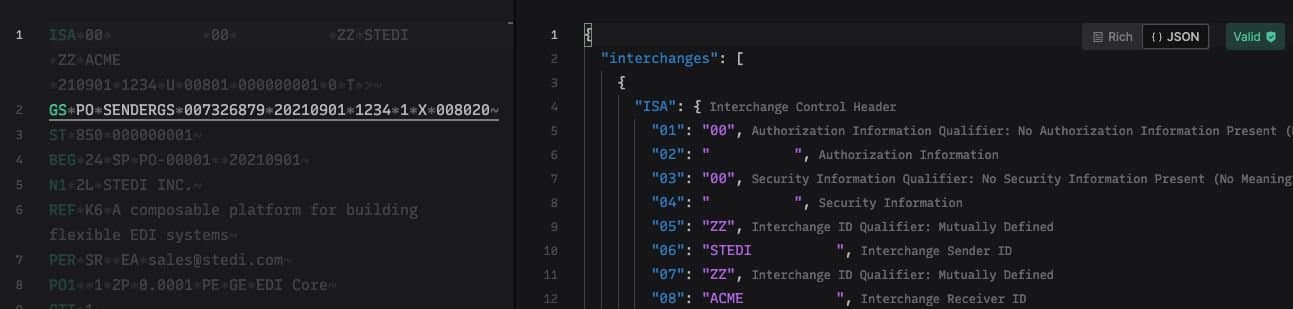
You can now toggle between "Rich view" and "JSON view" in the Inspector. The JSON view displays the EDI input in our custom JSON EDI (JEDI for short) format, along with the same annotations that were present in Terminal, for faster manual scanning of the file.

Support missing X12 003XXX versions

Support for 003040 and 003030 are now visible from our EDI Reference. More to come.

Faster EDI Inspector experience on the web

A missing header on responses from EDI Core meant that browsers would always need to issue two synchronous requests in order to translate and validate payloads in EDI Inspector. The addition of the missing headers speeds up the experience considerably, especially for users far away from Virginia, USA.

EDI Translate improvements in Terminal

To improve the legibility of JEDI v1 in Terminal, a description was added next to each segment and element.

ISA segment padding

The ISA segment of an X12 EDI document has fixed width fields for each element so the length of the segment always turns out the exact same length. Previously, converting from JEDI to EDI required that ISA elements be of accurate length.

X12 3XXX releases

Support for 30503060, and 3070 X12 releases has been added to EDI Reference and EDI Core's /translate endpoint.