Introducing OAuth Stedi apps
Stedi apps are pre-configured integrations between a provider's Stedi account and an external platform, like an electronic health record (EHR), practice management system, or revenue cycle management (RCM) system.
We're releasing a completely revamped, OAuth-based version of Stedi apps that allows deeper, more seamless integration with external applications. OAuth Stedi apps include several new features:
-
One-click installation – Providers can install a Stedi app without copying API keys or SFTP credentials between Stedi and the app.
-
Support sessions – App developers can open a time-limited support session in a provider's Stedi account.
-
Self-provisioning – An installed Stedi app can create its own event destinations and SFTP users, run eligibility checks, and manage transaction enrollments in a provider's Stedi account.
-
Self-service app registration – App developers can create an app and get OAuth credentials directly in the Stedi portal.
-
Redesigned Stedi app store – App developers can list their app so providers can find and install it.
Previously, providers had to generate API keys and SFTP credentials and share them with the app developer. To provide support, the app developer's staff had to join the provider's Stedi account as members. That access lasted until the provider removed the members.
Now, industry-standard OAuth replaces that credential handoff. A provider installs an app by approving one consent screen. The app developer's support staff can work in a provider's Stedi account through a time-limited session instead of a standing login.
Important: We're not changing existing Stedi apps that use API keys or SFTP credentials as part of this release. All existing Stedi apps will continue working. If you're a current Stedi app developer who wants to upgrade to OAuth, contact us.
Watch the 2026 Stedi Keynote announcement:
One-click installation for providers
A provider can click an install link in the app developer's platform, or select the Stedi app in the redesigned Stedi app store. Stedi then shows a consent screen with the app's name and the exact permissions the app requests.
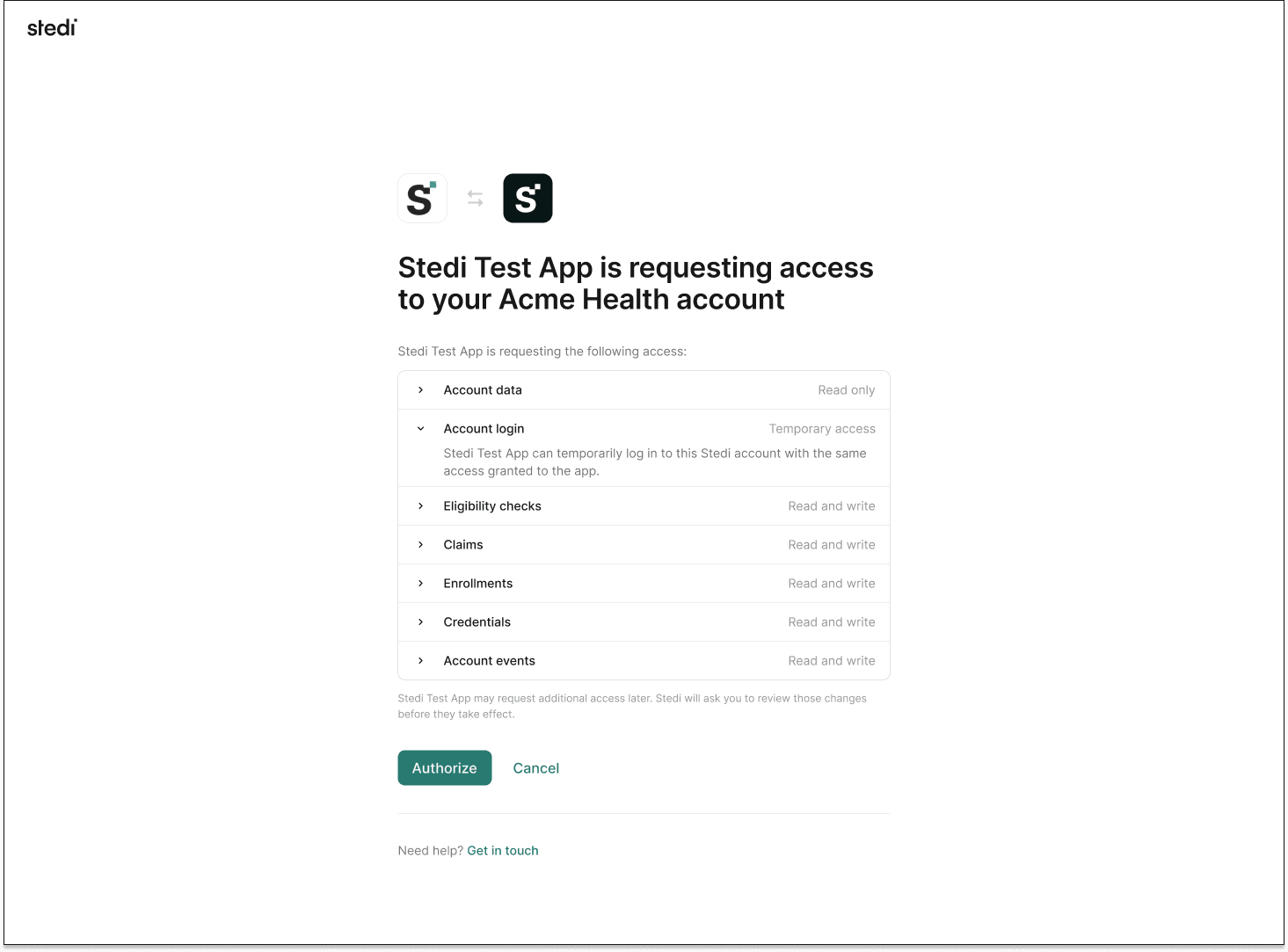
The provider approves, and the connection is live.
Support sessions
App installation grants the app developer the ability to run a time-limited support session in the provider's account. When a provider uninstalls the app, that ability is removed. Support sessions use the app's permissions – nothing more.
Self-provisioning
Once the provider approves the app, the app can set up the account itself. It calls Stedi APIs with its own tokens.
An app can create event destinations, create SFTP users, run eligibility checks, and manage transaction enrollments. It acts under the exact permissions the provider approved on the consent screen. Stedi labels each resource the app creates, so providers can see what the app manages.
Stedi also sends app.installed and app.uninstalled events to the app developer's own Stedi account. Providers can uninstall an app at any time, and its access ends within an hour.
Self-service for app developers
App developers can now register apps in the Stedi portal and get their OAuth credentials there. The entire process is self-service.
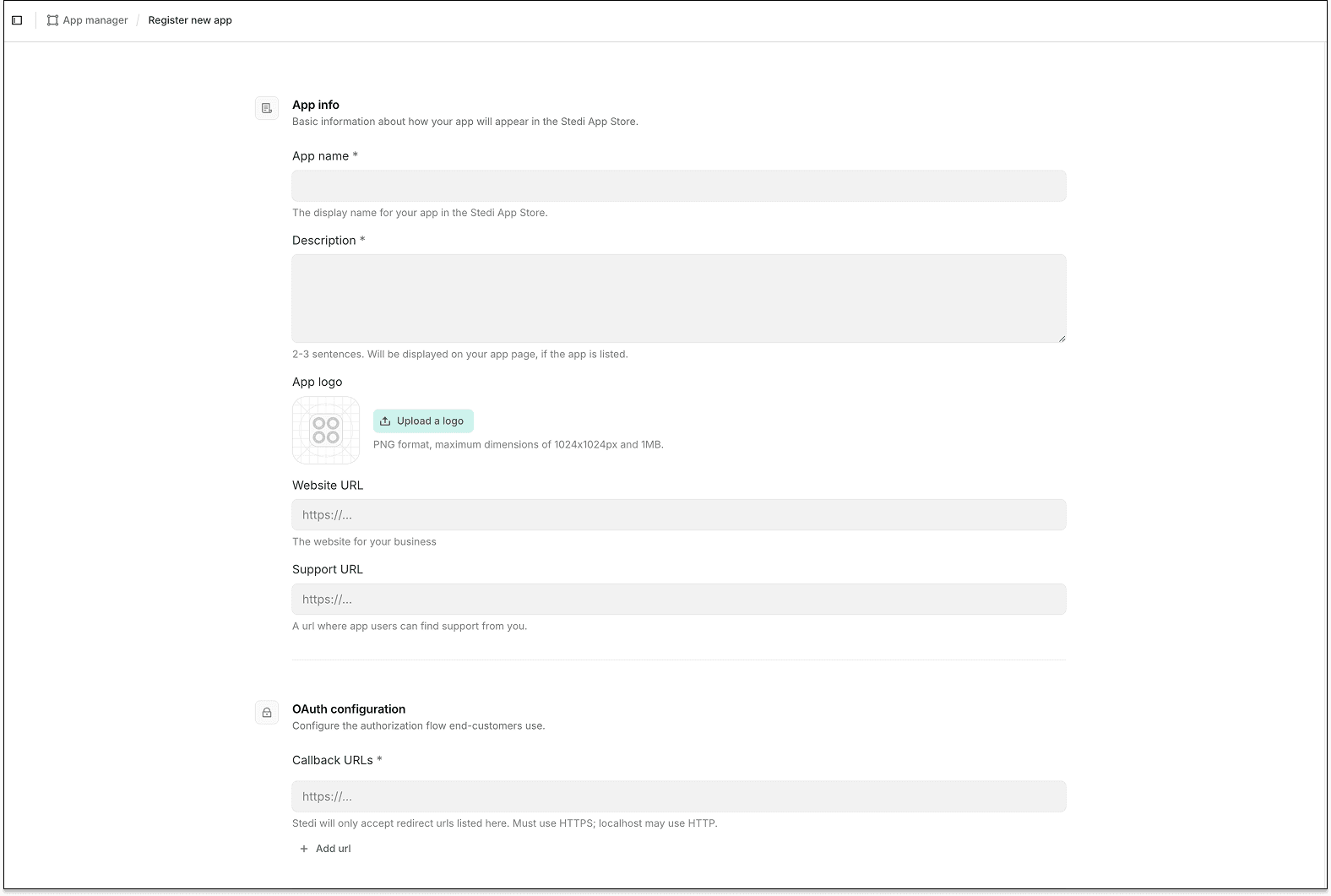
App developers can list their app in the redesigned Stedi app store so providers can find it. Each Stedi account can have one active app installed.
Pricing and availability
It's free to build and publish a Stedi app. There are no developer fees. It's also free for providers to install an app.
OAuth Stedi apps are in private preview. We're onboarding new Stedi app developers. Contact us if you want to build a Stedi app.
For more details, see our announcement blog.