Introducing the ERA PDF API endpoint

Dec 19, 2025

Products

You can now programmatically retrieve PDF versions of your 835 Electronic Remittance Advice (ERAs) using Stedi’s new ERA PDF API endpoint.

The PDFs are the same as the ones you can download from the Stedi portal:
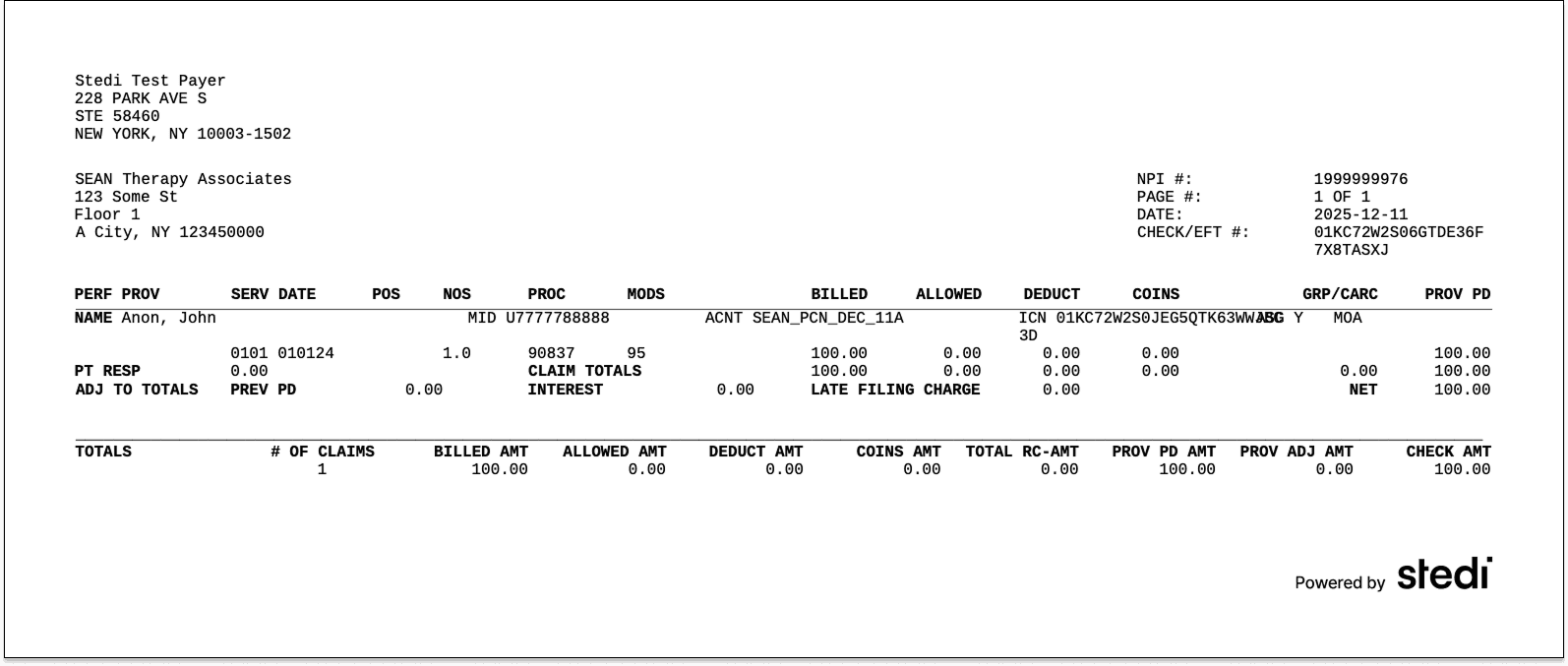
Each PDF gives you a clean, printable view of the ERA’s data, showing exactly how claims were paid, adjusted, or denied by the payer.

Having a PDF can make it easier for teams to post remittances by hand or keep physical copies of their ERAs.

How to use the endpoint

Stedi generates a PDF for every processed ERA. To download the PDF through the API:

  1. Get the ERA’s transaction ID from one of the following:


    Example from a webhook event:

    {
      "event": {
        "detail": {
          "transactionId": "95e7786c-7066-4494-b83a-b1f300624902",  // Transaction ID
          "direction": "INBOUND",
          ...
          "x12": {
            "metadata": {
              "transaction": {
                "transactionSetIdentifier": "835",                  // 835 ERA
                ...
              },
              ...
            },
            ...
          },
          ...
        },
        ...
      }
    }


  2. Use the transaction ID to call the ERA PDF API endpoint and retrieve the generated PDF. The API returns the PDF as a binary blob, which you can save to a file with a .pdf extension.

    curl -X GET \
      "https://healthcare.us.stedi.com/2024-04-01/electronic-remittance-advice/{transactionId}/pdf" \
      -H "Authorization: <api_key>" \
      -H "Accept: application/pdf" \
      > era.pdf

Try it out

The ERA PDF API endpoint is available now on Stedi’s Developer and Enterprise plans.

To learn more, check out our API reference. To try the endpoint yourself, reach out for a free trial.

You can now programmatically retrieve PDF versions of your 835 Electronic Remittance Advice (ERAs) using Stedi’s new ERA PDF API endpoint.

The PDFs are the same as the ones you can download from the Stedi portal:

Each PDF gives you a clean, printable view of the ERA’s data, showing exactly how claims were paid, adjusted, or denied by the payer.

Having a PDF can make it easier for teams to post remittances by hand or keep physical copies of their ERAs.

How to use the endpoint

Stedi generates a PDF for every processed ERA. To download the PDF through the API:

  1. Get the ERA’s transaction ID from one of the following:


    Example from a webhook event:

    {
      "event": {
        "detail": {
          "transactionId": "95e7786c-7066-4494-b83a-b1f300624902",  // Transaction ID
          "direction": "INBOUND",
          ...
          "x12": {
            "metadata": {
              "transaction": {
                "transactionSetIdentifier": "835",                  // 835 ERA
                ...
              },
              ...
            },
            ...
          },
          ...
        },
        ...
      }
    }


  2. Use the transaction ID to call the ERA PDF API endpoint and retrieve the generated PDF. The API returns the PDF as a binary blob, which you can save to a file with a .pdf extension.

    curl -X GET \
      "https://healthcare.us.stedi.com/2024-04-01/electronic-remittance-advice/{transactionId}/pdf" \
      -H "Authorization: <api_key>" \
      -H "Accept: application/pdf" \
      > era.pdf

Try it out

The ERA PDF API endpoint is available now on Stedi’s Developer and Enterprise plans.

To learn more, check out our API reference. To try the endpoint yourself, reach out for a free trial.

You can now programmatically retrieve PDF versions of your 835 Electronic Remittance Advice (ERAs) using Stedi’s new ERA PDF API endpoint.

The PDFs are the same as the ones you can download from the Stedi portal:

Each PDF gives you a clean, printable view of the ERA’s data, showing exactly how claims were paid, adjusted, or denied by the payer.

Having a PDF can make it easier for teams to post remittances by hand or keep physical copies of their ERAs.

How to use the endpoint

Stedi generates a PDF for every processed ERA. To download the PDF through the API:

  1. Get the ERA’s transaction ID from one of the following:


    Example from a webhook event:

    {
      "event": {
        "detail": {
          "transactionId": "95e7786c-7066-4494-b83a-b1f300624902",  // Transaction ID
          "direction": "INBOUND",
          ...
          "x12": {
            "metadata": {
              "transaction": {
                "transactionSetIdentifier": "835",                  // 835 ERA
                ...
              },
              ...
            },
            ...
          },
          ...
        },
        ...
      }
    }


  2. Use the transaction ID to call the ERA PDF API endpoint and retrieve the generated PDF. The API returns the PDF as a binary blob, which you can save to a file with a .pdf extension.

    curl -X GET \
      "https://healthcare.us.stedi.com/2024-04-01/electronic-remittance-advice/{transactionId}/pdf" \
      -H "Authorization: <api_key>" \
      -H "Accept: application/pdf" \
      > era.pdf

Try it out

The ERA PDF API endpoint is available now on Stedi’s Developer and Enterprise plans.

To learn more, check out our API reference. To try the endpoint yourself, reach out for a free trial.

Share

Twitter
LinkedIn

Get started with Stedi

Get started with Stedi

Automate healthcare transactions with developer-friendly APIs that support thousands of payers. Contact us to learn more and speak to the team.

Get updates on what’s new at Stedi

Get updates on what’s new at Stedi

Get updates on what’s new at Stedi

Get updates on what’s new at Stedi

Backed by

Stedi is a registered trademark of Stedi, Inc. All names, logos, and brands of third parties listed on our site are trademarks of their respective owners (including “X12”, which is a trademark of X12 Incorporated). Stedi, Inc. and its products and services are not endorsed by, sponsored by, or affiliated with these third parties. Our use of these names, logos, and brands is for identification purposes only, and does not imply any such endorsement, sponsorship, or affiliation.

Get updates on what’s new at Stedi

Backed by

Stedi is a registered trademark of Stedi, Inc. All names, logos, and brands of third parties listed on our site are trademarks of their respective owners (including “X12”, which is a trademark of X12 Incorporated). Stedi, Inc. and its products and services are not endorsed by, sponsored by, or affiliated with these third parties. Our use of these names, logos, and brands is for identification purposes only, and does not imply any such endorsement, sponsorship, or affiliation.

Get updates on what’s new at Stedi

Backed by

Stedi is a registered trademark of Stedi, Inc. All names, logos, and brands of third parties listed on our site are trademarks of their respective owners (including “X12”, which is a trademark of X12 Incorporated). Stedi, Inc. and its products and services are not endorsed by, sponsored by, or affiliated with these third parties. Our use of these names, logos, and brands is for identification purposes only, and does not imply any such endorsement, sponsorship, or affiliation.