Introducing API endpoints for enrollment documents
Jan 22, 2026
You can now programmatically upload, download, and delete documents for transaction enrollment requests using Stedi’s new Transaction Enrollment API endpoints:
Only PDF documents are supported.
What is transaction enrollment?
Transaction enrollment is the process of registering a provider to exchange a specific type of healthcare transaction with a payer.
Transaction enrollment is always required for Electronic Remittance Advice (ERAs). For other transaction types, like eligibility checks and claim submissions, enrollment requirements vary by payer.
Stedi offers fully managed, API-based transaction enrollment. You can submit and track enrollment requests using Stedi’s Transaction Enrollment API or the Stedi portal, which also supports bulk CSV imports.
When possible, Stedi handles all enrollment paperwork for you and your provider. When we can’t, we give you updates and clear next steps for what’s needed next.
What are enrollment documents?
Enrollment requirements vary by payer. Some payers require additional documents, such as:
A form with a wet signature
A practice W-9
A voided check
In these cases, Stedi updates the enrollment status to PROVIDER_ACTION_REQUIRED and notifies the submitter by email. You can then view next steps and upload the required documents through the Stedi portal or API.
Upload an enrollment document
Previously, you could only upload enrollment documents using the Stedi portal. Now, you can also upload them programmatically using the Upload Enrollment Document endpoint:
Call the Upload Enrollment Document endpoint with the enrollment ID for the enrollment request.
The enrollment ID is returned in the responses for the Create Enrollment and List Enrollments endpoints. It's also listed at the top of the enrollment's details page in the Stedi portal.
Include the PDF’s file name, including the.pdffile extension, in the request body’snamefield:curl --request POST \ --url "https://enrollments.us.stedi.com/2024-09-01/enrollments/{enrollmentId}/documents" \ --header "Authorization: <api_key>" \ --header "Content-Type: application/json" \ --data '{ "name": "provider-license.pdf" }'
The endpoint returns a pre-signed URL for uploading the PDF. The URL expires in 24 hours.
{ "enrollmentId": "db6675c5-7bg7-4af9-8c68-a54a336d2911", "uploadUrl": "https://s3.amazonaws.com/enrollment-documents/db6675c5-7bg7-4af9-8c68-a54a336d2911/provider-license.pdf?X-Amz-Algorithm=AWS4-HMAC-SHA256&X-Amz-Credential=...", "documentId": "doc-123e4567-e89b-12d3-a456-426614174000" }
Make a
PUTrequest to the pre-signed URL to upload the PDF. Set theContent-TypeHTTP request header toapplication/pdf.curl --request PUT \ --url "<uploadUrl>" \ --header "Content-Type: application/pdf" \ --upload-file /path/to/provider-license.pdf
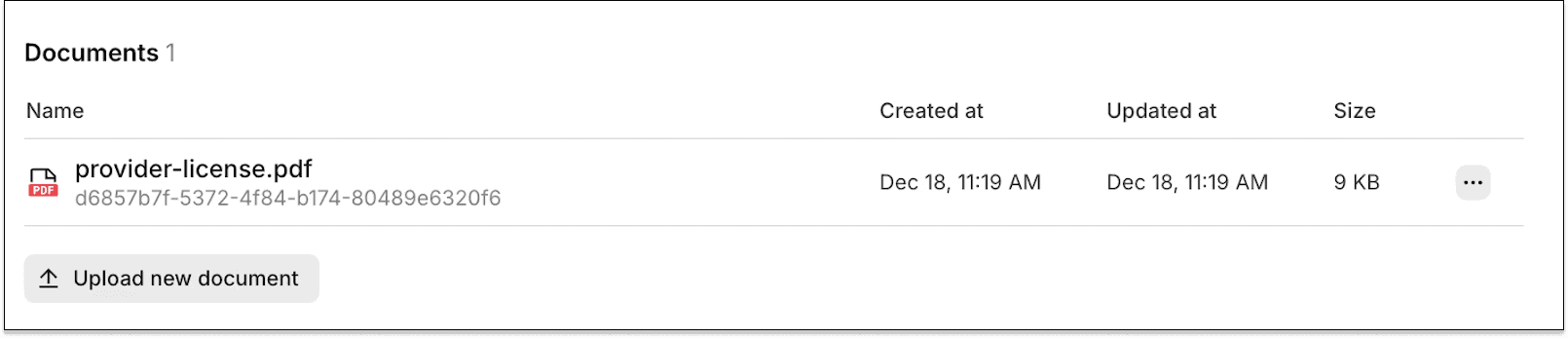
Uploaded documents are listed on the enrollment's details page in the Stedi portal.

Download and delete enrollment documents
In addition to uploading, you can also download and delete previously uploaded documents using the respective Download Enrollment Document and Delete Enrollment Document endpoints.
Get started
Stedi’s Transaction Enrollment API, including the new enrollment document endpoints, is available on the Developer plan and above.
For complete details, check out our API reference documentation.
You can now programmatically upload, download, and delete documents for transaction enrollment requests using Stedi’s new Transaction Enrollment API endpoints:
Only PDF documents are supported.
What is transaction enrollment?
Transaction enrollment is the process of registering a provider to exchange a specific type of healthcare transaction with a payer.
Transaction enrollment is always required for Electronic Remittance Advice (ERAs). For other transaction types, like eligibility checks and claim submissions, enrollment requirements vary by payer.
Stedi offers fully managed, API-based transaction enrollment. You can submit and track enrollment requests using Stedi’s Transaction Enrollment API or the Stedi portal, which also supports bulk CSV imports.
When possible, Stedi handles all enrollment paperwork for you and your provider. When we can’t, we give you updates and clear next steps for what’s needed next.
What are enrollment documents?
Enrollment requirements vary by payer. Some payers require additional documents, such as:
A form with a wet signature
A practice W-9
A voided check
In these cases, Stedi updates the enrollment status to PROVIDER_ACTION_REQUIRED and notifies the submitter by email. You can then view next steps and upload the required documents through the Stedi portal or API.
Upload an enrollment document
Previously, you could only upload enrollment documents using the Stedi portal. Now, you can also upload them programmatically using the Upload Enrollment Document endpoint:
Call the Upload Enrollment Document endpoint with the enrollment ID for the enrollment request.
The enrollment ID is returned in the responses for the Create Enrollment and List Enrollments endpoints. It's also listed at the top of the enrollment's details page in the Stedi portal.
Include the PDF’s file name, including the.pdffile extension, in the request body’snamefield:curl --request POST \ --url "https://enrollments.us.stedi.com/2024-09-01/enrollments/{enrollmentId}/documents" \ --header "Authorization: <api_key>" \ --header "Content-Type: application/json" \ --data '{ "name": "provider-license.pdf" }'
The endpoint returns a pre-signed URL for uploading the PDF. The URL expires in 24 hours.
{ "enrollmentId": "db6675c5-7bg7-4af9-8c68-a54a336d2911", "uploadUrl": "https://s3.amazonaws.com/enrollment-documents/db6675c5-7bg7-4af9-8c68-a54a336d2911/provider-license.pdf?X-Amz-Algorithm=AWS4-HMAC-SHA256&X-Amz-Credential=...", "documentId": "doc-123e4567-e89b-12d3-a456-426614174000" }
Make a
PUTrequest to the pre-signed URL to upload the PDF. Set theContent-TypeHTTP request header toapplication/pdf.curl --request PUT \ --url "<uploadUrl>" \ --header "Content-Type: application/pdf" \ --upload-file /path/to/provider-license.pdf
Uploaded documents are listed on the enrollment's details page in the Stedi portal.

Download and delete enrollment documents
In addition to uploading, you can also download and delete previously uploaded documents using the respective Download Enrollment Document and Delete Enrollment Document endpoints.
Get started
Stedi’s Transaction Enrollment API, including the new enrollment document endpoints, is available on the Developer plan and above.
For complete details, check out our API reference documentation.
Get started with Stedi
Automate healthcare transactions with developer-friendly APIs that support thousands of payers. Contact us to learn more and speak to the team.
Get updates on what’s new at Stedi
Developers
Resources
Backed by
Stedi is a registered trademark of Stedi, Inc. All names, logos, and brands of third parties listed on our site are trademarks of their respective owners (including “X12”, which is a trademark of X12 Incorporated). Stedi, Inc. and its products and services are not endorsed by, sponsored by, or affiliated with these third parties. Our use of these names, logos, and brands is for identification purposes only, and does not imply any such endorsement, sponsorship, or affiliation.
Developers
Resources
Get updates on what’s new at Stedi
Backed by
Stedi is a registered trademark of Stedi, Inc. All names, logos, and brands of third parties listed on our site are trademarks of their respective owners (including “X12”, which is a trademark of X12 Incorporated). Stedi, Inc. and its products and services are not endorsed by, sponsored by, or affiliated with these third parties. Our use of these names, logos, and brands is for identification purposes only, and does not imply any such endorsement, sponsorship, or affiliation.
Developers
Resources
Backed by
Stedi is a registered trademark of Stedi, Inc. All names, logos, and brands of third parties listed on our site are trademarks of their respective owners (including “X12”, which is a trademark of X12 Incorporated). Stedi, Inc. and its products and services are not endorsed by, sponsored by, or affiliated with these third parties. Our use of these names, logos, and brands is for identification purposes only, and does not imply any such endorsement, sponsorship, or affiliation.
