

Transaction enrollment
Transaction enrollment is the process of registering a provider to exchange specific healthcare transactions with a payer. It involves submitting information about the provider, including their name, tax ID, NPI, billing address, and contact information.
Do I need to enroll my provider?
For 835 ERAs, always yes. For other transactions, it depends on the payer.
Check the Payer Network or use the Payers API to determine whether your payers require enrollment for the transaction types you want to send and receive. Each transaction type is marked as either:
- Supported, enrollment not required
- Supported, enrollment required
- Not supported
For example, the following payer record shows that Blue Cross Blue Shield of North Carolina requires enrollments for 835 ERAs, as indicated in the transactionSupport.claimPayment property.
{
  "stediId": "UPICO",
  "displayName": "Blue Cross Blue Shield of North Carolina",
  "primaryPayerId": "BCSNC",
  "transactionSupport": {
    "eligibilityCheck": "SUPPORTED",
    "claimStatus": "SUPPORTED",
    "claimSubmission": "SUPPORTED",
    "claimPayment": "ENROLLMENT_REQUIRED",
    "dentalClaimSubmission": "SUPPORTED",
    "professionalClaimSubmission": "SUPPORTED",
    "institutionalClaimSubmission": "SUPPORTED",
    "coordinationOfBenefits": "SUPPORTED",
    "unsolicitedClaimAttachment": "NOT_SUPPORTED"
  }
  // truncated for brevity
}
If enrollment for a supported transaction type is:
- Not required: The provider can start exchanging transactions through Stedi right away. They'll include their information (like their NPI) in transactions as needed.
- Required: The provider must complete transaction enrollment before they can start exchanging those transactions through Stedi. Note that ERA enrollment is exclusive to one clearinghouse. Switching a provider to Stedi stops ERA delivery through the previous clearinghouse.
How long does enrollment take?
Most enrollments are completed within 24 - 48 hours. However, some payers may take up to 30 days, depending on their internal processes and requirements.
Check out FAQ for answers to other common questions about transaction enrollment.
Enrollment process
Stedi handles the entire enrollment process for you, including submitting the required information to the payer and monitoring the status of the enrollment.
Here's how it works:
The provider record includes the information required to enroll the provider with payers, including the provider's name, tax ID, NPI, and contact information.
You can create enrollment requests individually through the Stedi portal, in bulk through CSV import, or programmatically through the API. Stedi gets alerted about new enrollment requests once they're in STEDI_ACTION_REQUIRED status.
For each provider, you'll create one enrollment request per transaction type. For example, you would create three separate requests to enroll a provider for 837P professional claims, 270 real-time eligibility checks, and 835 ERAs.
When we begin the enrollment process with the payer, we'll set the enrollment status to PROVISIONING and send you notifications. You can manage your notification preferences to control which notifications you receive.
We'll also reach out to you in your dedicated Slack or Teams channel with resources and to answer any follow-up questions.
For some payers, such as those with one-click enrollment, Stedi can complete the entire enrollment process for you. We sign enrollment PDF forms on your behalf, when possible, to speed up the process and eliminate extra work for your team.
If payers require additional steps from providers as part of their standard enrollment process, Stedi sets the enrollment status to PROVIDER_ACTION_REQUIRED and adds a task to the enrollment request with clear instructions. The enrollment process continues once the required tasks are completed.
You can check which payers require additional steps on our Transaction Enrollments Hub.
Once the enrollment is approved, the enrollment status is set to LIVE, and the provider can start exchanging the enrolled transactions with the payer.
Enrollment statuses
An enrollment request can have one of the following statuses:
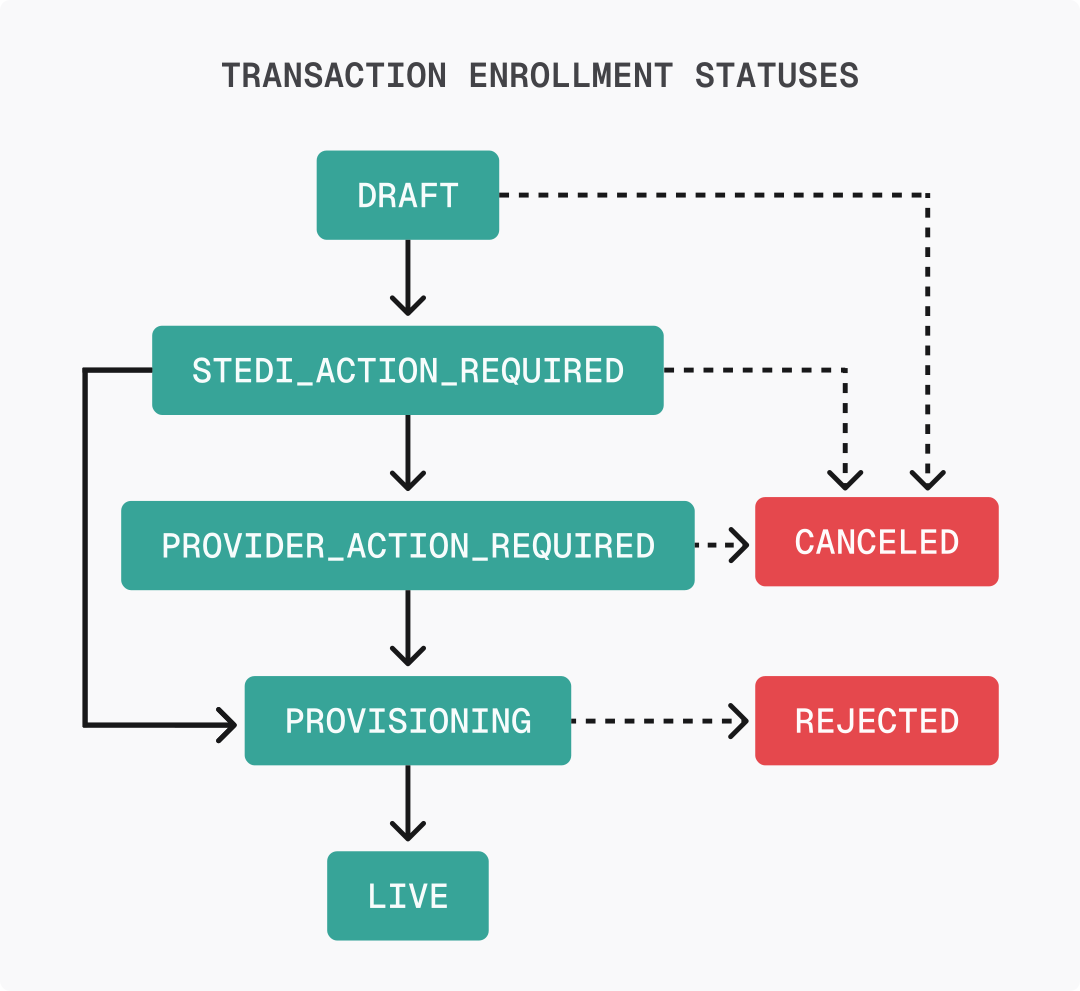
DRAFT: You are still editing the record and it has not been submitted to Stedi.STEDI_ACTION_REQUIRED: You have submitted the enrollment and it is ready for Stedi to begin processing.PROVIDER_ACTION_REQUIRED: The enrollment requires action from the healthcare provider to proceed, such as providing additional documentation. Stedi will add a note to your enrollment request with clear instructions.PROVISIONING: Stedi has begun the process of completing the enrollment with the payer.LIVE: The enrollment process is complete, and the specified provider can begin exchanging the listed transaction types with the payer.REJECTED: The payer rejected the enrollment. Common reasons for rejection include incorrect details in the request and that the provider is not credentialed with the payer. Customer support will contact you with reasons for rejection and next steps.CANCELED: The enrollment has been terminated per customer or provider request. You can only cancel enrollments that are inDRAFT,STEDI_ACTION_REQUIRED, orPROVIDER_ACTION_REQUIREDstatus.
One-click enrollment
We offer one-click enrollment for eligible payers. Once you submit the enrollment request, Stedi handles the entire process without any additional action from you. These payers don't require any signatures or documentation other than what is included in the enrollment request.
You can determine whether a payer is eligible for one-click enrollment by:
- Checking the Payer Network. Click a payer's name to view its details. Stedi lists the Type as One-click for transaction types that support one-click enrollment.
- Calling the Payers API. The
enrollment.transactionEnrollmentProcesses.{transactionType}.typeproperty is set toONE_CLICKfor transaction types that support one-click enrollment.
Rejected enrollments
In rare cases, the enrollment status might be set to REJECTED if the payer denies the enrollment request. Rejection can happen for many reasons, but the most common are:
- The provider isn't credentialed with the payer. If a payer rejects your transaction enrollment request with a message indicating the provider is "not on file" or "not recognized," it likely means the provider hasn't completed credentialing and payer enrollment with that payer. Visit Credentialing and enrollment to learn more.
- There was incorrect data in the enrollment submission.
If an enrollment is rejected, Stedi puts a note on the enrollment request explaining the reason and how to resolve it. You can review the note through the UI or API and contact Stedi support in Slack or Teams with any additional questions.