Changelog

Stedi's CMS-1500 claim form now supports line item control numbers

You can now set line item control numbers for individual service lines in a professional claim using the Stedi portal’s CMS-1500 form.

What is a line item control number?

In a claim, a service line represents billing for a specific service, such as an office visit or X-ray.

A line item control number is a unique, provider-assigned identifier for each service line in a claim.

Payers return line item control numbers in Electronic Remittance Advice (ERAs). Both providers and payers can use them to track service lines and reconcile claim submissions with payments.

Previously, the CMS-1500 form automatically assigned a random identifier to each service line. Now you can set your own.

How it works

When submitting a claim using the Stedi portal’s CMS-1500 form, click Set manual line item control numbers in the service lines table to reveal the Line Item Control Number field for each service line.

You can enter up to 30 characters per line. Each number must be unique within the claim.

Once you enter a line item control number, the fields stay visible and can't be hidden. To hide empty fields, click Hide manual line item control numbers.

If you later need to resubmit a claim using the CMS-1500 form, any existing line item control numbers are automatically mapped to the new submission.

Claim edit: All invalid ICD-10-CM diagnosis codes are now returned at once

Stedi's claim edit for invalid ICD-10-CM diagnosis codes now returns all invalid codes in the rejection's error message. The edit applies to 837P professional and 837I institutional claims.

Previously, if a claim had multiple invalid codes, only one was returned per rejection. To fix all the invalid codes, you had to correct and resubmit the claim multiple times – once for each invalid code.

How the edit works

In healthcare claims, diagnosis codes describe what’s wrong with the patient. HIPAA requires that professional and institutional claims only use valid, billable ICD-10-CM codes as diagnosis codes.

Diagnosis codes

Claim typeJSON API field(s)X12 element
837P professionalclaimInformation.healthCareCodeInformationHI-01 through HI-12 (Diagnosis Code) of Loop 2300 (Claim Information)
837I institutionalclaimInformation.principalDiagnosis.principalDiagnosisCode(principal diagnosis code) claimInformation.otherDiagnosisInformationList[].otherDiagnosisCode (secondary diagnosis code)HI-01 (Principal Diagnosis Code) of Loop 2300 (Claim Information) HI-02 through HI-12 (Other Diagnosis Code) of Loop 2300 (Claim Information)

Stedi previously introduced an edit for invalid ICD-10-CM diagnosis codes. The edit rejects a professional or institutional claim when any diagnosis code is:

  • Not a valid ICD‑10‑CM code.
    For example, if the code is misspelled or doesn’t exist in the official ICD-10-CM code list.

  • A non-billable ICD‑10‑CM code.
    Some ICD-10-CM codes are categories. They cover a broad diagnostic grouping rather than a specific condition. For example, E11 (Type 2 diabetes mellitus) is a category header.

    By themselves, category headers aren’t considered billable codes. They’re not specific enough to describe the exact condition or encounter being billed. A billable ICD-10-CM code must include both a category and a subcategory, such as E11.9 (Type 2 diabetes mellitus without complications).

  • Not valid for the claim’s dates of service.
    Updates to the ICD-10-CM code set are published each year. If a claim uses a code that wasn’t valid on the dates of service, Stedi rejects it.

    For example, Z11.52 (“Encounter for screening for COVID-19”) became effective on October 1, 2021. A claim with a date of service before that date would be rejected because the code wasn’t valid at the time.

This edit catches these issues before the claim reaches the payer. It prevents payer rejections, which are slower and delay payment for the provider.

Rejection errors

If you submit a claim using Stedi's Claim Submission API endpoints and the claim fails the edit, you'll get back an error response in real time. The response includes details in the errors array:

{
  "errors": [
    {
      "code": "33",
      "description": "Invalid ICD-10-CM Diagnosis Code. All submitted diagnosis codes must be valid per the ICD-10 manual. Diagnosis code(s), XY9999, ZZ0000, do not exist in the code set. Correct and resubmit.",
      "followupAction": "Please Correct and Resubmit"
    }
  ]
}

If you submit a claim using SFTP and the claim fails the edit, Stedi will reject the claim with a 277CA claim acknowledgment. The acknowledgment will include a related claim status category code, claim status code, and error message:

STC*A7>700*[DATE]*U*[AMOUNT]******A7>255**Invalid ICD-10-CM Diagnosis Code. All submitted diagnosis codes must be valid per the ICD-10 manual. Diagnosis code(s), XY9999, ZZ0000, do not exist in the code set. Correct and resubmit.~

Claim edit: Invalid procedure code format

Stedi now rejects 837P professional, 837D dental, and 837I institutional claims with a procedure code that isn't exactly 5 alphanumeric characters or is made up entirely of letters.

How the edit works

Procedure codes, such as medical CPT/HCPCS codes and dental CDT codes, identify a service performed during a patient visit.

Procedure code

Claim typeJSON API fieldX12 element
837P professionalserviceLines[].professionalService.procedureCodeSV1-01-02 (Procedure Code) of Loop 2400 (Service Line)
837D dentalserviceLines[].dentalService.procedureCodeSV3-01-02 (Procedure Code) of Loop 2400 (Service Line)
837I institutionalserviceLines[].institutionalService.procedureCodeSV2-02-02 (Procedure Code) of Loop 2400 (Service Line)

In a claim, all valid procedure codes must be exactly 5 alphanumeric characters with no spaces or special characters. They must also include at least one digit. A code made up entirely of letters, such as PHONE, isn't valid; an all-numeric code, such as 87070, is.

If a claim contains a procedure code with spaces or special characters, Stedi automatically removes the spaces and characters during validation. If the resulting procedure code has a length other than 5, or is made up entirely of letters, Stedi rejects the claim. This prevents later payer rejections, which are slower and can delay payment for the provider.

For 837D dental claims, Stedi also checks that the procedure code starts with the letter D, following the CDT code format.

Rejection errors

If you submit a claim using Stedi's Claim Submission API endpoints and the claim fails the edit, you'll get back an error response in real time. The response includes details in the errors array:

837P professional and 837I institutional claims

{
  "errors": [
    {
      "code": "33",
      "description": "Invalid Procedure Code Format. Procedure codes must be exactly 5 alphanumerical characters with no spaces or special characters. Invalid procedure code(s) ['PHONE'] detected. Correct and resubmit.",
      "followupAction": "Please Correct and Resubmit"
    }
  ]
}

837D dental claims

{
  "errors": [
    {
      "code": "33",
      "description": "Invalid Dental Procedure Code Format. Procedure codes must be exactly 5 alphanumerical characters and start with 'D' with no spaces or special characters. Invalid procedure code(s) ['DABCD'] detected. Correct and resubmit.",
      "followupAction": "Please Correct and Resubmit"
    }
  ]
}

SFTP rejections

If you submit a claim using SFTP and the claim fails the edit, Stedi will reject the claim with a 277CA claim acknowledgment. The acknowledgment will include a related claim status category code, claim status code, and error message:

837P professional and 837I institutional claims

STC*A7>511*[DATE]*U*[AMOUNT]******A7>454**Invalid Procedure Code Format. Procedure codes must be exactly 5 alphanumerical characters with no spaces or special characters. Invalid procedure code(s) ['PHONE'] detected. Correct and resubmit.~

837D dental claims

STC*A7>511*[DATE]*U*[AMOUNT]******A7>454**Invalid Dental Procedure Code Format. Procedure codes must be exactly 5 alphanumerical characters and start with 'D' with no spaces or special characters. Invalid procedure code(s) ['DABCD'] detected. Correct and resubmit.~

Introducing ERA last received timestamps

Stedi's List Enrollments and Retrieve Enrollment API responses now return a lastEraReceivedAt timestamp for ERA enrollment records.

The timestamp contains the last time Stedi routed a production Electronic Remittance Advice (ERA) for the combination of NPI, Tax ID, and payer listed in the enrollment record. For example:

{
  "id": "db6675c5-7bg7-4af9-8c68-a54a336d2911",
  "transactions": {
    "claimPayment": {
      "enroll": true  // ERA enrollment record
    }
  },
  "lastEraReceivedAt": "2026-03-27T05:31:56Z", // Timestamp of last ERA received
  ...
}

You can use the lastEraReceivedAt field to troubleshoot gaps in a payer’s ERA delivery or find payers that have stopped sending remittance.

Availability

lastEraReceivedAt is only populated for ERA transaction enrollments, not enrollments for other transaction types.

The field is omitted from enrollments that haven't yet received a production ERA.

Filter by the last ERA received timestamp

You can use the List Enrollments endpoint's new lastEraReceivedFrom and lastEraReceivedTo query parameters to filter ERA enrollments by the timestamp of the last ERA received. For example:

curl "https://enrollments.us.stedi.com/2024-09-01/enrollments?lastEraReceivedFrom=2025-01-01T00:00:00Z&lastEraReceivedTo=2025-03-31T23:59:59Z" \
  -H "Authorization: Key <api_key>"

Sort by the last ERA received timestamp

Use lastEraReceivedAt as a sortBy parameter for the List Enrollments endpoint to sort by your most- or least-recently active ERA enrollments.

curl "https://enrollments.us.stedi.com/2024-09-01/enrollments?sortBy=lastEraReceivedAt:desc" \
  -H "Authorization: Key <api_key>"

Stedi portal

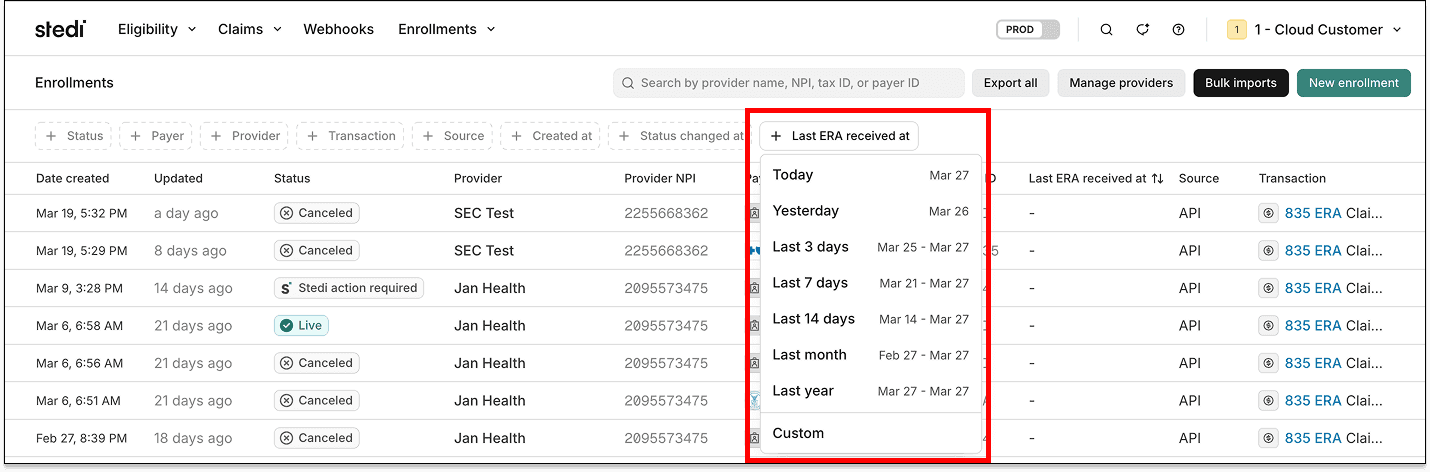
The Last ERA received at field is available in the Stedi portal’s enrollments list view as a filter.

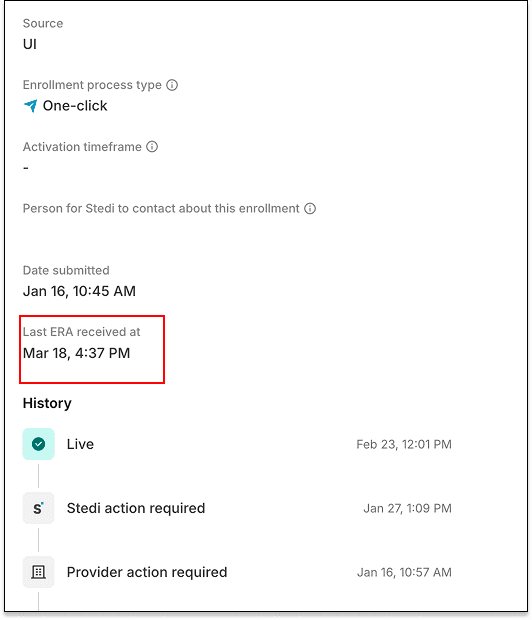
The field also appears in the enrollment detail view.

Medicaid Texas is now one-click enrollment

Medicaid Texas – CHIP (Payer ID: 10186) now supports one-click transaction enrollment for Electronic Remittance Advice (ERAs).

About one-click enrollment

Transaction enrollment is the process of registering a provider to exchange specific healthcare transactions with a payer. Payers always require transaction enrollment for ERAs.

Transaction enrollment requirements vary by payer. Some payers may require the submitter to sign PDFs or complete tasks in the payer's portal.

With one-click transaction enrollment, you only need to submit an enrollment request. There are no follow-up steps. Stedi handles everything else.

You can check whether a payer supports one-click enrollment using the Stedi Payer Network or the Payer APIs.

UnitedHealthcare Community Plan is now one-click enrollment

Healthcare payer UnitedHealthcare Community Plan (Payer ID: 04567) now supports one-click transaction enrollment for Electronic Remittance Advice (ERAs).

About one-click enrollment

Transaction enrollment is the process of registering a provider to exchange specific healthcare transactions with a payer. Payers always require transaction enrollment for ERAs.

Transaction enrollment requirements vary by payer. Some payers may require the submitter to sign PDFs or complete tasks in the payer's portal.

With one-click transaction enrollment, you only need to submit an enrollment request. There are no follow-up steps. Stedi handles everything else.

You can check whether a payer supports one-click enrollment using the Stedi Payer Network or the Payer APIs.

UPMC Health Plan is now one-click enrollment

Healthcare payer UPMC Health Plan (Payer ID: 23281) now supports one-click transaction enrollment for Electronic Remittance Advice (ERAs).

About one-click enrollment

Transaction enrollment is the process of registering a provider to exchange specific healthcare transactions with a payer. Payers always require transaction enrollment for ERAs.

Transaction enrollment requirements vary by payer. Some payers may require the submitter to sign PDFs or complete tasks in the payer's portal.

With one-click transaction enrollment, you only need to submit an enrollment request. There are no follow-up steps. Stedi handles everything else.

You can check whether a payer supports one-click enrollment using the Stedi Payer Network or the Payer APIs.

Claim edit: Duplicate diagnosis codes

Stedi now rejects 837P professional, 837D dental, and 837I institutional claims that contain duplicate diagnosis codes.

How the edit works

A claim’s diagnosis codes describe what’s wrong with the patient. For example, in 837P professional or 837I institutional claims, M54.50 is the ICD-10-CM diagnosis code for “Low back pain, unspecified."

A claim can include multiple diagnosis codes, listed in order of importance. The primary diagnosis code is in position 1, the next is in position 2, and so on. All codes after position 1 make up the secondary diagnosis list.

Each diagnosis code on the claim must be unique. You can’t submit the same code twice.

Submitting the same diagnosis code more than once does not provide additional clinical information to the payer. It may lead to confusion during processing or review.

Diagnosis codes for 837P professional and 837D dental claims

For 837P professional and 837D dental claims, all diagnosis codes appear in the same array field. The first entry is the primary diagnosis. Subsequent entries are secondary diagnoses.

Claim typeJSON API fieldX12 element
837P professionalclaimInformation.healthCareCodeInformationHI-01 through HI-12 (Diagnosis Code) of Loop 2300 (Claim Information)
837D dentalclaimInformation.healthCareCodeInformationHI-01 through HI-04 (Diagnosis Code) of Loop 2300 (Claim Information)

Diagnosis codes for 837I institutional claims

For 837I institutional claims, the primary and secondary diagnosis codes are in separate fields.

Claim typeDiagnosis code typeJSON API fieldX12 element
837I institutionalPrimary diagnosis codeclaimInformation.principalDiagnosis.principalDiagnosisCodeHI-01 (Principal Diagnosis Code) of Loop 2300 (Claim Information)
Secondary diagnosis codesclaimInformation.otherDiagnosisInformationList[][].otherDiagnosisCodeHI-02 through HI-12 (Other Diagnosis Code) of Loop 2300 (Claim Information)

If a diagnosis code appears more than once in a claim, the payer may reject the claim.

This edit catches the issue before the claim reaches the payer. It prevents payer rejections, which are slower and delay payment for the provider.

Rejection errors

This edit has two conditions, each producing a different error.

The primary diagnosis code appears in the secondary diagnosis list

If you submit a claim using Stedi's Claim Submission API endpoints and the claim fails the edit, you'll get back an error response in real time. The response includes details in the errors array:

{
  "errors": [
    {
      "code": "33",
      "description": "Duplicate Diagnosis Code. The primary diagnosis code, F329, must be unique and cannot also be reported in the secondary diagnosis list. Correct and resubmit.",
      "followupAction": "Please Correct and Resubmit"
    }
  ]
}

If you submit a claim using SFTP and the claim fails the edit, Stedi will reject the claim with a 277CA claim acknowledgment. The acknowledgment will include a related claim status category code, claim status code, and error message:

STC*A7>254*[DATE]*U*[AMOUNT]********Duplicate Diagnosis Code. The primary diagnosis code, F329, must be unique and cannot also be reported in the secondary diagnosis list. Correct and resubmit.~

The same diagnosis code appears more than once among secondary diagnoses

If you submit a claim using Stedi's Claim Submission API endpoints and the claim fails the edit, you'll get back an error response in real time. The response includes details in the errors array:

{
  "errors": [
    {
      "code": "33",
      "description": "Duplicate Diagnosis Code. Diagnosis code(s) F329 are incorrectly duplicated. Diagnosis codes must be unique within the claim. Correct and resubmit.",
      "followupAction": "Please Correct and Resubmit"
    }
  ]
}

If you submit a claim using SFTP and the claim fails the edit, Stedi will reject the claim with a 277CA claim acknowledgment. The acknowledgment will include a related claim status category code, claim status code, and error message:

STC*A7>255*[DATE]*U*[AMOUNT]********Duplicate Diagnosis Code. Diagnosis code(s) F329 are incorrectly duplicated. Diagnosis codes must be unique within the claim. Correct and resubmit.~

Tip: Update your diagnosis pointers

If you remove a duplicate diagnosis code in an 837P professional or 837D dental claim, update any diagnosis pointers on the claim's service lines to avoid mismatched pointers.

Diagnosis pointers link each service line of a claim to a diagnosis code. Diagnosis pointers are positional. Each pointer refers to the index position of a diagnosis code on the claim. For example:

  • If a service line uses diagnosis pointer 2, it refers to the diagnosis code in position 2.

  • If a service line uses diagnosis pointer 3, it refers to the diagnosis code in position 3.

Removing a code can shift the positions of remaining codes. This would make existing pointers incorrect and can result in payer rejections.

Diagnosis pointers

Claim typeJSON API fieldX12 element
837P professionalclaimInformation.serviceLines[].professionalService.compositeDiagnosisCodePointersSV1-07 (Composite Diagnosis Code Pointer) of Loop 2400 (Service Line)
837D dentalclaimInformation.serviceLines[].dentalService.compositeDiagnosisCodePointersSV3-11 (Composite Diagnosis Code Pointer) of Loop 2400 (Service Line)

Claim edit: Missing insurance type code when Medicare is a non-primary payer

Stedi now rejects 837P professional and 837D dental claims where Medicare appears as a non-primary payer and the insurance type code is missing.

How the edit works

In coordination of benefits (COB) scenarios, a claim may list multiple payers. For example, a patient may have a commercial payer as their primary payer and Medicare as their secondary payer. You indicate whether a payer is primary, secondary, tertiary, and so on using a payment responsibility sequence number code, also called a payment responsibility level code.

Payment responsibility level

Claim typeJSON API fieldX12 element
837P professionalclaimInformation.otherSubscriberInformation[].paymentResponsibilityLevelCodeSBR-01 (Payer Responsibility Sequence Number Code) of Loop 2320 (Other Subscriber Information)
837D dentalclaimInformation.otherSubscriberInformation[].paymentResponsibilityLevelCodeSBR-01 (Payer Responsibility Sequence Number Code) of Loop 2320 (Other Subscriber Information)

Any non-primary payers on a claim must have a claim filing indicator. The indicator tells you what type of payer or plan it is. For example, CI is for a commercial insurance company.

Claim filing indicator

Claim typeJSON API fieldX12 element
837P professionalclaimInformation.otherSubscriberInformation[].claimFilingIndicatorCodeSBR-09 (Claim Filing Indicator Code) of Loop 2320 (Other Subscriber Information)
837D dentalclaimInformation.otherSubscriberInformation[].claimFilingIndicatorCodeSBR-09 (Claim Filing Indicator Code) of Loop 2320 (Other Subscriber Information)

If Medicare is a non-primary payer on the claim, the claim filing indicator must be MA (Medicare Part A) or MB (Medicare Part B). In these cases, an insurance type code is also required.

The insurance type code indicates why Medicare isn't the primary payer. For example, code 12 means the patient has an employer group health plan.

Insurance type code

Claim typeJSON API fieldX12 element
837P professionalclaimInformation.otherSubscriberInformation[].insuranceTypeCodeSBR-05 (Insurance Type Code) of Loop 2320 (Other Subscriber Information)
837D dentalclaimInformation.otherSubscriberInformation[].insuranceTypeCodeSBR-05 (Insurance Type Code) of Loop 2320 (Other Subscriber Information)

If the insurance type code is missing, the payer may reject the claim.

This edit catches the issue before the claim reaches the payer. It prevents payer rejections, which are slower and delay payment for the provider.

Rejection errors

If you submit a claim using Stedi's Claim Submission API endpoints and the claim fails the edit, you'll get back an error response in real time. The response includes details in the errors array:

{
  "errors": [
    {
      "code": "33",
      "description": "Missing required insurance type code. Insurance type code (Loop 2320 SBR05) is required when the payer is Medicare and Medicare is not the primary payer. Correct and resubmit.",
      "followupAction": "Please Correct and Resubmit"
    }
  ]
}

If you submit a claim using SFTP and the claim fails the edit, Stedi will reject the claim with a 277CA claim acknowledgment. The acknowledgment will include a related claim status category code, claim status code, and error message:

STC*A6:578*[DATE]*U*[AMOUNT]********Missing required insurance type code. Insurance type code (Loop 2320 SBR05) is required when the payer is Medicare and Medicare is not the primary payer. Correct and resubmit.~

Introducing 999 acknowledgment settings for SFTP users

If you use Stedi’s SFTP server, you’ll now receive negative 999 Implementation Acknowledgments from Stedi for claims with invalid X12 syntax or implementation guide errors.

You can also opt in to receive positive 999 acknowledgments, which are returned for claims with valid X12 syntax.

You’ll receive 999 acknowledgments in the from-stedi directory for claims submitted through SFTP, the Claim Submission API, or the Stedi portal. The acknowledgments arrive within minutes of submission.

What is a 999 acknowledgment?

A 999 Implementation Acknowledgment is a standard X12 transaction set. It confirms whether a submitted functional group and its transaction sets use valid X12 syntax. It is not used for application-level validation.

Negative 999 acknowledgments

A negative 999 acknowledgment means Stedi rejected at least one transaction in the X12 file due to a structural error, such as a malformed segment or a missing required element. Rejected transactions are not further processed by Stedi or forwarded to the payer.

The AK9 (Functional Group Response) segment summarizes the result for the functional group. AK9-01 (Functional Group Acknowledge Code) is set to R if all transactions were rejected, or P if the group was partially accepted:

AK9*P*3*3*1~    ← Partially accepted: 3 transactions submitted, 3 received, 1 accepted (2 rejected)

For each rejected transaction, IK5-01 (Transaction Set Acknowledgment Code) is set to R. The IK3 (Error Identification) and IK4 (Implementation Data Element Note) segments identify where the error occurred. For example:

AK2*837*0002~      ← Responding to transaction 0002
IK3*CLM*22**8~CLM segment at position 22 has element errors
IK4*2*782*1~       ← Element 2 is missing a mandatory value
IK5*R*5~           ← Transaction rejected

If you receive a negative 999, you must correct the errors and resubmit the claim.

Positive 999 acknowledgments

A positive 999 acknowledgment confirms that all transactions in a functional group were accepted for further processing. IK5-01 returns A (Accepted), and AK9 returns A (Accepted). For example:

AK2*837*0001~
IK5*A~           ← Transaction accepted
AK9*A*1*1*1~     ← All accepted: 1 transaction submitted, 1 received, 1 accepted

Interpreting 999 acknowledgments

For more tips on interpreting 999 acknowledgments, see our SFTP docs.

How to update your 999 acknowledgment settings

You can opt in to receive positive 999 acknowledgments using the Stedi portal:

  1. Go to the SFTP setup page in your account settings.

  2. Under 999 settings, select All 999s to receive 999 acknowledgments for every transaction. Leave the default to receive negative acknowledgments.

For more information, see our SFTP docs.