Changelog

EDI Inspector on Stedi Guides now validates EDI files locally on your browser

EDI Inspector on Stedi Guides allows you and your trading partners to test EDI files against the guide. EDI Inspector now performs this validation without your EDI content ever leaving your browser. Any pasted EDI content in the EDI Inspector stays on your machine and is never sent over the wire. Local validation also means you get an extremely responsive interface that gives you real-time feedback as you troubleshoot and update your EDI content.

This is now the default behavior of EDI Inspector on all guide pages (including Public Guides), and the EDI Inspector on guide builder UI. Try out EDI Inspector on a sample guide here.
Logs and metrics for Functions are now available in public preview

You can now access logs and metrics for Stedi Functions directly in the Functions web UI. Logs are useful for troubleshooting test and production workloads, and the metrics provide an insight into your functions’ performance over time.

Logs and metrics for Functions are available in public preview, which means we’re actively improving the feature. Functions is generally available - you can read more about how Functions can help with your EDI integration in this blog.

Stash price cut: No more fixed charges for API requests (100% drop)

We’re announcing a 100% price cut for API request pricing for Stash, a key-value store designed for any EDI workflow or B2B integration. You are no longer charged any fixed amount for the number of Stash API requests. This change is currently in effect (since Nov 2022 billing cycle).

You are only charged for the read and write units, and for the storage of data. The pricing for these dimensions remains unchanged from before (see pricing).

Format your EDI files with a single click in the EDI Inspector

There is nothing like having an organized view when you’re analyzing data. This is especially true for testing and troubleshooting EDI files. With the EDI Inspector on Stedi guides, you can now format your EDI content with the click of a button to make it more legible. For example, you can use this option on a single-line EDI file to display each segment in a separate line.

The format button is available with the EDI Inspector on all Stedi guides, including Public Guides pages.

Create a Stedi Guide from the EDI Inspector page

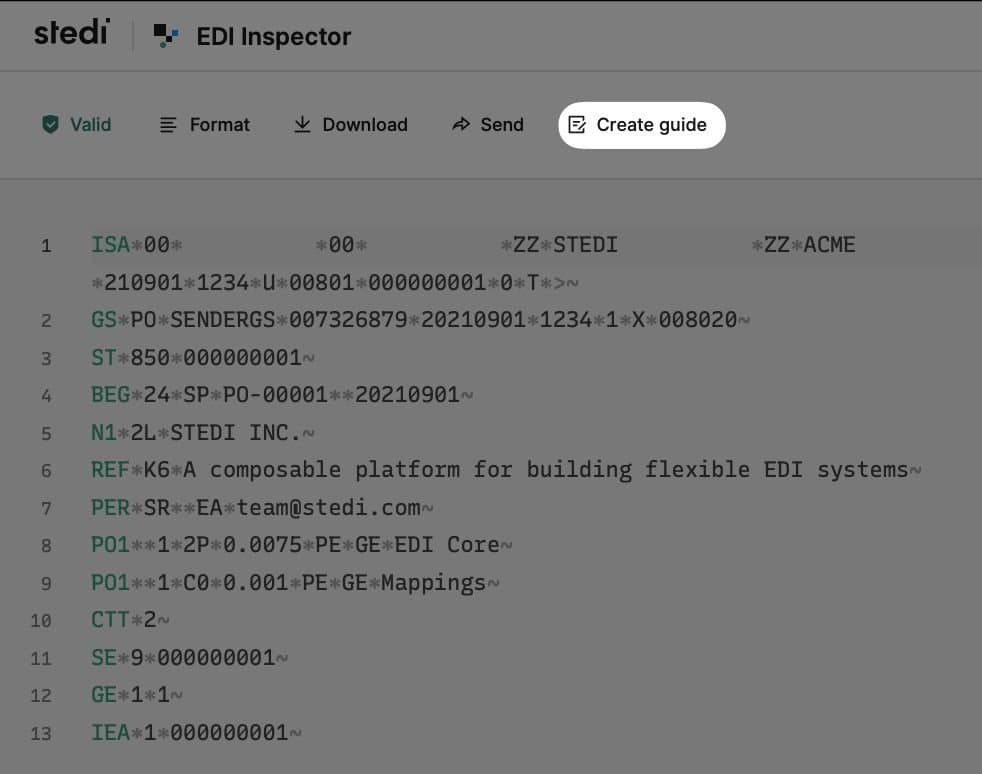
You can now create a Stedi guide directly from the EDI Inspector page. Besides validating an EDI sample, EDI Inspector will now present an option to create a Stedi guide for the specific transaction set of the EDI sample. Upon choosing this option, you will be taken to the guide builder UI with the X12 release version and transaction set pre-selected for you. You can continue after this jumpstart and complete the guide based on specifications from your trading partner.

For more details on creating a Stedi guide, check out our user guide.

Customize your Public guide further with usage notes

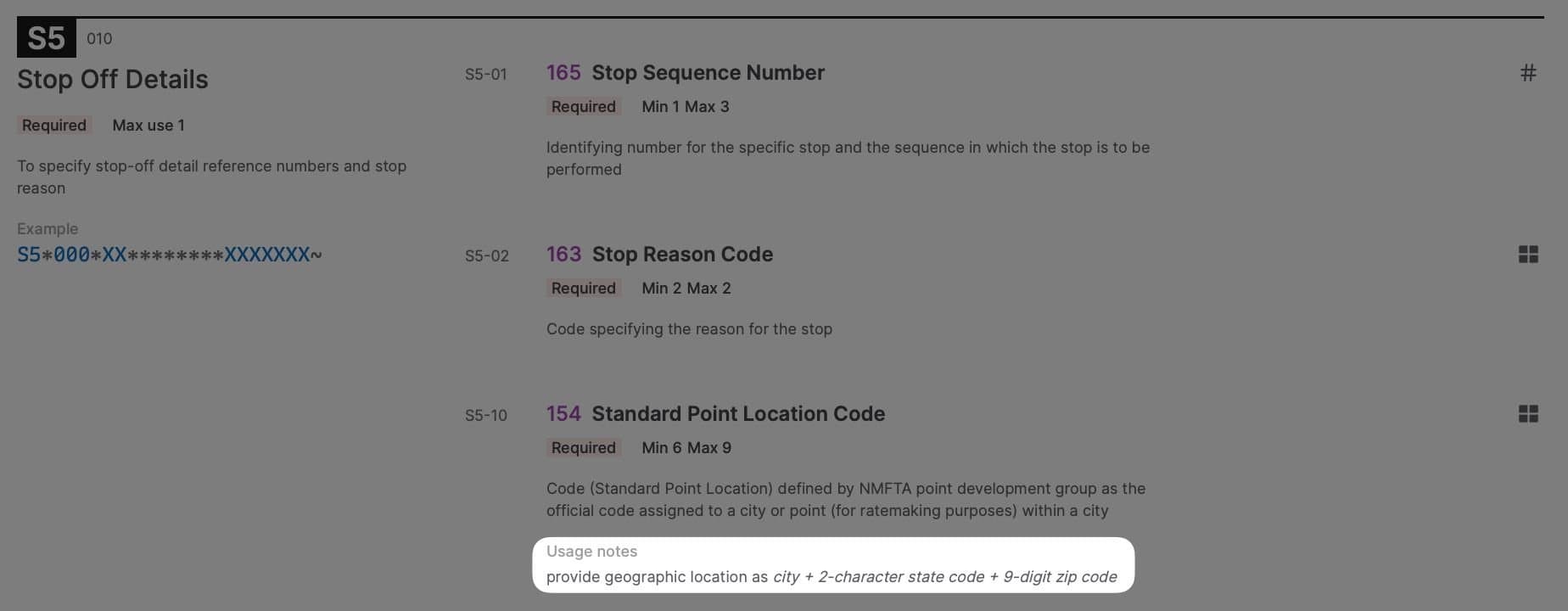
You can now add optional usage notes to any segment, loop, or element within your Stedi guide. Usage notes can also be added to individual codes for an identifier (ID) type element to convey additional context. Usage notes are rendered as part of your Public guide, and provide your trading partners guidance specific to your business beyond the standard X12 descriptions.

For example, your logistics company has a custom numbering scheme for stop sequence for Motor Carrier Load Tenders (204) and Freight Invoices (859), or your Healthcare Claim (837) specification requires a partner to provide geographic location as city + 2-character state code + 9-digit ZIP Code. This information can now be conveyed via usage notes for your trading partners to review as they onboard.

Usage notes are also rendered when viewing the guide privately by any member of your Stedi account. You can add usage notes to any Stedi guide using the guide builder UI.

EDI Translate now supports writing multiple transaction sets within a single interchange

Every EDI message contains an interchange envelope, with one or more transaction sets nested inside the interchange. The transaction set contains the actual content of the message.

Previously, customers using EDI Translate to generate EDI from a JSON payload could only generate a single transaction set inside of an interchange. Now, customers who want to “batch” multiple transaction sets inside a single interchange can do so using the same API by passing an array of transaction sets in the JSON payload.

There is no additional charge for generating EDI with multiple transaction sets, you only pay for the request and the data processed (see pricing).

View all historical transactions in your billing dashboard

Customers can now view all historical transactions in the billing dashboard by navigating to the transactions section. View and download all historical transactions such as invoices, credit notes, and payments.

Public Guides now lets you share EDI Inspector view along with the EDI file

Public Guides is a radically new and improved way for businesses to share EDI specifications and speed up the trading partner onboarding process. It features a built-in EDI inspector for validation and troubleshooting of EDI files against specifications right on the browser.

Now, Public Guides lets you share a link to your EDI inspector view, along with the EDI file and the validation results. By clicking the link, a recipient can load up the same file in the public guide’s EDI Inspector view, and they will see the same validation results (including any errors). This helps overcome communication gaps in describing validation issues over email, and the need to send EDI files back and forth. Try it out on a sample public guide, or build your own guide today.

Public Guides now provides error resolution suggestions for validation errors

Public Guides comes with a built-in EDI inspector allowing customers to validate and troubleshoot EDI files against specifications right in the browser.

Starting today, in addition to highlighting the validation error, EDI Inspector also provides an option to update the EDI file with a suggested fix. This allows customers to quickly resolve issues, without having to refer back to the specifications. Try it out on a sample public guide, or build your own guide today.