Introducing requested effective dates for ERA enrollments
ERAs & transaction enrollment
You can now set an optional requested effective date on ERA transaction enrollment requests. This date tells the payer when you'd like them to start routing ERAs to Stedi.
A provider can only receive Electronic Remittance Advice (ERAs) from a payer through one clearinghouse at a time. Without a predictable start date, you can't tell providers when to expect ERAs at Stedi or when to stop checking for ERAs at their old clearinghouse.
A requested effective date gives you that start date. This makes clearinghouse migrations and provider go-live dates easier to plan.
How requested effective dates work
Requested effective dates are a request to the payer, not a guarantee. The payer, not Stedi, controls when an enrollment takes effect.
Checking payer support
Not all payers support requested effective dates. You can check whether a payer supports them using the Payers API or the Stedi Payer Network before submitting an enrollment request.
In the Stedi Payer Network:
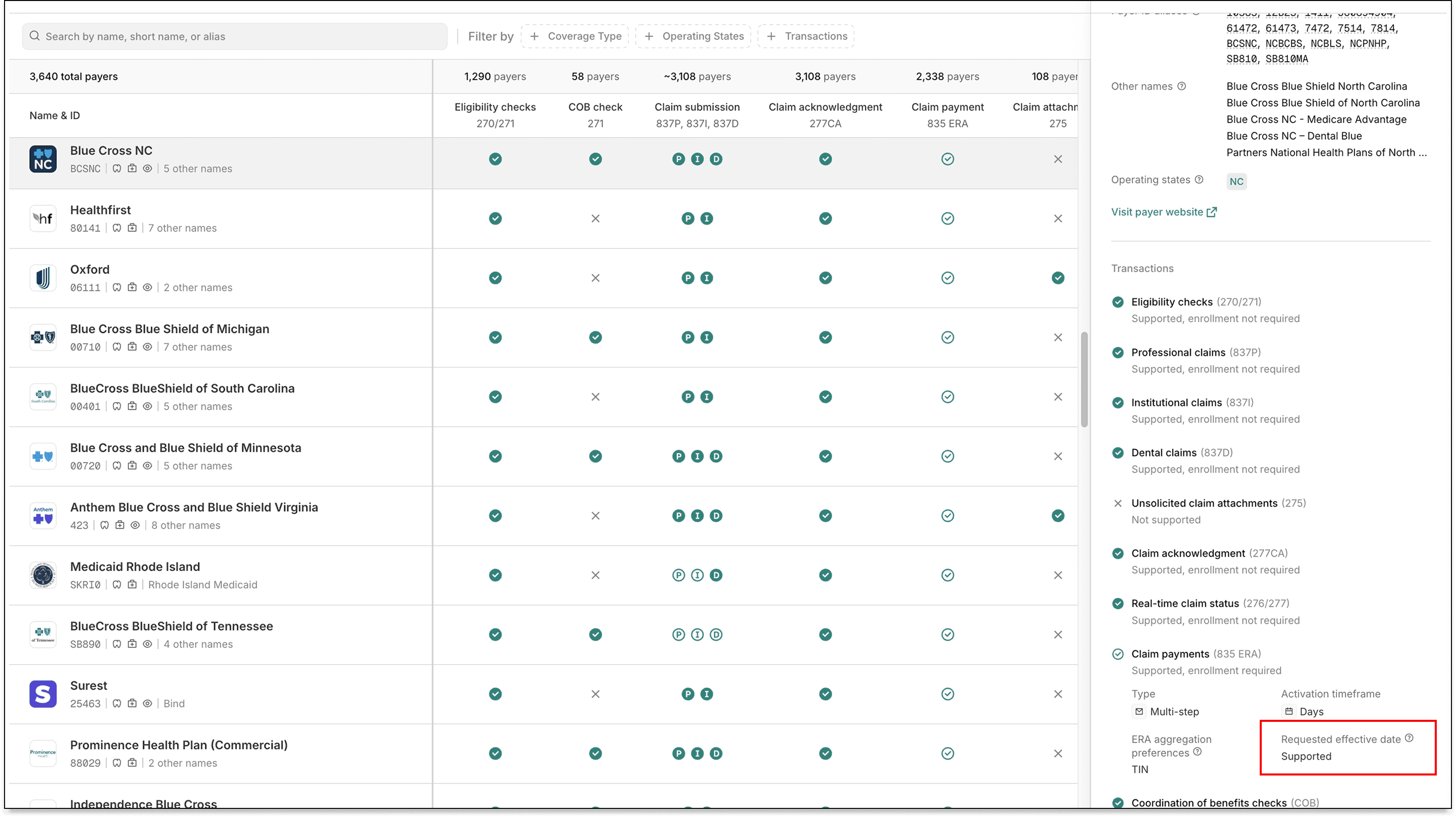
In Payers API responses, check the requestedEffectiveDate field in the claimPayment enrollment process to determine support. The field is omitted when Stedi has yet to determine a payer's support for requested effective dates.
{ "payer": { "enrollment": { "transactionEnrollmentProcesses": { "claimPayment": { "requestedEffectiveDate": "SUPPORTED", // Payer supports requested effective dates for ERA enrollments ... } }, ... }, ... } }
Enrollments API
Setting a requested effective date
You can now pass an optional requestedEffectiveDate field in Create Enrollment API requests. The date uses YYYYMMDD format and can be today or any date up to 6 months from now.
{ "transactions": { "claimPayment": { "enroll": true // ERA enrollment } }, "requestedEffectiveDate": "20260601", // Requested effective date ... }
On DRAFT enrollments, omitting the requestedEffectiveDate field leaves the value empty. For enrollments in the STEDI_ACTION_REQUIRED status, the requested effective date defaults to the submission date.
If the payer explicitly doesn't support requested effective dates, Stedi rejects the request.
Updating existing enrollments
You can update a DRAFT enrollment’s requestedEffectiveDate using an Update Enrollment API request.
Viewing requested effective dates
The Retrieve Enrollment API and List Enrollments API responses return requestedEffectiveDate on each enrollment record. For example, in a Retrieve Enrollment response:
{ "id": "db6675c5-7be7-4af9-8c68-a54a336d2911", "requestedEffectiveDate": "20260601", ... }
Filtering and sorting by requested effective dates
The List Enrollments API also accepts new query parameters to filter and sort by requested effective date:
Use
requestedEffectiveDateFromandrequestedEffectiveDateToto filter enrollments with a requested effective date in a given rangeUse
sortBy=requestedEffectiveDate:ascorsortBy=requestedEffectiveDate:descto sort results by requested effective date
For example, the following request returns enrollments with a Q2 2026 requested effective date, sorted from earliest to latest:
curl --request GET \ --url "https://enrollments.us.stedi.com/2024-09-01/enrollments?requestedEffectiveDateFrom=20260401&requestedEffectiveDateTo=20260630&sortBy=requestedEffectiveDate:asc" \ --header "Authorization: <api_key>"
Stedi portal
Requested effective dates appear in the enrollments list view.

You can filter enrollments by requested effective date.
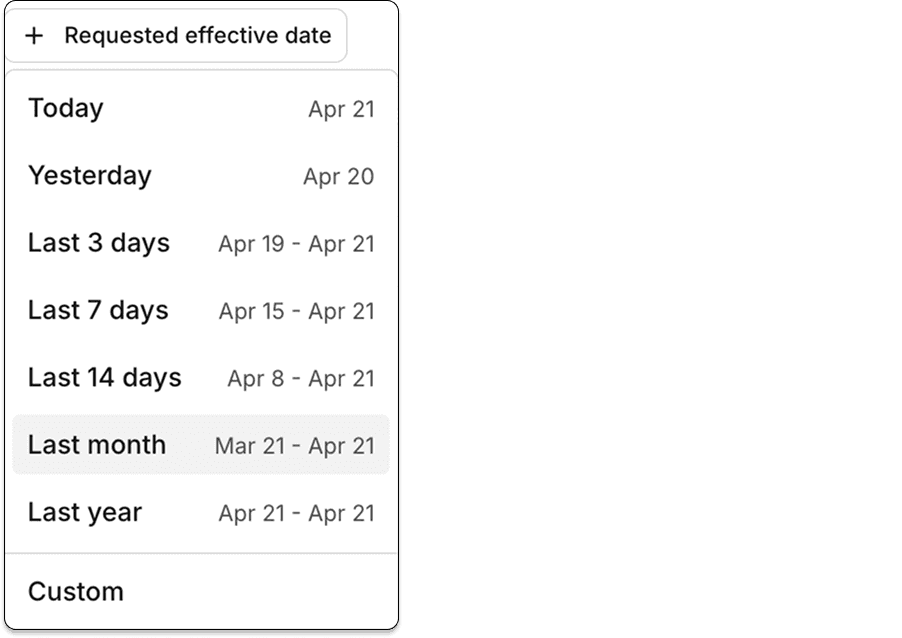
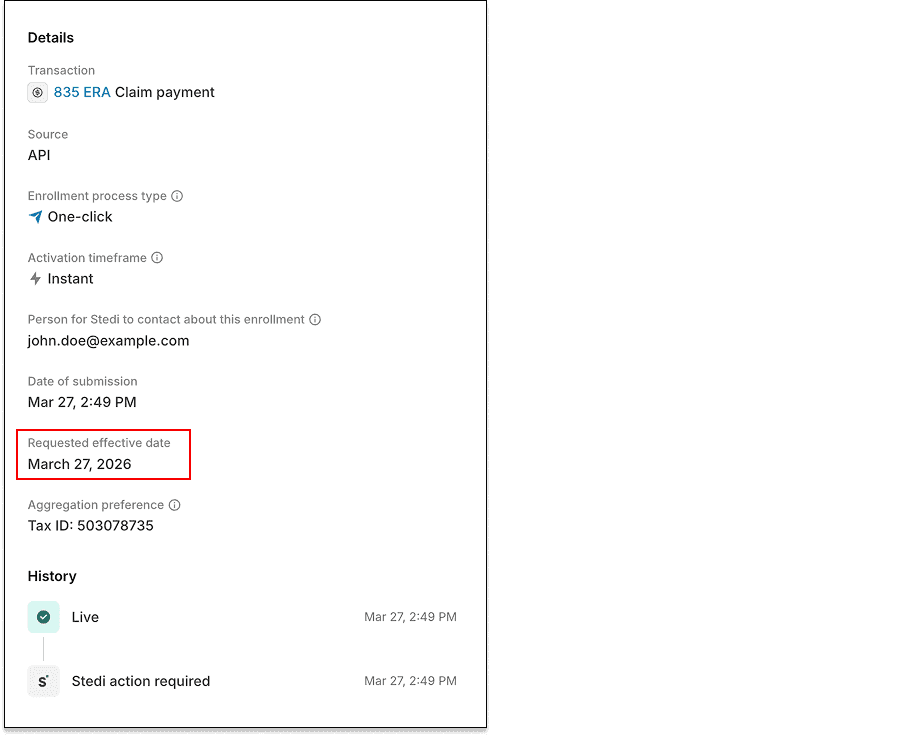
They also appear, when applicable, on each enrollment's detail page in the Stedi portal.
Availability
Transaction enrollment is free on all Stedi plans.
To learn more, check out our transaction enrollment docs.
You can now set an optional requested effective date on ERA transaction enrollment requests. This date tells the payer when you'd like them to start routing ERAs to Stedi.
A provider can only receive Electronic Remittance Advice (ERAs) from a payer through one clearinghouse at a time. Without a predictable start date, you can't tell providers when to expect ERAs at Stedi or when to stop checking for ERAs at their old clearinghouse.
A requested effective date gives you that start date. This makes clearinghouse migrations and provider go-live dates easier to plan.
How requested effective dates work
Requested effective dates are a request to the payer, not a guarantee. The payer, not Stedi, controls when an enrollment takes effect.
Checking payer support
Not all payers support requested effective dates. You can check whether a payer supports them using the Payers API or the Stedi Payer Network before submitting an enrollment request.
In the Stedi Payer Network:

In Payers API responses, check the requestedEffectiveDate field in the claimPayment enrollment process to determine support. The field is omitted when Stedi has yet to determine a payer's support for requested effective dates.
{ "payer": { "enrollment": { "transactionEnrollmentProcesses": { "claimPayment": { "requestedEffectiveDate": "SUPPORTED", // Payer supports requested effective dates for ERA enrollments ... } }, ... }, ... } }
Enrollments API
Setting a requested effective date
You can now pass an optional requestedEffectiveDate field in Create Enrollment API requests. The date uses YYYYMMDD format and can be today or any date up to 6 months from now.
{ "transactions": { "claimPayment": { "enroll": true // ERA enrollment } }, "requestedEffectiveDate": "20260601", // Requested effective date ... }
On DRAFT enrollments, omitting the requestedEffectiveDate field leaves the value empty. For enrollments in the STEDI_ACTION_REQUIRED status, the requested effective date defaults to the submission date.
If the payer explicitly doesn't support requested effective dates, Stedi rejects the request.
Updating existing enrollments
You can update a DRAFT enrollment’s requestedEffectiveDate using an Update Enrollment API request.
Viewing requested effective dates
The Retrieve Enrollment API and List Enrollments API responses return requestedEffectiveDate on each enrollment record. For example, in a Retrieve Enrollment response:
{ "id": "db6675c5-7be7-4af9-8c68-a54a336d2911", "requestedEffectiveDate": "20260601", ... }
Filtering and sorting by requested effective dates
The List Enrollments API also accepts new query parameters to filter and sort by requested effective date:
Use
requestedEffectiveDateFromandrequestedEffectiveDateToto filter enrollments with a requested effective date in a given rangeUse
sortBy=requestedEffectiveDate:ascorsortBy=requestedEffectiveDate:descto sort results by requested effective date
For example, the following request returns enrollments with a Q2 2026 requested effective date, sorted from earliest to latest:
curl --request GET \ --url "https://enrollments.us.stedi.com/2024-09-01/enrollments?requestedEffectiveDateFrom=20260401&requestedEffectiveDateTo=20260630&sortBy=requestedEffectiveDate:asc" \ --header "Authorization: <api_key>"
Stedi portal
Requested effective dates appear in the enrollments list view.

You can filter enrollments by requested effective date.

They also appear, when applicable, on each enrollment's detail page in the Stedi portal.

Availability
Transaction enrollment is free on all Stedi plans.
To learn more, check out our transaction enrollment docs.
Get started with Stedi
Automate healthcare transactions with developer-friendly APIs that support thousands of payers. Contact us to learn more and speak to the team.
Get updates on what’s new at Stedi
Product
Developers
Resources
Backed by
Stedi and the S design mark are registered trademarks of Stedi, Inc. All names, logos, and brands of third parties listed on our site are trademarks of their respective owners (including “X12”, which is a trademark of X12 Incorporated). Stedi, Inc. and its products and services are not endorsed by, sponsored by, or affiliated with these third parties. Our use of these names, logos, and brands is for identification purposes only, and does not imply any such endorsement, sponsorship, or affiliation.
Product
Developers
Resources
Get updates on what’s new at Stedi
Backed by
Stedi and the S design mark are registered trademarks of Stedi, Inc. All names, logos, and brands of third parties listed on our site are trademarks of their respective owners (including “X12”, which is a trademark of X12 Incorporated). Stedi, Inc. and its products and services are not endorsed by, sponsored by, or affiliated with these third parties. Our use of these names, logos, and brands is for identification purposes only, and does not imply any such endorsement, sponsorship, or affiliation.
Product
Developers
Resources
Backed by
Stedi and the S design mark are registered trademarks of Stedi, Inc. All names, logos, and brands of third parties listed on our site are trademarks of their respective owners (including “X12”, which is a trademark of X12 Incorporated). Stedi, Inc. and its products and services are not endorsed by, sponsored by, or affiliated with these third parties. Our use of these names, logos, and brands is for identification purposes only, and does not imply any such endorsement, sponsorship, or affiliation.
