

Supported payers
Stedi supports thousands of medical, dental, and vision payers. You can get details about all supported payers through our interactive Payer Network, our Payers API, or the Stedi Agent.
Find payer details
You can use the following methods to determine:
- The transaction types supported for each payer and whether transaction enrollment is required.
- The payer IDs you need to send transactions through Stedi.
- Which payers support medical, dental, and vision use cases.
- The states and territories where each payer operates.
Payer Network
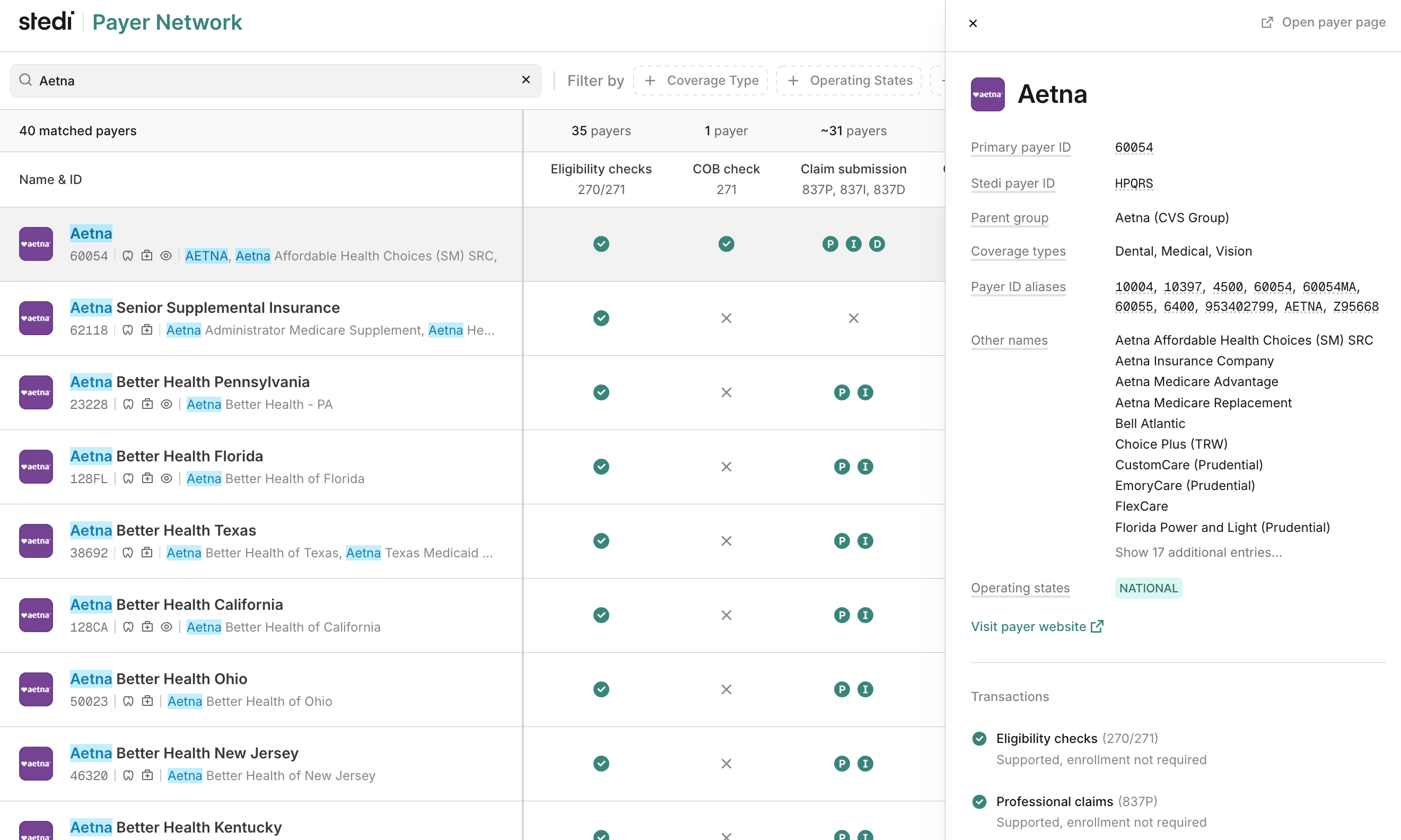
Visit the Payer Network to review a searchable list of supported payers.
Payers API
You can use the following endpoints to search for payers and retrieve their details.
- Retrieve payer: Retrieve a specific payer record using the Stedi payer ID, a unique identifier Stedi assigns to each payer that will never change
- List Payers JSON: List all supported payers in JSON format - supports pagination
- List Payers CSV: List all supported payers in CSV format
- Search Payers: Search for payers by name, payer ID, or payer ID alias - supports fuzzy matching. Stedi returns results in JSON format.
These endpoints are especially useful when you want to embed payer details or search capabilities into your system or application. For example, you can use the Search Payers endpoint to allow patients to search for and select their insurance provider in a patient intake form. Learn more about how to use payer IDs in applications.
If you store payer details in your own system, refresh them at least once a day.
Stedi Agent
You can chat with the Stedi Agent to get information about supported payers. To use it, you must be at least an Operator role within your Stedi account.
To start chatting with the Stedi Agent:
- Go to the Chats page in the Stedi portal.
- Click New chat and select Payer Finder.
- Type your question in the chat window and press Enter. For example, you could ask "What is the payer ID for Aetna?" or "Does Cigna support dental eligibility checks?" You can also ask more complex questions, like "Which payers support dental eligibility checks and require transaction enrollment?" Talk to Stedi Agent like you would a human support agent.
- Ask follow-up questions as needed. You can ask multiple questions about different payers in the same chat.
The Stedi Agent will respond to your questions and display its answers in the chat window.
What if my payer isn't available?
If a payer you need isn't in the network, request a payer and we'll add them. We're continuously expanding our network.
Refresh payer data
Payer records can change. Payers merge, change names, receive new payer IDs, and shut down. Supported transaction types and enrollment requirements also sometimes change.
We recommend refreshing your cached payer data at least once a day. Use List Payers JSON or List Payers CSV to retrieve the full list of supported payers and their current details.
When you store payer records, key them on the Stedi payer ID so each refresh can update a payer's name and IDs without breaking your data relationships. Learn more about how to use payer IDs in applications.
Supported transaction types and enrollment requirements
Check whether the transaction types you want to send or receive are supported for each of your payers. For example, if the Payer Network shows that real-time claim status checks aren't supported, you can't send them to that payer.
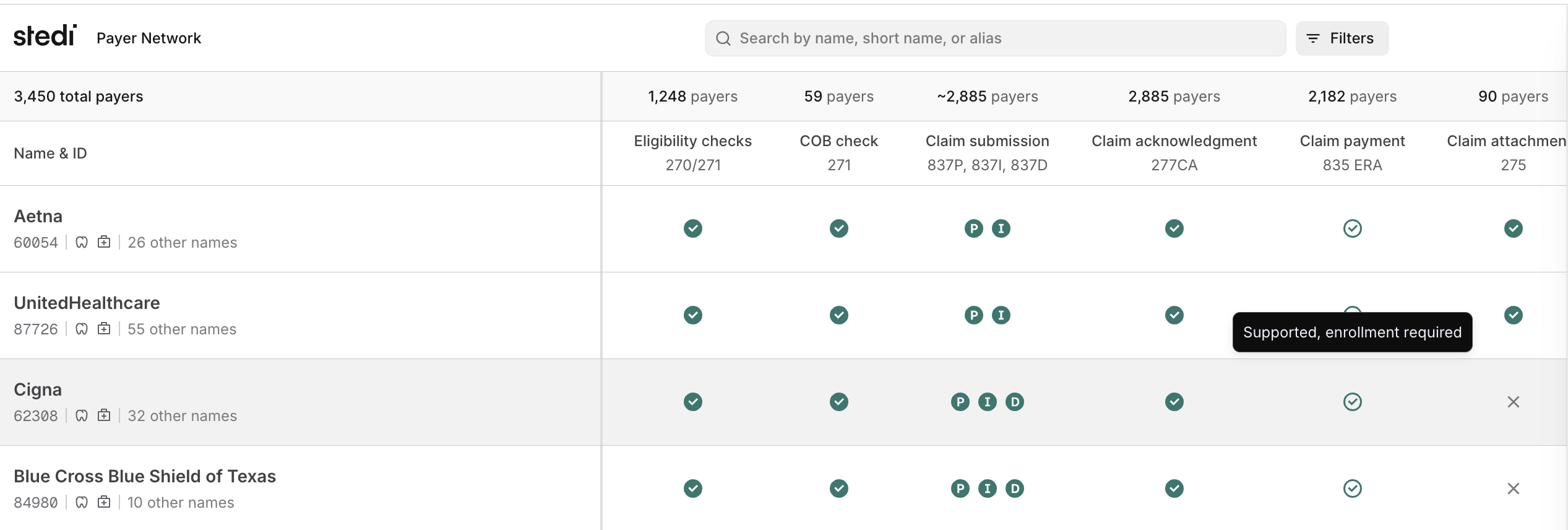
For supported transactions, check whether transaction enrollment is required. Transaction enrollment is the process of registering a provider to exchange a specific healthcare transaction with a specific payer through Stedi. All payers require transaction enrollment for 835 ERAs. For other transactions, like claims and eligibility checks, it depends on the payer.
-
The Payer Network shows Transactions for each payer. Transaction types are marked as Supported (enrollment not required), Supported, enrollment required (you must complete transaction enrollment first), or Not supported (transaction type not available for this payer).
-
The Retrieve Payer, List Payers, and Search Payers endpoints return a
transactionSupportobject for each payer. Each property in the object has a value ofSUPPORTED(enrollment not required),ENROLLMENT_REQUIRED(enrollment required), orNOT_SUPPORTED(transaction type not available).For example, the following
claimPaymentproperty shows that Blue Cross Blue Shield of North Carolina requires enrollment for 835 Electronic Remittance Advice (ERAs):{ "stediId": "UPICO", "displayName": "Blue Cross NC", "primaryPayerId": "BCSNC", "transactionSupport": { "claimPayment": "ENROLLMENT_REQUIRED", "claimStatus": "SUPPORTED", "coordinationOfBenefits": "SUPPORTED", "dentalClaimSubmission": "SUPPORTED", "eligibilityCheck": "SUPPORTED", "institutionalClaimSubmission": "SUPPORTED", "professionalClaimSubmission": "SUPPORTED", "unsolicitedClaimAttachment": "NOT_SUPPORTED" } // ... }
Learn more about transaction enrollment, including the enrollment process and how to submit enrollment requests.
Payer IDs
The Payer Network includes three types of payer IDs. You can use any of these IDs to send transactions through Stedi.
You must include leading 0 characters in payer IDs. For example, use 00540
for SISCO, not 540.
Primary payer ID (recommended)
The primary payer ID is the most commonly used ID for a payer and most often corresponds to the name the payer uses internally and provides to patients on member ID cards.
When you don't already have a payer ID you use for a particular payer, we recommend using the primary Payer ID.
Stedi payer ID
The Stedi payer ID is a unique identifier Stedi assigns to each payer. This ID will not change, even if the primary payer ID is updated. We maintain a list of Stedi payer IDs to ensure that 1) you can always refer to a payer using a consistent identifier, 2) we can more easily route requests to the payer through the most reliable connection behind the scenes, and 3) we can update our products without introducing breaking changes.
You may want to use the Stedi payer ID for requests if you are building a system that requires a consistent and immutable set of payer IDs.
Payer ID aliases
These are alternative IDs associated with a payer. If a payer changes their primary payer ID, payer ID aliases ensure that customers who still refer to the old ID can find the payer and continue sending transactions to the payer uninterrupted. Some payers also have different payer IDs for different plans. Payer ID aliases ensure that requests using these IDs are routed to the same payer.
Use payer IDs in applications
We recommend the following best practices when using payer IDs in provider-facing applications:
| ID Type | Best Practices |
|---|---|
Stedi payer ID (stediId) |
|
Primary payer ID (primaryPayerId) |
|
Payer ID aliases (aliases) |
|
Medical, dental, and vision coverage
Payers may support medical use cases, dental use cases, vision use cases, or all three. Coverage types only apply to batch and real-time eligibility checks.
- The Payer Network lists Coverage types for each payer that indicate supported eligibility check use cases.
- The Retrieve Payer, List Payers, and Search Payers endpoints return a
coverageTypesarray for each payer indicating supported eligibility check use cases.
For example, Aetna's Coverage types in the network are Dental, Medical, Vision. That means you can submit eligibility checks for medical, dental, and vision services to Aetna.
Operating states
Operating states refer to the geographical areas where a payer sells insurance plans. This can differ from the location of the payer's legal headquarters and from the location of the patient's home or work address.
For example, if a company is headquartered in Washington (WA), an employee in their Georgia office can still have Premera WA coverage. In this case, WA is the operating state because that's where the plan is sold.
Operating states data can change rapidly for smaller payers. If you have questions about operating states for a specific payer, contact us.
- The Payer Network lists Operating states for each payer that indicate where they operate.
- The Retrieve Payer, List Payers, and Search Payers endpoints return an
operatingStatesarray for each payer indicating where they operate.
For example, Cigna's Operating states in the network are NATIONAL, indicating that Cigna operates throughout the entire United States.
Other payer names
The Payer Network includes other names for many payers. These additional names help you search for and identify payers using the name most familiar to your organization. For example, "Eaton Benefits Ohio" is an alternative associated with "Cigna" – searching for either name returns the same payer within the database.
Stedi payer errors
Stedi returns the following error messages when a payer is not supported or enrolled properly.
| Error message | Possible causes and resolutions |
|---|---|
Payer is not configured for {transaction type}. Please contact Stedi support to resolve. | Stedi does not yet support this transaction type for this payer, or there is a mis-mapping of payer IDs. Contact us with the name of the payer, and we'll investigate the issue. |
Payer connection does not support {transaction type}. Please contact Stedi support to discuss connectivity options. | Stedi has a connection to this payer, but it doesn't currently support this functionality (real-time eligibility or claim submission). Contact us for a timeline on enabling it. |
Payer is not configured. Please check our published payer list or contact Stedi support to resolve. | Stedi doesn't recognize the payer ID you provided. Double-check the payer ID in the Stedi Payer Network, or contact us with the name of the payer, and we will help you determine the correct payer ID. |
Payer is not supported. Please contact Stedi support to discuss connectivity options. | Stedi doesn't yet have connectivity to this payer. We're likely already working on it - contact us for details about the connectivity timeline. |