

Model Context Protocol (MCP)
Our Model Context Protocol (MCP) server defines a set of tools that AI agents can use to perform and troubleshoot eligibility checks through Stedi.
When building agents that work with eligibility data, we recommend using our MCP server. It excels at individual eligibility checks, especially when your agent needs to retrieve coverage data in real time. For example:
- A voice agent can use the MCP server to quickly verify benefits in a few seconds instead of calling payers over the phone. It can then place follow-up calls to payers only as needed - for example, to collect additional benefit details.
- A Revenue Cycle Management (RCM) workflow agent can use the MCP server to validate a patient's coverage before scheduling an appointment or submitting a claim.
You can also use the MCP server to perform individual checks with MCP clients. This is useful for testing your integration during development and for enabling operations teams to run ad-hoc checks or troubleshoot issues. Be sure to put measures in place to stay compliant with your organization's data-handling policies, HIPAA, and other applicable requirements.
Why use the MCP server?
Performing eligibility checks successfully requires more than just calling Stedi's APIs. In addition to determining the right payer, you must know the required and recommended properties, know how to interpret errors, and build out a robust retry strategy for various failure cases.
The troubleshooting process can be complex. For example, if your check fails due to a payer connectivity issue, you should retry immediately. If it fails due to a Subscriber Not Found error, you must systematically diagnose the issue in order to successfully retrieve benefits information. We have best practices for entering patient data, troubleshooting, and retries in our docs - you'd typically need to implement this logic in your product and then maintain it over time.
The MCP server is helpful because it comes with all of this logic built in.
Features
The MCP server allows agents to:
- Find the correct payer: The MCP server has a tool for searching Stedi's payer database. This allows agents to access information like payer IDs and supported transaction types as needed when answering questions or running eligibility checks.
- Run eligibility checks: The MCP server has a tool for constructing and submitting eligibility requests using available patient and provider data. If the first attempt fails, the server provides instructions about how to adjust inputs, retry, and move forward.
- Troubleshoot rejection codes: The MCP server provides instructions on what to do in these scenarios - for example, remove the member ID, adjust the name, or try alternate, related payer IDs. These are the same tactics our support team uses internally to resolve issues.
In essence, the MCP server allows you to tell your agent to "run an eligibility check" at the appropriate times during its workflow. You can focus on building your agent's core functionality, while the MCP server handles the complexities of eligibility checks.
Limitations
The MCP server is designed for an agent that is performing and troubleshooting a single eligibility check. It's not intended for bulk eligibility checks, or for interpreting the benefits in an eligibility response.
- For bulk eligibility checks, use Batch Eligibility Check API directly. Visit batch refresh checks for details.
- To interpret the eligibility response, you'll need to layer your own logic on top of the MCP server. For example, you'll need custom logic for tasks like determining whether a patient has active coverage for a particular service or retrieving the patient's copay. Visit determine patient benefits for complete details.
Data security and compliance
The MCP server uses TLS encryption for all connections. You can authenticate to the MCP server using one of the following methods:
- API key authentication (standard Stedi production or test key)
- OAuth 2.x authentication (OAuth required for Claude integrations)
If you're using our MCP server with a third-party tool like Claude or ChatGPT, follow your organization's data handling policies to ensure that you stay compliant with HIPAA and other applicable requirements. For example, your organization likely requires a BAA with any third-party tool before using the tool with Stedi's MCP server.
Test mode
You can start using the MCP server in test mode. In test mode, you can use test API keys to develop and test your integration without transmitting PHI or PII.
The MCP server is only available for production accounts. If you have a sandbox account, click Upgrade account in the side navigation to access the MCP server.
How the MCP server works
Your AI agent connects to the server using an MCP client. Once connected, the server gives your agent access to the available tools and prompts for running eligibility checks.
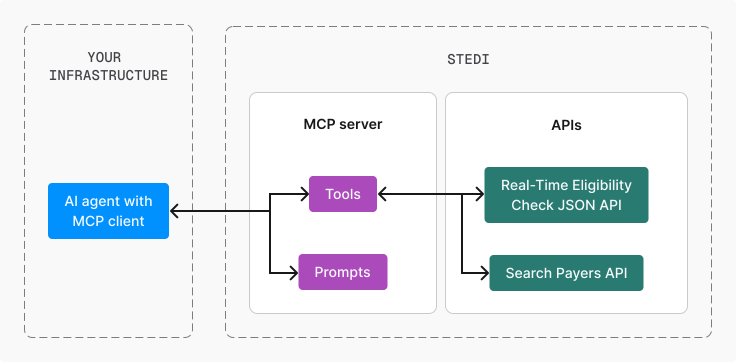
The MCP server adds minimal overhead - you'll get the same fast response times from our APIs with added intelligence for your agents.
Tools
Tools interact with Stedi's APIs to perform tasks. The MCP server provides the following tools for your agent to use:
| Tool Name | Description |
|---|---|
search_for_payer | Calls the Search Payers endpoint to find a Stedi payer based on a provided payer ID or name. It even works with partial names or typos. For example, cig finds Cigna. |
eligibility_check | Runs an eligibility check using the Real-Time Eligibility Check JSON endpoint. The JSON format provides the most reliable results for AI agents. |
Prompts
The MCP server includes prompts to help your agent recover from common eligibility errors. They cover the most common recoverable scenarios we see in production:
- How to handle common errors
- When to retry eligibility checks
- What to do when a payer isn't found
You and your agent stay in control of executing follow-up actions, such as troubleshooting and retries.
Many LLM clients don't automatically read prompt definitions. You must explicitly instruct them to "read the prompts" or use a client-specific command. Otherwise, the model may never access prompt content.
Install the MCP server
The eligibility MCP server is a Streamable HTTP MCP server. We support two authentication methods:
- API key authentication (standard usage)
- OAuth 2.x authentication (required for Claude integrations)
API Key Authentication
Endpoint:
https://mcp.us.stedi.com/2025-07-11/mcpTo connect your agent:
- Create a production or test API key for authentication. Use test API keys to develop without transmitting PHI or PII.
- Add the following configuration to your agent's MCP client:
{
  "mcpServers": {
    "stedi-healthcare": {
      "type": "http",
      "url": "https://mcp.us.stedi.com/2025-07-11/mcp",
      "headers": {
        "Authorization": "STEDI_PROD_API_KEY"
      }
    }
  }
}
OAuth Authentication
We recommend using API key authentication when possible for simplicity.
Endpoint:
https://mcp.us.stedi.com/mcp2This flow doesn't require an API key in the MCP configuration. To connect your agent, add the following configuration to your agent's MCP client:
{
  "mcpServers": {
    "healthcare-mcp": {
      "type": "http",
      "url": "https://mcp.us.stedi.com/mcp2"
    }
  }
}
OAuth authentication currently supports email and password only. Single sign-on (SSO) authentication is not supported. You must have the Operator role or above, and your plan must include healthcare eligibility. Sessions expire after 30 days - you'll need to reauthenticate through your chosen AI agent.
Claude Code
OAuth authentication is required when adding Stedi's MCP server to Claude Code. Run this command to install the MCP server:
claude mcp add --transport http stedi-eligibility-mcp https://mcp.us.stedi.com/mcp2To use the MCP server:
- Run
/mcpinside Claude Code. - Begin the authentication process for
stedi-eligibility-mcp. A browser window opens where you can sign in to your Stedi account. - Sign in using your Stedi account credentials.
OAuth completes and the MCP server becomes available for you to use.
ChatGPT
The Stedi app requires a ChatGPT Enterprise plan. The app isn't available on ChatGPT plans for individuals (Free/Go/Plus/Pro).
The Stedi app is available for ChatGPT users. To connect:
- Open ChatGPT.
- Click Apps in the sidebar.
- Search for and select Stedi from the list of available apps.
- Click Connect.
- Sign in to your Stedi account.
- Review and authorize the permissions the Stedi app is requesting.
Once connected, you can use ChatGPT to perform actions in your Stedi account. For example, you might write "Run an eligibility check for John Doe with the following demographic information."
Example use
Here are some examples of how you might use the MCP server in different scenarios.
Search for a payer
You can instruct your agent to retrieve the correct payer ID before running an eligibility check.
Example prompt
Determine the correct payer ID for Cigna and confirm whether eligibility checks are supported.
What happens
The MCP server:
- Invokes the
search_for_payertool. - Matches "Cigna".
- Returns the correct payer ID and supported transaction types.
- Confirms whether the payer supports eligibility (270/271) transactions.
Run an eligibility check
You can instruct your agent to use the MCP server to check patient eligibility before scheduling appointments.
Example prompt
Run an eligibility check for this patient before scheduling their appointment.
What happens
The MCP server:
- Invokes the
eligibility_checktool. - Constructs a properly formatted JSON eligibility request using available patient and provider data.
- Submits the request to the payer in real time.
- Returns structured eligibility response data.
- Provides retry guidance if the request fails due to a recoverable issue.
Recover from failures
The MCP server can help your agent recover from common errors when running eligibility checks.
Example prompt
Read the prompts from Stedi's MCP server. Then use Stedi's MCP server to troubleshoot and retry the eligibility check for patients with "Subscriber Not Found" errors.
What happens
The MCP server:
- Analyzes the rejection reason.
- Provides structured retry guidance based on best practices for that error type. For example, if the error is
Subscriber Not Found, the MCP server may recommend removing the member ID or adjusting the name details. - After the agent updates the request, the MCP server re-runs the eligibility check and returns the updated results.
MCP server vs. Stedi Agent
The Stedi Agent and the Model Context Protocol (MCP) server can both help you resolve failed eligibility checks and find payer information, but they serve different use cases.
-
The Stedi Agent is a Stedi-controlled, AI assistant within the Stedi portal. It's ready to use whenever you need it. Unlike the MCP server, you can't manage or invoke the Stedi Agent programmatically - you can only use it within the Stedi portal. The Stedi Agent is built on top of the MCP server, meaning it uses the MCP server's exposed tools to perform actions.
-
The MCP Server provides a set of tools, which are a wrapper around Stedi's APIs, that AI agents can use to find payer information and perform and troubleshoot eligibility checks. The MCP server includes the same retry logic (in a prompt) that the Stedi Agent uses to automatically resolve eligibility check failures.
You can use the MCP server to build your own AI agents tailored to your use case. Unlike the Stedi Agent, you'll need to install and configure the MCP server for your preferred AI agent.
Pricing
Stedi offers the MCP server on all paid plans. There is no charge for using the MCP server itself - you only pay for related API requests.
Note that for eligibility checks, there's no charge for non-billable requests, such as those that return errors indicating that the payer is down. Visit billing for eligibility checks for details.
We encourage you to contact us with questions, feedback, or for help using our products.
Contact us
We make every effort to respond as soon as possible, particularly to urgent requests. For both general support requests and billing inquiries, you can contact us through the following methods:
- Website for all request types
- Email support@stedi.com for support requests, billing questions, and/or set up a dedicated Slack or Teams channel
When you report an issue, please include the following:
- A description of the issue, including the current behavior and the expected behavior
- Your Stedi account ID, if you submit through our website
- Screenshots showing the problem, when possible
Privacy Policy
Refer to our Privacy Notice for details on how we handle your data.