

Test mode
Test mode provides a separate test environment where you can realistically simulate transactions in your Stedi account without PHI/PII and without sending any data to payers.
Sandbox accounts can only operate in test mode. Production accounts can access test mode at any time by toggling Test mode to ON in the side navigation.
Test mode is for testing transactions intended for submission through Stedi and isn't a substitute for any paid Stedi product. Stedi applies fair use limits to test volume and may reject, throttle, or disable test traffic that exceeds them.
Generate test API keys
Test API keys allow you to send mock eligibility checks and test claims through Stedi's APIs.
When submitting through Stedi's APIs, use a test API key:
- Log into your Stedi account.
- Click API keys in the side navigation.
- Click + Generate new API Key.
- Enter descriptive name for the API key.
- Choose Test as the Mode.
- Click Generate.
- Copy your key and store it in a secure location.
Learn more about API authentication.
Send mock eligibility checks
Mock transactions you send in test mode are free for testing purposes and won't incur any charges from Stedi.
You can submit mock real-time eligibility checks through the manual eligibility check form or through Stedi's APIs. You can choose from a variety of predefined requests for well-known payers, including:
- Aetna
- Cigna
- UnitedHealthcare
- National Centers for Medicare & Medicaid Services (CMS)
For each mock request, Stedi returns a realistic mock benefits response for that payer so you can get a sense for the kinds of data you'll receive in production. The benefits responses include examples of copays, deductibles, and other patient payment responsibilities, as well as active coverage.
You can also submit a mock Medicare Beneficiary Identifier (MBI) lookup. MBI lookups allow you to use a patient's Social Security Number (SSN) to retrieve their MBI and complete benefits information from the Centers for Medicare and Medicaid Services (CMS).
Test the MCP server
The Model Context Protocol (MCP) server works with test mode, allowing you to develop AI agents that work with eligibility data without transmitting PHI or PII.
The MCP server is only available for production accounts. If you have a sandbox account, click Upgrade account in the side navigation to access the MCP server.
The MCP server provides tools that AI agents can use to:
- Search for payers: Find the correct payer ID and supported transaction types.
- Run eligibility checks: Construct and submit properly formatted eligibility requests.
- Troubleshoot errors: Get guidance on recovering from common errors like "Subscriber Not Found".
You can connect the MCP server to AI agents using test API keys. Visit the Model Context Protocol (MCP) for full installation instructions and details.
Review eligibility check results
After you submit a mock eligibility check, you can review all the request and response details. This includes:
- A list of historical eligibility checks that you can filter by status, payer ID, date, and error code.
- The raw API request and response.
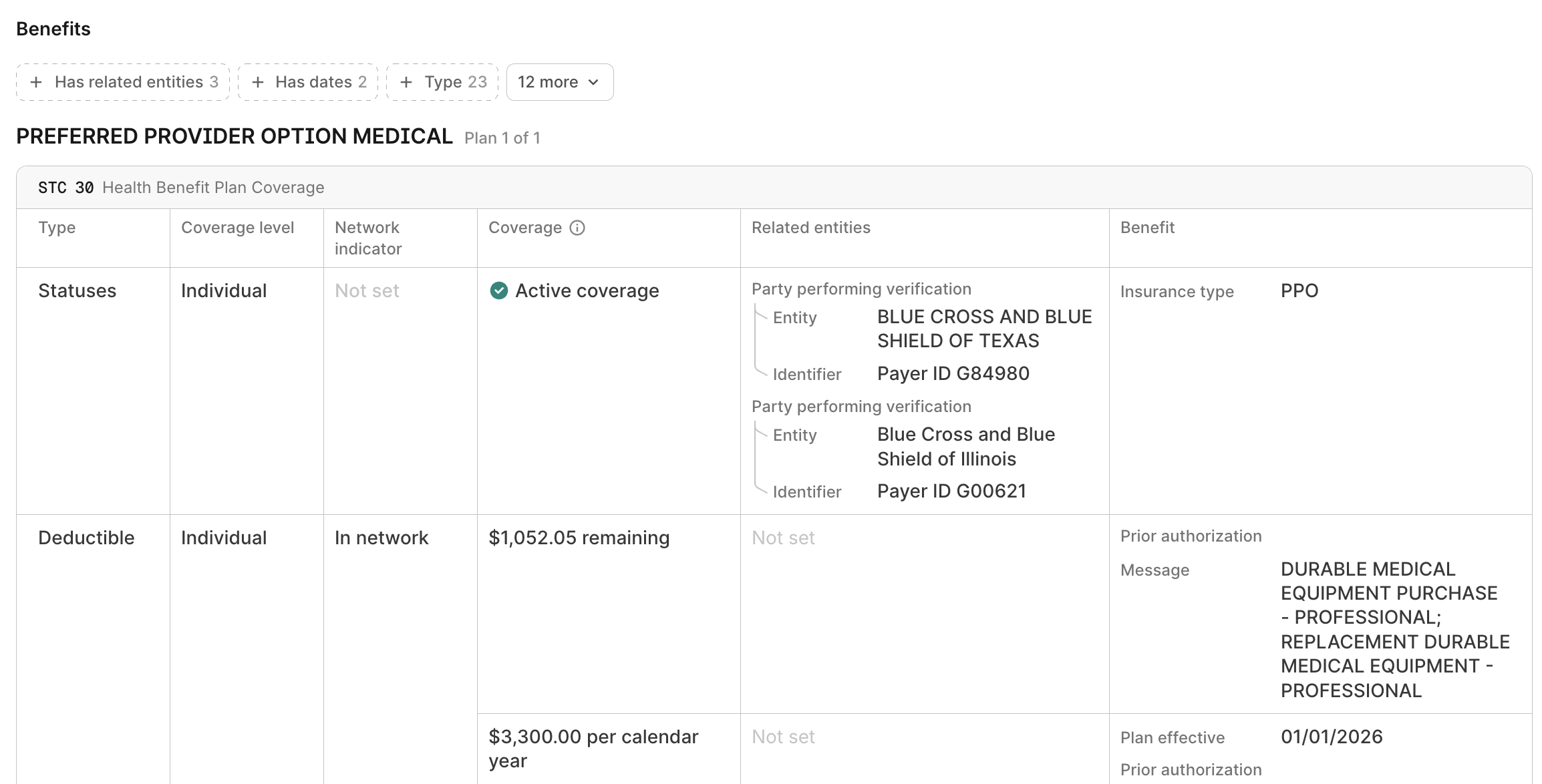
- A user-friendly benefits view designed to help you understand the patient's active coverage and payment responsibilities, such as co-pay and deductible amounts.
- Eligibility check Debug view, which lets you systematically troubleshoot failed checks until you receive a successful response from the payer.
To review an eligibility check's results:
- Go to the checks view.
- Click the eligibility check with the benefits information you want to view.
Stedi opens the eligibility check's Overview tab. Click Benefits to review a table of the mock benefits data.
Submit test claims and attachments
Test claim submission is only available for production accounts. If you have a sandbox account, click Upgrade account in the side navigation to submit test claims.
You can submit test claims and unsolicited claim attachments through the API, SFTP, or Stedi portal. Stedi offers two test workflows:
- Test payer-specific edits: Submit test claims to any payer and receive test 277CA claim acknowledgments from Stedi.
- Generate a test ERA: Submit test claims to the Stedi Test Payer and receive both test 277CA and test 835 Electronic Remittance Advice (ERA) responses from Stedi.
Visit Test claim workflows for complete instructions on submitting test claims, attachments, and retrieving test responses.
Review test claims and responses
You can view all test claims and their associated responses in the claims view by toggling Test mode to ON in the side navigation.
Test event destinations
You can configure event destinations in test mode. Event destinations automatically send Stedi events to your endpoint when Stedi resources change, such as when a file or transaction completes processing.
Event destinations you create in test mode only receive test events. For example, if you submit a test claim, the event destination receives events like file.processed when Stedi successfully processes the file, or transaction.processed when Stedi translates the claim into X12 EDI format. This lets you verify your endpoint handles Stedi events correctly before going live.
You can also use test API keys with the List Events and Retrieve Event endpoints. When you use a test API key, these endpoints only return test events.
Explore the Stedi portal
The test environment lets you get familiar with Stedi's UI tools and learn more about how you can use Stedi to automate claims and eligibility check workflows.
Not supported
Test mode doesn't support the following features:
- Transaction enrollment
- Agentic Discovery
- Insurance discovery checks
- Coordination of benefits (COB) checks
- 276/277 real-time claim status
- Custom mock data or payer selection for eligibility checks