Common questions about third-party administrators (TPAs)
Under self-funded health plans, employers or unions pay for their members' care with their own money. They then hire a third-party administrator (TPA) to run their plans.
In most cases, a TPA-run plan works like any other health plan. But there are some nuances. For example, the payer on the member ID card isn't always the one that runs the plan. That can affect how you check eligibility and track claims.
This guide answers questions we commonly hear about TPAs and TPA-run plans from Stedi customers.
What is a TPA?
A third-party administrator (TPA) runs a health plan for an employer or union that pays for care with its own money. This type of plan is called a self-funded plan.
The TPA adjudicates claims, pays providers, and handles member support. It acts as the actual payer.
How is a TPA different from an ASO?
A TPA is a separate company that runs the plan for the employer or union. Some large payers also own TPAs. For example, UMR is a TPA owned by UnitedHealthcare.
In an administrative services only (ASO) arrangement, a payer like Cigna or Aetna runs the plan itself. Self-funded plans can use either arrangement.
For an ASO plan, the payer on the member ID card is the payer that runs the plan. Eligibility checks and claims work like they do for that payer's other plans.
Why does the member ID card show another payer's logo?
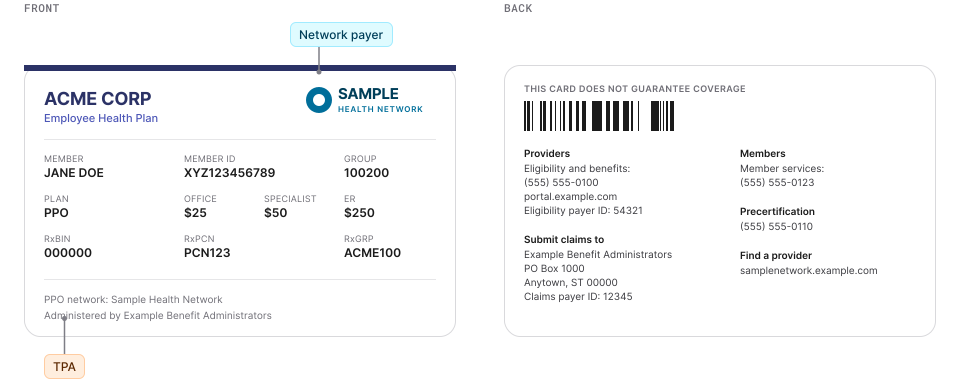
Many TPAs lease a provider network from a payer, like Cigna, UnitedHealthcare, or Aetna. We call that payer the "network payer" throughout the rest of this guide.
The member ID card shows the network payer's logo, even though the TPA runs the plan.
For more information, see Why claims go missing and how to find them.
Do TPAs support eligibility checks?
It depends on the TPA. Under HIPAA, self-funded plans that TPAs run must accept standard X12 transactions, such as eligibility checks, claims, and claim status checks. However, some TPAs, particularly smaller ones, haven't built out support for real-time transactions.
If a TPA doesn't seem to support real-time eligibility checks or claim status checks, reach out to Stedi. We may be able to find another route. We also work directly with TPAs to add support.
Which payer ID should I use for a TPA-run plan?
Use the payer ID printed on the member ID card.
For a TPA-run plan, that payer ID may belong to the TPA or the network payer. Some cards list separate payer IDs for claims and eligibility checks.
To confirm the payer ID, search for it using the Stedi Payer Network website or the Payers API. If you can't find the payer ID, contact Stedi. It's likely we support the payer under another ID or name.
Why does the eligibility response say to "call the number on the card?"
This response typically indicates the payer recognizes the member but doesn't have the related benefit details. A TPA or a carveout administrator holds them instead.
The response may also name the administrator as a related entity, such as a "Third-Party Administrator." You can often send a second eligibility check to the administrator to get the benefits.
For more information, see Why you're missing carveout benefits in eligibility checks.
Examples
If you're using our API or SDKs, Stedi returns eligibility data in one of two response shapes, depending on the endpoint you call.
Responses from our Real-Time Eligibility Check JSON endpoint organize benefits in a plans array. Responses from our Batch Eligibility Check, Insurance Discovery, Real-Time Eligibility Check Raw X12, and Legacy Real-Time Eligibility Check JSON endpoints use a benefitsInformation array.
The following examples show both, labeled plans and benefitsInformation.
The entry is in the plans[].benefits.contactFollowingEntityForInformation field:
{
  "plans": [
    {
      "benefits": {
        "contactFollowingEntityForInformation": [
          {
            "coverageLevel": "INDIVIDUAL",
            "service": {
              "system": "STC",
              "value": "30",
              "definition": "Health Benefit Plan Coverage"
            },
            "relatedEntities": [
              {
                "type": "THIRD_PARTY_ADMINISTRATOR",
                "name": {
                  "organization": "ACME BENEFIT ADMINISTRATORS" // The TPA
                },
                "contacts": [
                  {
                    "phoneNumbers": ["5555551234"]
                  }
                ]
              }
            ],
            "messages": [
              "ADDITIONAL BENEFIT INFORMATION MAY APPLY, BUT IS NOT AVAILABLE ELECTRONICALLY. PLEASE CALL THE NUMBER ON THE BACK OF THE MEMBER'S ID CARD."
            ]
          }
        ]
      },
      ...
    }
  ],
  ...
}
The entry is a benefitsInformation object with a code of U:
{
  "benefitsInformation": [
    {
      "code": "U", // Contact Following Entity for Eligibility or Benefit Information
      "name": "Contact Following Entity for Eligibility or Benefit Information",
      "coverageLevelCode": "IND",
      "serviceTypeCodes": ["30"],
      "benefitsRelatedEntities": [
        {
          "entityIdentifier": "Third-Party Administrator",
          "entityType": "Non-Person Entity",
          "entityName": "ACME BENEFIT ADMINISTRATORS", // The TPA
          "contactInformation": {
            "contacts": [
              {
                "communicationMode": "Telephone",
                "communicationNumber": "5555551234"
              }
            ]
          }
        }
      ],
      "additionalInformation": [
        {
          "description": "ADDITIONAL BENEFIT INFORMATION MAY APPLY, BUT IS NOT AVAILABLE ELECTRONICALLY. PLEASE CALL THE NUMBER ON THE BACK OF THE MEMBER'S ID CARD."
        }
      ]
    },
    ...
  ],
  ...
}
How are claims processed for a TPA-run plan?
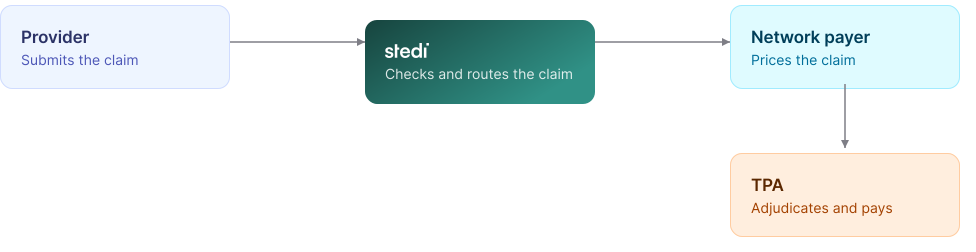
Submit the claim using the payer ID on the member ID card.
For most plans, the claim goes to the network payer first. The network payer prices the claim against its contracted rates, then forwards it to the TPA. For other plans, the claim goes straight to the TPA, which sends it to the network payer for pricing.
Either way, the TPA adjudicates the claim and pays the provider from the plan's funds.
For more information, see Why claims go missing and how to find them.
Does a "forwarded to another entity" claim status mean the claim went to a TPA?
It can. A 277CA claim acknowledgment or claim status response includes these codes when the payer forwards the claim:
- Claim status category code of
A0(Acknowledgement/Forwarded) - Claim status code of
16(Claim/encounter has been forwarded to another entity)
That entity can be a TPA. It can also be a carveout administrator, an independent practice association (IPA), or another downstream payer.
For most TPA-run plans, the network payer forwards the claim to the TPA after it prices the claim.
A claim status response doesn't name the entity. It only includes a generic TT (Transfer To) entity code.
To find where the claim went:
-
Check for a claim acknowledgment from the downstream payer.
Its payer information names the entity. If that payer supports real-time claim status checks, send one using its payer ID. Its member ID for the patient may differ from the one on the original claim. -
Check the ERA.
The Electronic Remittance Advice (ERA) shows which entity adjudicated and paid the claim. -
Call the original payer.
Ask which entity it forwarded the claim to.
Get started with Stedi
To get started with Stedi, sign up for a free sandbox account. It takes less than two minutes. No credit card is required.
When you're ready, upgrade to production on our pay-as-you-go plan. There are no monthly minimums or setup fees. You only pay for the transactions you use.