How to estimate patient responsibility for Medicare APCM
Advanced Primary Care Management (APCM) is a Medicare Part B service that pays primary care providers a monthly fee for the care a patient gets between visits.
In most cases, the patient pays the provider part of that fee. That amount is the patient's responsibility, also called a cost share.
Providers are required to get the patient's consent before APCM starts. Providers must also tell the patient that Medicare cost sharing usually applies.
You can use eligibility checks and Electronic Remittance Advice (ERAs) to estimate those cost shares.
This guide answers questions we commonly hear from teams that run APCM programs, like:
- Does an eligibility check show whether a plan covers APCM?
- Where do I find a patient's APCM cost share estimate in a Medicare eligibility response?
- Which Service Type Code (STC) should I use for Medicare Advantage APCM checks?
- Why doesn't my estimate match what the patient owed?
What is APCM?
Advanced Primary Care Management (APCM) is a Medicare Part B service. It lets a primary care provider bill Medicare a monthly fee for each Medicare patient who agrees to receive APCM.
The monthly fee covers the patient's care plan, care between visits, coordination with the patient's other providers, and a care team the patient can reach at any hour.
How do providers bill for APCM?
The Centers for Medicare & Medicaid Services (CMS) – the government payer for Medicare – created three Healthcare Common Procedure Coding System (HCPCS) Level II codes for APCM, called APCM codes or APCM billing codes.
Providers can bill one APCM code per covered Medicare patient each calendar month.
The code used depends on the patient's chronic conditions and Qualified Medicare Beneficiary (QMB) status. QMB is a Medicaid program that pays Medicare premiums and cost shares for low-income patients.
APCM billing codes
| HCPCS code | Patient |
|---|---|
G0556 | One or fewer chronic conditions |
G0557 | Two or more chronic conditions |
G0558 | QMB with two or more chronic conditions |
Most providers bill APCM on professional claims.
Does an eligibility check show whether a plan covers APCM?
No. Eligibility responses don't list APCM as its own benefit. However, eligibility checks can tell you the patient's coverage and cost shares at the plan level.
Where do I find a patient's APCM cost share estimate in a Medicare eligibility response?
Send an eligibility check to CMS with payer ID CMS and STC 30 (Health Benefit Plan Coverage). CMS returns the Part B deductible and co-insurance under STC 30 in the eligibility response.
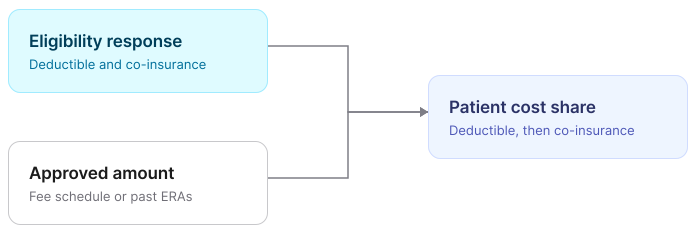
Look for active Part B coverage in the month you bill. The eligibility response's Part B deductible and co-insurance apply to APCM and other Part B services.
The patient pays any remaining Part B deductible first. Then they pay the co-insurance, which is a percentage of the Medicare-approved amount.
The eligibility response doesn't include the approved amount – the total payment Medicare sets for a service. Medicare and the patient share that amount. You can get the approved amount from the Medicare Physician Fee Schedule or from the provider's past ERAs.
Note: For QMB patients, CMS returns an insurance type of QUALIFIED_MEDICARE_BENEFICIARY (QM), a $0 Part B deductible, and a 0% co-insurance. Providers can't bill QMB patients for the Part B deductible or co-insurance.
Examples
If you're using our API or SDKs, Stedi returns eligibility data in one of two response shapes, depending on the endpoint you call.
Responses from our Real-Time Eligibility Check JSON endpoint organize benefits in a plans array. Responses from our Batch Eligibility Check, Insurance Discovery, Real-Time Eligibility Check Raw X12, and Legacy Real-Time Eligibility Check JSON endpoints use a benefitsInformation array.
The following examples show both, labeled plans and benefitsInformation.
{
  "plans": [
    {
      "benefits": {
        "statuses": [
          {
            "status": "ACTIVE_COVERAGE",
            "insuranceType": "MEDICARE_PART_B",
            "coverageLevel": "INDIVIDUAL",
            "service": { "system": "STC", "value": "30" }
          }
        ],
        "deductible": [
          {
            "insuranceType": "MEDICARE_PART_B",
            "coverageLevel": "INDIVIDUAL",
            "service": { "system": "STC", "value": "30" },
            "timePeriod": "CALENDAR_YEAR",
            "amount": "283" // Part B deductible for 2026
          },
          {
            "insuranceType": "MEDICARE_PART_B",
            "coverageLevel": "INDIVIDUAL",
            "service": { "system": "STC", "value": "30" },
            "timePeriod": "REMAINING",
            "amount": "120" // Deductible left to meet
          }
        ],
        "coInsurance": [
          {
            "insuranceType": "MEDICARE_PART_B",
            "coverageLevel": "INDIVIDUAL",
            "service": { "system": "STC", "value": "30" },
            "timePeriod": "VISIT",
            "percent": "0.2" // 20% co-insurance
          }
        ]
      }
    }
  ]
}
{
"benefitsInformation": [
{
"code": "1", // Active Coverage
"insuranceTypeCode": "MB", // Medicare Part B
"serviceTypeCodes": ["30"]
},
{
"code": "C", // Deductible
"insuranceTypeCode": "MB",
"serviceTypeCodes": ["30"],
"timeQualifierCode": "23", // Calendar Year
"benefitAmount": "283" // Part B deductible for 2026
},
{
"code": "C", // Deductible
"insuranceTypeCode": "MB",
"serviceTypeCodes": ["30"],
"timeQualifierCode": "29", // Remaining
"benefitAmount": "120" // Deductible left to meet
},
{
"code": "A", // Co-Insurance
"insuranceTypeCode": "MB",
"serviceTypeCodes": ["30"],
"timeQualifierCode": "27", // Visit
"benefitPercent": "0.2" // 20% co-insurance
}
]
}Do Medicare Advantage plans cover APCM?
It depends on the plan. Medicare Advantage plans are run by commercial payers, not CMS. Each plan sets its own billing rules and cost shares.
Some Medicare Advantage plans pay for the APCM codes. Others cover similar care under a different name.
To find out whether a patient has Medicare Advantage, see Medicare Advantage eligibility made easy.
Which STC should I use for Medicare Advantage APCM checks?
Most Medicare Advantage plans don't support eligibility checks for procedure codes, like G0557. Send an STC instead, and test which ones each payer supports.
-
Step 1. Start with STC
30.
All medical payers support STC30(Health Benefit Plan Coverage), which makes it a baseline. -
Step 2. Test STCs
98and1.
Send STC98(Professional (Physician) Visit – Office), then STC1(Medical Care). Send one STC per request unless you know the payer supports multiple STCs in eligibility requests. -
Step 3. Compare to the baseline.
If a response returns benefits that STC30didn't, the payer supports that STC.
STC 98 returns the office visit cost share, not an APCM cost share. Some plans charge that copay for APCM. Others pay for APCM in full.
For more tips, see How to pick the right STC.
Why doesn't my estimate match what the patient owed?
Check for these common errors:
-
The check went to a supplemental plan, not Medicare.
Many Original Medicare patients also have Medigap or another secondary plan. That plan's eligibility response shows its own benefits, not what Medicare leaves for the patient.Send an eligibility check to CMS first, then account for the secondary (or tertiary) plan. The eligibility response from CMS may list the secondary plan as crossover coverage. It may not list every plan.
In many cases, the secondary plan pays some or all of the patient's co-insurance.
-
The check ran long after the date of service.
The remaining deductible reflects claims the payer has processed as of the check date. Run the check close to the date of service, before you bill. -
The estimate used the office visit cost share.
For Medicare Advantage plans, STC98returns the office visit cost share. Some plans don't apply it to APCM. -
The comparison only checked co-insurance.
Compare both the copay and co-insurance amounts.
How do I refine Medicare Advantage estimates with ERAs?
Compare your estimates to your ERAs to learn how each plan handles APCM. Look for adjustments with:
- A Claim Adjustment Group Code of
PR(Patient Responsibility). - A Claim Adjustment Reason Code (CARC) of
1(Deductible),2(Co-insurance), or3(Copay).
The following example shows an APCM service line from our 835 ERA Report JSON API endpoint. The patient owed a $30 copay:
{
  "serviceLines": [
    {
      "servicePaymentInformation": {
        "adjudicatedProcedureCode": "G0557", // APCM
        "lineItemChargeAmount": "60",
        "lineItemProviderPaymentAmount": "30"
      },
      "serviceAdjustments": [
        {
          "claimAdjustmentGroupCode": "PR", // Patient Responsibility
          "adjustmentReasonCode1": "3",     // Copay
          "adjustmentAmount1": "30"
        }
      ]
    }
  ]
}
Get started with Stedi
To get started with Stedi, sign up for a free sandbox account. It takes less than two minutes. No credit card is required.
When you're ready, upgrade to production on our pay-as-you-go plan. There are no monthly minimums or setup fees. You only pay for the transactions you use.