How to use Stedi's Batch Eligibility API
Real-time eligibility checks let you verify a patient's insurance and benefits in seconds. But many checks don't need an instant answer.
For example, during eligibility refreshes, a provider may run thousands of checks at once. The provider often doesn't need the results for these checks until hours or days later.
Using real-time checks for eligibility refreshes can overload payer systems. The payer's system can slow down or go offline, which causes checks to fail.
Stedi's batch eligibility checks help solve this. With batch eligibility checks, you can run up to 10,000 eligibility checks from one API request or CSV upload.
Batch checks run asynchronously in a separate pipeline from your real-time checks. Stedi handles the queuing and retry logic for you. As a result, fewer checks fail in a batch when a payer's system slows down or goes offline.
AI agents and other automated workflows often run eligibility checks in bulk. If your workflow doesn't need instant results, you can use Stedi's Batch Eligibility API to send the checks as a batch.
This guide covers how to submit a batch, track its progress, and get the results.
How the batch endpoints work together
The Batch Eligibility API has four endpoints. The Batch Eligibility Check endpoint submits a batch. The other three track its progress and return the results.
| Endpoint | Use it to |
|---|---|
| Batch Eligibility Check | Submit a batch of eligibility checks |
| Retrieve Batch Status | Get the status and progress counts for a batch |
| Poll Batch Eligibility Checks | Get full results for finished checks in a batch |
| Retrieve Batch Check Statuses | Get the state and result of each check in a batch |
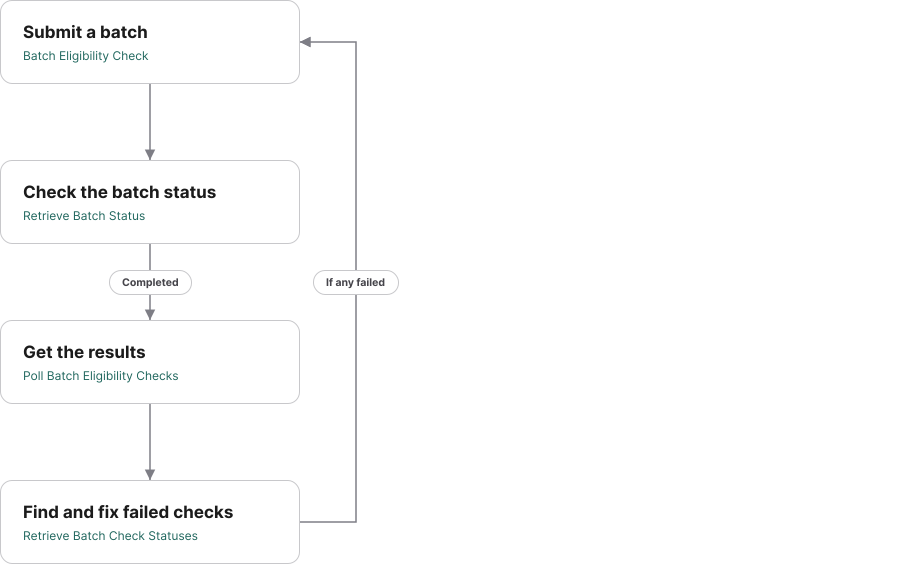
Step 1. Submit a batch
Use the Batch Eligibility Check endpoint to submit a batch of eligibility checks. Each batch can contain up to 10,000 checks. You can submit as many concurrent batches as you need.
Each check in the batch requires the same input data as a real-time check. To learn which patient identifiers to send and how to enter names, see Patient information.
Each check also needs a submitterTransactionIdentifier. Use it to track each check's status and match its result to your patient records. Use a value that maps to your own record, like a patient ID.
curl --request POST \
  --url "https://manager.us.stedi.com/2024-04-01/eligibility-manager/batch-eligibility" \
  --header "Authorization: <api_key>" \
  --header "Content-Type: application/json" \
  --data '{
  "name": "refresh-2026-12-01-run-1", // Optional. Must be unique in your account.
  "maxRetryHours": 24, // Defaults to 8 hours. Up to 24 hours.
  "items": [
    {
      "submitterTransactionIdentifier": "PAT000001", // Unique ID for the check in the batch.
      "tradingPartnerServiceId": "AHS",
      "encounter": {
        "dateOfService": "20261201", // Omit to use today's date.
        "serviceTypeCodes": ["30"]
      },
      "provider": {
        "npi": "1999999984"
      },
      "subscriber": {
        "memberId": "1234567890",
        "dateOfBirth": "19750101",
        "firstName": "Jane",
        "lastName": "Doe"
      }
    }
  ]
}'
The response includes a batchId. Later, you'll use this ID to get the batch's status and results.
{
  "batchId": "01932c61-2d4f-7d22-85fa-c7db2e13e771",
  "submittedAt": "2026-12-01T14:00:00Z"
}
Step 2. Check the batch status
Batch checks are asynchronous. Most batches finish in 15 to 30 minutes. To check a batch's status, call the Retrieve Batch Status endpoint with the batchId:
curl --request GET \
  --url "https://manager.us.stedi.com/2024-04-01/eligibility-manager/batch/<batch-id>" \
  --header "Authorization: <api_key>"
The response shows the batch's progress:
{
  "id": "01932c61-2d4f-7d22-85fa-c7db2e13e771",
  "name": "refresh-2026-12-01-run-1",
  "batchType": "ELIGIBILITY",
  "status": "IN_PROGRESS",
  "totalCount": 10000,
  "successCount": 2400,    // Checks with a payer response, including payer errors.
  "errorCount": 0,         // Checks with no payer response, even after retries.
  "inProgressCount": 7600, // Checks still running or retrying.
  "createdAt": "2026-12-01T14:00:00.000Z",
  "updatedAt": "2026-12-01T14:20:13.119Z"
}
Poll the endpoint on a schedule until the batch's status is COMPLETED or COMPLETED_WITH_ERRORS.
To get results sooner, you can move to the next step before the batch finishes:
- Start when
successCountorerrorCountis greater than zero. Both mean Stedi has finished at least one check. - After the first call, poll for results with exponential backoff. See our polling docs for guidance.
- Stop when
inProgressCountreaches zero, or thestatusisCOMPLETEDorCOMPLETED_WITH_ERRORS.
Step 3. Get the results
To get the full results of each check, including coverage status and benefits, call the Poll Batch Eligibility Checks endpoint with the batchId:
curl --request GET \
  --url "https://manager.us.stedi.com/2024-04-01/eligibility-manager/polling/batch-eligibility?batchId=<batch-id>" \
  --header "Authorization: <api_key>"
Each result is a full eligibility response, in the same format as a Legacy Real-Time Eligibility Check JSON response.
Match each result to your records with its submitterTransactionIdentifier. Stedi returns it exactly as you sent it. Each result also includes a Stedi-assigned eligibility check ID in id.
{
  "items": [
    {
      "id": "ec_550e8400-e29b-41d4-a716-446655440000",
      "batchId": "01932c61-2d4f-7d22-85fa-c7db2e13e771",
      "submitterTransactionIdentifier": "PAT000001",  // The ID you assigned when you submitted the batch.
      "tradingPartnerServiceId": "AHS",
      "subscriber": {
        "memberId": "1234567890",
        "firstName": "JANE",
        "lastName": "DOE",
        "dateOfBirth": "19750101"
      },
      "planStatus": [
        {
          "statusCode": "1",
          "status": "Active Coverage",
          "planDetails": "Open Access Plus",
          "serviceTypeCodes": ["30"]
        }
      ],
      "benefitsInformation": [
        {
          "code": "1",
          "name": "Active Coverage",
          "serviceTypeCodes": ["30"],
          "serviceTypes": ["Health Benefit Plan Coverage"],
          "planCoverage": "Open Access Plus"
        },
        ...
      ]
    }
  ],
  "nextPageToken": "945ff6de..."
}
Results are paginated. To get the next page, pass the response's nextPageToken as the pageToken query parameter.
The Poll Batch Eligibility Checks endpoint only returns finished checks, including checks where the payer returned an error. To get the status of individual checks, use the Retrieve Batch Check Statuses endpoint.
Coverage-only results
If you only need to know whether each patient has active coverage, you can use the Retrieve Batch Check Statuses endpoint instead:
curl --request GET \
  --url "https://manager.us.stedi.com/2024-04-01/eligibility-manager/batch/<batch-id>/items" \
  --header "Authorization: <api_key>"
It returns the state of every check in the batch, including checks that haven't finished. Finished checks also have an eligibilityCheckResult, like ACTIVE or INACTIVE. The endpoint doesn't return the full eligibility response.
The following example shows a patient with active coverage:
{
  "items": [
    {
      "batchId": "01932c61-2d4f-7d22-85fa-c7db2e13e771",
      "state": "COMPLETED",                        // Stedi got a payer response.
      "additionalInfo": {
        "eligibility": {
          "eligibilityCheckResult": "ACTIVE",      // The patient has active coverage.
          "submitterTransactionIdentifier": "PAT000001",
          "subscriberMemberId": "1234567890",
          "payerId": "AHS",
          ...
        }
      },
      ...
    }
  ],
  "nextPageToken": "945ff6de..."
}
Step 4. Find and fix failed checks
After the batch finishes, use the Retrieve Batch Check Statuses endpoint to find failed checks.
Use the eligibilityCheckResult or state query parameter to filter the list. For example, the following request returns failed checks:
curl --request GET \
  --url "https://manager.us.stedi.com/2024-04-01/eligibility-manager/batch/<batch-id>/items?eligibilityCheckResult=FAILED" \
  --header "Authorization: <api_key>"
Each item includes the check's state, submitterTransactionIdentifier, and eligibilityCheckResult:
{
  "items": [
    {
      "batchId": "01932c61-2d4f-7d22-85fa-c7db2e13e771",
      "state": "COMPLETED",
      "additionalInfo": {
        "eligibility": {
          "eligibilityCheckResult": "FAILED",
          "submitterTransactionIdentifier": "PAT000002",
          "payerId": "AHS",
          ...
        }
      },
      ...
    }
  ],
  "nextPageToken": "..."
}
The check's state shows why it failed:
state | eligibilityCheckResult | What happened | What to do |
|---|---|---|---|
COMPLETED | FAILED | The payer returned an error, like AAA 72 | Fix the data and resubmit |
COMPLETED_WITH_ERRORS | FAILED | No payer response after the full retry period | Resubmit later |
Put it together
The following pseudo-code shows the full workflow:
// Submit
send the batch to the Batch Eligibility Check endpoint
save the batchId

// Wait for the batch to finish
repeat on a schedule:
  get the batch status
until the status is COMPLETED or COMPLETED_WITH_ERRORS

// Get the results
// Optional: start earlier, once successCount or errorCount is above zero
for each page from the Poll Batch Eligibility Checks endpoint:
  save each result by its submitterTransactionIdentifier

// Resubmit failed checks
get checks with a FAILED result from the Retrieve Batch Check Statuses endpoint
for checks in COMPLETED:
  fix their data and send them in a new batch
for checks in COMPLETED_WITH_ERRORS:
  send them again later in a new batch
FAQs
Why did Stedi reject my whole batch?
If any check in a batch is invalid, Stedi rejects the entire Batch Eligibility Check request with a 400 error. For example, a check might be missing a required field or have an invalid value.
The error response points to the invalid field or value. Use that pointer to find and fix the check.
{
  "message": "1 validation error detected",
  "fieldList": [
    {
      "path": "/items/42/subscriber/gender",  // The 43rd check in the batch.
      "message": "Value at '/items/42/subscriber/gender' failed to satisfy constraint: Member must satisfy enum value set: [F, M]"
    }
  ]
}
To avoid a rejected batch, validate each check before you submit. Check for the required fields and allowed values in the API reference.
Incorrect patient data doesn't reject the batch. For example, Stedi still sends a check with a wrong member ID to the payer. The payer returns an AAA error, like 72 (Invalid/Missing Subscriber/Insured ID), in the check's result.
Do I need to build retry logic?
No. Stedi retries checks that fail due to payer connectivity issues, such as AAA errors 42 and 80. Retries continue for the batch's retry period, set by maxRetryHours.
Stedi doesn't retry an AAA 42 error when the payer's follow-up action indicates a problem with the request.
How should I split checks across batches?
For more than 10,000 checks, split them across batches and run the batches in parallel.
Build each batch with a mix of payers. Don't group checks by payer. If a batch's checks go to one payer and that payer has an outage, most of the batch can fail at once.
Do batch checks cost more or need a new enrollment?
No. A batch check costs the same as a real-time check. Batch checks use the same transaction enrollment as real-time checks. Providers don't need to enroll again.
Get started with Stedi
To get started with Stedi, sign up for a free sandbox account. It takes less than two minutes. No credit card is required.
When you're ready, upgrade to production on our pay-as-you-go plan. There are no monthly minimums or setup fees. You only pay for the transactions you use.
Batch eligibility checks are available on all paid Stedi plans.