Introducing eligibility check PDFs
Products
You can now download a PDF version of your eligibility checks using the Stedi portal or our new Retrieve Eligibility PDF API endpoint.
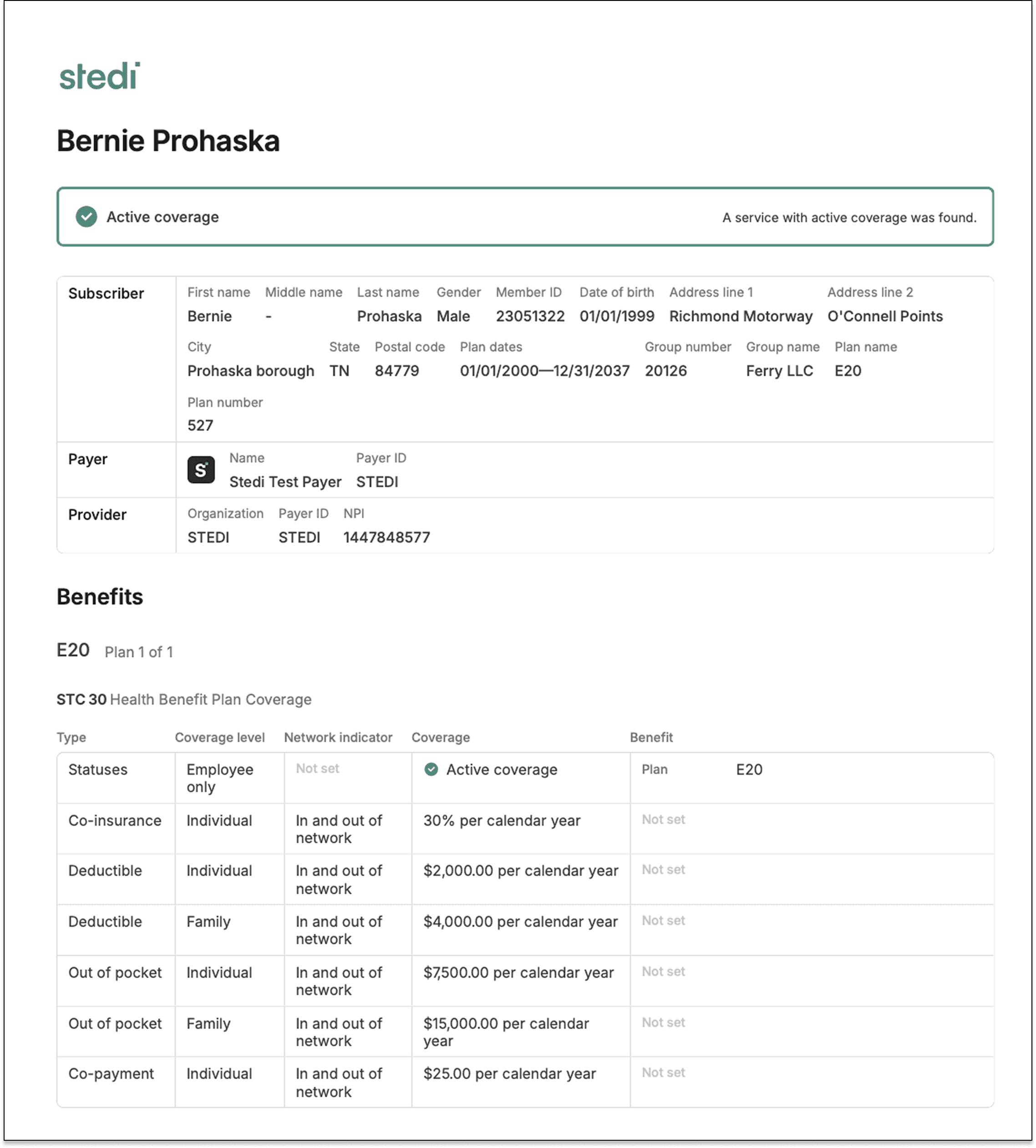
Eligibility check PDFs are designed to be easy to read, print, and upload to other systems. Their layout mirrors the Stedi portal's eligibility benefits table.
If you're building an EHR, RCM, or practice management platform, the new API endpoint lets you offer PDF downloads from your tool.
What's in an eligibility check PDF?
Eligibility checks verify a patient's insurance coverage and benefits with a payer. An eligibility check PDF gives you a printable, human-readable version of the check’s response.
Summary
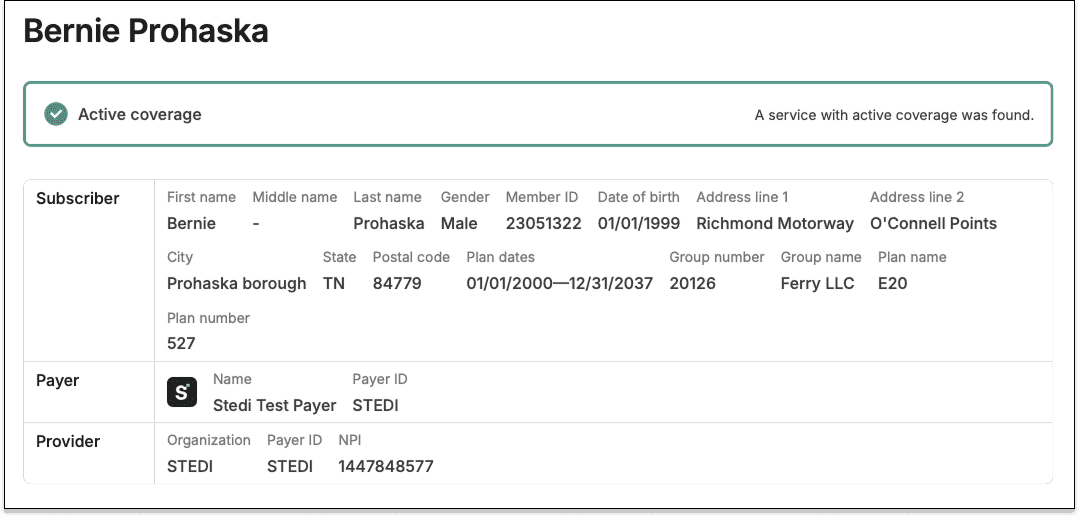
The top of the PDF shows the patient's coverage status – whether the patient has active coverage with the payer.
Below the coverage status, the PDF lists information for the patient, subscriber, dependent (if applicable), payer, and provider.
Errors for failed checks
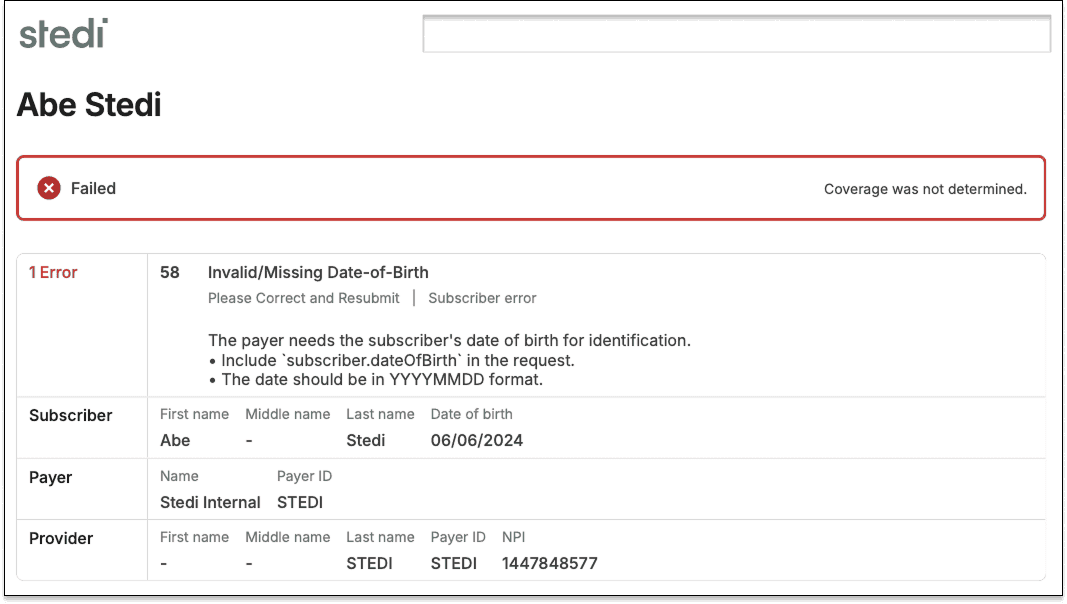
For failed eligibility checks, the summary is the only section returned in the PDF. It contains any AAA errors returned by the payer for the eligibility request.
Benefits
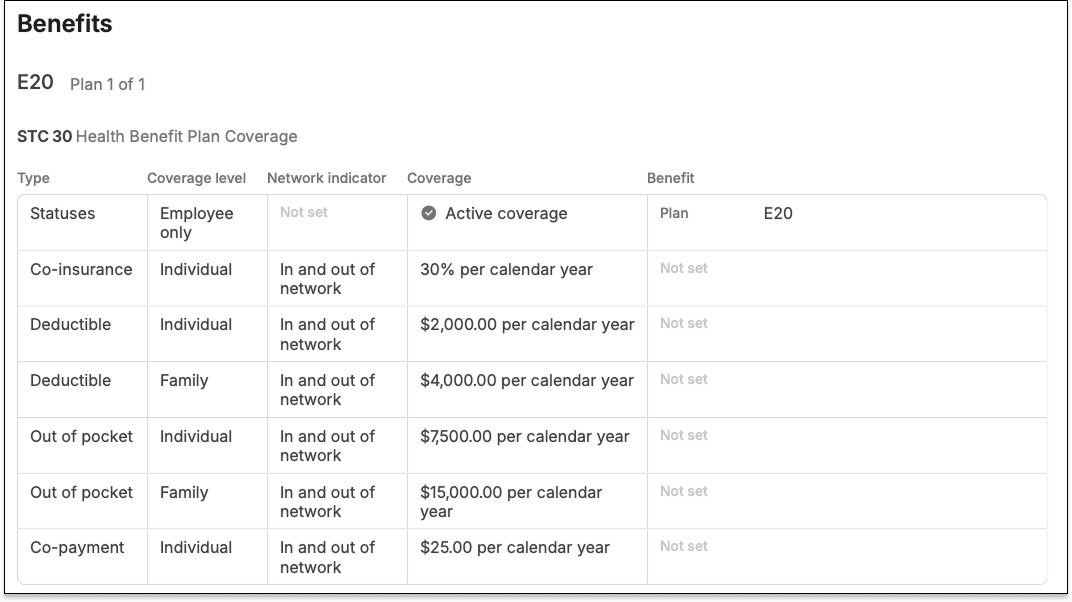
Benefits are grouped by health plan. Within each plan, benefit details are organized by the Service Type Codes (STCs) and procedure codes from the payer’s response.
Each row in the table shows the benefit type, coverage level, network indicator, coverage amount, and any free-text messages from the payer.
If present, the benefits for STC 30 (Health Benefit Plan Coverage) and STC 35 (Dental Care) – the baseline STCs for medical and dental care – appear first.
Request
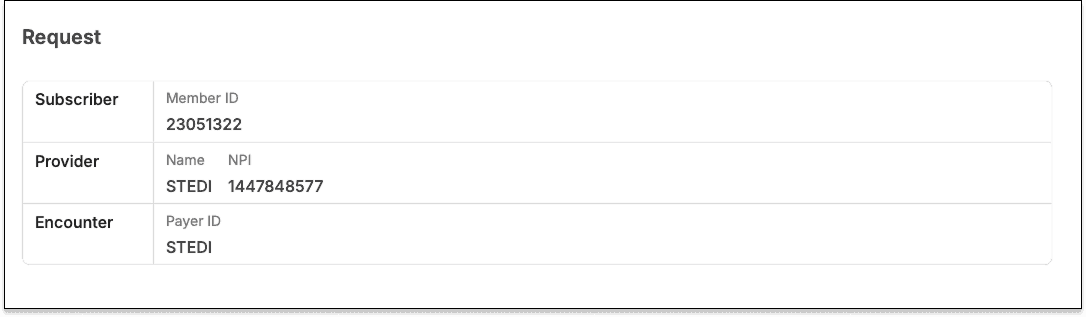
The Request section lists information from the eligibility check’s request, including the payer ID, the billing provider’s NPI, and the patient’s member ID.
For more tips on interpreting eligibility check PDFs, see our docs.
API
You can programmatically download eligibility check PDFs using the API:
Get the eligibility check’s ID. You can find it in the:
idfield of JSON, Raw X12, and SOAP Real-time Eligibility Check API responses.items.idfield of a Poll Batch Eligibility Checks API response.Eligibility check’s details page in the Stedi portal
Call the Retrieve Eligibility PDF API endpoint with the eligibility check ID.
By default, the endpoint returns the PDF as a base64-encoded string. IncludeAccept: application/pdfto get the raw PDF data. Save the response as a.pdffile to view it as a PDF.
Stedi portal
You can also download eligibility PDFs from the eligibility check's details page in the Stedi portal. These PDFs are identical to the ones returned by the API.

Pricing
You can download eligibility PDFs from the Stedi portal on all plans. Accounts on the Basic plan get 100 free eligibility check PDF downloads per month. Additional PDF downloads are billed at standard transaction rates.
The Retrieve Eligibility PDF API endpoint is available on the Developer and Enterprise plans.
For more details, see our pricing page.
Try it today
You can sign up for Stedi’s free Basic plan in less than two minutes, no credit card required.
You can now download a PDF version of your eligibility checks using the Stedi portal or our new Retrieve Eligibility PDF API endpoint.
Eligibility check PDFs are designed to be easy to read, print, and upload to other systems. Their layout mirrors the Stedi portal's eligibility benefits table.
If you're building an EHR, RCM, or practice management platform, the new API endpoint lets you offer PDF downloads from your tool.

What's in an eligibility check PDF?
Eligibility checks verify a patient's insurance coverage and benefits with a payer. An eligibility check PDF gives you a printable, human-readable version of the check’s response.
Summary
The top of the PDF shows the patient's coverage status – whether the patient has active coverage with the payer.
Below the coverage status, the PDF lists information for the patient, subscriber, dependent (if applicable), payer, and provider.

Errors for failed checks
For failed eligibility checks, the summary is the only section returned in the PDF. It contains any AAA errors returned by the payer for the eligibility request.

Benefits
Benefits are grouped by health plan. Within each plan, benefit details are organized by the Service Type Codes (STCs) and procedure codes from the payer’s response.
Each row in the table shows the benefit type, coverage level, network indicator, coverage amount, and any free-text messages from the payer.
If present, the benefits for STC 30 (Health Benefit Plan Coverage) and STC 35 (Dental Care) – the baseline STCs for medical and dental care – appear first.

Request
The Request section lists information from the eligibility check’s request, including the payer ID, the billing provider’s NPI, and the patient’s member ID.

For more tips on interpreting eligibility check PDFs, see our docs.
API
You can programmatically download eligibility check PDFs using the API:
Get the eligibility check’s ID. You can find it in the:
idfield of JSON, Raw X12, and SOAP Real-time Eligibility Check API responses.items.idfield of a Poll Batch Eligibility Checks API response.Eligibility check’s details page in the Stedi portal
Call the Retrieve Eligibility PDF API endpoint with the eligibility check ID.
By default, the endpoint returns the PDF as a base64-encoded string. IncludeAccept: application/pdfto get the raw PDF data. Save the response as a.pdffile to view it as a PDF.
Stedi portal
You can also download eligibility PDFs from the eligibility check's details page in the Stedi portal. These PDFs are identical to the ones returned by the API.

Pricing
You can download eligibility PDFs from the Stedi portal on all plans. Accounts on the Basic plan get 100 free eligibility check PDF downloads per month. Additional PDF downloads are billed at standard transaction rates.
The Retrieve Eligibility PDF API endpoint is available on the Developer and Enterprise plans.
For more details, see our pricing page.
Try it today
You can sign up for Stedi’s free Basic plan in less than two minutes, no credit card required.
Share
Get started with Stedi
Automate healthcare transactions with developer-friendly APIs that support thousands of payers. Contact us to learn more and speak to the team.
Get updates on what’s new at Stedi
Product
Developers
Resources
Backed by
Stedi and the S design mark are registered trademarks of Stedi, Inc. All names, logos, and brands of third parties listed on our site are trademarks of their respective owners (including “X12”, which is a trademark of X12 Incorporated). Stedi, Inc. and its products and services are not endorsed by, sponsored by, or affiliated with these third parties. Our use of these names, logos, and brands is for identification purposes only, and does not imply any such endorsement, sponsorship, or affiliation.
Product
Developers
Resources
Backed by
Stedi and the S design mark are registered trademarks of Stedi, Inc. All names, logos, and brands of third parties listed on our site are trademarks of their respective owners (including “X12”, which is a trademark of X12 Incorporated). Stedi, Inc. and its products and services are not endorsed by, sponsored by, or affiliated with these third parties. Our use of these names, logos, and brands is for identification purposes only, and does not imply any such endorsement, sponsorship, or affiliation.
Product
Developers
Resources
Get updates on what’s new at Stedi
Backed by
Stedi and the S design mark are registered trademarks of Stedi, Inc. All names, logos, and brands of third parties listed on our site are trademarks of their respective owners (including “X12”, which is a trademark of X12 Incorporated). Stedi, Inc. and its products and services are not endorsed by, sponsored by, or affiliated with these third parties. Our use of these names, logos, and brands is for identification purposes only, and does not imply any such endorsement, sponsorship, or affiliation.
