Introducing Stedi Treasury
You can now enroll for EFTs, then receive and automatically reconcile payments from payers with Stedi Treasury.
Clearinghouses and EHR/PM systems allow you to submit claims and enroll for the Electronic Remittance Advice (ERA), which includes the details of payments sent by payers to providers. But when it comes to enrolling for EFTs – that is, the actual ACH payments themselves – providers have been left on their own to navigate a confusing variety of payer-specific processes. And when the actual payments arrive in the provider's bank account, providers have had to go through a series of manual steps to reconcile each payment received to the corresponding ERA and related claims.
Stedi Treasury unlocks simple EFT enrollment along with automatic reconciliation. You can enroll for EFTs and track the entire claim lifecycle from claim submission to payout in the Stedi portal.
Watch the 2026 Stedi Keynote announcement:
Note: Stedi Lockbox was in private preview when we recorded this video. It's now generally available.
How Stedi Treasury works
When a provider signs up for Stedi Treasury, we provision a demand deposit (DDA) bank account in the provider's name via our banking partner, Grasshopper Bank. Treasury accounts are in the provider's name, FDIC-insured up to $250,000, and are fully integrated with your Stedi account for payment tracking and reconciliation. Each Treasury account takes about five minutes to set up.
The EFT enrollment process is often tedious. Payers often ask for voided checks, account verification letters, or micro-deposit verification. With Treasury, you submit and track EFT enrollments with the same transaction enrollment process you already use for ERAs, either using the Stedi portal, CSV, or API. Since Treasury accounts are fully integrated with Stedi, we handle the paperwork for you whenever possible, including generating the voided checks and verification letters, verifying micro-deposits, and more.
Once the enrollment process is complete, payments from payers land in the provider's Stedi Treasury account. Stedi then automatically pays out the full amount to the provider's external bank account as a same-day ACH payment. Stedi doesn't delay or batch the funds.

Setup for Stedi Treasury takes three steps:
- Create one or more billing entities for the provider.
- Link each billing entity to an external bank account.
- Enroll the provider for EFTs through Stedi with each payer.
Once the EFT enrollments are live, you can track and reconcile payments through the Stedi portal.
Billing entities
A billing entity is a legal entity, such as a practice's LLC or a health system, that receives payments from a payer. Each billing entity is represented by a unique Taxpayer Identification Number (TIN), which is either an SSN or EIN. Stedi creates a unique bank account at Grasshopper Bank for each TIN.
To create a billing entity, select Treasury > Billing entities in the Stedi portal's navigation. Then click Create billing entity.
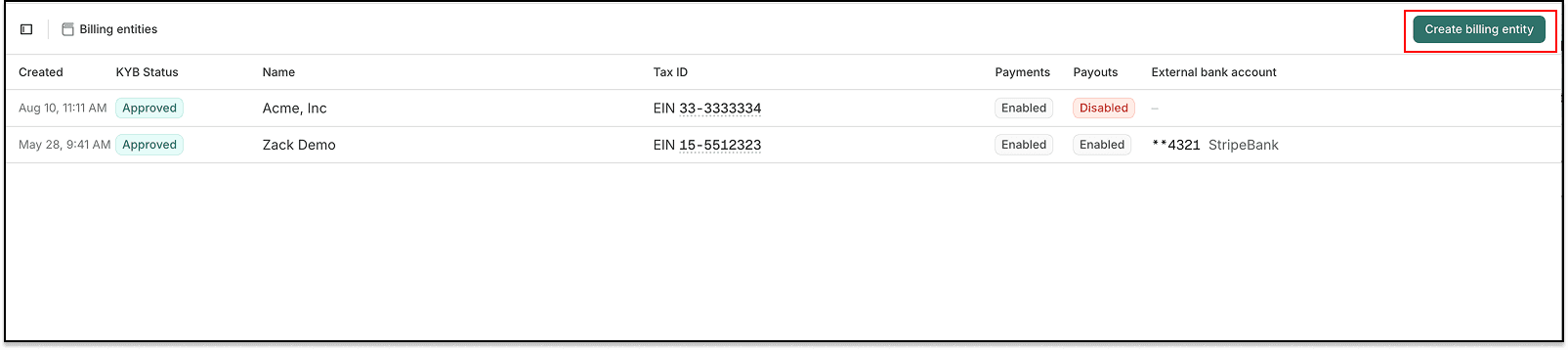
You must complete an application and verification process to create a billing entity. The process takes about five minutes. You can complete it entirely in the Stedi portal, and most applications are approved automatically.
Create a separate billing entity for each legal entity that receives payments from payers. For example, if you manage payments for multiple providers, each with a separate EIN, you'd create separate billing entities.
Link external bank accounts
To receive payouts from the Stedi Treasury account, you'll need to link the billing entity to an external bank account. This is typically the provider's operating bank account, such as a Chase or Bank of America account.
To link an external bank account, click Link external bank account on the billing entity's page in the Stedi portal.

You can link the same external bank account to multiple billing entities or link a different external bank account for each.
EFT transaction enrollment
To receive EFTs from a payer through Stedi, providers must complete EFT enrollment with the payer. Stedi Treasury lets you do this using Stedi's existing transaction enrollment process.
You can submit and track EFT enrollment requests using Stedi's Transaction Enrollment API or the Stedi portal, which supports bulk CSV uploads.
Where possible, Stedi handles any administrative work for the enrollment. For example, Stedi can generate voided checks, send bank verification letters, and verify micro-deposits that payers ask for during EFT enrollment.
If a payer requires a step only the provider can complete, Stedi surfaces it as a task in the API or the Stedi portal.
You'll receive payments from the payer in Stedi Treasury after the EFT enrollment goes live.
Payer support for EFTs
Stedi supports over 750 payers for EFT enrollment, with more being added every day. Check the Payers API or the Stedi Payer Network to confirm that a payer supports EFT and to check their enrollment requirements.
For example, in a Payers API response:
{
  "displayName": "Aetna",
  "primaryPayerId": "60054",
  "transactionSupport": {
    "electronicFundsTransfer": "ENROLLMENT_REQUIRED", // EFT enrollment required
    ...
  },
  ...
}
If your payer still mails paper checks, you can use Stedi Lockbox to automatically scan and deposit their paper checks into a Stedi Treasury account.
Payments
The Payments page lists funds a payer sends to a Treasury account.
The page lists a status for each payment. A payment is Pending while the funds settle, then Received.
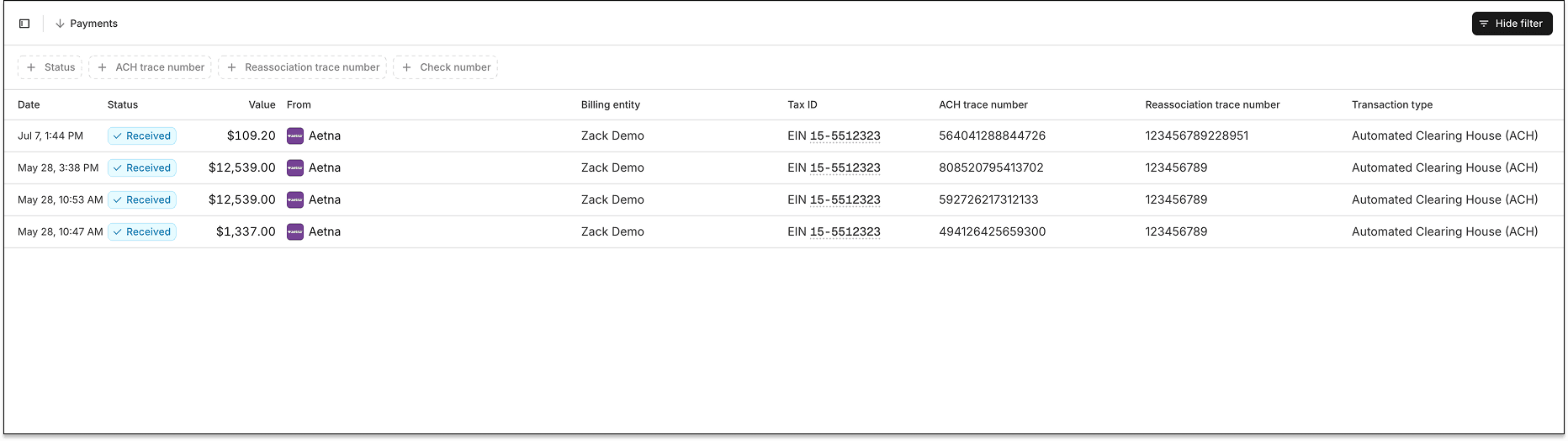
You can also click the Payments tab on the billing entity's page to view all payments for the billing entity.

Payment details
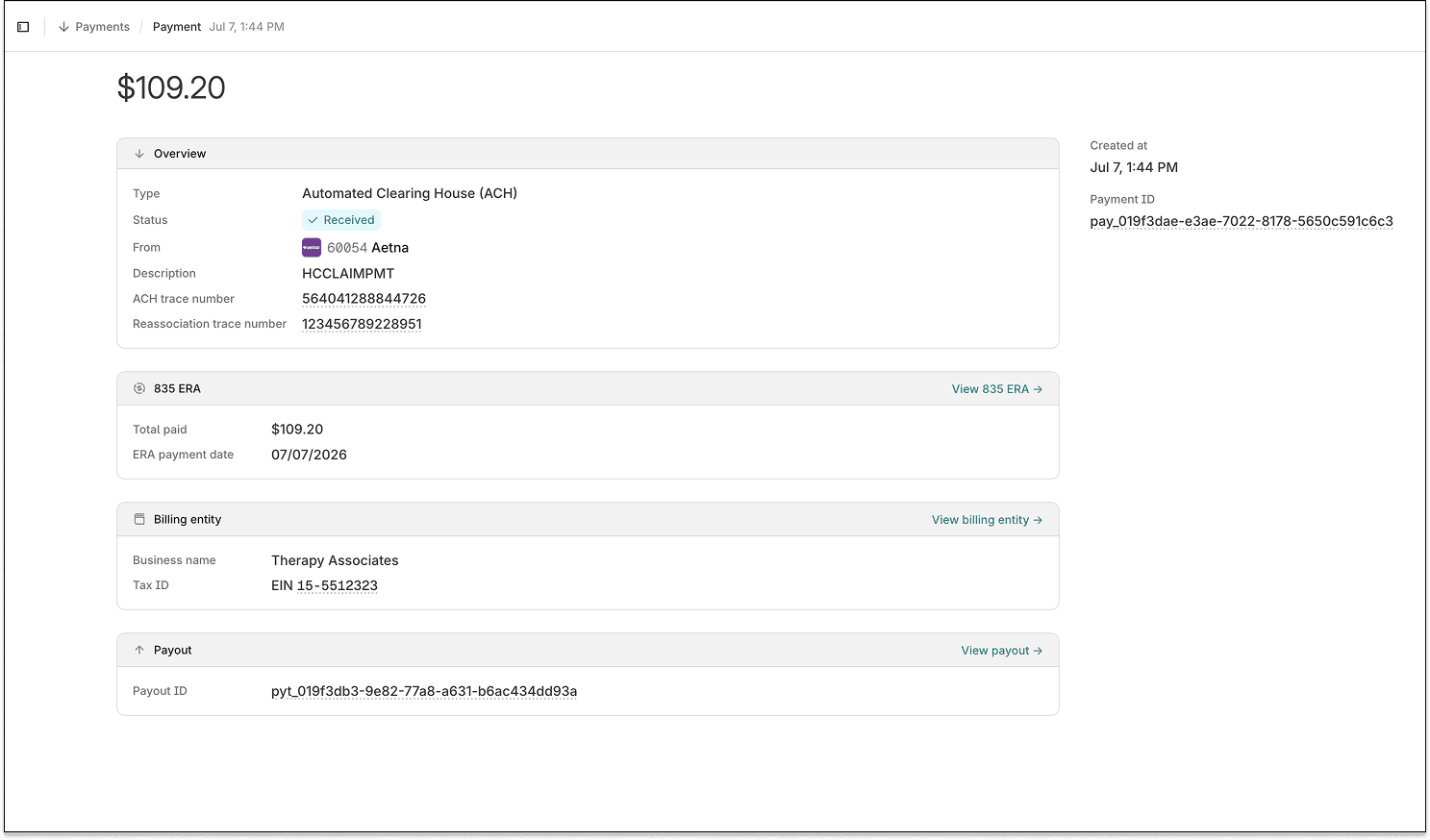
Click any payment row to see the payment's detail page. The page shows the payment's status, the payer, its trace numbers, the related ERA, the billing entity, and any related payout.
Automatic reconciliation
If you submit claims and receive ERAs through Stedi, you can trace an individual payment on the payment's detail page back to its ERA and claim in the Stedi portal's claims view.
Stedi associates payments with ERAs based on the reassociation trace number returned in both.
You can also navigate from an ERA's detail page to its associated payment.
Payouts
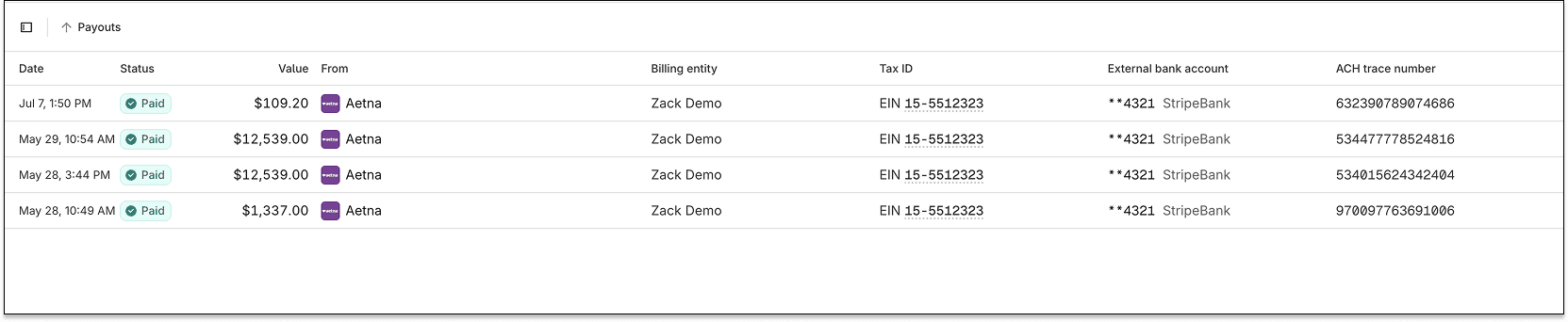
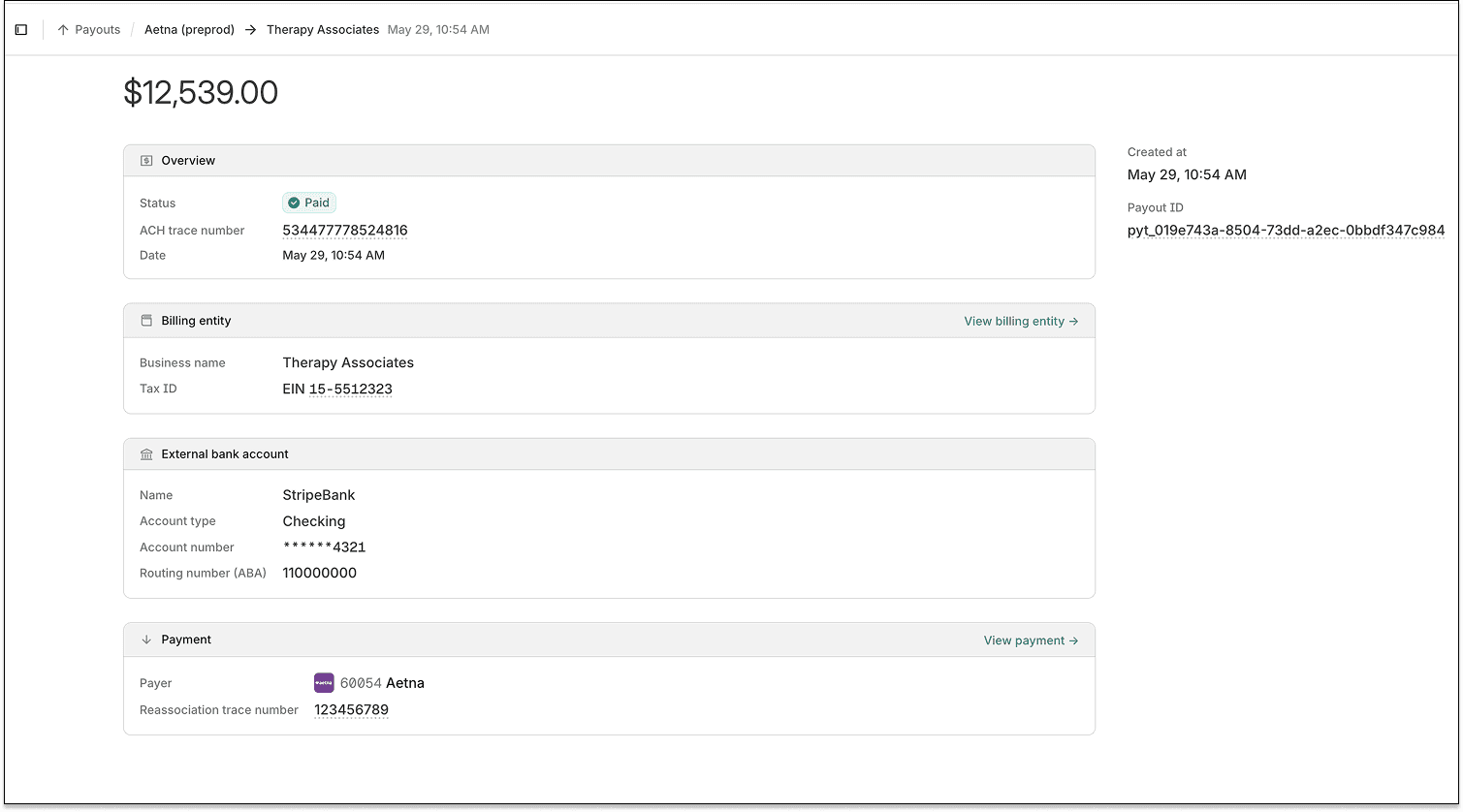
The Payouts page lists payouts – ACH deposits from a Stedi Treasury account to the linked external bank account. Each payout lists its current status, moving from Pending to In transit to Paid.
Payout timing
Stedi issues a payout immediately after a payment settles in a Stedi Treasury account. Funds arrive in the linked external bank account the same business day if the payment settles before 4:45 PM ET. Otherwise, funds arrive the next business day. We don't hold funds.
Each payment gets its own payout for easier tracking. If a Stedi Treasury account receives a $100 payment, Stedi issues a $100 payout. Payouts aren't bundled. Any fees are billed separately.
Note: Payout timing is subject to standard cutoff times, Federal Reserve operating days, and settlement reviews.
Payout details
Click any payout on the Payouts page to see the related payout's detail page. The page shows the payout's status, its ACH trace number, the date Stedi sent it, the billing entity and external bank account that received it, and the related payment from the payer.
Bank statements
You can access monthly bank statements showing all credits and debits to the billing entity's Stedi Treasury account. You can use these statements for accounting, reporting, or auditing.
To access statements, click the Statements tab on the billing entity's page.
Stedi Lockbox
Payers don't always pay electronically. Many still mail paper checks, and many mail paper remits – explanations of payment (EOPs) or explanations of benefits (EOBs) – instead of ERAs.
A Stedi Lockbox is a mailing address that receives payer mail on the provider's behalf. When you sign up for Stedi Lockbox, you get one. You can give the address to payers whenever they require a mailbox for paper remits.
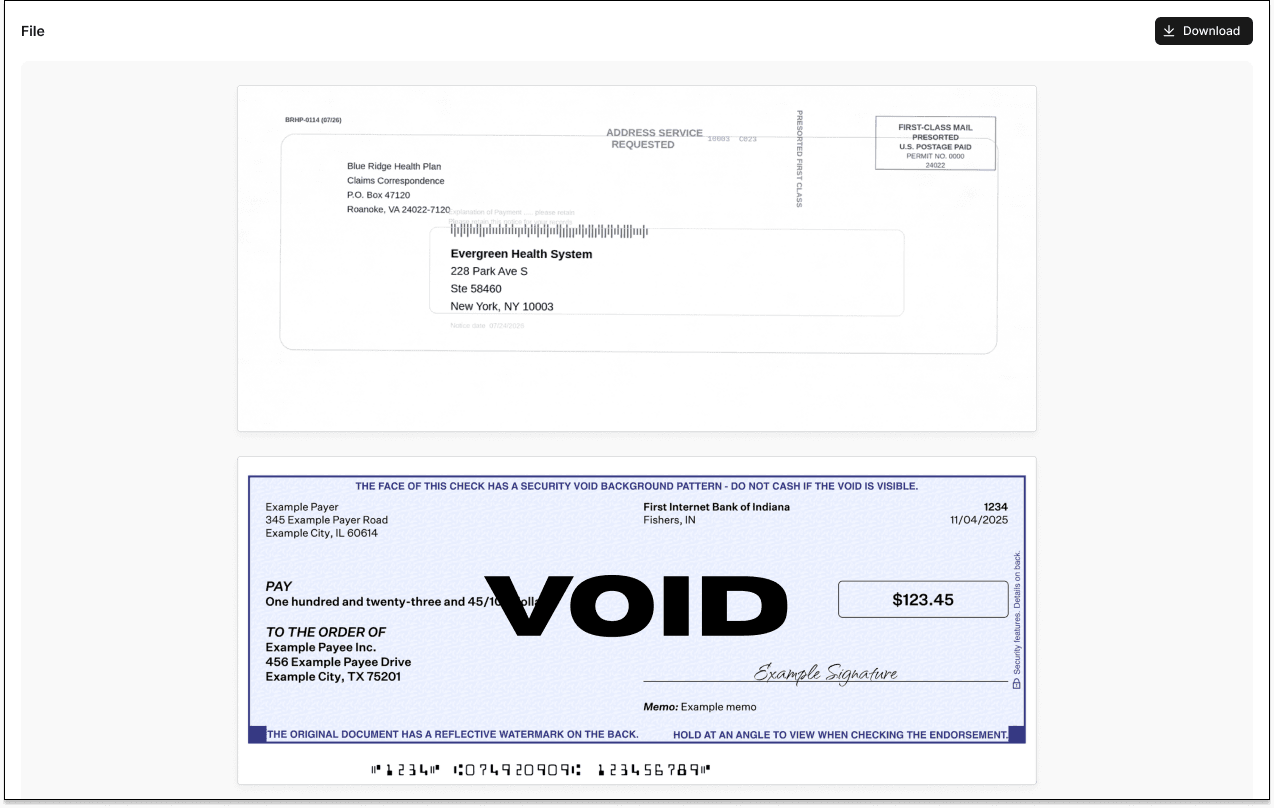
Every item that arrives at the address is scanned. Checks become payment records in the Stedi portal. Paper remits and other mail become PDFs with OCR text.
Automatic check deposits
When a Stedi Lockbox receives a paper check, it's automatically scanned and deposited into the associated Stedi Treasury account.
These check deposits appear in the Stedi portal the same way EFTs do, with one addition – a Mail card showing that the payment arrived as a paper check.
Like EFTs, check deposits are paid out after they settle.

The related payment's detail page includes a scanned image of the check.
Paper remits
When a Stedi Lockbox receives a paper remit, such as an EOP or EOB, Stedi makes it available in the related Stedi account as a PDF.
Each PDF includes optical character recognition (OCR) text, so you can process the contents downstream.
Availability and pricing
Stedi Treasury is generally available in the Stedi portal for Stedi production accounts. API access is coming soon. Contact us for pricing and to turn it on for your account.
Stedi Lockbox is available for Stedi production accounts. Contact us to turn it on for your account.
Stedi is a financial technology company, not a bank. Banking services are provided by Grasshopper Bank, N.A., Member FDIC. The FDIC's deposit insurance coverage only protects against the failure of an FDIC-insured bank.