Verifying medical benefits for infusion and specialty pharmacy
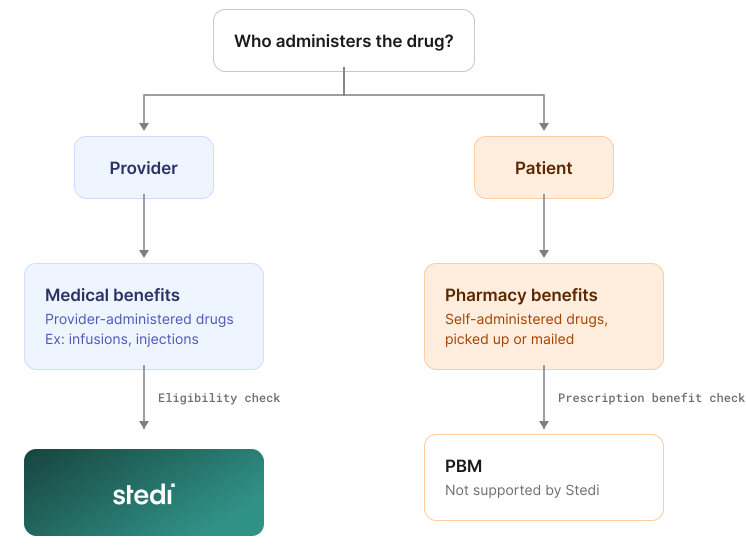
Provider-administered drugs, like infusions and injections, often fall under a patient's medical benefits, not their pharmacy benefits.
To confirm insurance coverage for these drugs, pharmacies and infusion centers need to verify the patient's medical benefits. One way to do that at scale is with eligibility checks.
Unlike payer portals or phone calls, eligibility checks can return results in 1-3 seconds, are standardized across payers, and cost pennies per check. Stedi lets you automate those checks with Stedi's API or run them manually in the Stedi portal.
If you're building eligibility workflows for pharmacies or infusion centers, this guide answers common questions and gives you tips for verifying medical benefits.
Can I check coverage or costs for a specific drug or J-code?
Usually not. Eligibility check requests technically support procedure codes, like CPT and HCPCS codes. But most medical payers don't support them. That includes J-codes, the HCPCS codes for specific drugs, like the drug in an infusion. Medicare is a partial exception. Eligibility checks sent to CMS (payer ID: CMS) support some HCPCS codes, but not J-codes.
Instead, most payers expect a Service Type Code (STC) in the request. The STC tells the payer what type of benefits you'd like returned in the response.
The STC's benefits are often enough to estimate the patient's costs. For example, the response may include the patient's deductible, copay, coinsurance, and out-of-pocket maximum. Many payers also return how much of the deductible and out-of-pocket maximum the patient has left.
Which STCs should I use?
STC support varies by payer. Testing is the best way to find out which STCs work for each payer. For general tips, see Test payer STC support.
Step 1. Start with STC 30
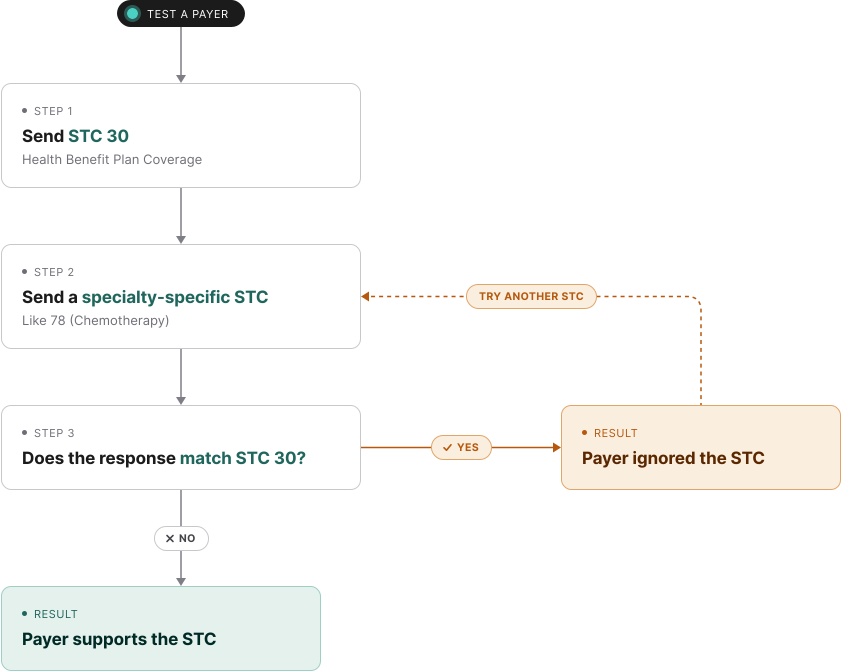
Begin with STC 30 (Health Benefit Plan Coverage) as your baseline. All medical payers support it. Many payers return their STC 30 response when you send an STC they don't support.
Step 2. Test more specific STCs
Try one or more specific STCs related to the drug's specialty, like 78 (Chemotherapy) or ON (Oncology) for a chemotherapy drug. To find STCs for a procedure code, use Stedi's CPT/HCPCS to STC lookup tool. It includes common STC mappings for CPT and HCPCS codes, including J-codes.
Step 3. Compare to the baseline
Compare each response against your STC 30 baseline. If an STC returns benefits that STC 30 didn't, the payer supports that STC. An identical response means the payer ignored the STC you sent.
Do pharmacy STCs return drug benefits?
Sometimes. It varies by payer. STC 88 (Pharmacy) often shows only whether the patient has pharmacy coverage. Many payers also return the name of the patient's pharmacy benefit manager (PBM). Some return pharmacy copays.
Other pharmacy STCs, like 91 (Brand Name Prescription Drug) and 92 (Generic Prescription Drug), often return the same information as 88.
For drugs covered under medical benefits, test 88 alongside the STC for the service. Stedi's CPT/HCPCS to STC lookup tool includes 88 in its mappings for injectable drugs, like J-codes.
For drug-level coverage and costs, you need a prescription benefit transaction with the patient's PBM. Stedi doesn't support those transactions or connect to PBMs. To learn more, see What an eligibility check can (and can't) tell you about pharmacy benefits.
Can I send multiple STCs in one check?
It's technically supported, but we don't recommend it. Some payers support multiple STCs in one request. Others only respond to the first STC and ignore the rest.
Send one STC per request unless you've tested the payer. To test, send one check with all the STCs, then one check for each STC. Compare the responses. Use multiple STCs only for payers that return better benefits information that way.
Do payers return different benefits based on the site of care?
Some do. A payer may return different benefits for a provider's office, a hospital outpatient department, or the patient's home.
To check, send a place of service code in the request. For example, use 11 (Office), 12 (Home), 19 (Off Campus-Outpatient Hospital), or 22 (On Campus-Outpatient Hospital). Then send the same check without the code and compare the responses.
The Real-Time Eligibility Check JSON endpoint takes the code in encounter.placeOfService.code. The Batch Eligibility Check and Legacy Real-Time Eligibility Check JSON endpoints take it in encounter.industryCode.
When a payer returns site-specific benefits, the response lists the place of service for each benefit.
Response examples
Responses from our Real-Time Eligibility Check JSON endpoint organize benefits in a plans array. Responses from our Batch Eligibility Check, Insurance Discovery, Real-Time Eligibility Check Raw X12, and Legacy Real-Time Eligibility Check JSON endpoints use a benefitsInformation array.
The following examples show both, labeled plans and benefitsInformation.
The place of service is in each benefit's placesOfService array, like plans[].benefits.coPayment[].placesOfService:
{
  "plans": [
    {
      "benefits": {
        "coPayment": [
          {
            "amount": "30",
            "coverageLevel": "INDIVIDUAL",
            "network": { "indicator": "IN_NETWORK" },
            "placesOfService": [
              { "code": "11", "name": "Office" } // Provider's office
            ],
            "service": {
              "system": "STC",
              "value": "1",
              "definition": "Medical Care"
            },
            "timePeriod": "VISIT"
          },
          {
            "amount": "0",
            "coverageLevel": "INDIVIDUAL",
            "network": { "indicator": "IN_NETWORK" },
            "placesOfService": [
              { "code": "12", "name": "Home" } // Patient's home
            ],
            "service": {
              "system": "STC",
              "value": "1",
              "definition": "Medical Care"
            },
            "timePeriod": "VISIT"
          }
        ]
      },
      ...
    }
  ],
  ...
}
The place of service is in the benefitsInformation[].eligibilityAdditionalInformationList[].industryCode field when codeListQualifierCode is ZZ (Mutually Defined):
{
  "benefitsInformation": [
    {
      "code": "B", // Co-Payment
      "name": "Co-Payment",
      "coverageLevelCode": "IND",
      "serviceTypeCodes": ["1"], // Medical Care
      "benefitAmount": "30",
      "inPlanNetworkIndicatorCode": "Y",
      "eligibilityAdditionalInformationList": [
        {
          "codeListQualifierCode": "ZZ", // Mutually Defined
          "industryCode": "11" // Office
        }
      ],
      ...
    },
    {
      "code": "B", // Co-Payment
      "name": "Co-Payment",
      "coverageLevelCode": "IND",
      "serviceTypeCodes": ["1"], // Medical Care
      "benefitAmount": "0",
      "inPlanNetworkIndicatorCode": "Y",
      "eligibilityAdditionalInformationList": [
        {
          "codeListQualifierCode": "ZZ", // Mutually Defined
          "industryCode": "12" // Home
        }
      ],
      ...
    },
    ...
  ],
  ...
}
Do eligibility checks show prior authorization requirements for drugs?
Sometimes. Some payers show whether a service requires prior authorization in the eligibility response. Support varies by payer and STC.
These flags apply to the service, not a specific drug. Occasionally, a payer adds a free-text note about prior authorization for a general class of drugs. To learn where to find prior authorization flags, see Is prior authorization required? in our docs.
How do I get medical benefits if I don't know the patient's member ID or payer?
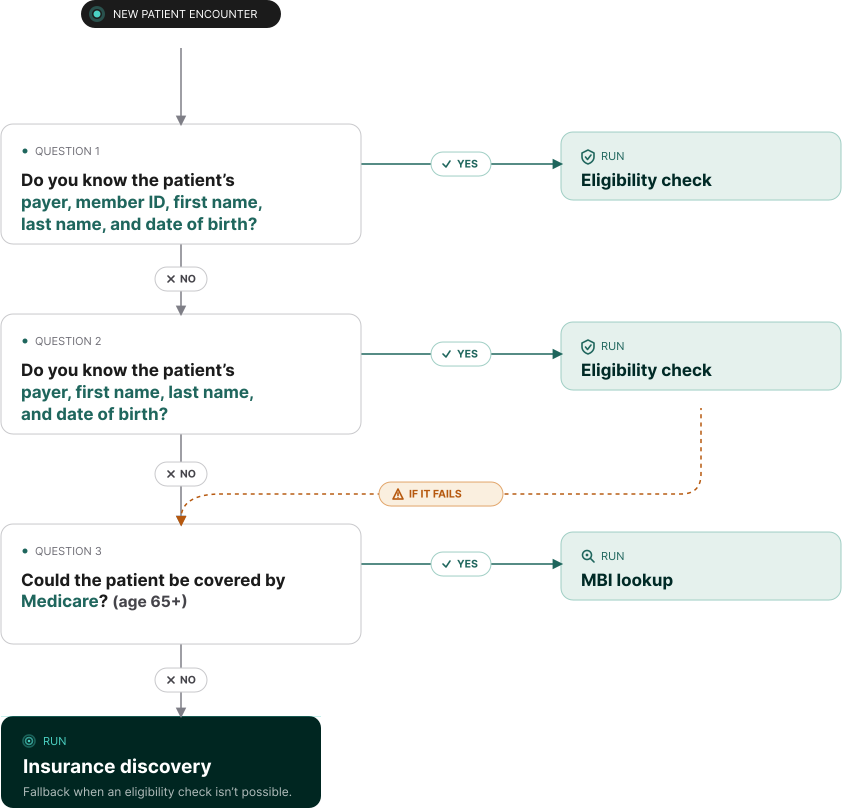
Try insurance discovery. It finds a patient's active coverage using only their demographic information, like name, date of birth, state, and (optionally) Social Security Number (SSN). Patients are likely to know these details.
If discovery finds coverage, you get the patient's payer ID and member ID.
Discovery only returns general benefits (STC 30). To get benefits for a specific service, run an eligibility check with one of the STCs above. For example, use 88 for pharmacy benefits.
Agentic Discovery
In the Stedi portal, you can also run Agentic Discovery. It runs an eligibility check first. If the check fails on bad intake data, it retries with corrections. If it still can't find coverage, it falls back to insurance discovery.
How do I find a patient's MBI for Medicare?
Use Stedi MBI lookup to find the patient's Medicare Beneficiary Identifier (MBI) using demographic information. There are two types of MBI lookup:
MBI lookup types
| Type | What you send | Payer ID |
|---|---|---|
| With SSN | Name, date of birth, SSN | MBILU |
| No SSN | Name, date of birth, U.S. state | MBILUNOSSN |
We recommend MBI lookup with SSN if you have the patient's SSN. It's more likely to find results.
You can run both types of MBI lookup through the Real-Time Eligibility Check JSON and Batch Eligibility Check endpoints. You can also run them in the Stedi portal or with a bulk CSV upload.
Should I use real-time or batch eligibility checks?
We recommend starting with real-time eligibility checks. They're simpler to set up. And they're synchronous: each request returns the results in 1-3 seconds.
Real-time checks work well when you need the results right away, like checks at referral or intake. They also work for smaller bulk jobs, even ones that aren't time-sensitive.
If you need to run thousands of time-insensitive eligibility checks at once, use batch checks. For example, you can use them to refresh eligibility for your whole patient population.
Batch checks are asynchronous: you submit the batch, then retrieve the results when they're ready. Most batches complete in 15-30 minutes.
You can send up to 10,000 checks in a batch. Stedi queues the checks and retries them automatically. By default, it retries checks that fail because of payer connectivity issues for up to 8 hours.
Real-time vs. batch checks
| Type | Processing | Results in | Checks per request | Best for |
|---|---|---|---|---|
| Real-time eligibility checks | Synchronous | 1-3 seconds | 1 | Checks at referral or intake |
| Batch eligibility checks | Asynchronous | 15-30 minutes for most batches | Up to 10,000 | Refreshing eligibility for your whole patient population |
Get started with Stedi
To get started with Stedi, sign up for a free sandbox account. It takes less than two minutes. No credit card is required.
When you're ready, upgrade to production on our pay-as-you-go plan. There are no monthly minimums or setup fees. You only pay for the transactions you use.