What are split claims?
You submit one claim. But when the remittance comes back from the payer, it breaks out the service lines into two or more claims instead. What's going on?
It's a split claim. The payer divided the claim you originally submitted into separate claims during processing.
In most cases, split claims aren't a problem. But if you need to correct the claim, the correction has to account for the split. Otherwise, the payer can reject it.
This guide answers questions we commonly hear from teams that submit claims through Stedi, like:
- How do you know a claim was split?
- How do you correct a split claim?
- How do you bill a secondary payer after a split?
What is a split claim?
A split claim is one claim that the payer divides into two or more claims during processing. The payer adjudicates – decides whether to pay and how much – each split claim separately.
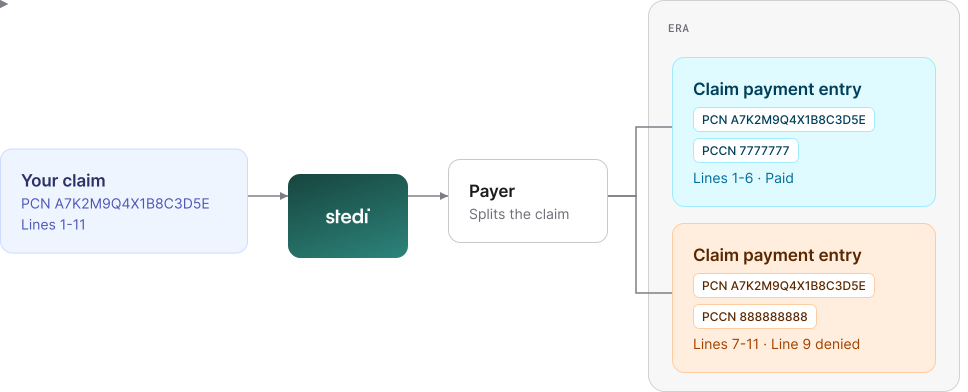
The split claims keep the original claim's patient control number (PCN), but each gets its own payer claim control number (PCCN).
Why do payers split claims?
Most payers don't share their rules for when or why they may split a submitted claim. Common reasons include:
-
The original claim has more service lines than the payer's limit.
-
The original claim's service dates cover more than one month or calendar year.
-
The payer can adjudicate some service lines right away but needs more documentation for others.
-
The original claim includes services that the payer processes separately, like outpatient psychiatric services and physical therapy. Some plans also have carveout benefits, like advanced imaging or fertility, that are handled by a separate administrator.
How do you know a claim was split?
Usually, the split shows up in the Electronic Remittance Advice (ERA) as multiple payment entries for the same claim. Some payers also flag the split earlier in the 277CA claim acknowledgment.
A real-time claim status check can also show a split. The response can include claim status code 717. Not all payers send it.
Split claims in ERAs
A claim payment entry is the ERA's record of how the payer processed one claim.
Each claim payment entry for a split claim has:
-
The same patient control number (PCN).
The PCN is the tracking ID you assign to the claim when you submit it. The payer returns it unchanged in the ERA. -
A different payer claim control number (PCCN).
The PCCN is the payer's ID for that split claim. To replace or void that split claim, you reference its PCCN.
Each entry covers only the service lines in that split claim. The entries can be in the same ERA or in separate ERAs.
Remittance Advice Remark Codes (RARCs)
Payers should also include a Remittance Advice Remark Code (RARC) in the entry. A RARC gives more information about how the payer processed the claim. A RARC of MA15 means the claim was split.
In the 835 ERA JSON response, each split claim is a separate transactions[].detailInfo[].paymentInfo[] entry. In each entry, check:
claimPaymentInfo.patientControlNumberfor the PCN.claimPaymentInfo.payerClaimControlNumberfor the PCCN.outpatientAdjudication.claimPaymentRemarkCode[N]for a RARC ofMA15. Not all payers return this RARC for split claims.
"paymentInfo": [
  {
    "claimPaymentInfo": {
      "patientControlNumber": "A7K2M9Q4X1B8C3D5E", // Same PCN
      "payerClaimControlNumber": "7777777", // PCCN for lines 1-6
      "totalClaimChargeAmount": "600",
      ...
    },
    "outpatientAdjudication": {
      "claimPaymentRemarkCode1": "MA15" // Claim was split
    },
    ...
  },
  {
    "claimPaymentInfo": {
      "patientControlNumber": "A7K2M9Q4X1B8C3D5E", // Same PCN
      "payerClaimControlNumber": "888888888", // PCCN for lines 7-11
      "totalClaimChargeAmount": "500",
      ...
    },
    ...
  }
]
In the X12 835, each split claim is a separate Loop 2100 (Claim Payment Information). In each loop, check:
CLP01(Patient Control Number) for the PCN.CLP07(Payer Claim Control Number) for the PCCN.MOA03-MOA07(Claim Payment Remark Code) for a RARC ofMA15. Not all payers return this RARC for split claims.
CLP*A7K2M9Q4X1B8C3D5E*1*600*480*120*12*7777777~
MOA***MA15~
...
CLP*A7K2M9Q4X1B8C3D5E*1*500*300*100*12*888888888~
...
Split claims in claim acknowledgments
A 277CA claim acknowledgment is the payer's response that says whether it accepted the claim for adjudication. Some payers also use it to report a split claim.
A claim acknowledgment for a split claim reports the claim's status with two codes:
-
A claim status category code of
A5.
The category code gives the general status, like accepted or rejected.A5means the payer split the claim when it accepted the claim for adjudication. -
A claim status code of
717.
The status code gives more detail for a claim status category code.717means "This claim has been split for processing."
Some payers send a separate claim acknowledgment for each split claim. In these cases, each claim acknowledgment has the same PCN but a different PCCN.
In the 277CA JSON response, the split is in transactions[].payers[].claimStatusTransactions[].claimStatusDetails[].patientClaimStatusDetails[].claims[].claimStatus. Check:
referencedTransactionTraceNumberfor the PCN.informationClaimStatuses[].informationStatuses[].healthCareClaimStatusCategoryCodefor a claim status category code ofA5.informationClaimStatuses[].informationStatuses[].statusCodefor a claim status code of717.tradingPartnerClaimNumberfor the PCCN.
"claimStatus": {
  "informationClaimStatuses": [
    {
      "informationStatuses": [
        {
          "healthCareClaimStatusCategoryCode": "A5", // Split claim
          "healthCareClaimStatusCategoryCodeValue": "Acknowledgement/Split Claim - The claim/encounter has been split upon acceptance into the adjudication system.",
          "statusCode": "717", // Claim split for processing
          "statusCodeValue": "This claim has been split for processing."
        }
      ]
    }
  ],
  "referencedTransactionTraceNumber": "A7K2M9Q4X1B8C3D5E", // Your PCN
  "tradingPartnerClaimNumber": "888888888", // PCCN for this split claim
  ...
}
In the X12 277CA, the split is in Loop 2200D (Claim Status Tracking Number). Check:
TRN02(Referenced Transaction Trace Number) for the PCN.STC01-01(Health Care Claim Status Category Code) for a claim status category code ofA5.STC01-02(Health Care Claim Status Code) for a claim status code of717.REF02ofREF*1K(Payer Claim Control Number) for the PCCN.
TRN*2*A7K2M9Q4X1B8C3D5E~
STC*A5:717*20261001*WQ*500~
REF*1K*888888888~
Split claims in claim status checks
A real-time claim status check asks the payer for the current status of a claim. The payer responds right away.
If the payer split the claim, the response can include more than one claim – one for each split claim. Each claim in the response has the same PCN and a different PCCN.
This is most common when you don't include a PCCN in the request. With a PCCN, the payer can return only the split claim with that PCCN.
The submitted amount for each claim can also differ from the total you billed. Some payers change it when they split the claim.
In the Real-Time Claim Status JSON response, each split claim is a separate claims[] entry. In each entry, check:
claimStatus.patientAccountNumberfor the PCN.claimStatus.tradingPartnerClaimNumberfor the PCCN.claimStatus.submittedAmountfor the split claim's charges.
"claims": [
  {
    "claimStatus": {
      "patientAccountNumber": "A7K2M9Q4X1B8C3D5E", // Same PCN
      "tradingPartnerClaimNumber": "7777777", // PCCN for lines 1-6
      "submittedAmount": "600", // Charges for lines 1-6
      ...
    },
    ...
  },
  {
    "claimStatus": {
      "patientAccountNumber": "A7K2M9Q4X1B8C3D5E", // Same PCN
      "tradingPartnerClaimNumber": "888888888", // PCCN for lines 7-11
      "submittedAmount": "500", // Charges for lines 7-11
      ...
    },
    ...
  }
]
In the Real-Time Claim Status (276/277) Raw X12 response, each split claim is a separate Loop 2200D (Claim Status Tracking Number). In each loop, check:
REF02ofREF*EJ(Patient Control Number) for the PCN.REF02ofREF*1K(Payer Claim Control Number) for the PCCN.STC04(Total Claim Charge Amount) for the split claim's charges.
STC*F1:65*20261015**600*480~
REF*1K*7777777~
REF*EJ*A7K2M9Q4X1B8C3D5E~
...
STC*F1:65*20261015**500*300~
REF*1K*888888888~
REF*EJ*A7K2M9Q4X1B8C3D5E~
...
How do you track a claim that was split?
You can track split claims by the patient control number (PCN) you included in the original claim. Every split claim keeps the same PCN.
Payers return the PCN in 277CA claim acknowledgments, Electronic Remittance Advice (ERAs), and real-time claim status check responses. They also return each split claim's own payer claim control number (PCCN) in those responses.
Can you prevent a payer from splitting a claim?
No, not reliably. You can lower the chance of some splits, but the payer decides.
Two things can help:
-
Check the payer's line limit.
The HIPAA X12 standard allows up to 50 service lines on professional (837P) and dental (837D) claims. Institutional (837I) claims allow up to 999. Payer limits may be lower. -
Look at the service dates.
A payer that splits by month won't split a claim whose service dates fall in one month.
Payers also split for reasons they don't document. Build your system so one claim can map to more than one PCCN.
How do you correct a split claim?
For most payers, you correct a split claim with a replacement claim. A replacement claim is a resubmission that tells the payer which claim to change.
To submit a replacement claim, follow the steps in Resubmit or cancel claims. For a split claim, also follow this guidance.
Use the split claim's PCCN
Reference the PCCN of the split claim you want to replace. Take it from the ERA, if you have one.
In the 835 ERA JSON response, the PCCN is in claimPaymentInfo.payerClaimControlNumber. In X12, it's in CLP07 of Loop 2100 (Claim Payment Information).
If you don't have the ERAs, use the PCCN from the claim acknowledgment. In the 277CA JSON response, the PCCN is in claimStatus.tradingPartnerClaimNumber. In X12, it's in REF02 of REF*1K (Payer Claim Control Number) in Loop 2200D (Claim Status Tracking Number).
Copy the PCCN exactly
Keep every space and character. For example, use FW12345678 0012345678, not FW123456780012345678. Send the full value, even if the payer adds labels.
Use the latest PCCN
You can correct a claim more than once. When the payer adjudicates a replacement claim, it may assign a new PCCN. When you submit a new replacement claim, use the PCCN from the latest ERA.
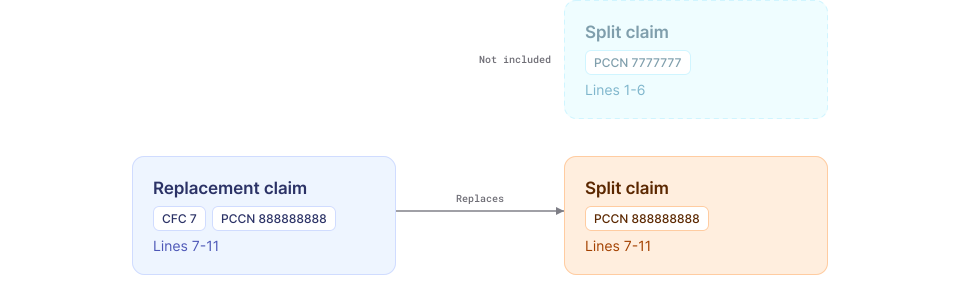
Only include service lines from the split claim
If you include service lines from another split claim, the payer may reject the replacement as a duplicate.
For example, you submit one claim with 11 service lines. The payer splits it into two claims:
- PCCN
7777777: lines 1-6, paid - PCCN
888888888: lines 7-11, line 9 denied
To correct line 9, send a replacement with only lines 7-11 and PCCN 888888888. Set the claim charge amount to the total of lines 7-11.
Use the Create Professional Claim (CMS-1500) JSON endpoint. Set encounter.resubmission.code to REPLACEMENT_OF_PRIOR_CLAIM. Put the PCCN in encounter.resubmission.originalReferenceNumber:
{
  "billing": {
    "patientControlNumber": "R3T8W1Y6Z0N4P9L2H", // New, unique PCN
    ...
  },
  "encounter": {
    "resubmission": {
      "code": "REPLACEMENT_OF_PRIOR_CLAIM", // Replacement claim
      "originalReferenceNumber": "888888888" // PCCN for the split claim
    },
    ...
  },
  "serviceLines": [
    ... // Service lines 7-11 only
  ],
  ...
}
Use the Professional Claims (837P) JSON endpoint. Set claimInformation.claimFrequencyCode to 7. Put the PCCN in claimInformation.claimSupplementalInformation.claimControlNumber:
{
  "claimInformation": {
    "patientControlNumber": "R3T8W1Y6Z0N4P9L2H", // New, unique PCN
    "claimFrequencyCode": "7", // Replacement claim
    "claimChargeAmount": "500", // Total of lines 7-11
    "claimSupplementalInformation": {
      "claimControlNumber": "888888888" // PCCN for the split claim
    },
    "serviceLines": [
      ... // Service lines 7-11 only
    ],
    ...
  },
  ...
}
Dental and institutional claims use the same fields. Use the Dental Claims (837D) JSON or Institutional Claims (837I) JSON endpoint.
Use the Professional Claims (837P) Raw X12 endpoint. Set CLM05-03 to 7. Put the PCCN in REF*F8 of Loop 2300 (Claim Information):
CLM*R3T8W1Y6Z0N4P9L2H*500***11:B:7*Y*A*Y*Y~
REF*F8*888888888~
...
How does Stedi show split claims?
Stedi's claim records link each split claim to your original claim by its PCN. You see one claim, not one for each split claim.
You can retrieve claim records using our Claims Lifecycle API or the claims view in the Stedi portal. In the claim timeline view, a single claim submission can show multiple claim acknowledgments or claim payment information records, depending on where the payer split the claim.
Below are a few caveats to keep in mind.
Paid amount
The claim's paid amount is the total across the claim payment information records for every split claim. In claim records returned by the Claims Lifecycle API, it's in the totalClaimPaidAmount field.
For example, a Retrieve Claim response for the split claim in this guide:
{
  "id": "clm_01K6XFP3TZ8RA9X84963NMW40N",
  "patientControlNumber": "A7K2M9Q4X1B8C3D5E",
  "totalClaimChargeAmount": "1100.00", // 600.00 + 500.00
  "totalClaimPaidAmount": "780.00", // 480.00 + 300.00 from both split claims
  ...
}
Status
Stedi sets the claim's status from its acknowledgments and ERAs. If the split claims have different results, the status can be Unknown.
For example, one split claim is paid and the other is denied. In claim records returned by the Claims Lifecycle API, the status is UNKNOWN. A Retrieve Claim response for that claim:
{
  "id": "clm_01K6XFP3TZ8RA9X84963NMW40N",
  "patientControlNumber": "A7K2M9Q4X1B8C3D5E",
  "status": "UNKNOWN", // One split claim paid, one denied
  ...
}
How do you bill a secondary payer after a split?
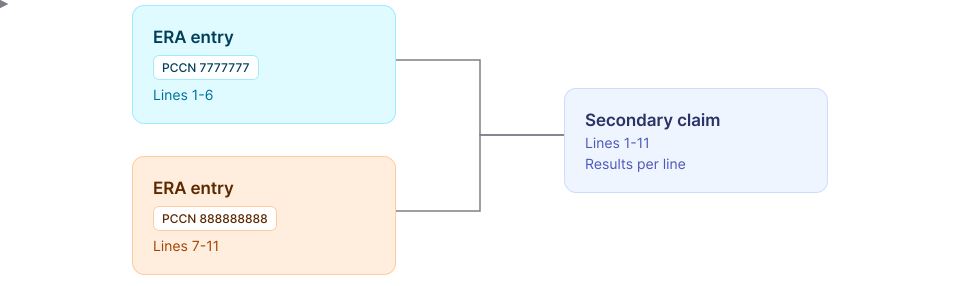
Send one claim to the secondary payer, not one for each split claim. It lists the same service lines and total charges as your original claim.
The secondary claim also reports what the primary payer paid and adjusted on each service line. After a split, that information is spread across the ERA entries for each split claim.
To build the secondary claim:
-
Match each ERA service line to your claim. Use the line item control number. The ERA returns it in
serviceLines[].lineItemControlNumberin the 835 ERA JSON response, or inREF*6Rof Loop2110(Service Payment Information) in X12.You set it on each service line when you submit the claim:
-
JSON API:
claimInformation.serviceLines[].providerControlNumberin the Professional Claims (837P) JSON or Dental Claims (837D) JSON endpoint.claimInformation.serviceLines[].lineItemControlNumberin the Institutional Claims (837I) JSON endpoint. -
Raw X12 API or SFTP:
REF02ofREF*6R(Line Item Control Number) in Loop2400(Service Line) of the X12 837. -
CMS-1500 JSON:
serviceLines[].lineItemControlNumberin the Create Professional Claim (CMS-1500) JSON endpoint.
-
-
Collect the primary payer's results for each line. Take each line's payment and adjustments from the ERA entry for its split claim. If the payer split one line into several lines, add up their results.
-
Add the results to the secondary claim. Put them in each service line's adjudication information.
For example, the secondary claim lists lines 1-11. Lines 1-6 get their results from the ERA entry for PCCN 7777777. Lines 7-11 get theirs from the entry for PCCN 888888888.
Here's where to put the adjudication information, based on how you submit claims:
-
JSON API:
claimInformation.serviceLines[].lineAdjudicationInformationin the Professional Claims (837P) JSON, Dental Claims (837D) JSON, or Institutional Claims (837I) JSON endpoint. -
Raw X12 API or SFTP: Loop
2430(Line Adjudication Information) in the Professional Claims (837P) Raw X12, Dental Claims (837D) Raw X12, or Institutional Claims (837I) Raw X12 endpoint. For SFTP, use the same loop in your X12 837 file. -
CMS-1500 JSON: The Create Professional Claim (CMS-1500) JSON endpoint doesn't support secondary claims.
Get started with Stedi
To get started with Stedi, sign up for a free sandbox account. It takes less than two minutes. No credit card is required.
When you're ready to submit claims, upgrade to production on our pay-as-you-go plan. There are no monthly minimums or setup fees. You only pay for the transactions you use.