How to bill providers for payer transactions
Many EHRs, RCM tools, and other platforms use Stedi to process clearinghouse transactions from their own products. We call them our Platform Partners.
If you're one of them, you likely need to charge providers – your customers – for those transactions.
Unlike most legacy clearinghouses, Stedi offers transparent, usage-based pricing. You can see prices on our public pricing page.
Usage-based pricing gives you options. For example, you can pass Stedi's rates through to your providers or bundle them into a flat monthly fee. Partners and prospects often ask us how to charge their providers for the transactions they run through Stedi.
This guide covers billing models we've seen work and tips for putting them into practice. You'll learn what Stedi bills for, how to track each provider's usage, and how to charge for it.
Which Stedi account model should I use?
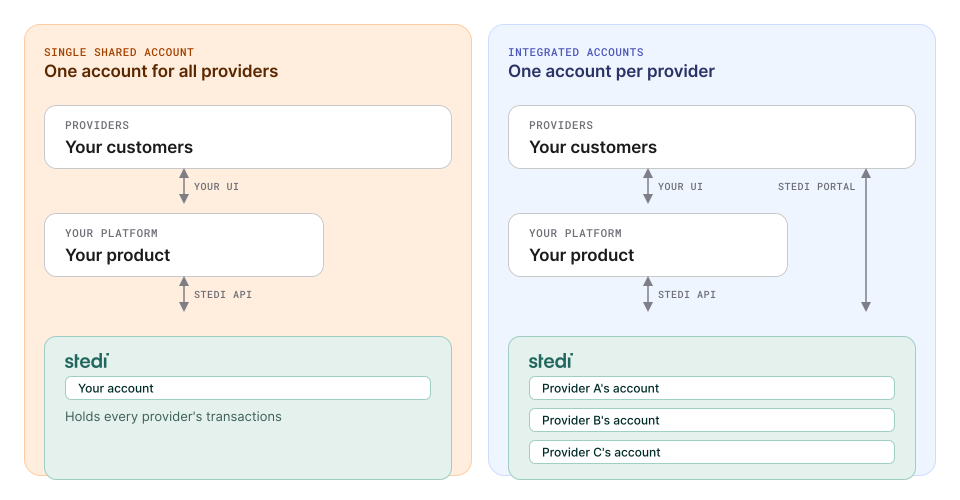
Stedi supports two account models. Your choice changes who pays Stedi and who tracks each provider's Stedi usage.
Single shared account
You use one Stedi account for all your providers. Stedi bills you with one monthly invoice for all transactions run in your account.
You track each provider's usage yourself. The invoice doesn't break down usage by provider.
With a shared account, you can white-label Stedi's features in your product, so your providers see only your brand. Platforms that want providers to use only their product often use a shared account.
Your providers never interact with Stedi directly. Stedi sees all their transactions in your one account, and your team handles their support.
Integrated accounts
Each provider has its own Stedi account. Each account connects to your product through a Stedi app. These dedicated provider accounts are called integrated accounts.
Each provider's activity stays in its own account. Developers call this tenancy. Your providers can also log in to the Stedi portal and contact Stedi support directly.
EHRs and practice management systems often use integrated accounts. We recommend them for most EHRs. You choose who pays Stedi for these accounts.
You pay (consolidated billing)
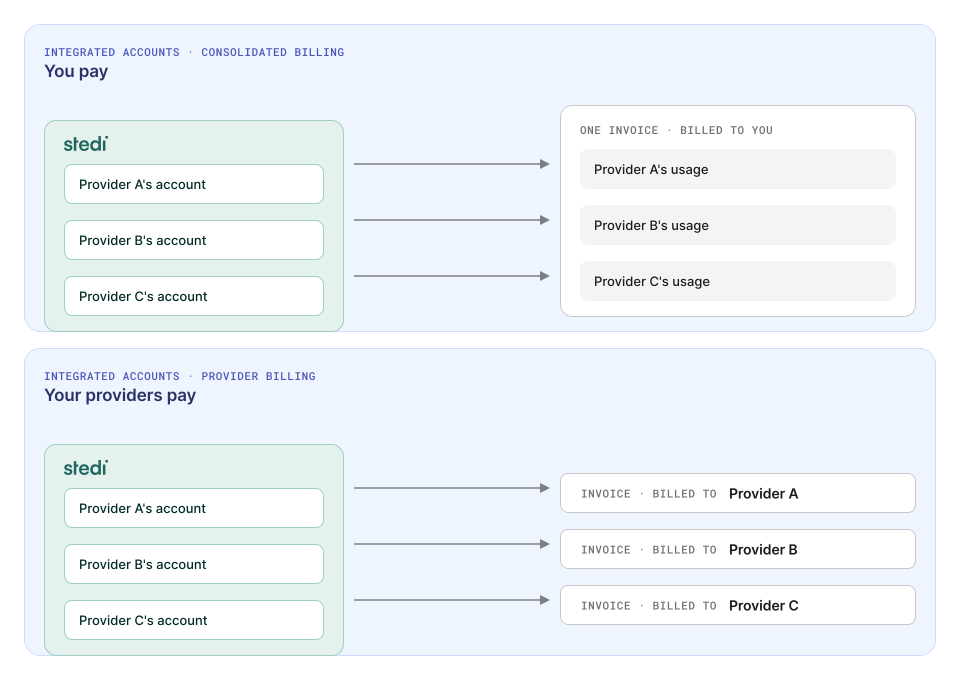
Stedi sends you one monthly invoice for all your providers' accounts. The invoice breaks down usage by account, so you don't have to track usage yourself. This option requires a custom pricing plan.
Consolidated billing is the most popular choice for Platform Partners who use integrated accounts and publish their own Stedi app.
All your providers' volume counts together, so your rates drop as your usage grows. You also control what your providers pay. You can mark up Stedi's rates, bundle them into your own pricing, or price them at cost. Your providers don't need to add a payment method when they sign up for Stedi.
Your providers pay
Each provider pays Stedi for its own account and contracts with us directly. You can't see your providers' Stedi bills. You charge your providers only for your own product.
Can I split a Stedi bill with my providers?
No. Either you or your provider pays the whole bill for a Stedi account. For example, you can't pay for claims while your provider pays for eligibility checks.
What billing models can I use with Stedi?
Stedi doesn't limit which billing models you use with your providers.
Most of our Platform Partners pay Stedi for their providers' transactions. They then charge their providers with one of the following models:
Pass-through
You charge your providers what Stedi charges you.
Stedi offers automatic volume discounts. As your volume grows, your per-transaction rates drop automatically. You and your providers get lower rates as your platform processes more transactions.
Per-transaction markup
You charge a rate above what Stedi charges you for that transaction. The difference is your markup. It can be a fixed amount or a percentage.
Bundled fee
You charge a fixed, flat, monthly fee for "included" transactions and price that according to what a typical customer would spend and the target margin you're looking to achieve. Some Platform Partners also include "overages" for specific products like insurance discovery.
For example, a provider averages 50 eligibility checks a month. You charge that provider a flat monthly fee that covers the cost of those checks, plus your margin. You can also charge per eligibility check if they exceed the included amount as an "overage."
Does Stedi charge implementation, setup, or support fees?
No. Stedi doesn't charge setup or implementation fees for you or your providers.
All Stedi support is free. Every production account gets real-time support over Slack, Microsoft Teams, or email, including during onboarding. Our average response time is less than 10 minutes.
Does Stedi charge per-provider or per-location fees?
No. Stedi doesn't charge per-provider or per-location fees. You can add as many providers as you need.
Stedi also offers free, API-based turnkey transaction enrollment to help you onboard providers easily. We handle 95%+ of the enrollment paperwork for you.
How do Stedi's automatic volume discounts work?
On the pay-as-you-go plan, each transaction type has price tiers based on your monthly volume. Each transaction costs the rate for the tier it falls in. So your first transactions each month cost more than your later ones.
As your volume grows during the month, your blended rate – your average cost per transaction – drops. To get your blended rate, divide your total cost for a transaction type by the number of those transactions.
The tiers reset at the start of each month. So your blended rate can change from month to month.
If you charge your providers your blended rate, you won't know the exact rate until the month ends. Plan your billing cycle around that.
Do all my providers' transactions count toward volume discounts?
Yes, if you pay Stedi for your providers' transactions. Stedi counts volume across all your providers. As your platform's usage grows, your rates drop.
If your providers pay Stedi directly, each provider's volume counts only toward its own rates.
How do I track each provider's usage?
If you use integrated accounts with consolidated billing, Stedi automatically tracks each provider's usage and breaks this down on your monthly invoice. If your providers pay Stedi directly, you don't need to track their Stedi usage.
With a shared account, record each transaction when you send it. For each transaction, store:
-
The provider's NPI, TIN, or both. This tells you which provider to charge. The NPI (National Provider Identifier) is a unique 10-digit ID for each provider. The TIN is the provider's tax ID. Most platforms use the NPI.
-
The transaction type. Stedi charges different rates for different transaction types, such as eligibility checks and claims.
-
The payer ID. A small number of payers add their own fees to transactions. We call these passthrough fees.
Stedi bills these fees at cost, separate from the rates on our pricing page. You can pass them on to your providers.
-
The date. Specifically, the month in which the transaction occurred. Stedi bills monthly, and our volume discounts reset each month.
-
Whether the transaction is billable. Some transactions, like eligibility checks that fail because the payer is down, aren't billable. For details, see Billing for eligibility checks and Billing for claims.
The following TypeScript example uses the Stedi TypeScript SDK. It sends an eligibility check and records whether Stedi bills for it.
// Records one usage record per eligibility check.
import { Stedi, StediServiceException, type CreateEligibilityCheckCommandInput } from "@stedi/sdk";

// Stedi doesn't bill for checks that return these AAA errors.
const NON_BILLABLE_AAA_CODES = new Set(["42", "79", "80"]);

interface UsageRecord {
  npi: string;
  payerId: string;
  transactionType: "eligibility";
  sentAt: Date;
  billable: boolean;
}

const apiKey = process.env["STEDI_API_KEY"] ?? "";
// Stedi doesn't bill for checks sent in test mode.
const isTestMode = apiKey.startsWith("test_");
const client = new Stedi({ apiKey: { apiKey } });

export async function checkEligibility(
  request: CreateEligibilityCheckCommandInput,
  // Replace with a write to your own database.
  recordUsage: (record: UsageRecord) => Promise<void>,
) {
  const usage = {
    npi: request.provider?.npi ?? "",
    // Some payers add their own fees. Stedi bills these passthrough fees at cost.
    payerId: request.payerId ?? "",
    transactionType: "eligibility" as const,
    sentAt: new Date(),
  };

  try {
    const response = await client.createEligibilityCheck(request);
    const hasNonBillableError = (response.errors ?? []).some((error) =>
      NON_BILLABLE_AAA_CODES.has(error.code ?? ""),
    );
    await recordUsage({ ...usage, billable: !isTestMode && !hasNonBillableError });
    return response;
  } catch (error) {
    // Stedi doesn't bill for requests that fail with a 4xx or 5xx error.
    if (error instanceof StediServiceException) {
      await recordUsage({ ...usage, billable: false });
    }
    throw error;
  }
}
How do I calculate what each transaction costs?
Use the rates on the pricing page. If you're on a custom plan, use your contracted rates.
Count your transactions of each type for the month. Your count tells you which price tier each new transaction falls in. Then apply your markup to get the amount you charge your provider.
For how tiers work, see How do Stedi's automatic volume discounts work?
If you charge per transaction, you don't need to wait for Stedi's invoice. When your own records are complete, you can charge your providers right away.
How do I check my records against Stedi's invoice?
With a shared account, Stedi's monthly invoice shows totals for each transaction type across your whole account. It doesn't show totals for each provider. Your own records are the only source for that detail.
If you use integrated accounts with consolidated billing, the invoice breaks down usage by account.
Next steps
The right billing model depends on your platform, your providers, and your volume. For tailored guidance on your setup, contact us. We've helped hundreds of Platform Partners get started.