Introducing transaction enrollment tasks

Feb 17, 2026

Products

You can now use Stedi’s Transaction Enrollment API or the Stedi portal to complete enrollment tasks.

As part of this release, we’ve:

What is transaction enrollment?

Transaction enrollment is the process of registering a provider to exchange a specific type of healthcare transaction with a payer.

Transaction enrollment is always required for Electronic Remittance Advice (ERAs). For other transaction types, like eligibility checks and claim submissions, enrollment requirements vary by payer.

Stedi offers fully managed, API-based transaction enrollment. You can submit and track enrollment requests using Stedi’s Transaction Enrollment API or the Stedi portal, which also supports bulk CSV imports

What are enrollment tasks?

Stedi manages transaction enrollment – including required paperwork – for you whenever possible. However, some payers require the provider (or their delegate) to complete specific steps.

We call those steps tasks. A task is any action that must be completed by the provider or the provider’s delegate to move an enrollment forward. Examples include:

  • Electronic funds transfer (EFT) enrollment with ERA enrollment, which involves giving the payer the provider’s bank information

  • Completing an action in the payer’s portal

Previously, completing these tasks required contacting Stedi by email or through a support channel.

Now, you can complete these steps in the Stedi portal or build your own enrollment UI using the Transaction Enrollment API.

Notifications for new provider tasks

When there's a new task that requires the provider to take action, Stedi adds a task to the enrollment request with instructions and sets the enrollment status to PROVIDER_ACTION_REQUIRED.

The email address listed as the userEmail (called Person for Stedi to contact in the Stedi portal) will also receive a notification that there's a new task to complete.

Manage tasks using the API

You can now programmatically retrieve and manage enrollment tasks using the Transaction Enrollment API.

Retrieve tasks

Responses from the List Enrollments and Retrieve Enrollment API now return a tasks object array. For example:

{
  "id": "db6675c5-7bg7-4af9-8c68-a54a336d2911",
  "status": "PROVIDER_ACTION_REQUIRED",
  ...
  "tasks": [
    {
      "id": "ac6665a5-7b97-4agh-8c74-a00a336c2989", // ID for the task
      "responsibleParty": "PROVIDER", // Either "PROVIDER" or "STEDI"
      "isComplete": false,
      "rank": 0,  // Task priority. Lower tasks must be completed first.
      "definition": {
        "followInstructions": { // Either "followInstructions" or "provideInformation"
          "instructions": "Please provide your banking information"
        }
      }
    }
  ]
}

Task types

Each task object’s definition property indicates its task type:

  • followInstructions – A task where the provider must follow specific instructions, such as completing an action in a payer portal.

  • provideInformation – A task where the provider must supply specific information, such as banking information for EFT enrollment.

Update tasks

You can use the new Update Enrollment Task API endpoint to provide free-text information or mark a task as complete.

To complete a task, call the endpoint with the completed request body field set to true. You can provide free-text information, such as banking information for EFT enrollment, in the request’s responseData object:

curl --request POST \
  --url "https://enrollments.us.stedi.com/2024-09-01/tasks/{taskId}" \
  --header "Authorization: <api_key>" \
  --header "Content-Type: application/json" \
  --data '{
    "completed": true,
    "responseData": {
      "provideInformation": {
        "response": "Here is my banking information: ..."
      }
    }
  }'

Important: Only provide responseData for definition.provideInformation tasks. Stedi ignores responseData for other task types. You must complete tasks in rank order, from lowest to highest.

View and manage tasks in the Stedi portal

You can review and manage tasks assigned to the provider in the Tasks section at the top of the enrollment request's details page in the Stedi portal. Tasks are automatically sorted by rank, with tasks to complete first at the top.
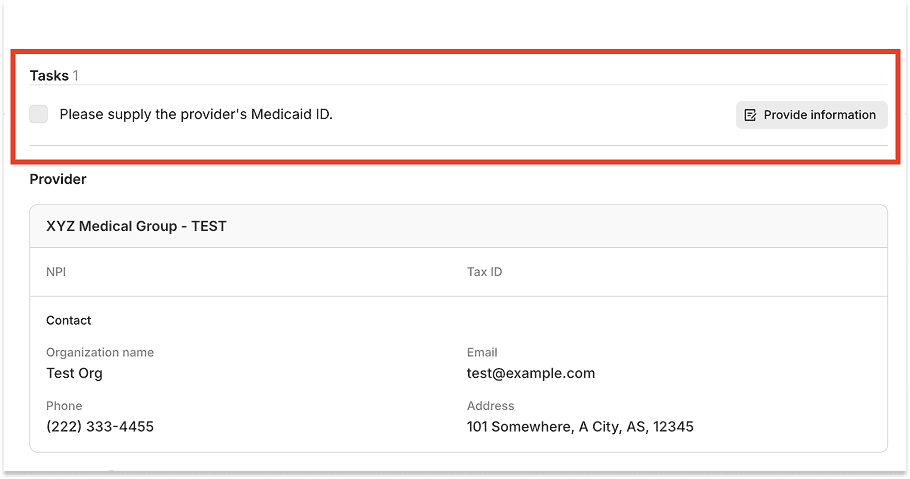
Provide information task

If a task requires information from the provider, click Provide information and enter the details in the free-text field.

Provide information task

Once you've taken the required action, check the box next to the task to mark it as complete. 
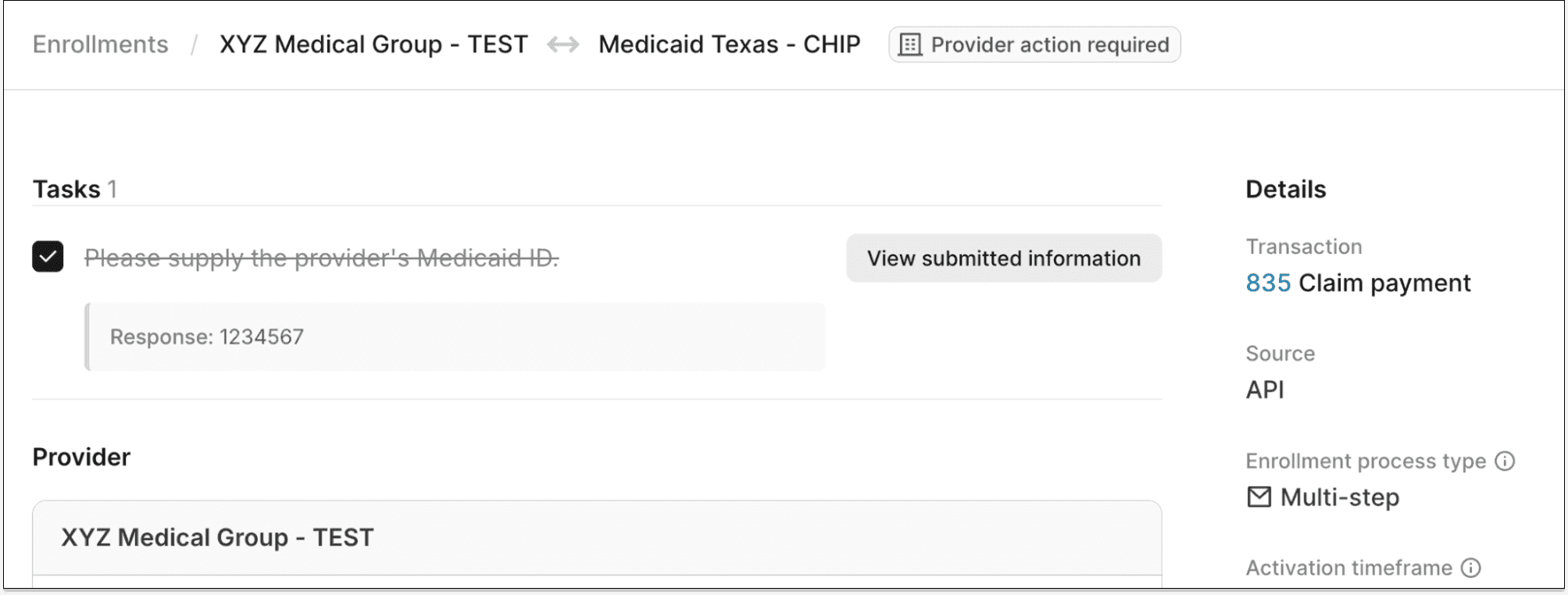
Completed task

Stedi is automatically notified when you complete a task, and the enrollment process continues.

Security

You must have the Operator role or above to complete enrollment tasks in the Stedi portal. Information shared through enrollment tasks is encrypted and stored securely. 

Get started

Transaction enrollment through the Stedi portal is free for all Stedi accounts. Stedi’s Transaction Enrollment API is available on the Developer plan and above.

Signup takes less than two minutes. No credit card is needed for accounts on Stedi’s free Basic plan.

You can now use Stedi’s Transaction Enrollment API or the Stedi portal to complete enrollment tasks.

As part of this release, we’ve:

What is transaction enrollment?

Transaction enrollment is the process of registering a provider to exchange a specific type of healthcare transaction with a payer.

Transaction enrollment is always required for Electronic Remittance Advice (ERAs). For other transaction types, like eligibility checks and claim submissions, enrollment requirements vary by payer.

Stedi offers fully managed, API-based transaction enrollment. You can submit and track enrollment requests using Stedi’s Transaction Enrollment API or the Stedi portal, which also supports bulk CSV imports

What are enrollment tasks?

Stedi manages transaction enrollment – including required paperwork – for you whenever possible. However, some payers require the provider (or their delegate) to complete specific steps.

We call those steps tasks. A task is any action that must be completed by the provider or the provider’s delegate to move an enrollment forward. Examples include:

  • Electronic funds transfer (EFT) enrollment with ERA enrollment, which involves giving the payer the provider’s bank information

  • Completing an action in the payer’s portal

Previously, completing these tasks required contacting Stedi by email or through a support channel.

Now, you can complete these steps in the Stedi portal or build your own enrollment UI using the Transaction Enrollment API.

Notifications for new provider tasks

When there's a new task that requires the provider to take action, Stedi adds a task to the enrollment request with instructions and sets the enrollment status to PROVIDER_ACTION_REQUIRED.

The email address listed as the userEmail (called Person for Stedi to contact in the Stedi portal) will also receive a notification that there's a new task to complete.

Manage tasks using the API

You can now programmatically retrieve and manage enrollment tasks using the Transaction Enrollment API.

Retrieve tasks

Responses from the List Enrollments and Retrieve Enrollment API now return a tasks object array. For example:

{
  "id": "db6675c5-7bg7-4af9-8c68-a54a336d2911",
  "status": "PROVIDER_ACTION_REQUIRED",
  ...
  "tasks": [
    {
      "id": "ac6665a5-7b97-4agh-8c74-a00a336c2989", // ID for the task
      "responsibleParty": "PROVIDER", // Either "PROVIDER" or "STEDI"
      "isComplete": false,
      "rank": 0,  // Task priority. Lower tasks must be completed first.
      "definition": {
        "followInstructions": { // Either "followInstructions" or "provideInformation"
          "instructions": "Please provide your banking information"
        }
      }
    }
  ]
}

Task types

Each task object’s definition property indicates its task type:

  • followInstructions – A task where the provider must follow specific instructions, such as completing an action in a payer portal.

  • provideInformation – A task where the provider must supply specific information, such as banking information for EFT enrollment.

Update tasks

You can use the new Update Enrollment Task API endpoint to provide free-text information or mark a task as complete.

To complete a task, call the endpoint with the completed request body field set to true. You can provide free-text information, such as banking information for EFT enrollment, in the request’s responseData object:

curl --request POST \
  --url "https://enrollments.us.stedi.com/2024-09-01/tasks/{taskId}" \
  --header "Authorization: <api_key>" \
  --header "Content-Type: application/json" \
  --data '{
    "completed": true,
    "responseData": {
      "provideInformation": {
        "response": "Here is my banking information: ..."
      }
    }
  }'

Important: Only provide responseData for definition.provideInformation tasks. Stedi ignores responseData for other task types. You must complete tasks in rank order, from lowest to highest.

View and manage tasks in the Stedi portal

You can review and manage tasks assigned to the provider in the Tasks section at the top of the enrollment request's details page in the Stedi portal. Tasks are automatically sorted by rank, with tasks to complete first at the top.

Provide information task

If a task requires information from the provider, click Provide information and enter the details in the free-text field.

Provide information task

Once you've taken the required action, check the box next to the task to mark it as complete. 

Completed task

Stedi is automatically notified when you complete a task, and the enrollment process continues.

Security

You must have the Operator role or above to complete enrollment tasks in the Stedi portal. Information shared through enrollment tasks is encrypted and stored securely. 

Get started

Transaction enrollment through the Stedi portal is free for all Stedi accounts. Stedi’s Transaction Enrollment API is available on the Developer plan and above.

Signup takes less than two minutes. No credit card is needed for accounts on Stedi’s free Basic plan.

You can now use Stedi’s Transaction Enrollment API or the Stedi portal to complete enrollment tasks.

As part of this release, we’ve:

What is transaction enrollment?

Transaction enrollment is the process of registering a provider to exchange a specific type of healthcare transaction with a payer.

Transaction enrollment is always required for Electronic Remittance Advice (ERAs). For other transaction types, like eligibility checks and claim submissions, enrollment requirements vary by payer.

Stedi offers fully managed, API-based transaction enrollment. You can submit and track enrollment requests using Stedi’s Transaction Enrollment API or the Stedi portal, which also supports bulk CSV imports

What are enrollment tasks?

Stedi manages transaction enrollment – including required paperwork – for you whenever possible. However, some payers require the provider (or their delegate) to complete specific steps.

We call those steps tasks. A task is any action that must be completed by the provider or the provider’s delegate to move an enrollment forward. Examples include:

  • Electronic funds transfer (EFT) enrollment with ERA enrollment, which involves giving the payer the provider’s bank information

  • Completing an action in the payer’s portal

Previously, completing these tasks required contacting Stedi by email or through a support channel.

Now, you can complete these steps in the Stedi portal or build your own enrollment UI using the Transaction Enrollment API.

Notifications for new provider tasks

When there's a new task that requires the provider to take action, Stedi adds a task to the enrollment request with instructions and sets the enrollment status to PROVIDER_ACTION_REQUIRED.

The email address listed as the userEmail (called Person for Stedi to contact in the Stedi portal) will also receive a notification that there's a new task to complete.

Manage tasks using the API

You can now programmatically retrieve and manage enrollment tasks using the Transaction Enrollment API.

Retrieve tasks

Responses from the List Enrollments and Retrieve Enrollment API now return a tasks object array. For example:

{
  "id": "db6675c5-7bg7-4af9-8c68-a54a336d2911",
  "status": "PROVIDER_ACTION_REQUIRED",
  ...
  "tasks": [
    {
      "id": "ac6665a5-7b97-4agh-8c74-a00a336c2989", // ID for the task
      "responsibleParty": "PROVIDER", // Either "PROVIDER" or "STEDI"
      "isComplete": false,
      "rank": 0,  // Task priority. Lower tasks must be completed first.
      "definition": {
        "followInstructions": { // Either "followInstructions" or "provideInformation"
          "instructions": "Please provide your banking information"
        }
      }
    }
  ]
}

Task types

Each task object’s definition property indicates its task type:

  • followInstructions – A task where the provider must follow specific instructions, such as completing an action in a payer portal.

  • provideInformation – A task where the provider must supply specific information, such as banking information for EFT enrollment.

Update tasks

You can use the new Update Enrollment Task API endpoint to provide free-text information or mark a task as complete.

To complete a task, call the endpoint with the completed request body field set to true. You can provide free-text information, such as banking information for EFT enrollment, in the request’s responseData object:

curl --request POST \
  --url "https://enrollments.us.stedi.com/2024-09-01/tasks/{taskId}" \
  --header "Authorization: <api_key>" \
  --header "Content-Type: application/json" \
  --data '{
    "completed": true,
    "responseData": {
      "provideInformation": {
        "response": "Here is my banking information: ..."
      }
    }
  }'

Important: Only provide responseData for definition.provideInformation tasks. Stedi ignores responseData for other task types. You must complete tasks in rank order, from lowest to highest.

View and manage tasks in the Stedi portal

You can review and manage tasks assigned to the provider in the Tasks section at the top of the enrollment request's details page in the Stedi portal. Tasks are automatically sorted by rank, with tasks to complete first at the top.

Provide information task

If a task requires information from the provider, click Provide information and enter the details in the free-text field.

Provide information task

Once you've taken the required action, check the box next to the task to mark it as complete. 

Completed task

Stedi is automatically notified when you complete a task, and the enrollment process continues.

Security

You must have the Operator role or above to complete enrollment tasks in the Stedi portal. Information shared through enrollment tasks is encrypted and stored securely. 

Get started

Transaction enrollment through the Stedi portal is free for all Stedi accounts. Stedi’s Transaction Enrollment API is available on the Developer plan and above.

Signup takes less than two minutes. No credit card is needed for accounts on Stedi’s free Basic plan.

Share

Twitter
LinkedIn

Get started with Stedi

Get started with Stedi

Automate healthcare transactions with developer-friendly APIs that support thousands of payers. Contact us to learn more and speak to the team.

Get updates on what’s new at Stedi

Get updates on what’s new at Stedi

Get updates on what’s new at Stedi

Get updates on what’s new at Stedi

Backed by

Stedi is a registered trademark of Stedi, Inc. All names, logos, and brands of third parties listed on our site are trademarks of their respective owners (including “X12”, which is a trademark of X12 Incorporated). Stedi, Inc. and its products and services are not endorsed by, sponsored by, or affiliated with these third parties. Our use of these names, logos, and brands is for identification purposes only, and does not imply any such endorsement, sponsorship, or affiliation.

Get updates on what’s new at Stedi

Backed by

Stedi is a registered trademark of Stedi, Inc. All names, logos, and brands of third parties listed on our site are trademarks of their respective owners (including “X12”, which is a trademark of X12 Incorporated). Stedi, Inc. and its products and services are not endorsed by, sponsored by, or affiliated with these third parties. Our use of these names, logos, and brands is for identification purposes only, and does not imply any such endorsement, sponsorship, or affiliation.

Get updates on what’s new at Stedi

Backed by

Stedi is a registered trademark of Stedi, Inc. All names, logos, and brands of third parties listed on our site are trademarks of their respective owners (including “X12”, which is a trademark of X12 Incorporated). Stedi, Inc. and its products and services are not endorsed by, sponsored by, or affiliated with these third parties. Our use of these names, logos, and brands is for identification purposes only, and does not imply any such endorsement, sponsorship, or affiliation.