A quick start guide to eligibility checks
Eligibility checks confirm whether a patient has active insurance and what their plan covers. They're the standard method for insurance verification, also called verification of benefits (VOB).
Unlike other verification methods, like payer phone calls or scraping payer portals, eligibility checks are fast, scalable, and inexpensive (a single check costs pennies). They’re also standardized; the same request and response format works across every payer.
If you're building an AI agent or other automated workflow, this guide covers the basics of implementing eligibility checks in under 15 minutes: what they are, how to run them, and how to handle common errors.
What is an eligibility check?
An eligibility check is a standardized healthcare transaction that confirms that a patient has active insurance and returns their plan benefits. Providers typically use eligibility checks to answer two questions:
-
Will the patient’s insurance cover this visit?
-
If yes, what payment should I collect from the patient before the visit?
When to run an eligibility check
Providers typically run eligibility checks:
-
Before a new appointment or billing encounter
-
Before submitting a claim, to confirm the patient's information is current
Providers may also run periodic checks, called refreshes, for patients with regular visits to catch coverage changes.
Verifying coverage prevents two problems: claim denials that could leave the provider unpaid, and surprise bills for the patient.
What does an eligibility check return?
Eligibility responses can reliably tell you:
-
A patient’s coverage status (active or inactive)
-
Cost share information, such as co-insurance, co-pays, and deductibles
For more, check out What you can (and can’t) reliably get from a 271 eligibility response.
How to run eligibility checks
You can run eligibility checks using Stedi’s JSON Real-Time Eligibility Check API. In the request, include:
-
The payer ID, used to route the check to the payer. Look it up using Stedi’s Payers API or the Stedi Payer Network.
-
A Service Type Code (STC), a two-character code that groups related healthcare services into broad categories. Use one STC per request. Many (but not all) dental payers may let you submit a CDT procedure code instead of an STC. Most medical payers don’t support CPT/HCPCS procedure codes in eligibility requests.
-
The provider’s name and National Provider Identifier (NPI).
-
The patient’s first name, last name, date of birth, and member ID. This information may be in the
subscriberordependentsobject. It depends on whether the patient qualifies as a dependent.
Important: Don’t include other patient information, like middle name or address. Eligibility checks only return results if they match one – and only one – member. If the information you provide doesn’t match what the payer has on file, the payer won’t return results.
An example JSON Real-Time Eligibility Check API request:
curl --request POST \
  --url "https://healthcare.us.stedi.com/2024-04-01/change/medicalnetwork/eligibility/v3" \
  --header "Authorization: <api_key>" \
  --header "Content-Type: application/json" \
  --data '{
    "tradingPartnerServiceId": "AHS",
    "encounter": {
      "serviceTypeCodes": ["30"]
    },
    "provider": {
      "organizationName": "ACME Health Services",
      "npi": "1999999984"
    },
    "subscriber": {
      "dateOfBirth": "19000101",
      "firstName": "Jane",
      "lastName": "Doe",
      "memberId": "1234567890"
    }
  }'
You can also run real-time checks using:
Stedi also supports time-insensitive batch eligibility checks using the Batch Eligibility Check API or a bulk CSV upload.
What if the eligibility check doesn't return all the benefits I need?
Test STC support with the payer
As a first step, systematically test the payer’s Service Type Code (STC) support.
STCs are standardized, but not all payers support all STCs. Some payers return a baseline response if you send an STC they don’t support. Use our Service Type Code Lookup tool to look up STCs to test.
Check for carveout benefits
Some payers carve out specific benefits, like mental health, pharmacy, or chiropractic benefits, to a separate administrator. In these cases, the payer’s eligibility response won't include those benefit details.
If you’re using the JSON Eligibility Check API, check for benefitsInformation entries with a related STC in serviceTypeCodes and a benefitsRelatedEntities section. The entityName field will contain the carveout admin’s name. If present, entityIdentificationValue contains the patient’s member ID for the carveout admin. For example:
{
  "benefitsInformation": [
    {
      "code": "U",// Contact Following Entity for Eligibility or Benefit Information
      "serviceTypeCodes": [
        "MH"// Mental Health
      ],
      ...
      "benefitsRelatedEntities": [
      {
        "entityIdentifier": "Third-Party Administrator",
        "entityType": "Non-Person Entity",
        "entityName": "Acme Health Payer",
        "entityIdentificationValue": "123456789", // Member ID for the carveout admin
        "contactInformation": {
          "contacts": [
            {
              "communicationMode": "Telephone",
              "communicationNumber": "1234567890"
            }
          ]
        }
      },
      ...
    },
    {
      "code": "D",                        // Benefit Description
      "serviceTypeCodes": ["MH"],
      "additionalInformation": [
        {
          "description": "BEHAVIORAL HEALTH MANAGED SEPARATELY"
        }
      ]
    }
  ],
  ...
}
Use Stedi's Payer API or Payer Network to get the payer ID for the carveout admin’s name. Then run a follow-up eligibility check with the carveout admin, using the returned member ID and the related STC.
Contact the payer
Payers don't always return the same benefit details available through a call or a portal. It's common to have an agent run an eligibility check first, then fill any gaps using a voice AI agent or portal scraping if the check doesn't return what's needed.
For more tips, see How to deal with gaps in eligibility responses.
What do I do if a patient doesn't have active coverage?
Run an insurance discovery check to see if the patient has any other active insurance coverage. If not, the patient may need to self-pay or contact their insurer.
What do I do if I get an AAA error?
If a payer can’t return eligibility data, they return an AAA error in the response explaining why.
AAA errors typically come back with a 200 HTTP status code. In most cases, you’ll need to parse the error, not just the HTTP status.
AAA error | What it means | What to do next |
| The payer couldn’t match the subscriber’s details to anyone in their system. | Verify the member ID matches the patient’s insurance card. Include any prefix or suffix on the patient’s ID. Double-check the patient’s name and date of birth. Use the full legal name. For example, “Robert,” not “Bob.” Avoid nicknames, abbreviations, or special characters. Try different name orderings. Check if the patient has recently changed names. Confirm the request is going to the right payer. |
| The payer is temporarily unavailable. | Automatically retry using the retry strategy outlined in our docs. If retries fail, retry with a different patient and NPI to rule out request-level issues. If all requests are failing, contact Stedi support. |
| If the response has a If the response has a | If the error comes back with a If you get a If all requests continue failing, contact Stedi support. |
| The transaction timed out or failed midstream. | Automatically retry using the retry strategy outlined in our docs. If retries fail, retry with a different patient and NPI to rule out request-level issues. If all requests are failing, contact Stedi support. |
| The member ID doesn’t match the payer’s requirements. | Use the exact ID on the subscriber’s insurance card. If no card is available, run an insurance discovery check using demographic data, like name and date of birth. |
| The provider isn’t authorized to submit eligibility checks to the payer. | Some payers require transaction enrollment for eligibility requests. Ensure the provider is enrolled with the payer. Some payers require portal credentials in eligibility requests. See Portal credentials in our docs. |
For more tips, see AAA eligibility errors in plain English.
The patient doesn't know their payer. How do I find it?
If the patient doesn’t know their payer, run an insurance discovery check. Provide as much patient demographic information as possible to increase the chances of finding matching coverage.
Insurance discovery checks aren't as reliable as eligibility checks. Don't use them as a first line of defense. But they’re a good backup when eligibility checks fail or aren't possible.
A Medicare patient doesn’t know their member ID. Can I look it up?
For traditional Medicare beneficiaries, their Medicare Beneficiary Identifier (MBI) is the functional equivalent of a member ID. It’s listed on the front of government-issued Medicare cards.
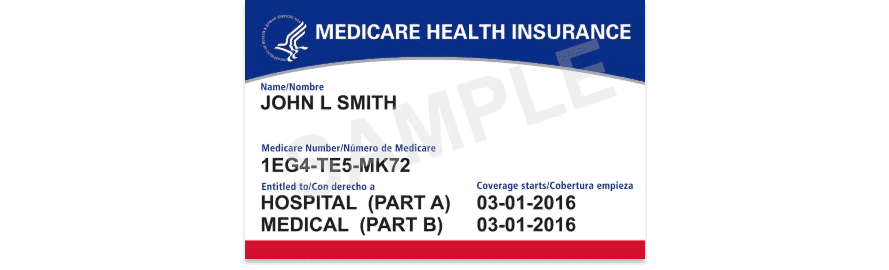
If you don’t have the patient’s MBI, you can get it using an MBI lookup with the patient’s SSN and demographic details. Stedi offers two types: one with SSN and one without. For details, see our MBI lookup docs.
The patient may have multiple insurance plans. Which one do I use?
When a patient has multiple health plans, providers submit claims to each payer in order – primary, secondary, tertiary. This is called coordination of benefits (COB).
A COB check tells you whether a patient has multiple plans, whether coverage overlaps, and which payer is responsible for payment first.
A COB check isn’t a replacement for an eligibility check. The two checks return different data:
-
An eligibility check returns full benefits information from the one payer you name in the request.
-
A COB check returns summary information about each of the patient’s active health plans, whether there’s coverage overlap, and which payer pays first (primacy). It doesn’t return the full benefits you'd get from an eligibility check.
We recommend you run an eligibility check first, then the COB check, then a follow-up eligibility check with each additional payer the COB check finds.
Unlike eligibility checks, the COB response shape is standardized across all supported payers. There are no payer-specific variations in what information is included or how the response is structured.
What patient information is required to run a COB check?
COB checks require the patient's first name, last name, date of birth, and either member ID or SSN. These details must exactly match the payer's records for one of the patient's active plans.
COB checks are much more sensitive to data accuracy than eligibility checks. We recommend you build the COB request from a successful eligibility response for that patient.
Do all payers support COB checks?
No. Payer support for COB checks is narrower than it is for eligibility checks.
COB results depend on whether the patient’s payers contribute to the COB database, so results may be partial or negative. COB doesn’t support Medicare plans, but Stedi supports many Medicare Advantage plans.
You can find the payers that support COB using the Stedi Payer Network or Payers API.
A COB check didn’t find the patient’s other plans. Now what?
Stedi can only report information for other COB-supported health plans from our payer list. You have three fallbacks:
-
Check
benefitsRelatedEntitiesin the eligibility response. Many payers list a known additional plan there. Run an eligibility check with that plan to confirm active coverage. -
Run an MBI lookup to check for Medicare coverage. This helps most for patients aged 65 or older.
-
Run an insurance discovery check to find active plans you didn’t capture at intake.
Insurance discovery checks can’t determine payer primacy. To find which payer is responsible for paying claims, you must run a COB check.