Changelog

Stedi SFTP and Stedi Buckets are Generally Available

Stedi SFTP is a serverless SFTP endpoint for exchanging files at any volume. Provision users via SFTP UI or via the API and begin transferring files in seconds.Stedi SFTP is fully integrated with Stedi Buckets - a simple, reliable data store. When you upload files programmatically via the Buckets SDK

, those files are available to your trading partner via their SFTP credentials. And each time your trading partner uploads files via SFTP, those files are available via the Buckets SDK, too.

With a usage-based pricing model and no servers to manage, developers can easily offer SFTP connectivity to their trading partners as part of a new or existing B2B workflow without incurring fixed costs or operational overhead.

Create a serverless SFTP user in 20 seconds or less:

Mappings improvements

Edit JSON Schema in the Mappings UI

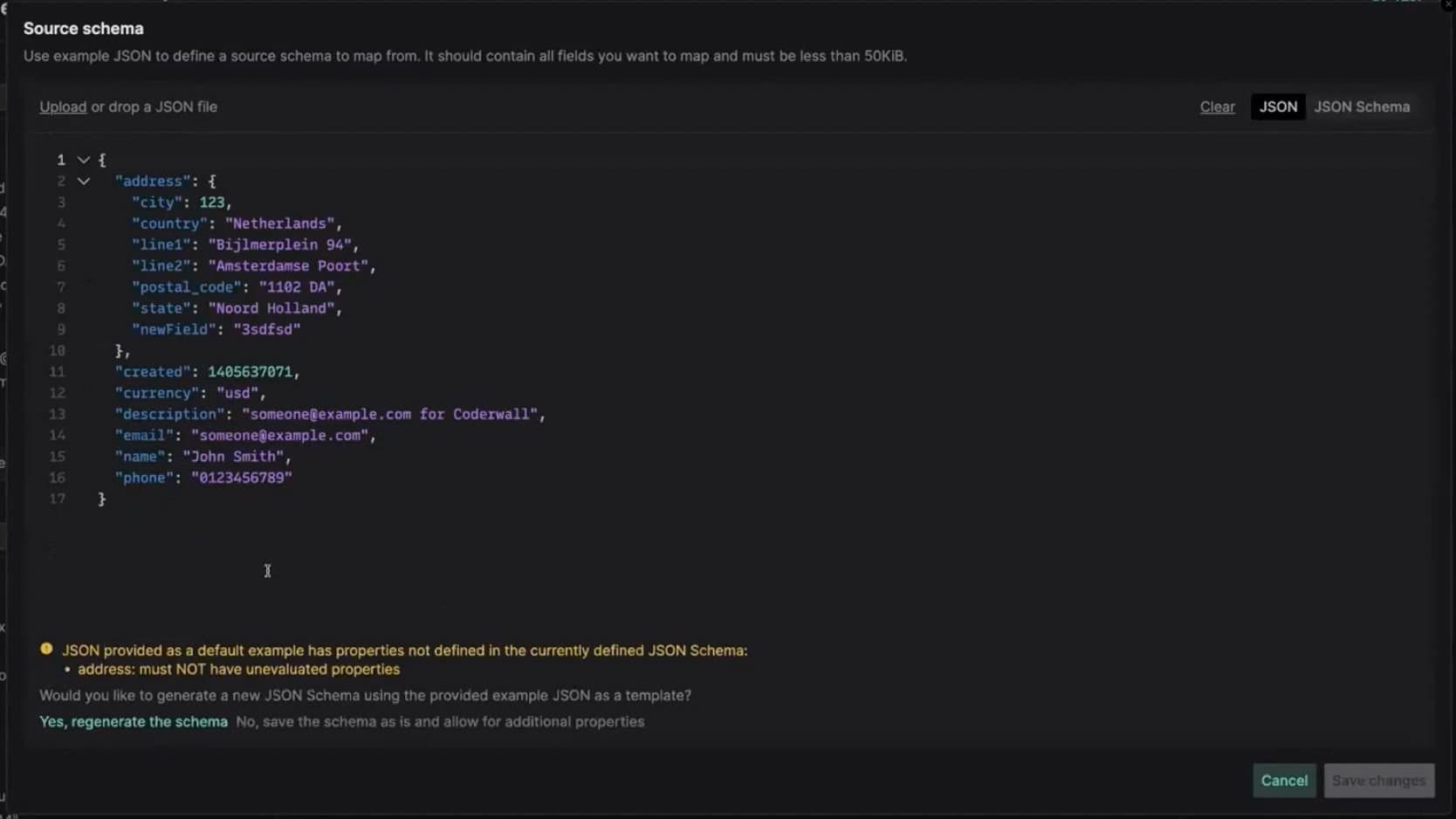
You can now upload and edit JSON Schema directly in the Mappings UI. Any changes in field descriptions will be automatically reflected on the mapping canvas.

In cases when JSON Schema conflicts with a JSON example after an update, you will be able to decide whether you'd like to re-generate the JSON Schema based on your new example or update your JSON Schema yourself.

Navigate source and target more easily with tree view

The source/target documents are now displayed in tree view to make it easier to navigate through large files. You can also use the search bar to quickly find the field you're looking for.

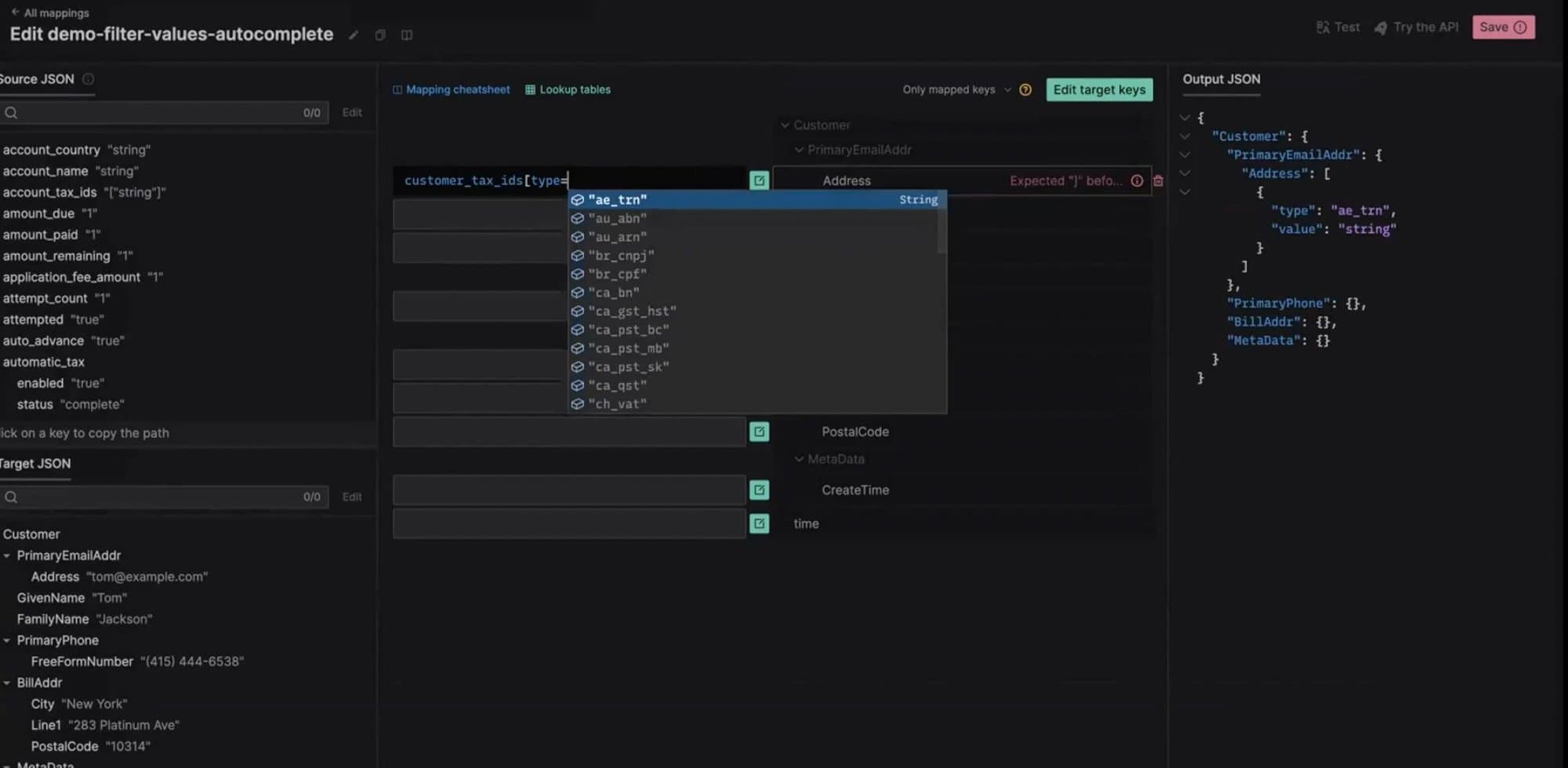
Improved autocomplete suggestions for values

Now, when you work with complex JSONata expressions that require filtering objects in arrays, you will see autocomplete suggestions for values in the predicate expressions.

Higher limits

We have increased the size limits for Mappings APIs to the following values:

  • Mapping source JSON Schema - 300 KiB

  • Mapping target JSON Schema - 300 KiB

  • Mapping JSONata expression - 300 KiB

  • Lookup tables combined size - 300 KiB

Mappings

Mappings: List indexes bank

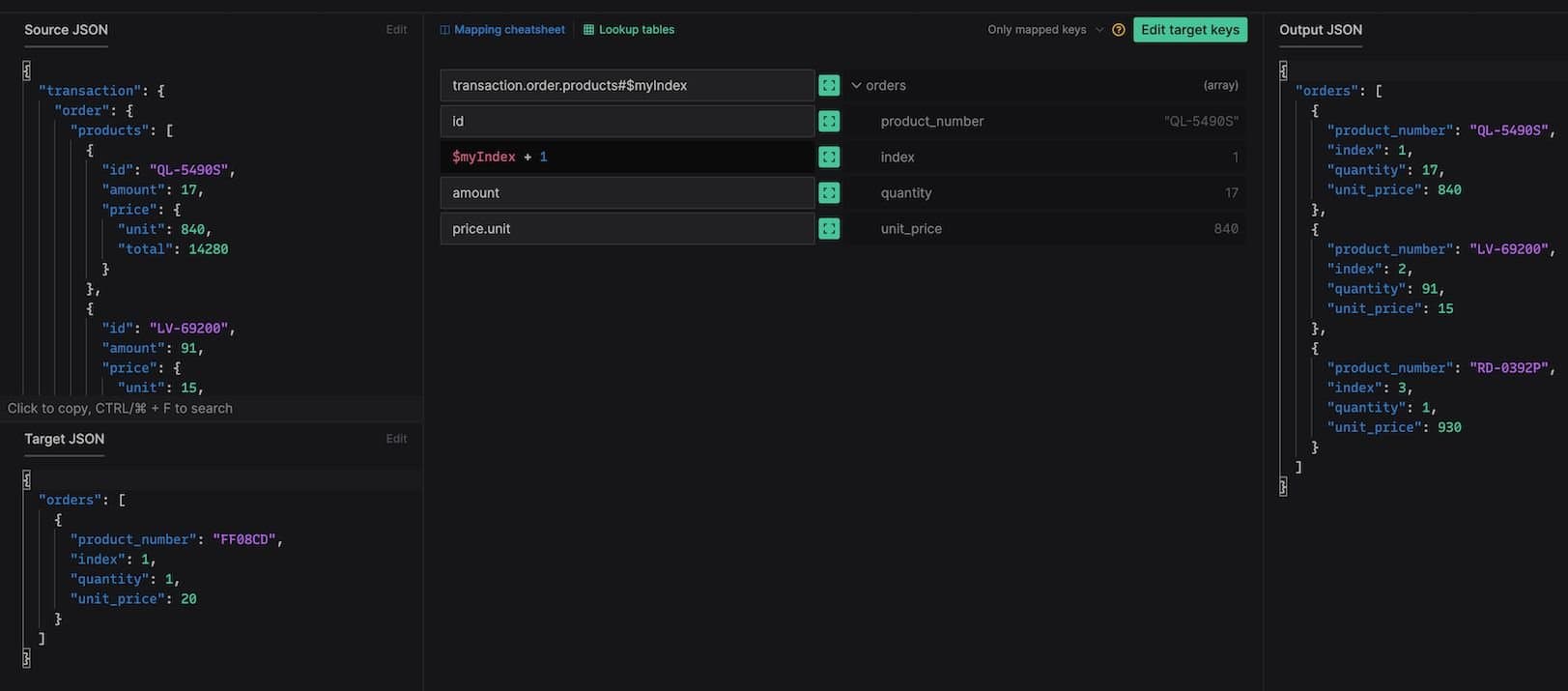
If the list entries of your target document are expected to include a list index number, you can now access it by binding a positional variable to the List Context. You can read more about the positional variable binding in the JSONata docs. To learn more about list indexes and see examples, read our documentation here.

Mappings: JSON Schema preview in Mappings UI

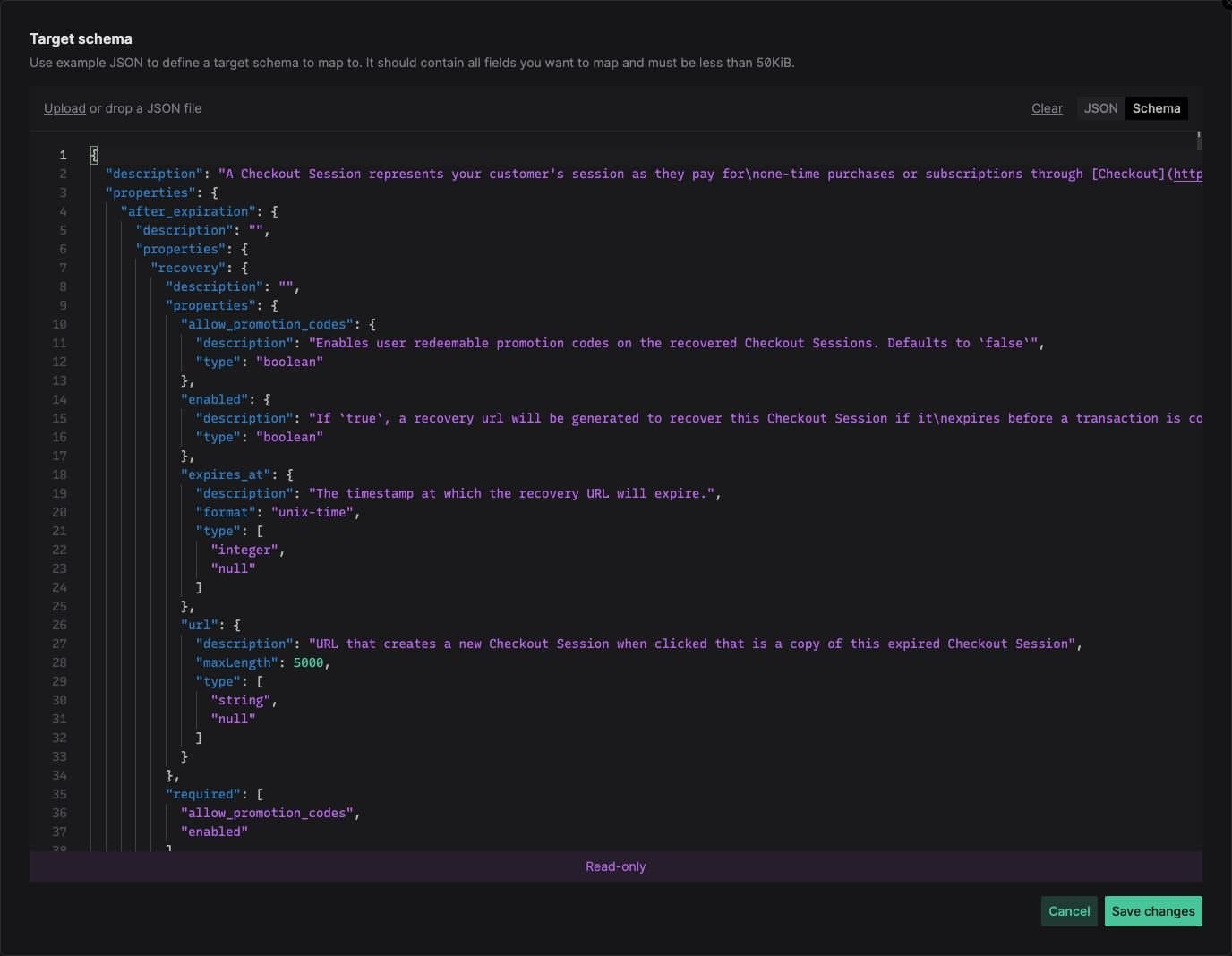
When you define a Source and Target JSON in the Mappings UI, these shapes are automatically converted to JSON Schema on the backend. Now, you can navigate to this JSON Schema directly in the Mappings UI. By using JSON Schema, you get a more precise description of the structure and validation constraints of your JSON documents.

EDI Core, Mappings, and Converter are now HIPAA eligible

EDI Core, Mappings, and Converter are now HIPAA eligible. Developers can now use Stedi’s APIs to build business integrations and process transactions that contain Protected Health Information (PHI).

To start building HIPAA eligible systems using Stedi you will need to agree to a HIPAA Business Associate Addendum (BAA) with Stedi. To establish a BAA with Stedi, or if you have any other questions, please contact us.

Mappings API is now multi-region

Since launch, Mappings served traffic from a single geographic region. Now, Mappings serves traffic from multiple regions. This will increase the reliability of the service in the case of a regional outage, and decrease latency for requests made geographically closer.

API for managing API keys is now generally avaialable

Requests to Stedi APIs are authenticated using a secret token called an API key. Each API key belongs to a single account and each account can have multiple API keys. API keys can be created inside of the Stedi UI by navigating to the API keys tab.

With the launch of the API for creating, listing, and deleting API keys, you can now manage this process programmatically. To learn more, you can read our documentation.

Prettier plugin for JSONata language

Prettier is an opinionated code formatter. It enforces a consistent style by parsing your code and re-printing it with its own rules that take the maximum line length into account, wrapping code when necessary.

Since developers use JSONata in the Mappings product, Stedi has contributed to Prettier by adding the prettier-plugin-jsonata, which uses the JSONata parser available as part of the jsonata package.

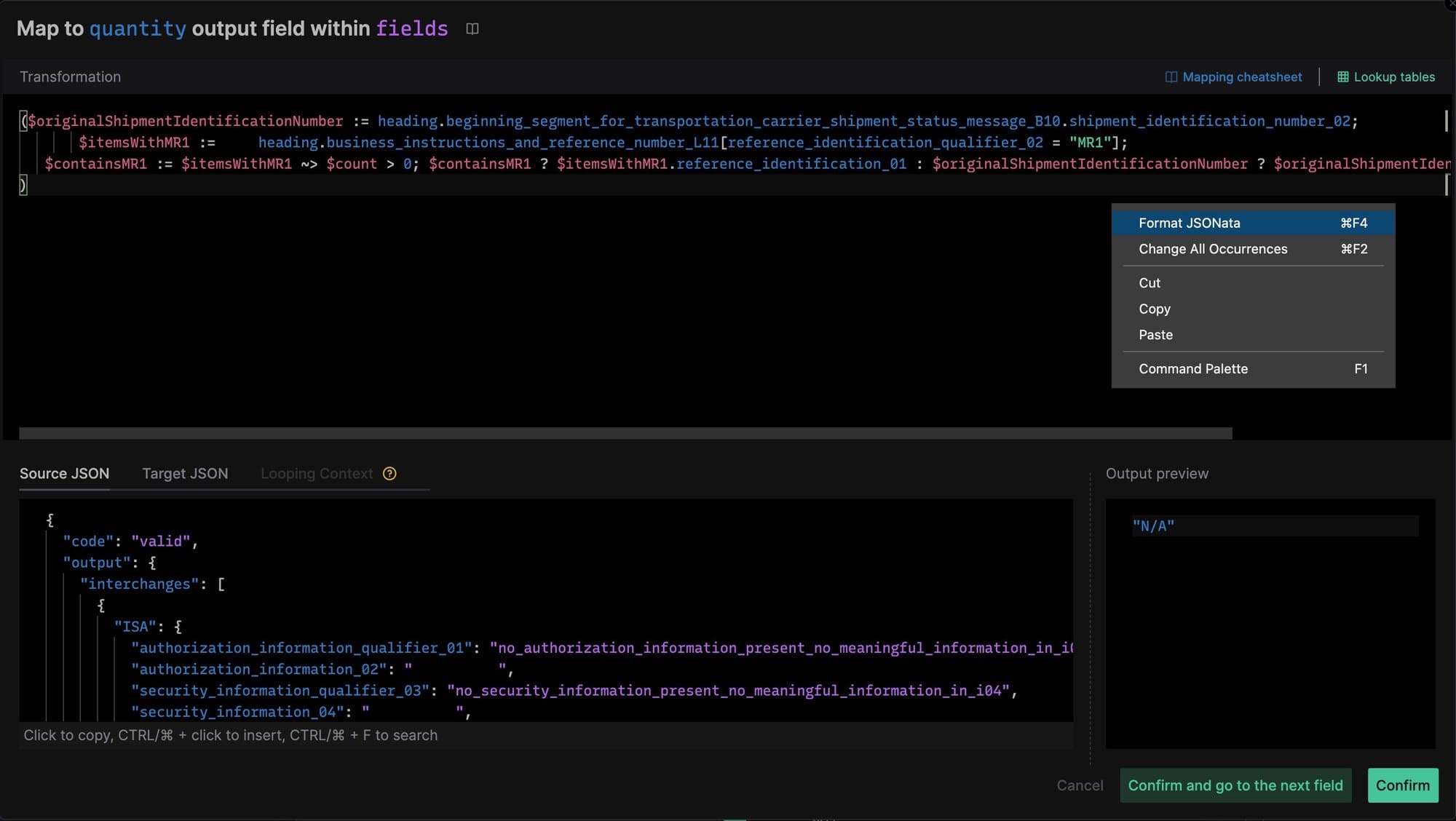
Here is what JSONata looks like in the Mappings expression editor before formatting:

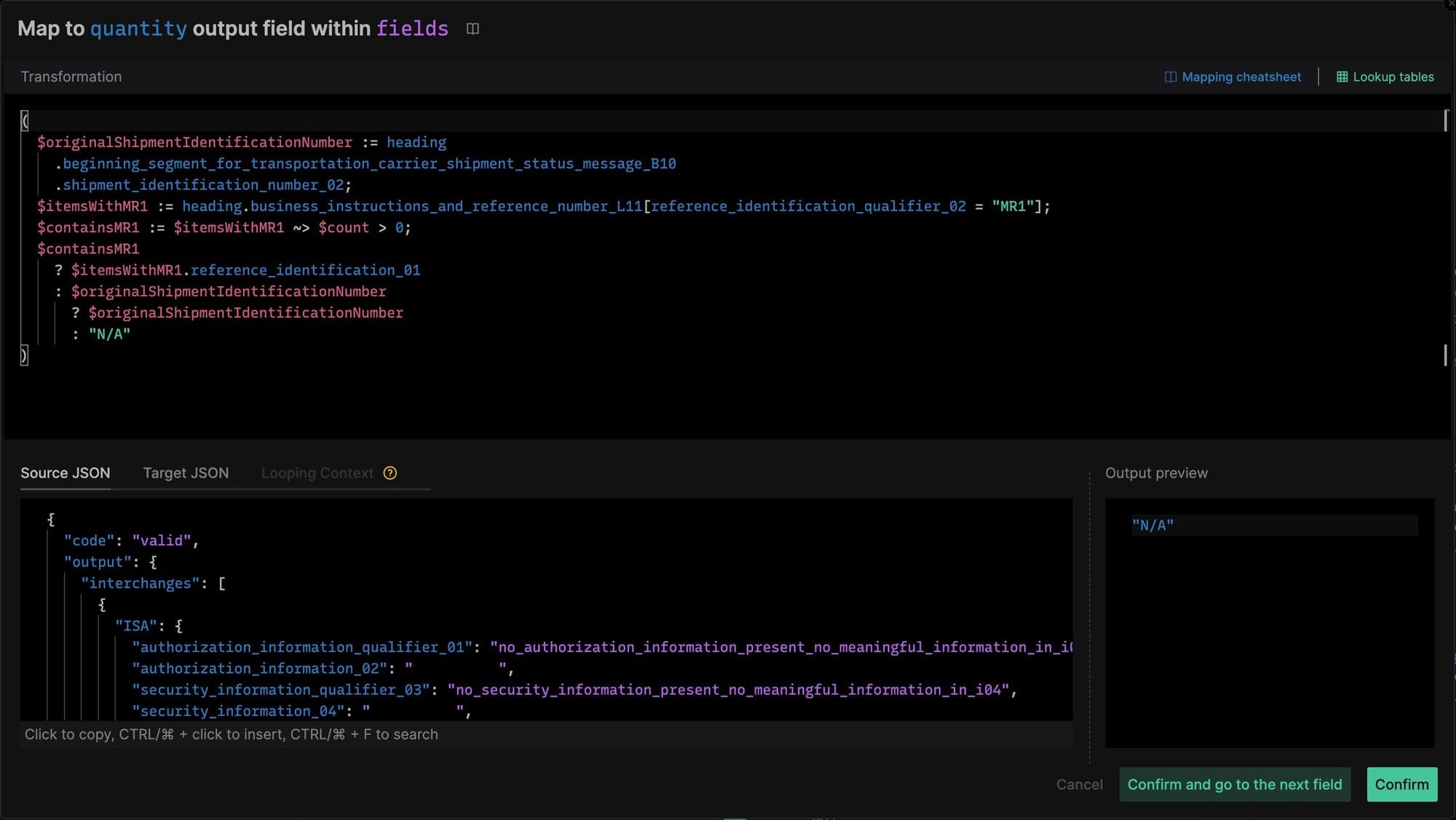
…and after formatting:

Converter is Generally Available

Converter is an API that allows developers to convert various formats like CSV and XML to JSON, providing a hassle-free way to manage these conversions. Converter has a transparent, pay-per-use pricing model with a generous free tier. There are no minimum fees, monthly commitments, or upfront costs to use this product.

In the example below, the Converter API uses the headers in the CSV as keys in the JSON. The result is a list with an object for each row, where the object has a field for each column. So, if you have a CSV like this…

type,invoiceNumber,poNumber,amt invoice,INV20023,30278099,100.50 invoice,INV20024,30288899,50.99

…the resulting JSON will look like this:

{ "output": [ { "type": "invoice", "invoiceNumber": "INV20023", "poNumber": 30278099, "amt": 100.5 }, { "type": "invoice", "invoiceNumber": "INV20024", "poNumber": 30288899, "amt": 50.99 } ] }

Increased maximum size for Mappings documents

To support developers working with larger JSON documents, we have increased the maximum mapped document size from 1 megabyte to 4 megabytes in order to accommodate a wider range of use cases.

New $currentDateTime function in Mappings

You can now use $currentDateTime function to generate current date and time in different formats and timezones. For example, if you want to generate a current date in an EDI format, you can achieve this by $currentDateTime($dateTime.EDIDate). If you need to have it generated for a different timezone, you can do so by specifying the 2nd argument like so: $currentDateTime($dateTime.EDIDate, "Europe/Berlin"). Read more

EDI Core APIs are now multi-region

Since launch, EDI Core served traffic from a single geographic region. Now, EDI Core serves traffic from multiple regions. This will increase the reliability of the service in the case of a regional outage, and decrease latency for requests made geographically closer.

Mappings: Lookup tables

You can now add one or more lookup tables to your mappings. Lookup tables are powerful for use cases where you have a field that contains a code and you wish to replace it with a related value.

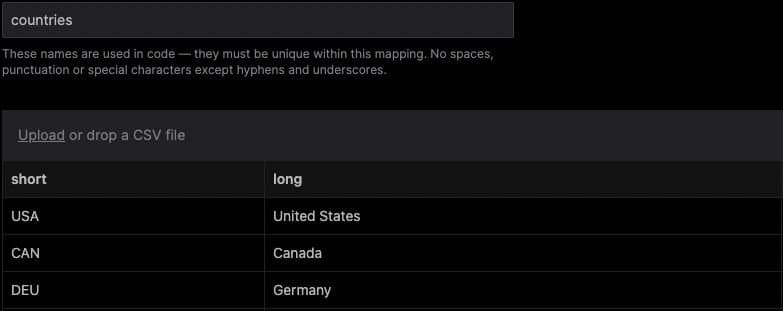
For example, if you have a source field with a country code (`USA`) and you want to replace it with the country name (`United States`), you can achieve this by building a countries lookup table:

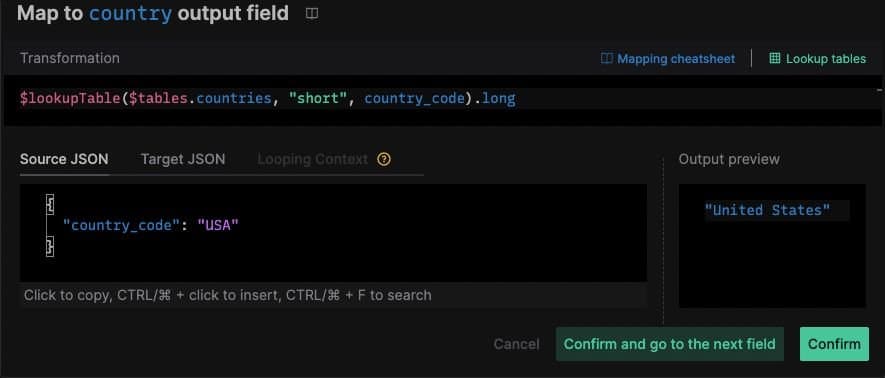
You can then use the lookup table in your mapping expression with the $lookupTable function:

To learn more, see: Mappings documentationMappings API documentation.

EDI Core: Embed EDI payload into Launch snippets

Now, when you explore an EDI file in Inspector, the Launch modal will generate a code snippet using that EDI payload.

Mappings: Ability to explicitly omit fields from the mapping output

Mappings now supports omitting fields from the mapping output using the $omitField constant.

If a given expression evaluates the $omitField constant, the field the expression is defined for will be omitted in the output. The $omitField constant is compatible with all mapping types and all JSONata expressions.

To learn more, refer to the Mappings documentation here.

EDI Core: Launch modal with sample code snippets

We added a new Launch modal in Inspector with code snippets for making a HTTP request, cURL, Node.js + Axios, Python + Requests. Simply copy the code into a tool of your choice, insert your API key and a sample payload, and beging translating between EDI and JEDI programmatically.

EDI Inspector & Reference

EDI Inspector: ability to download EDI file and improved data rendering

You can now save an EDI file from the Inspector editor.

We also improved data rendering format making the EDI file more human-readable:

  • Dates previously displayed as 20210901 now are shown as Sep 1, 2021.

  • Prior to the change, X12 elements that had a paired relational constraint were displayed as two separate entries. Example:

Communication Number Qualifier: Internet Email Address <> EA Communication Number: team@stedi.com

We now combine these into a single entry, with the qualifier as the label. You can click on either of these values to see the relevant reference information.

Internet Email Address <> EA : team@stedi.com

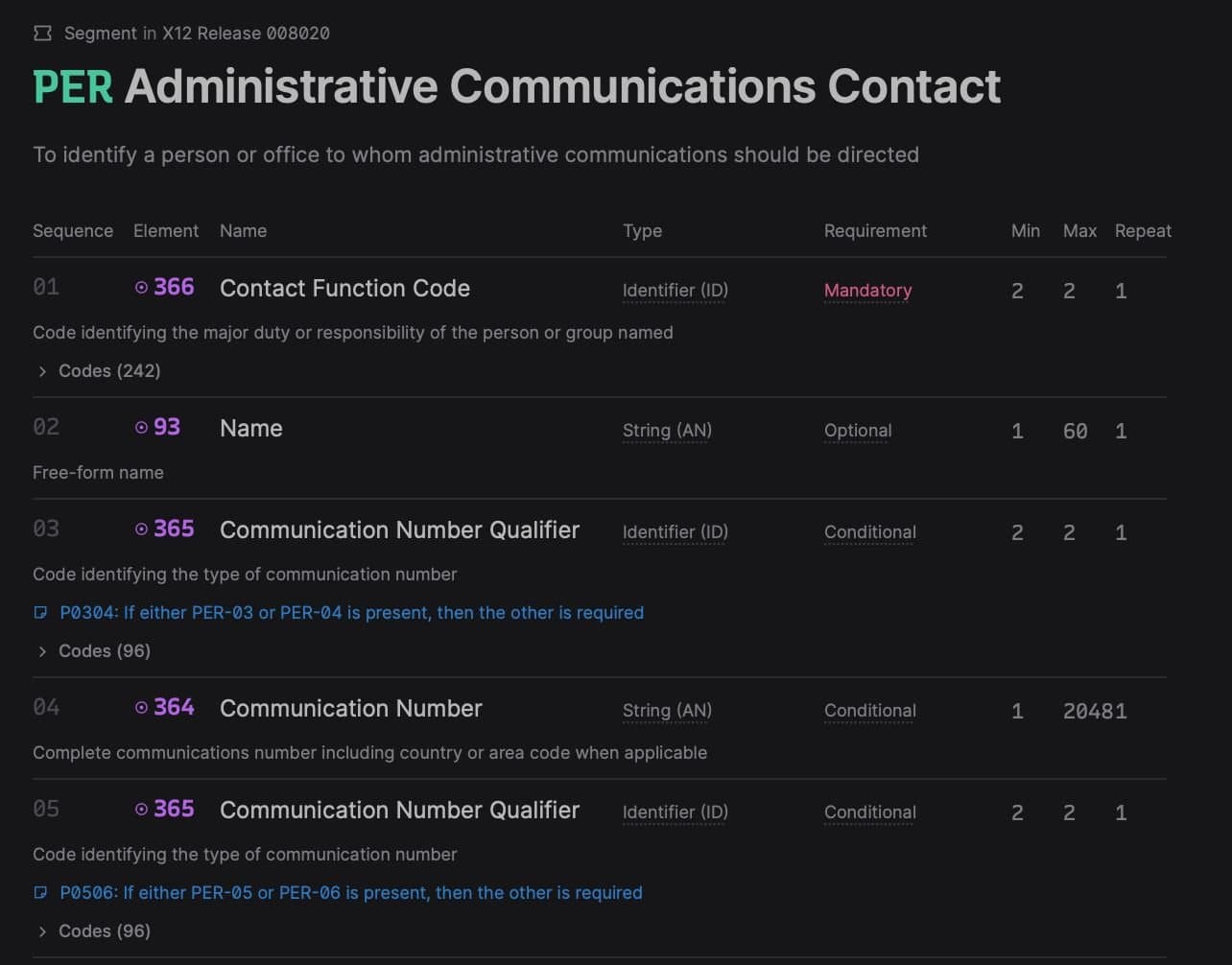
EDI Reference: Human-readable conditions

The EDI Reference has been updated to display a human-readable interpretation of relation condition code (ex. P0304: If either PER-03 or PER-04 is present, then the other is required). Before the enhancement, only the relation condition code was provided, which was difficult to parse (ex. P0304).See example

Mappings: Launch modal with sample code snippets

When you create or import a mapping, you can now open a Launch modal with code snippets in cURL, Node.js + Axios, Python + Requests. Simply copy the code into a tool of your choice, insert your API key and a sample payload to try out the mapping.

EDI Core: format EDI files

You can now prettify unformatted EDI files in Inspector and through the /prettify endpoint.

EDI Core: parse EDI files without envelopes

As a consumer of the /translate EDI core API, you now have the ability to parse EDI files that do NOT have envelopes. Before this enhancement, parsing a file without ISA/IEA GS/GE segments would result in a 422 response. Now, the EDI Core API will return a response based on the desired output parameters. The API response will identify the missing envelopes and elements for you.

View the response of the following payload in the inspector here:

ST*850*000000001~ BEG*24*SP*PO-00001**20210901~ N1*2L*STEDI INC.~ REF*K6*A composable platform for building flexible EDI systems~ PER*SR**EA*team@stedi.com~ PO1**1*2P*0.0001*PE*GE*EDI Core~ PO1**1*C0*0.05*PE*GE*Mappings~ CTT*2~ SE*9*000000001~

EDI Core: parse segments not in spec

The /translate EDI core API has been updated to support the parsing of segments that are not part of a given X12 release. Before this update, such a segment would result in a 422 response. Now, the API will return a valid response that clearly identifies the segment in question.

View the response of the following payload in the inspector here

ST*850*000000001~ BEG*24*SP*PO-00001**20210901~ N1*2L*STEDI INC.~ AUD*K6*<--AUD is NOT part of the 850 spec -->~ PER*SR**EA*team@stedi.com~ PO1**1*2P*0.0001*PE*GE*EDI Core~ PO1**1*C0*0.05*PE*GE*Mappings~ CTT*2~ SE*9*000000001~

EDI Core: remove empty segments

You are now able to specify the option to remove_empty_segments in the output_options of the EDI Core API.

"output_options": { "generate_control_numbers": true, "remove_empty_segments": true },

This feature can be helpful in cases when you're translating from JEDI to EDI and you wish to omit blank segments. Read more

Announcing 98% price decrease for Mapping requests

As of January 1, 2022, Mapping has a new pricing table, seen here. The decreased price of $0.001 per request for new and existing customers costs 98% less than the previous price of $0.05 (for volumes between 101-1,000,000 requests a month).

The price per request is tiered and the first 100 requests per month are free.

Request CountPriceFirst 100FreeFrom 101 to 1,000,000$0.001Above 1,000,000Contact us

JEDI 2.0 format is now available in production

Until now, the new JEDI 2.0 format was in "beta" as it stabilized. As of today, JEDI 2.0 is now ready for production use and comes with long-term support and commitment to no breaking changes.

You can read more about the JEDI@2.0 format here.

Below is an example of a JEDI 2.0 file.

{ "interchanges": [ { "interchange_control_header_ISA": { "authorization_information_qualifier_01": "no_authorization_information_present_no_meaningful_information_in_i02_00", "authorization_information_02": "", "security_information_qualifier_03": "no_security_information_present_no_meaningful_information_in_i04_00", "security_information_04": "", "interchange_id_qualifier_05": "mutually_defined_ZZ", "interchange_sender_id_06": "", "interchange_id_qualifier_07": "mutually_defined_ZZ", "interchange_receiver_id_08": "", "interchange_date_09": "210902", "interchange_time_10": "1200", "repetition_separator_11": "/", "interchange_control_version_number_code_12": "00801", "interchange_control_number_13": "123456789", "acknowledgment_requested_code_14": "interchange_acknowledgment_requested_ta1_1", "interchange_usage_indicator_code_15": "test_data_T", "component_element_separator_16": ":" }, "groups": [ { "functional_group_header_GS": { "functional_identifier_code_01": "ocean_shipment_information_304_311_317_319_322_323_324_325_326_361_SO", "application_senders_code_02": "00", "application_receivers_code_03": "00", "date_04": "20210902", "time_05": "1200", "group_control_number_06": "987654321", "responsible_agency_code_07": "accredited_standards_committee_x12_X", "version_release_industry_identifier_code_08": "008010" }, "transaction_sets": [ { "heading": { "transaction_set_header_ST": { "transaction_set_identifier_code_01": "326", "transaction_set_control_number_02": "0000" }, "transaction_set_trailer_SE": { "number_of_included_segments_01": "2", "transaction_set_control_number_02": "0000" } }, "type": "326" } ], "functional_group_trailer_GE": { "number_of_transaction_sets_included_01": "1", "group_control_number_02": "987654321" } } ], "interchange_control_trailer_IEA": { "number_of_included_functional_groups_01": "1", "interchange_control_number_02": "123456789" }, "delimiters": { "element": "*", "segment": "~", "sub_element": ":", "repetition": "/" } } ] }