We’re replacing the SUBMITTED transaction enrollment status with two new statuses that show who needs to act next:
-
STEDI_ACTION_REQUIRED – Stedi needs to take action.
-
PROVIDER_ACTION_REQUIRED – You or the provider need to take action.
The SUBMITTED status is now deprecated. Any existing requests will keep the SUBMITTED status and use the previous status workflow until they're live, canceled, or rejected.
We've also clarified the PROVISIONING status to mean only thing: the request has been submitted to the payer.
These changes make it easier to see which requests need your attention. You can filter by the PROVIDER_ACTION_REQUIRED status in the Stedi portal or List Enrollments endpoint to see which requests require action by you or your provider. For example, using the endpoint:
https://enrollments.us.stedi.com/2024-09-01/enrollments?status=PROVIDER_ACTION_REQUIRED
How enrollment statuses work now
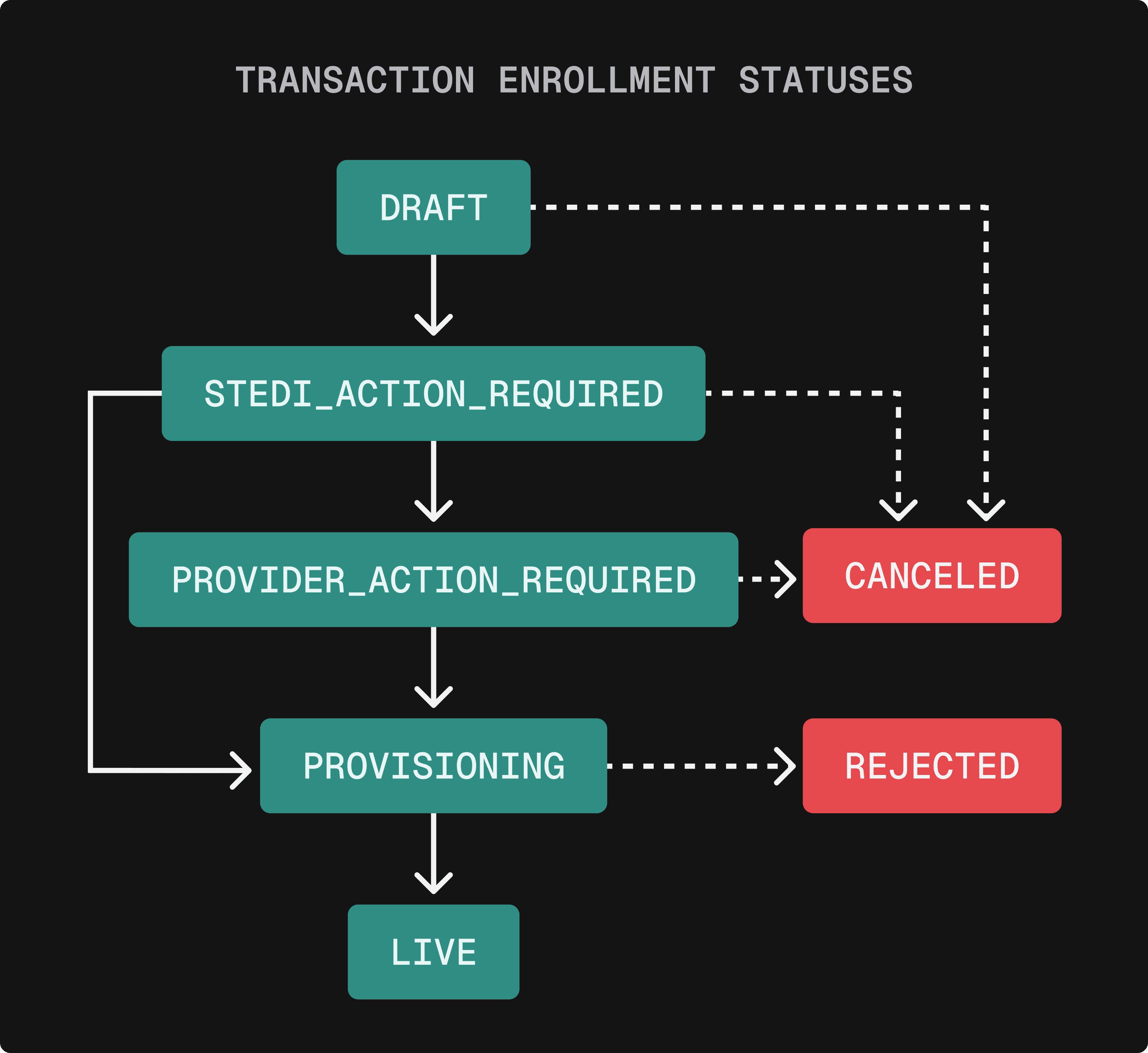
Requests submitted through the Stedi portal or a bulk CSV now start in the STEDI_ACTION_REQUIRED status. If you’re using the Create Enrollment endpoint, you can set the status to STEDI_ACTION_REQUIRED to start processing the enrollment.