Changelog

Claim edit: Missing country code for non-US addresses

Stedi now rejects 837P professional, 837D dental, and 837I institutional claims that include a non-US address without a country code.

How the edit works

HIPAA-adopted X12 EDI standards require a country code when any address in a claim is outside the United States.

If an address's state or province code is not a US state or territory, the address must include a country code. If the country code is missing from a non-US address, the payer may reject the claim.

If the country code for a non-US address in a claim is missing, Stedi attempts to look up the country code using the full address. If successful, Stedi then updates the claim.

For example, if a billing provider’s address lists a state/province code of ON (Ontario) and uses a Canadian postal code format, Stedi will automatically add a country code of CA (Canada).

If Stedi's lookup can't find the country code, this edit rejects the claim. It prevents payer rejections, which are slower and delay payment for the provider.

Rejection errors

If you submit a claim using Stedi's Claim Submission API endpoints and the claim fails the edit, you'll get back an error response in real time. The response includes details in the errors array.

The entity name in the error varies based on which address in the claim is missing the country code. For example, the following error indicates the billing provider's address is missing a country code:

{
  "errors": [
    {
      "code": "33",
      "description": "Missing Country Code. The country code for Billing Provider is required when the address is outside the United States. Correct and resubmit.",
      "followupAction": "Please Correct and Resubmit"
    }
  ]
}

If you submit a claim using SFTP and the claim fails the edit, Stedi will reject the claim with a 277CA claim acknowledgment. The acknowledgment will include a related claim status category code, claim status code, entity identifier code, and error message:

STC*A6>680>85*[DATE]*U*[AMOUNT]********Missing Country Code. The country code for Billing Provider is required when the address is outside the United States. Correct and resubmit.~

Introducing claims management features for the Stedi portal

We’ve released a dedicated set of claims management features in the Stedi portal, including an improved claims view.

The new claims view is built around the claim itself. You can see where each claim stands, review its history, and filter across your entire claims volume. Features include:

  • A filterable list of all claims submitted through Stedi

  • The ability to see the current status of a claim

  • A timeline for each claim showing 837 claim submissions and related 277CA claim acknowledgments

  • Detail pages for each claim submission and acknowledgment transaction

For more details, see our announcement blog.

Stedi's CMS-1500 claim form now supports line item control numbers

You can now set line item control numbers for individual service lines in a professional claim using the Stedi portal’s CMS-1500 form.

What is a line item control number?

In a claim, a service line represents billing for a specific service, such as an office visit or X-ray.

A line item control number is a unique, provider-assigned identifier for each service line in a claim.

Payers return line item control numbers in Electronic Remittance Advice (ERAs). Both providers and payers can use them to track service lines and reconcile claim submissions with payments.

Previously, the CMS-1500 form automatically assigned a random identifier to each service line. Now you can set your own.

How it works

When submitting a claim using the Stedi portal’s CMS-1500 form, click Set manual line item control numbers in the service lines table to reveal the Line Item Control Number field for each service line.

You can enter up to 30 characters per line. Each number must be unique within the claim.

Once you enter a line item control number, the fields stay visible and can't be hidden. To hide empty fields, click Hide manual line item control numbers.

If you later need to resubmit a claim using the CMS-1500 form, any existing line item control numbers are automatically mapped to the new submission.

Claim edit: All invalid ICD-10-CM diagnosis codes are now returned at once

Stedi's claim edit for invalid ICD-10-CM diagnosis codes now returns all invalid codes in the rejection's error message. The edit applies to 837P professional and 837I institutional claims.

Previously, if a claim had multiple invalid codes, only one was returned per rejection. To fix all the invalid codes, you had to correct and resubmit the claim multiple times – once for each invalid code.

How the edit works

In healthcare claims, diagnosis codes describe what’s wrong with the patient. HIPAA requires that professional and institutional claims only use valid, billable ICD-10-CM codes as diagnosis codes.

Diagnosis codes

Claim typeJSON API field(s)X12 element
837P professionalclaimInformation.healthCareCodeInformationHI-01 through HI-12 (Diagnosis Code) of Loop 2300 (Claim Information)
837I institutionalclaimInformation.principalDiagnosis.principalDiagnosisCode(principal diagnosis code) claimInformation.otherDiagnosisInformationList[].otherDiagnosisCode (secondary diagnosis code)HI-01 (Principal Diagnosis Code) of Loop 2300 (Claim Information) HI-02 through HI-12 (Other Diagnosis Code) of Loop 2300 (Claim Information)

Stedi previously introduced an edit for invalid ICD-10-CM diagnosis codes. The edit rejects a professional or institutional claim when any diagnosis code is:

  • **Not a valid ICD‑10‑CM code.
    **For example, if the code is misspelled or doesn’t exist in the official ICD-10-CM code list.

  • **A non-billable ICD‑10‑CM code.
    **Some ICD-10-CM codes are categories. They cover a broad diagnostic grouping rather than a specific condition. For example, E11 (Type 2 diabetes mellitus) is a category header.

    By themselves, category headers aren’t considered billable codes. They’re not specific enough to describe the exact condition or encounter being billed. A billable ICD-10-CM code must include both a category and a subcategory, such as E11.9 (Type 2 diabetes mellitus without complications).

  • **Not valid for the claim’s dates of service.
    **Updates to the ICD-10-CM code set are published each year. If a claim uses a code that wasn’t valid on the dates of service, Stedi rejects it.

    For example, Z11.52 (“Encounter for screening for COVID-19”) became effective on October 1, 2021. A claim with a date of service before that date would be rejected because the code wasn’t valid at the time.

This edit catches these issues before the claim reaches the payer. It prevents payer rejections, which are slower and delay payment for the provider.

Rejection errors

If you submit a claim using Stedi's Claim Submission API endpoints and the claim fails the edit, you'll get back an error response in real time. The response includes details in the errors array:

{
  "errors": [
    {
      "code": "33",
      "description": "Invalid ICD-10-CM Diagnosis Code. All submitted diagnosis codes must be valid per the ICD-10 manual. Diagnosis code(s), XY9999, ZZ0000, do not exist in the code set. Correct and resubmit.",
      "followupAction": "Please Correct and Resubmit"
    }
  ]
}

If you submit a claim using SFTP and the claim fails the edit, Stedi will reject the claim with a 277CA claim acknowledgment. The acknowledgment will include a related claim status category code, claim status code, and error message:

STC*A7>700*[DATE]*U*[AMOUNT]******A7>255**Invalid ICD-10-CM Diagnosis Code. All submitted diagnosis codes must be valid per the ICD-10 manual. Diagnosis code(s), XY9999, ZZ0000, do not exist in the code set. Correct and resubmit.~

Claim edit: Invalid procedure code format

Stedi now rejects 837P professional, 837D dental, and 837I institutional claims with a procedure code that isn't exactly 5 alphanumeric characters or is made up entirely of letters.

How the edit works

Procedure codes, such as medical CPT/HCPCS codes and dental CDT codes, identify a service performed during a patient visit.

Procedure code

Claim typeJSON API fieldX12 element
837P professionalserviceLines[].professionalService.procedureCodeSV1-01-02 (Procedure Code) of Loop 2400 (Service Line)
837D dentalserviceLines[].dentalService.procedureCodeSV3-01-02 (Procedure Code) of Loop 2400 (Service Line)
837I institutionalserviceLines[].institutionalService.procedureCodeSV2-02-02 (Procedure Code) of Loop 2400 (Service Line)

In a claim, all valid procedure codes must be exactly 5 alphanumeric characters with no spaces or special characters. They must also include at least one digit. A code made up entirely of letters, such as PHONE, isn't valid; an all-numeric code, such as 87070, is.

If a claim contains a procedure code with spaces or special characters, Stedi automatically removes the spaces and characters during validation. If the resulting procedure code has a length other than 5, or is made up entirely of letters, Stedi rejects the claim. This prevents later payer rejections, which are slower and can delay payment for the provider.

For 837D dental claims, Stedi also checks that the procedure code starts with the letter D, following the CDT code format.

Rejection errors

If you submit a claim using Stedi's Claim Submission API endpoints and the claim fails the edit, you'll get back an error response in real time. The response includes details in the errors array:

837P professional and 837I institutional claims

{
  "errors": [
    {
      "code": "33",
      "description": "Invalid Procedure Code Format. Procedure codes must be exactly 5 alphanumerical characters with no spaces or special characters. Invalid procedure code(s) ['PHONE'] detected. Correct and resubmit.",
      "followupAction": "Please Correct and Resubmit"
    }
  ]
}

837D dental claims

{
  "errors": [
    {
      "code": "33",
      "description": "Invalid Dental Procedure Code Format. Procedure codes must be exactly 5 alphanumerical characters and start with 'D' with no spaces or special characters. Invalid procedure code(s) ['DABCD'] detected. Correct and resubmit.",
      "followupAction": "Please Correct and Resubmit"
    }
  ]
}

SFTP rejections

If you submit a claim using SFTP and the claim fails the edit, Stedi will reject the claim with a 277CA claim acknowledgment. The acknowledgment will include a related claim status category code, claim status code, and error message:

837P professional and 837I institutional claims

STC*A7>511*[DATE]*U*[AMOUNT]******A7>454**Invalid Procedure Code Format. Procedure codes must be exactly 5 alphanumerical characters with no spaces or special characters. Invalid procedure code(s) ['PHONE'] detected. Correct and resubmit.~

837D dental claims

STC*A7>511*[DATE]*U*[AMOUNT]******A7>454**Invalid Dental Procedure Code Format. Procedure codes must be exactly 5 alphanumerical characters and start with 'D' with no spaces or special characters. Invalid procedure code(s) ['DABCD'] detected. Correct and resubmit.~

Introducing ERA last received timestamps

Stedi's List Enrollments and Retrieve Enrollment API responses now return a lastEraReceivedAt timestamp for ERA enrollment records.

The timestamp contains the last time Stedi routed a production Electronic Remittance Advice (ERA) for the combination of NPI, Tax ID, and payer listed in the enrollment record. For example:

{
  "id": "db6675c5-7bg7-4af9-8c68-a54a336d2911",
  "transactions": {
    "claimPayment": {
      "enroll": true  // ERA enrollment record
    }
  },
  "lastEraReceivedAt": "2026-03-27T05:31:56Z", // Timestamp of last ERA received
  ...
}

You can use the lastEraReceivedAt field to troubleshoot gaps in a payer’s ERA delivery or find payers that have stopped sending remittance.

Availability

lastEraReceivedAt is only populated for ERA transaction enrollments, not enrollments for other transaction types.

The field is omitted from enrollments that haven't yet received a production ERA.

Filter by the last ERA received timestamp

You can use the List Enrollments endpoint's new lastEraReceivedFrom and lastEraReceivedTo query parameters to filter ERA enrollments by the timestamp of the last ERA received. For example:

curl "https://enrollments.us.stedi.com/2024-09-01/enrollments?lastEraReceivedFrom=2025-01-01T00:00:00Z&lastEraReceivedTo=2025-03-31T23:59:59Z" \
  -H "Authorization: Key <api_key>"

Sort by the last ERA received timestamp

Use lastEraReceivedAt as a sortBy parameter for the List Enrollments endpoint to sort by your most- or least-recently active ERA enrollments.

curl "https://enrollments.us.stedi.com/2024-09-01/enrollments?sortBy=lastEraReceivedAt:desc" \
  -H "Authorization: Key <api_key>"

Stedi portal

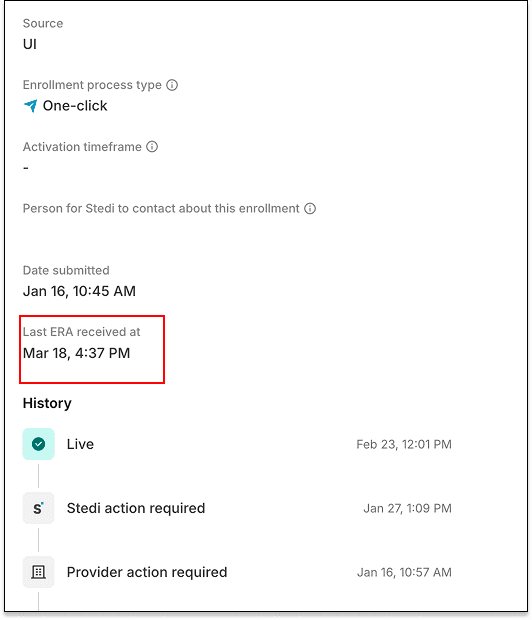
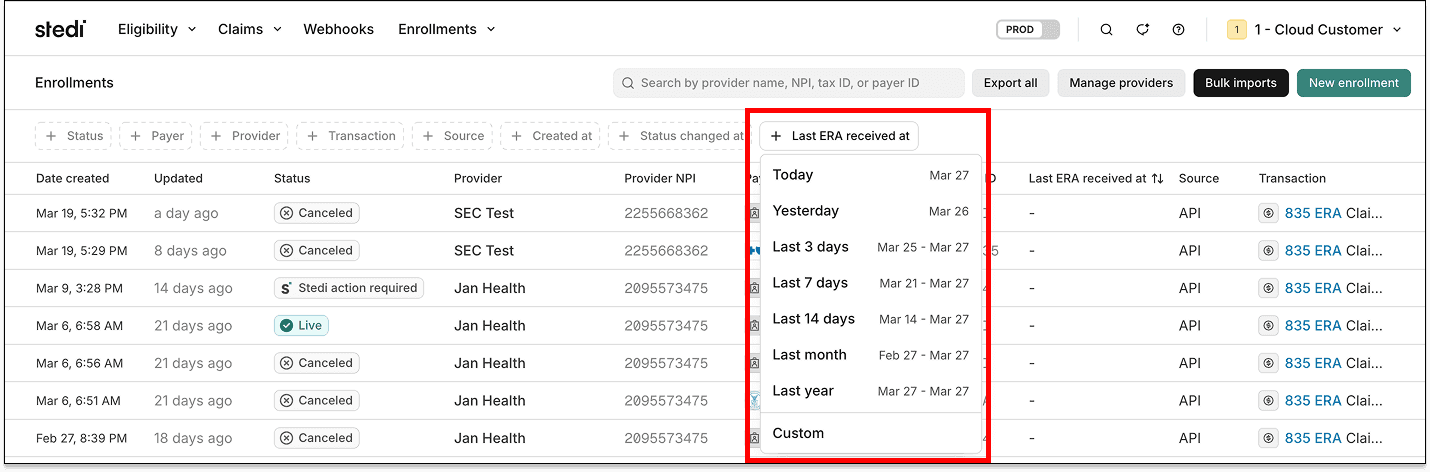
The Last ERA received at field is available in the Stedi portal’s enrollments list view as a filter.

The field also appears in the enrollment detail view.

Medicaid Texas is now one-click enrollment

Medicaid Texas – CHIP (Payer ID: 10186) now supports one-click transaction enrollment for Electronic Remittance Advice (ERAs).

About one-click enrollment

Transaction enrollment is the process of registering a provider to exchange specific healthcare transactions with a payer. Payers always require transaction enrollment for ERAs.

Transaction enrollment requirements vary by payer. Some payers may require the submitter to sign PDFs or complete tasks in the payer's portal.

With one-click transaction enrollment, you only need to submit an enrollment request. There are no follow-up steps. Stedi handles everything else.

You can check whether a payer supports one-click enrollment using the Stedi Payer Network or the Payer APIs.

UnitedHealthcare Community Plan is now one-click enrollment

Healthcare payer UnitedHealthcare Community Plan (Payer ID: 04567) now supports one-click transaction enrollment for Electronic Remittance Advice (ERAs).

About one-click enrollment

Transaction enrollment is the process of registering a provider to exchange specific healthcare transactions with a payer. Payers always require transaction enrollment for ERAs.

Transaction enrollment requirements vary by payer. Some payers may require the submitter to sign PDFs or complete tasks in the payer's portal.

With one-click transaction enrollment, you only need to submit an enrollment request. There are no follow-up steps. Stedi handles everything else.

You can check whether a payer supports one-click enrollment using the Stedi Payer Network or the Payer APIs.

UPMC Health Plan is now one-click enrollment

Healthcare payer UPMC Health Plan (Payer ID: 23281) now supports one-click transaction enrollment for Electronic Remittance Advice (ERAs).

About one-click enrollment

Transaction enrollment is the process of registering a provider to exchange specific healthcare transactions with a payer. Payers always require transaction enrollment for ERAs.

Transaction enrollment requirements vary by payer. Some payers may require the submitter to sign PDFs or complete tasks in the payer's portal.

With one-click transaction enrollment, you only need to submit an enrollment request. There are no follow-up steps. Stedi handles everything else.

You can check whether a payer supports one-click enrollment using the Stedi Payer Network or the Payer APIs.