How Stedi integrates with EHRs

Jan 12, 2026

Guide

Many healthcare practices run their day from an Electronic Health Record (EHR) platform – often just called an EHR. It’s where provider teams write clinical notes, schedule visits, send claims, and reconcile payments.

To support healthcare billing transactions, most EHRs connect to a healthcare clearinghouse, like Stedi. Stedi is the modern, programmable clearinghouse you can use to process transactions like eligibility checks, claims, and remits.

For providers, Stedi processes these transactions quickly and reliably, which means the provider can get paid faster. For developer teams building an EHR, Stedi offers an easy, fast integration experience with developer-friendly APIs and reliable infrastructure.

If you build or maintain an EHR, this guide shows how you can integrate with Stedi at a high level. It covers the workflows EHR teams ask about most: submitting 837 claims, managing transaction enrollments, and tracking 835 Electronic Remittance Advice (ERAs).

Our docs cover other commonly used clearinghouse features, including:

What is an EHR?

An EHR platform is the system healthcare practices use to document and manage patient care.

The primary – and original – job of an EHR is to store patient clinical records. These records track things like visits, diagnoses, and procedures.

Over time, EHRs have evolved to offer more features. For example, many EHRs now offer – or integrate with – practice management tools that do things like appointment scheduling or patient registration. This helps provider staff work faster by avoiding constant tool-switching.

Revenue cycle tools
In the same vein, many EHRs now also offer – or integrate with – revenue cycle management (RCM) tools. These tools let practices submit claims, track remits, and reconcile remits to payments directly in the EHR’s UI.

Those RCM tools rely on a healthcare clearinghouse – like Stedi – to connect to payers and ensure that billing transactions, like claims, are sent in HIPAA-compliant X12.

The problem with legacy clearinghouses

Many EHRs put significant effort into delivering a polished experience for providers. But they often end up having to push providers into outdated clearinghouse portals for billing transactions. In other cases, the legacy clearinghouse may only offer integration through SFTP or poorly documented APIs.

Many EHR teams we’ve talked to are also frustrated with how slowly legacy clearinghouses improve. It may take years for a clearinghouse to add an important feature or even respond to a feature request.

Stedi addresses these problems. We ship new features regularly – often multiple times per week. Our APIs and SFTP connections support deep EHR integration with a modern developer experience.

When EHR teams or providers need a clearinghouse UI, the Stedi portal – Stedi’s practice-friendly UI – lets them view, troubleshoot, and manage transactions in a modern interface.

How EHRs integrate with Stedi

EHRs typically connect to clearinghouses in one of two ways:

  1. The EHR builds all necessary clearinghouse workflows – like claim submission, transaction enrollment, and eligibility –  directly into its product UI. It then uses the clearinghouse to power these workflows behind the scenes.

  2. The EHR surfaces a subset of clearinghouse workflows in its UI. Each practice can use the clearinghouse’s portal directly for more advanced tasks.

Both patterns work well with Stedi.

You can build EHR UIs for the workflows you care about using Stedi’s APIs or SFTP connections. When something falls outside the UI, providers can use their own Stedi accounts to access the Stedi portal as a fallback.

Stedi’s account models support each of these integration patterns.

Stedi accounts

Stedi supports two account models: A single shared account or multiple, dedicated provider accounts.

Single shared account

In the shared account model, the EHR creates one Stedi account and uses it to process transactions for all providers and practices.

Instead of managing Stedi API keys or SFTP credentials for each provider, the EHR can use one central set of credentials that the EHR manages directly.

In this model, providers can’t directly access the Stedi portal. Any clearinghouse functionality must be surfaced in the EHR’s UI.

That’s the tradeoff: You’ll need to implement any Stedi features – including new features – in your EHR’s UI before providers can use them. Otherwise, providers can’t access those Stedi features.

Multiple, dedicated provider accounts

In the dedicated account model, each provider or practice creates their own Stedi account for free using our Basic plan. The plan includes Stedi portal access and several free transactions each month.

Accounts on the Basic plan can connect directly to the EHR through a Stedi app – a prebuilt integration between Stedi and the EHR platform. Each provider has their own Stedi API keys and SFTP credentials that can be used by the EHR’s app.

Install Stedi app

Stedi apps are add-ons for Basic accounts. As an app developer, you can choose to offer your app for free on the Basic plan or require a paid upgrade.

To discuss publishing a Stedi app, contact us. You can also check out Publish your app in our developer docs.

Our recommendation: Multiple, dedicated provider accounts

We recommend that most EHR development teams use the multiple, dedicated provider account model. It gives your team the most flexibility. If you use this model, you can build EHR UIs for the workflows you care about using Stedi’s APIs or SFTP.

When something falls outside your UI, providers can still use their Stedi accounts to access the Stedi portal directly. Stedi apps provide this access as a co-branded experience. Your providers get new Stedi features as soon as we ship them, without adding work to your roadmap.

Claim submission

Most EHRs that work with Stedi want to let providers submit claims without leaving the EHR. Stedi supports 837P professional, 837D dental, and 837I institutional claims.

Here’s how it would work with Stedi: The provider enters and submits the claim in the EHR’s UI. Behind the scenes, the EHR sends the claim data to Stedi. Most EHRs send this data using our JSON API endpoints. In these cases, Stedi converts the JSON claim data into HIPAA-compliant X12 before sending the claim to the payer.

EHRs that already use X12 EDI can also submit claims as raw X12 using our X12 API endpoints or an SFTP connection.

Claim edits

Payers run automated validation checks – called edits – on claims to ensure they don’t contain obvious errors. If a claim fails one of these edits, the payer rejects the claim.

Providers can usually fix the issue and resubmit, but payer rejections are slow. They often come back days after submission. That delay ultimately slows payments, which can affect the provider’s cash flow.

To save the provider time, Stedi also runs claims through our own set of edits that mirror the ones payers perform. If a claim fails one of these edits, we reject it and return an actionable error message.

Unlike payer rejections, you get rejections for Stedi edits quickly. If you submit a claim using our API or the Stedi portal, you receive errors in real time. If you’re using SFTP, you’ll receive the rejection as a 277CA claim acknowledgment within minutes.

As an example, the following JSON API error is from an edit that checks the patient’s date of birth and gender.

{
  "errors": [
    {
      "code": "33",
      "description": "The patient's date of birth and gender are both missing. Correct and resubmit.",
      "followupAction": "Please Correct and Resubmit"
    }
  ]
}

EHRs can show these error messages in their own UI. Providers will know exactly what to fix before they resubmit the claim.

CMS-1500 professional claims form

For most claims, the EHR’s UI is enough. But no EHR can cover every billing scenario, and real-world edge cases often fall outside what it’s built to handle.

When that happens with professional claims, providers and EHRs can use the Stedi portal’s professional claims form as a fallback. It’s modeled on the CMS-1500, the standard paper form for professional claims. If the provider’s staff has used the CMS-1500 form before, the layout will look familiar.
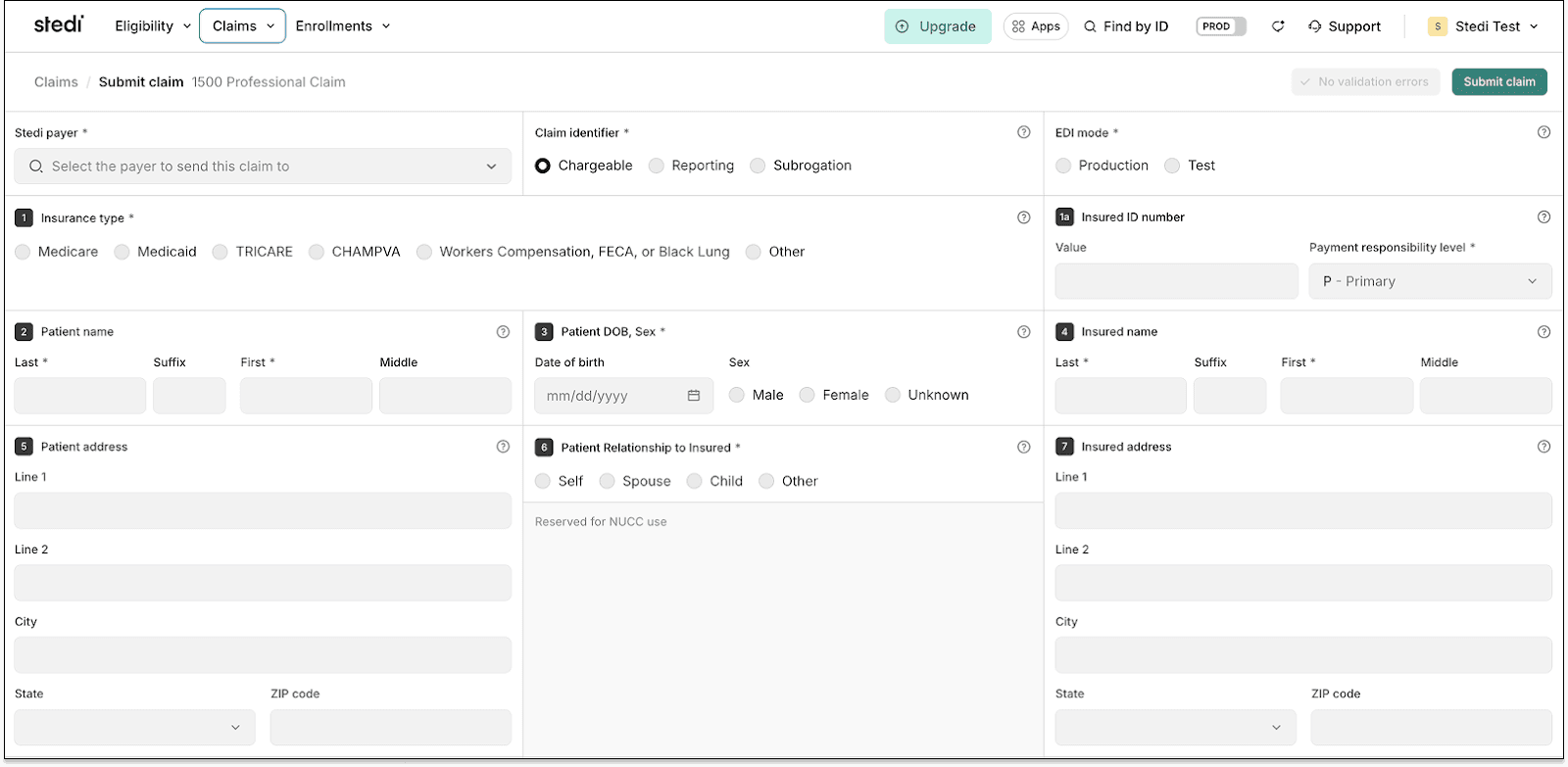
CMS-1500 professional claims form

The form’s fields are numbered to match the CMS-1500’s standardized boxes. Each includes a help icon with clear instructions so staff can complete the form quickly.

Like our API, the form runs claim edits and validates information in real time. It checks key details – such as NPIs and required fields – to reduce errors and prevent rejections.

CMS-1500 PDFs

Stedi also lets you generate a CMS-1500 PDF for any professional claim you submit.
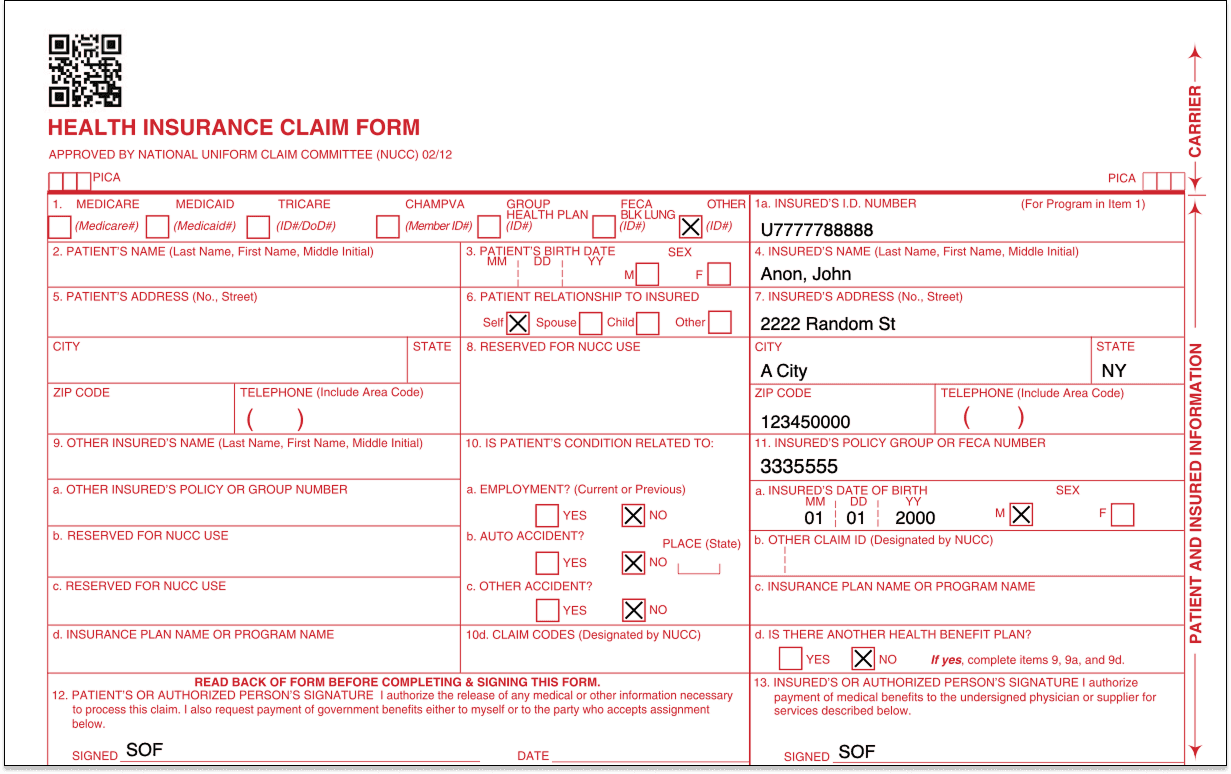
CMS-1500 PDF

Providers can download these PDFs directly in the Stedi portal. Check out our Provider docs for instructions.

EHR platforms can also generate these PDFs programmatically using our CMS-1500 PDF API endpoints. For details, see our related developer docs.

Transaction enrollment

Transaction enrollment is the process of registering a provider to exchange specific healthcare transactions with a payer.

Transaction enrollment is always required for 835 Electronic Remittance Advice (ERAs). A payer only sends ERAs to the clearinghouse the provider has enrolled with, and a provider can only enroll with the payer through one clearinghouse at a time.

For other transaction types, enrollment requirements vary by payer. You can check a payer’s enrollment requirements – and expected approval timelines – in the Stedi Payer Network or using Stedi’s Payers API.

How transaction enrollment works at Stedi

Most clearinghouses treat enrollment, including ERA enrollment, as a cost center. Because ERA revenue is small, they minimize their involvement and place the work on the provider.

Stedi offers fully managed, API-based transaction enrollment at no extra cost. EHRs can use Stedi’s enrollment API to programmatically submit and track enrollments for providers. Providers can also use the Stedi portal, which supports bulk CSV imports.

Less paperwork for providers

No matter how enrollment is submitted – through the API or the portal – Stedi handles most of the process and paperwork.

For many payers, submitting an enrollment request is all that’s required. Stedi signs enrollment PDF forms for the provider by default, eliminating more than 90% of the associated paperwork. There’s no chasing signatures and no avoidable delays.

Track ERAs

Once ERA enrollment with a payer is complete, the provider will begin receiving ERAs from that payer through Stedi.

Reconciliation is the process of matching a claim to its ERA, which explains how the claim was paid, and to the actual payment, making sure all three align.

If a provider uses their EHR to submit claims, they may also want the EHR to handle reconciliation.

The EHR needs a way to know when Stedi receives an ERA for one of its providers – and a way to retrieve the ERA itself from Stedi. 

Webhooks and APIs

If you want to work in JSON, you can set up a Stedi webhook to listen for events related to incoming ERA transactions. You can then call Stedi’s ERA Report API endpoint to retrieve the ERA data.

SFTP

If you already work with X12, you can use Stedi’s SFTP connection to download ERAs directly from the from-stedi directory.

Stedi portal

EHR platforms can also direct providers to the Stedi portal to get ERAs. In the portal, providers can see any claims they’ve submitted along with related claim acknowledgments and ERAs they’ve received.

ERA PDFs

EHR platforms can programmatically generate a PDF version of each ERA using Stedi’s ERA API endpoint. Providers can also download these PDFs directly from the Stedi portal. 

This makes it easy for provider teams to post remittances by hand or keep a physical copy of their ERAs.
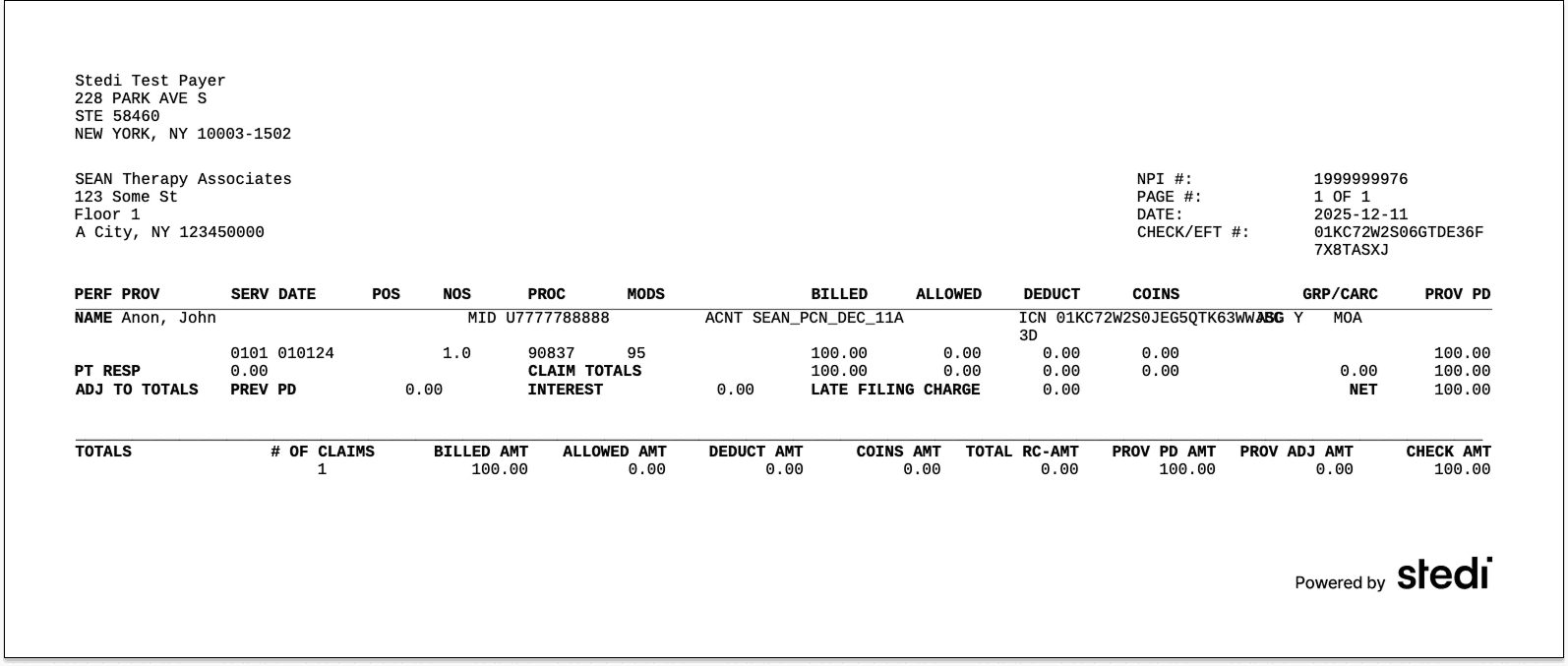
End-to-end test claims workflow

Stedi provides an end-to-end test claims workflow you can use to build integration tests and verify that your workflow is functioning properly.

When you submit test claims to the Stedi Test Payer, Stedi generates and returns a mock ERA based on the original claim.

Mock ERAs mirror what you’d receive from payers in production. Each includes the same information you’d get for a claim that was paid in full.

For more details, see Test claims workflow in the docs.

Next steps

This guide is just a high-level overview. If you’re building an EHR or looking to add clearinghouse functionality to your platform, reach out.

Our team can help you build a detailed integration plan that’s customized to your EHR.

Many healthcare practices run their day from an Electronic Health Record (EHR) platform – often just called an EHR. It’s where provider teams write clinical notes, schedule visits, send claims, and reconcile payments.

To support healthcare billing transactions, most EHRs connect to a healthcare clearinghouse, like Stedi. Stedi is the modern, programmable clearinghouse you can use to process transactions like eligibility checks, claims, and remits.

For providers, Stedi processes these transactions quickly and reliably, which means the provider can get paid faster. For developer teams building an EHR, Stedi offers an easy, fast integration experience with developer-friendly APIs and reliable infrastructure.

If you build or maintain an EHR, this guide shows how you can integrate with Stedi at a high level. It covers the workflows EHR teams ask about most: submitting 837 claims, managing transaction enrollments, and tracking 835 Electronic Remittance Advice (ERAs).

Our docs cover other commonly used clearinghouse features, including:

What is an EHR?

An EHR platform is the system healthcare practices use to document and manage patient care.

The primary – and original – job of an EHR is to store patient clinical records. These records track things like visits, diagnoses, and procedures.

Over time, EHRs have evolved to offer more features. For example, many EHRs now offer – or integrate with – practice management tools that do things like appointment scheduling or patient registration. This helps provider staff work faster by avoiding constant tool-switching.

Revenue cycle tools
In the same vein, many EHRs now also offer – or integrate with – revenue cycle management (RCM) tools. These tools let practices submit claims, track remits, and reconcile remits to payments directly in the EHR’s UI.

Those RCM tools rely on a healthcare clearinghouse – like Stedi – to connect to payers and ensure that billing transactions, like claims, are sent in HIPAA-compliant X12.

The problem with legacy clearinghouses

Many EHRs put significant effort into delivering a polished experience for providers. But they often end up having to push providers into outdated clearinghouse portals for billing transactions. In other cases, the legacy clearinghouse may only offer integration through SFTP or poorly documented APIs.

Many EHR teams we’ve talked to are also frustrated with how slowly legacy clearinghouses improve. It may take years for a clearinghouse to add an important feature or even respond to a feature request.

Stedi addresses these problems. We ship new features regularly – often multiple times per week. Our APIs and SFTP connections support deep EHR integration with a modern developer experience.

When EHR teams or providers need a clearinghouse UI, the Stedi portal – Stedi’s practice-friendly UI – lets them view, troubleshoot, and manage transactions in a modern interface.

How EHRs integrate with Stedi

EHRs typically connect to clearinghouses in one of two ways:

  1. The EHR builds all necessary clearinghouse workflows – like claim submission, transaction enrollment, and eligibility –  directly into its product UI. It then uses the clearinghouse to power these workflows behind the scenes.

  2. The EHR surfaces a subset of clearinghouse workflows in its UI. Each practice can use the clearinghouse’s portal directly for more advanced tasks.

Both patterns work well with Stedi.

You can build EHR UIs for the workflows you care about using Stedi’s APIs or SFTP connections. When something falls outside the UI, providers can use their own Stedi accounts to access the Stedi portal as a fallback.

Stedi’s account models support each of these integration patterns.

Stedi accounts

Stedi supports two account models: A single shared account or multiple, dedicated provider accounts.

Single shared account

In the shared account model, the EHR creates one Stedi account and uses it to process transactions for all providers and practices.

Instead of managing Stedi API keys or SFTP credentials for each provider, the EHR can use one central set of credentials that the EHR manages directly.

In this model, providers can’t directly access the Stedi portal. Any clearinghouse functionality must be surfaced in the EHR’s UI.

That’s the tradeoff: You’ll need to implement any Stedi features – including new features – in your EHR’s UI before providers can use them. Otherwise, providers can’t access those Stedi features.

Multiple, dedicated provider accounts

In the dedicated account model, each provider or practice creates their own Stedi account for free using our Basic plan. The plan includes Stedi portal access and several free transactions each month.

Accounts on the Basic plan can connect directly to the EHR through a Stedi app – a prebuilt integration between Stedi and the EHR platform. Each provider has their own Stedi API keys and SFTP credentials that can be used by the EHR’s app.

Install Stedi app

Stedi apps are add-ons for Basic accounts. As an app developer, you can choose to offer your app for free on the Basic plan or require a paid upgrade.

To discuss publishing a Stedi app, contact us. You can also check out Publish your app in our developer docs.

Our recommendation: Multiple, dedicated provider accounts

We recommend that most EHR development teams use the multiple, dedicated provider account model. It gives your team the most flexibility. If you use this model, you can build EHR UIs for the workflows you care about using Stedi’s APIs or SFTP.

When something falls outside your UI, providers can still use their Stedi accounts to access the Stedi portal directly. Stedi apps provide this access as a co-branded experience. Your providers get new Stedi features as soon as we ship them, without adding work to your roadmap.

Claim submission

Most EHRs that work with Stedi want to let providers submit claims without leaving the EHR. Stedi supports 837P professional, 837D dental, and 837I institutional claims.

Here’s how it would work with Stedi: The provider enters and submits the claim in the EHR’s UI. Behind the scenes, the EHR sends the claim data to Stedi. Most EHRs send this data using our JSON API endpoints. In these cases, Stedi converts the JSON claim data into HIPAA-compliant X12 before sending the claim to the payer.

EHRs that already use X12 EDI can also submit claims as raw X12 using our X12 API endpoints or an SFTP connection.

Claim edits

Payers run automated validation checks – called edits – on claims to ensure they don’t contain obvious errors. If a claim fails one of these edits, the payer rejects the claim.

Providers can usually fix the issue and resubmit, but payer rejections are slow. They often come back days after submission. That delay ultimately slows payments, which can affect the provider’s cash flow.

To save the provider time, Stedi also runs claims through our own set of edits that mirror the ones payers perform. If a claim fails one of these edits, we reject it and return an actionable error message.

Unlike payer rejections, you get rejections for Stedi edits quickly. If you submit a claim using our API or the Stedi portal, you receive errors in real time. If you’re using SFTP, you’ll receive the rejection as a 277CA claim acknowledgment within minutes.

As an example, the following JSON API error is from an edit that checks the patient’s date of birth and gender.

{
  "errors": [
    {
      "code": "33",
      "description": "The patient's date of birth and gender are both missing. Correct and resubmit.",
      "followupAction": "Please Correct and Resubmit"
    }
  ]
}

EHRs can show these error messages in their own UI. Providers will know exactly what to fix before they resubmit the claim.

CMS-1500 professional claims form

For most claims, the EHR’s UI is enough. But no EHR can cover every billing scenario, and real-world edge cases often fall outside what it’s built to handle.

When that happens with professional claims, providers and EHRs can use the Stedi portal’s professional claims form as a fallback. It’s modeled on the CMS-1500, the standard paper form for professional claims. If the provider’s staff has used the CMS-1500 form before, the layout will look familiar.

CMS-1500 professional claims form

The form’s fields are numbered to match the CMS-1500’s standardized boxes. Each includes a help icon with clear instructions so staff can complete the form quickly.

Like our API, the form runs claim edits and validates information in real time. It checks key details – such as NPIs and required fields – to reduce errors and prevent rejections.

CMS-1500 PDFs

Stedi also lets you generate a CMS-1500 PDF for any professional claim you submit.

CMS-1500 PDF

Providers can download these PDFs directly in the Stedi portal. Check out our Provider docs for instructions.

EHR platforms can also generate these PDFs programmatically using our CMS-1500 PDF API endpoints. For details, see our related developer docs.

Transaction enrollment

Transaction enrollment is the process of registering a provider to exchange specific healthcare transactions with a payer.

Transaction enrollment is always required for 835 Electronic Remittance Advice (ERAs). A payer only sends ERAs to the clearinghouse the provider has enrolled with, and a provider can only enroll with the payer through one clearinghouse at a time.

For other transaction types, enrollment requirements vary by payer. You can check a payer’s enrollment requirements – and expected approval timelines – in the Stedi Payer Network or using Stedi’s Payers API.

How transaction enrollment works at Stedi

Most clearinghouses treat enrollment, including ERA enrollment, as a cost center. Because ERA revenue is small, they minimize their involvement and place the work on the provider.

Stedi offers fully managed, API-based transaction enrollment at no extra cost. EHRs can use Stedi’s enrollment API to programmatically submit and track enrollments for providers. Providers can also use the Stedi portal, which supports bulk CSV imports.

Less paperwork for providers

No matter how enrollment is submitted – through the API or the portal – Stedi handles most of the process and paperwork.

For many payers, submitting an enrollment request is all that’s required. Stedi signs enrollment PDF forms for the provider by default, eliminating more than 90% of the associated paperwork. There’s no chasing signatures and no avoidable delays.

Track ERAs

Once ERA enrollment with a payer is complete, the provider will begin receiving ERAs from that payer through Stedi.

Reconciliation is the process of matching a claim to its ERA, which explains how the claim was paid, and to the actual payment, making sure all three align.

If a provider uses their EHR to submit claims, they may also want the EHR to handle reconciliation.

The EHR needs a way to know when Stedi receives an ERA for one of its providers – and a way to retrieve the ERA itself from Stedi. 

Webhooks and APIs

If you want to work in JSON, you can set up a Stedi webhook to listen for events related to incoming ERA transactions. You can then call Stedi’s ERA Report API endpoint to retrieve the ERA data.

SFTP

If you already work with X12, you can use Stedi’s SFTP connection to download ERAs directly from the from-stedi directory.

Stedi portal

EHR platforms can also direct providers to the Stedi portal to get ERAs. In the portal, providers can see any claims they’ve submitted along with related claim acknowledgments and ERAs they’ve received.

ERA PDFs

EHR platforms can programmatically generate a PDF version of each ERA using Stedi’s ERA API endpoint. Providers can also download these PDFs directly from the Stedi portal. 

This makes it easy for provider teams to post remittances by hand or keep a physical copy of their ERAs.

End-to-end test claims workflow

Stedi provides an end-to-end test claims workflow you can use to build integration tests and verify that your workflow is functioning properly.

When you submit test claims to the Stedi Test Payer, Stedi generates and returns a mock ERA based on the original claim.

Mock ERAs mirror what you’d receive from payers in production. Each includes the same information you’d get for a claim that was paid in full.

For more details, see Test claims workflow in the docs.

Next steps

This guide is just a high-level overview. If you’re building an EHR or looking to add clearinghouse functionality to your platform, reach out.

Our team can help you build a detailed integration plan that’s customized to your EHR.

Many healthcare practices run their day from an Electronic Health Record (EHR) platform – often just called an EHR. It’s where provider teams write clinical notes, schedule visits, send claims, and reconcile payments.

To support healthcare billing transactions, most EHRs connect to a healthcare clearinghouse, like Stedi. Stedi is the modern, programmable clearinghouse you can use to process transactions like eligibility checks, claims, and remits.

For providers, Stedi processes these transactions quickly and reliably, which means the provider can get paid faster. For developer teams building an EHR, Stedi offers an easy, fast integration experience with developer-friendly APIs and reliable infrastructure.

If you build or maintain an EHR, this guide shows how you can integrate with Stedi at a high level. It covers the workflows EHR teams ask about most: submitting 837 claims, managing transaction enrollments, and tracking 835 Electronic Remittance Advice (ERAs).

Our docs cover other commonly used clearinghouse features, including:

What is an EHR?

An EHR platform is the system healthcare practices use to document and manage patient care.

The primary – and original – job of an EHR is to store patient clinical records. These records track things like visits, diagnoses, and procedures.

Over time, EHRs have evolved to offer more features. For example, many EHRs now offer – or integrate with – practice management tools that do things like appointment scheduling or patient registration. This helps provider staff work faster by avoiding constant tool-switching.

Revenue cycle tools
In the same vein, many EHRs now also offer – or integrate with – revenue cycle management (RCM) tools. These tools let practices submit claims, track remits, and reconcile remits to payments directly in the EHR’s UI.

Those RCM tools rely on a healthcare clearinghouse – like Stedi – to connect to payers and ensure that billing transactions, like claims, are sent in HIPAA-compliant X12.

The problem with legacy clearinghouses

Many EHRs put significant effort into delivering a polished experience for providers. But they often end up having to push providers into outdated clearinghouse portals for billing transactions. In other cases, the legacy clearinghouse may only offer integration through SFTP or poorly documented APIs.

Many EHR teams we’ve talked to are also frustrated with how slowly legacy clearinghouses improve. It may take years for a clearinghouse to add an important feature or even respond to a feature request.

Stedi addresses these problems. We ship new features regularly – often multiple times per week. Our APIs and SFTP connections support deep EHR integration with a modern developer experience.

When EHR teams or providers need a clearinghouse UI, the Stedi portal – Stedi’s practice-friendly UI – lets them view, troubleshoot, and manage transactions in a modern interface.

How EHRs integrate with Stedi

EHRs typically connect to clearinghouses in one of two ways:

  1. The EHR builds all necessary clearinghouse workflows – like claim submission, transaction enrollment, and eligibility –  directly into its product UI. It then uses the clearinghouse to power these workflows behind the scenes.

  2. The EHR surfaces a subset of clearinghouse workflows in its UI. Each practice can use the clearinghouse’s portal directly for more advanced tasks.

Both patterns work well with Stedi.

You can build EHR UIs for the workflows you care about using Stedi’s APIs or SFTP connections. When something falls outside the UI, providers can use their own Stedi accounts to access the Stedi portal as a fallback.

Stedi’s account models support each of these integration patterns.

Stedi accounts

Stedi supports two account models: A single shared account or multiple, dedicated provider accounts.

Single shared account

In the shared account model, the EHR creates one Stedi account and uses it to process transactions for all providers and practices.

Instead of managing Stedi API keys or SFTP credentials for each provider, the EHR can use one central set of credentials that the EHR manages directly.

In this model, providers can’t directly access the Stedi portal. Any clearinghouse functionality must be surfaced in the EHR’s UI.

That’s the tradeoff: You’ll need to implement any Stedi features – including new features – in your EHR’s UI before providers can use them. Otherwise, providers can’t access those Stedi features.

Multiple, dedicated provider accounts

In the dedicated account model, each provider or practice creates their own Stedi account for free using our Basic plan. The plan includes Stedi portal access and several free transactions each month.

Accounts on the Basic plan can connect directly to the EHR through a Stedi app – a prebuilt integration between Stedi and the EHR platform. Each provider has their own Stedi API keys and SFTP credentials that can be used by the EHR’s app.

Install Stedi app

Stedi apps are add-ons for Basic accounts. As an app developer, you can choose to offer your app for free on the Basic plan or require a paid upgrade.

To discuss publishing a Stedi app, contact us. You can also check out Publish your app in our developer docs.

Our recommendation: Multiple, dedicated provider accounts

We recommend that most EHR development teams use the multiple, dedicated provider account model. It gives your team the most flexibility. If you use this model, you can build EHR UIs for the workflows you care about using Stedi’s APIs or SFTP.

When something falls outside your UI, providers can still use their Stedi accounts to access the Stedi portal directly. Stedi apps provide this access as a co-branded experience. Your providers get new Stedi features as soon as we ship them, without adding work to your roadmap.

Claim submission

Most EHRs that work with Stedi want to let providers submit claims without leaving the EHR. Stedi supports 837P professional, 837D dental, and 837I institutional claims.

Here’s how it would work with Stedi: The provider enters and submits the claim in the EHR’s UI. Behind the scenes, the EHR sends the claim data to Stedi. Most EHRs send this data using our JSON API endpoints. In these cases, Stedi converts the JSON claim data into HIPAA-compliant X12 before sending the claim to the payer.

EHRs that already use X12 EDI can also submit claims as raw X12 using our X12 API endpoints or an SFTP connection.

Claim edits

Payers run automated validation checks – called edits – on claims to ensure they don’t contain obvious errors. If a claim fails one of these edits, the payer rejects the claim.

Providers can usually fix the issue and resubmit, but payer rejections are slow. They often come back days after submission. That delay ultimately slows payments, which can affect the provider’s cash flow.

To save the provider time, Stedi also runs claims through our own set of edits that mirror the ones payers perform. If a claim fails one of these edits, we reject it and return an actionable error message.

Unlike payer rejections, you get rejections for Stedi edits quickly. If you submit a claim using our API or the Stedi portal, you receive errors in real time. If you’re using SFTP, you’ll receive the rejection as a 277CA claim acknowledgment within minutes.

As an example, the following JSON API error is from an edit that checks the patient’s date of birth and gender.

{
  "errors": [
    {
      "code": "33",
      "description": "The patient's date of birth and gender are both missing. Correct and resubmit.",
      "followupAction": "Please Correct and Resubmit"
    }
  ]
}

EHRs can show these error messages in their own UI. Providers will know exactly what to fix before they resubmit the claim.

CMS-1500 professional claims form

For most claims, the EHR’s UI is enough. But no EHR can cover every billing scenario, and real-world edge cases often fall outside what it’s built to handle.

When that happens with professional claims, providers and EHRs can use the Stedi portal’s professional claims form as a fallback. It’s modeled on the CMS-1500, the standard paper form for professional claims. If the provider’s staff has used the CMS-1500 form before, the layout will look familiar.

CMS-1500 professional claims form

The form’s fields are numbered to match the CMS-1500’s standardized boxes. Each includes a help icon with clear instructions so staff can complete the form quickly.

Like our API, the form runs claim edits and validates information in real time. It checks key details – such as NPIs and required fields – to reduce errors and prevent rejections.

CMS-1500 PDFs

Stedi also lets you generate a CMS-1500 PDF for any professional claim you submit.

CMS-1500 PDF

Providers can download these PDFs directly in the Stedi portal. Check out our Provider docs for instructions.

EHR platforms can also generate these PDFs programmatically using our CMS-1500 PDF API endpoints. For details, see our related developer docs.

Transaction enrollment

Transaction enrollment is the process of registering a provider to exchange specific healthcare transactions with a payer.

Transaction enrollment is always required for 835 Electronic Remittance Advice (ERAs). A payer only sends ERAs to the clearinghouse the provider has enrolled with, and a provider can only enroll with the payer through one clearinghouse at a time.

For other transaction types, enrollment requirements vary by payer. You can check a payer’s enrollment requirements – and expected approval timelines – in the Stedi Payer Network or using Stedi’s Payers API.

How transaction enrollment works at Stedi

Most clearinghouses treat enrollment, including ERA enrollment, as a cost center. Because ERA revenue is small, they minimize their involvement and place the work on the provider.

Stedi offers fully managed, API-based transaction enrollment at no extra cost. EHRs can use Stedi’s enrollment API to programmatically submit and track enrollments for providers. Providers can also use the Stedi portal, which supports bulk CSV imports.

Less paperwork for providers

No matter how enrollment is submitted – through the API or the portal – Stedi handles most of the process and paperwork.

For many payers, submitting an enrollment request is all that’s required. Stedi signs enrollment PDF forms for the provider by default, eliminating more than 90% of the associated paperwork. There’s no chasing signatures and no avoidable delays.

Track ERAs

Once ERA enrollment with a payer is complete, the provider will begin receiving ERAs from that payer through Stedi.

Reconciliation is the process of matching a claim to its ERA, which explains how the claim was paid, and to the actual payment, making sure all three align.

If a provider uses their EHR to submit claims, they may also want the EHR to handle reconciliation.

The EHR needs a way to know when Stedi receives an ERA for one of its providers – and a way to retrieve the ERA itself from Stedi. 

Webhooks and APIs

If you want to work in JSON, you can set up a Stedi webhook to listen for events related to incoming ERA transactions. You can then call Stedi’s ERA Report API endpoint to retrieve the ERA data.

SFTP

If you already work with X12, you can use Stedi’s SFTP connection to download ERAs directly from the from-stedi directory.

Stedi portal

EHR platforms can also direct providers to the Stedi portal to get ERAs. In the portal, providers can see any claims they’ve submitted along with related claim acknowledgments and ERAs they’ve received.

ERA PDFs

EHR platforms can programmatically generate a PDF version of each ERA using Stedi’s ERA API endpoint. Providers can also download these PDFs directly from the Stedi portal. 

This makes it easy for provider teams to post remittances by hand or keep a physical copy of their ERAs.

End-to-end test claims workflow

Stedi provides an end-to-end test claims workflow you can use to build integration tests and verify that your workflow is functioning properly.

When you submit test claims to the Stedi Test Payer, Stedi generates and returns a mock ERA based on the original claim.

Mock ERAs mirror what you’d receive from payers in production. Each includes the same information you’d get for a claim that was paid in full.

For more details, see Test claims workflow in the docs.

Next steps

This guide is just a high-level overview. If you’re building an EHR or looking to add clearinghouse functionality to your platform, reach out.

Our team can help you build a detailed integration plan that’s customized to your EHR.

Share

Twitter
LinkedIn

Get started with Stedi

Get started with Stedi

Automate healthcare transactions with developer-friendly APIs that support thousands of payers. Contact us to learn more and speak to the team.

Get updates on what’s new at Stedi

Get updates on what’s new at Stedi

Get updates on what’s new at Stedi

Get updates on what’s new at Stedi

Backed by

Stedi is a registered trademark of Stedi, Inc. All names, logos, and brands of third parties listed on our site are trademarks of their respective owners (including “X12”, which is a trademark of X12 Incorporated). Stedi, Inc. and its products and services are not endorsed by, sponsored by, or affiliated with these third parties. Our use of these names, logos, and brands is for identification purposes only, and does not imply any such endorsement, sponsorship, or affiliation.

Get updates on what’s new at Stedi

Backed by

Stedi is a registered trademark of Stedi, Inc. All names, logos, and brands of third parties listed on our site are trademarks of their respective owners (including “X12”, which is a trademark of X12 Incorporated). Stedi, Inc. and its products and services are not endorsed by, sponsored by, or affiliated with these third parties. Our use of these names, logos, and brands is for identification purposes only, and does not imply any such endorsement, sponsorship, or affiliation.

Get updates on what’s new at Stedi

Backed by

Stedi is a registered trademark of Stedi, Inc. All names, logos, and brands of third parties listed on our site are trademarks of their respective owners (including “X12”, which is a trademark of X12 Incorporated). Stedi, Inc. and its products and services are not endorsed by, sponsored by, or affiliated with these third parties. Our use of these names, logos, and brands is for identification purposes only, and does not imply any such endorsement, sponsorship, or affiliation.