The Stedi portal now lets you report missing ERAs
You can now report missing Electronic Remittance Advice (ERAs) from a form in the Stedi portal.
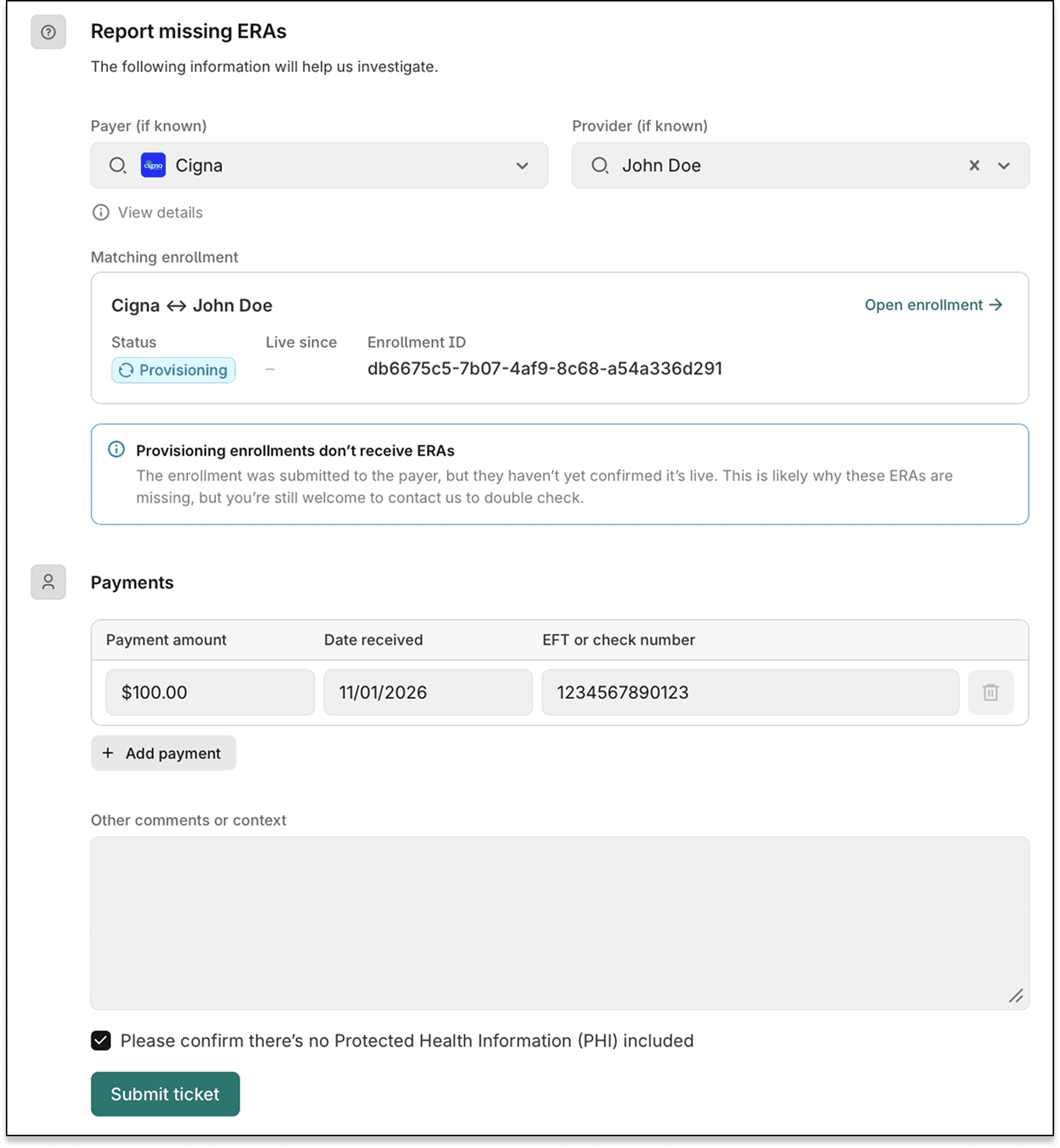
Previously, Stedi support followed up on missing ERA reports to ask for payment details. Now, the form collects them up front and sends them to Stedi support in a ticket.
To open the form, click Report a missing ERA in one of these places:
- Enrollment details page – For ERA enrollments with a
LIVEstatus. The form fills in the enrollment's payer and provider. - ERA list – When your filters return no results. The form fills in the payer and provider from your filters, if you set them.
In the form, enter the Payment amount, Date received, and EFT or check number for each payment. Stedi support uses these details to find the ERA with the payer.
To report more than one payment, click Add payment.
When you select a payer and provider, the form shows their ERA enrollment. The form also warns you about common reasons for a missing ERA, such as an enrollment that isn't live yet.
Before you click Submit ticket, you must confirm that the form doesn't include Protected Health Information (PHI). PHI is patient data, such as names, dates of birth, or member IDs.