Changelog

Claim edit: Invalid date format

Stedi now rejects 837P professional, 837D dental, and 837I institutional claims that include a date in an invalid format.

Date formats

X12 standards require that every date on a claim, such as the service date or admission date, use one of two formats:

  • Single date – Eight digits in CCYYMMDD format. Example: 20260515.

  • Date range – Two dates in CCYYMMDD-CCYYMMDD format. Example: 20260515-20260516.

In raw X12, each date has a related qualifier indicating the format: D8 for single dates and RD8 for date ranges.

Date formats in the JSON API

In Stedi’s JSON Claim Submission API endpoints, most dates that support both formats use paired fields. For example, in the JSON Professional Claim Submission endpoint, you can provide a service date either as:

Some dates support both formats in a single field. For example, in the JSON Dental Claim Submission endpoint, the claim-level serviceDate field accepts either a single date or a date range.

How the edit works

When a date in a claim doesn't match one of these formats, the payer may reject the claim.

This edit catches the issue before the claim reaches the payer. It prevents payer rejections, which take longer to resolve and delay payment for the provider.

Rejection errors

If you submit a claim using Stedi's Claim Submission API endpoints and the claim fails the edit, you'll get back an error response in real time. The response includes details in the errors array:

{
  "errors": [
    {
      "code": "33",
      "description": "Invalid Date Range Format. The Service date range (20250708-abc) must be submitted in format 'CCYYMMDD-CCYYMMDD' when reported with the date range qualifier (RD8). Correct and resubmit.",
      "followupAction": "Please Correct and Resubmit"
    }
  ]
}

If you submit a claim using SFTP and the claim fails the edit, Stedi will reject the claim with a 277CA claim acknowledgment. The acknowledgment will include a related claim status category code, claim status code, and error message:

STC*A7>569*[DATE]*U*[AMOUNT]********Invalid Date Range Format. The Service date range (20250708-abc) must be submitted in format 'CCYYMMDD-CCYYMMDD' when reported with the date range qualifier (RD8). Correct and resubmit.~

Introducing ERA views in the Stedi portal

You can now view Electronic Remittance Advice (ERAs) in the Stedi portal's claims view.

Features include:

  • A filterable list of all ERAs received through Stedi.

  • A detail page for each ERA showing payer and payee info, payment date and method, total paid, and claim-level adjustments.

  • A click-through from a claim's timeline to any ERAs that match its Patient Control Number (PCN).

  • Download options for the full ERA PDF, a single claim's PDF, or all claim PDFs at once.

For more details, see our announcement blog.

Claim edit: Invalid service unit counts

Stedi now rejects 837P professional, 837D dental, and 837I institutional claims that include an invalid service unit count.

What are service unit counts?

In a claim, a service line represents billing for a specific service, such as an office visit, lab test, or therapy session. The line’s procedure code indicates the type of service.

A service unit count is the number of units for a service line. The meaning of a unit – visits, tests, time increments, etc. – depends on the procedure code. For example, four units of a 15-minute therapy code equal one hour.

Invalid unit counts

X12 standards require service unit counts to be greater than zero. If a service line's unit count is zero or negative, the payer may reject the claim.

How this edit works

This edit catches claims with zero or negative service unit counts before the claims reach the payer. This prevents payer rejections, which take longer to resolve and delay payment for the provider.

The edit applies to three different service unit counts that can appear on a claim:

  • Submitted service unit counts – What the provider bills. Called the procedure count on dental claims.

  • Paid service unit counts – What a prior payer pays in coordination of benefits (COB) scenarios.

  • Repriced approved service unit counts – What a third-party repricer approves after reviewing the claim. Not commonly used by claim submitters.

Submitted service unit counts

A submitted service unit count is the number of units a provider bills on a service line, before any adjudication or adjustments.

Claim typeJSON API fieldX12 element
837P professionalclaimInformation.serviceLines[].professionalService.serviceUnitCountSV1-04 (Service Unit Count) of Loop 2400 (Service Line Number)
837I institutionalclaimInformation.serviceLines[].institutionalService.serviceUnitCountSV2-05 (Service Unit Count) of Loop 2400 (Service Line Number)
837D dentalclaimInformation.serviceLines[].dentalService.procedureCountSV3-06 (Procedure Count) of Loop 2400 (Service Line Number)

Rejection errors

If you submit a claim with a submitted service unit count that's zero or negative using Stedi’s Claim Submission API endpoints, you’ll get back an error response in real time. The response includes details in the errors array:

{
  "errors": [
    {
      "code": "33",
      "description": "Invalid Service Units. Service units must be greater than zero for each service line. Line 1 contains an invalid value, 0. Correct and resubmit.",
      "followupAction": "Please Correct and Resubmit"
    }
  ]
}

If you submit a claim with a submitted service unit count that's zero or negative using SFTP, Stedi will reject the claim with a 277CA claim acknowledgment. The acknowledgment will include a related claim status category code, claim status code, and error message:

STC*A7>476*[DATE]*U*[AMOUNT]********Invalid Service Units. Service units must be greater than zero for each service line. Line 1 contains an invalid value, 0. Correct and resubmit.~

Paid service unit counts

When a patient has more than one insurance plan, say a child covered by both parents’ health insurance, claims go to the primary payer first, then the secondary, and so on. This is called coordination of benefits (COB).

Claims sent to non-primary payers must report each previous payer’s payments and adjustments.

A paid service unit count reports how many units a previous payer paid for a given service line. For example, if the primary payer paid 2 of 3 office visit units, the claim submitted to the secondary payer should include a paid service unit count of 2 for that service line.

Claim typeJSON API fieldX12 element
837P professionalclaimInformation.serviceLines[].lineAdjudicationInformation[].paidServiceUnitCountSVD-05 (Paid Service Unit Count) of Loop 2430 (Line Adjudication Information)
837D dentalclaimInformation.serviceLines[].lineAdjudicationInformation[].paidServiceUnitCountSVD-05 (Paid Service Unit Count) of Loop 2430 (Line Adjudication Information)
837I institutionalclaimInformation.serviceLines[].lineAdjudicationInformation[].paidServiceUnitCountSVD-05 (Paid Service Unit Count) of Loop 2430 (Line Adjudication Information)

Rejection errors

If you submit a claim with a paid service unit count that's zero or negative using Stedi’s Claim Submission API endpoints, you’ll get back an error response in real time. The response includes details in the errors array:

{
  "errors": [
    {
      "code": "33",
      "description": "Invalid Paid Service Unit Count. Submitted value -2 on line 1 must be zero or greater. Negative values are not allowed. Correct and resubmit.",
      "followupAction": "Please Correct and Resubmit"
    }
  ]
}

If you submit a claim with a paid service unit count that's zero or negative using SFTP, Stedi will reject the claim with a 277CA claim acknowledgment and an error message:

STC*A7>608*[DATE]*U*[AMOUNT]********Invalid Paid Service Unit Count. Submitted value -2 on line 1 must be zero or greater. Negative values are not allowed. Correct and resubmit.~

Repriced approved service unit counts

Important: Most Stedi customers will not use repriced approved service unit counts. They're typically set by a repricer, not the claim submitter.

A contracted rate is the prenegotiated maximum a payer will pay for a specific service. Payers sometimes contract with third-party repricers to apply contracted rates to claims. Repricers are common in managed care and provider networks.

The repricer reviews submitted claims and may approve fewer units than the provider billed. For example, if a provider bills four units of a 15-minute therapy code (one hour total), the repricer may only approve three units (45 minutes). The repricer then updates the claim with the repriced approved service unit count and forwards the claim to the payer.

The payer uses this approved count, along with the contracted rate, to adjudicate the claim.

Claim typeJSON API fieldX12 element
837P professionalNot exposed in the JSON API.HCP-12 (Repriced Approved Service Unit Count) of Loop 2400 (Service Line Number)
837D dentalclaimInformation.serviceLines[].linePricingRepricingInformation.repricedApprovedServiceUnitCountHCP-12 (Repriced Approved Service Unit Count) of Loop 2400 (Service Line Number)
837I institutionalclaimInformation.claimPricingInformation.repricedApprovedServiceUnitCountHCP-12 (Repriced Approved Service Unit Count) of Loop 2300 (Claim Information)

Rejection errors

If you submit a claim with a repriced approved service unit count that's zero or negative using Stedi’s Claim Submission API endpoints, you’ll get back an error response in real time. The response includes details in the errors array:

{
  "errors": [
    {
      "code": "33",
      "description": "Invalid Repriced Approved Service Unit Count. Submitted value -1 on line 1 must be zero or greater. Negative values are not allowed. Correct and resubmit.",
      "followupAction": "Please Correct and Resubmit"
    }
  ]
}

If you submit a claim with a repriced approved service unit count that's zero or negative using SFTP, Stedi will reject the claim with a 277CA claim acknowledgment and an error message:

STC*A7>709*[DATE]*U*[AMOUNT]********Invalid Repriced Approved Service Unit Count. Submitted value -1 on line 1 must be zero or greater. Negative values are not allowed. Correct and resubmit.~

Resolution tips

Claim submitters sometimes use negative service unit counts to reverse charges, or submit zero units in error. Submit a void or replacement claim instead.
Test mode: New mock eligibility check with CDT procedure code

We've added a new dental mock eligibility check to Stedi's test mode. The mock check includes a Current Dental Terminology (CDT) procedure code in the eligibility request and response.

Previously, all mock eligibility requests used only Service Type Codes (STCs).

What is test mode?

Stedi’s test mode lets you run a full eligibility workflow without using real patient data or sending checks to payers.

In test mode, you use test API keys to send predefined mock eligibility checks and get realistic responses – with things like active coverage indicators, copays, and deductibles – using Stedi's production API endpoints.

You can use test mode for app development and integration tests. AI coding agents, like Claude Code and Codex, can use test mode to build and verify eligibility integrations end-to-end without accessing real patient data.

Our predefined mock eligibility requests cover 30+ scenarios across 5+ payers, including error cases. Each scenario includes copy-paste-ready examples for our JSON, Raw X12, and SOAP Eligibility endpoints.

Availability

Test mode is available on every Stedi account. Sign up to get started. It's free and takes less than two minutes. No credit card is required.

Claim edit: Phone numbers with invalid area or exchange codes

Stedi now rejects 837P professional, 837D dental, and 837I institutional claims that contain a phone number with an invalid area code or exchange code.

How the edit works

X12 standards require claims to include 10-digit telephone numbers for entities like the submitter and billing provider.

To be valid, a phone number’s area code (first 3 digits) and exchange code (next 3 digits) can't begin with 0 or 1. If they do, the payer may reject the claim.

This edit catches the issue before the claim reaches the payer. It prevents payer rejections, which are slower and delay payment for the provider.

Rejection errors

If you submit a claim using Stedi's Claim Submission API endpoints and the claim fails the edit, you'll get back an error response in real time. The response includes details in the errors array:

{
  "errors": [
    {
      "code": "33",
      "description": "Invalid Telephone number. The submitted telephone number, 0125550100, for Billing Provider is not a valid number. Area codes and phone numbers must not begin with 0 or 1. Correct and resubmit.",
      "followupAction": "Please Correct and Resubmit"
    }
  ]
}

If you submit a claim using SFTP and the claim fails the edit, Stedi will reject the claim with a 277CA claim acknowledgment. The acknowledgment will include a related claim status category code, claim status code, entity identifier code, and error message:

STC*A7>127>85*[DATE]*U*[AMOUNT]********Invalid Telephone number. The submitted telephone number, 0125550100, for Billing Provider is not a valid number. Area codes and phone numbers must not begin with 0 or 1. Correct and resubmit.~

Stedi's CMS-1500 claim form now supports Other Insured's Information (Box 9, 9a, and 9d)

You can now include a secondary or tertiary payer's health plan information in the Other Insured's Information section (Box 9, 9a, and 9d) of the Stedi portal's CMS-1500 professional form. Previously, you couldn’t submit this information using the form.

You can access the new section by selecting Yes in Box 11d – Is there another health benefit plan?

Once the section is open, you can expand Additional details to enter other information about the plan, including but not limited to:

  • The payer.

  • The payer responsibility sequence number code – primary, secondary, tertiary, or unknown.

  • Relationship to the insured – self, spouse, child, or other. Relative to the person listed in Box 4 – Insured Name.

  • The claim filing indicator.

To add more plans, click + Other insured.

Selecting No in Box 11d collapses the Other Insured's Information section and excludes its fields from the submitted claim. Any values you entered won't be included in the claim.

Coordination of benefits

Coordination of benefits (COB) is how payers divide responsibility for payment when a patient is covered by more than one insurance plan, such as a child covered under both parents' health plans.

In COB, the primary payer processes the claim first, then passes any remaining balance to the secondary payer, and so on.

The information in the Other Insured's Information section lets the primary payer see the patient's other plans so payment can be coordinated downstream.

Important: You can only use the CMS-1500 form to submit claims to primary payers. Submitting claims directly to a secondary or tertiary payer isn't supported.

The Stedi portal now supports requested effective dates for ERA enrollments

You can now set an optional requested effective date when creating ERA transaction enrollment requests in the Stedi portal. Previously, this field was only available through the Create Enrollment API.

The Requested effective date field appears in the Transaction step when you choose Claim payment (ERA) and the payer supports requested effective dates. The field defaults to today and accepts any date up to 6 months from today.

What is a requested effective date?

A requested effective date tells the payer when you'd like them to start routing ERAs to Stedi. The date is a request, not a guarantee. The payer controls when an enrollment actually takes effect.

For more information on requested effective dates, see Introducing requested effective dates for ERA enrollments.

Filter claims by member ID in the Stedi portal

You can now filter claims in the Stedi portal's claims view by one or more subscriber member IDs.

The subscriber's member ID also appears as a column in the claims list, alongside details like patient name, payer, and processed date.

For claims with secondary insurance, the column shows the subscriber's member ID for the primary plan.

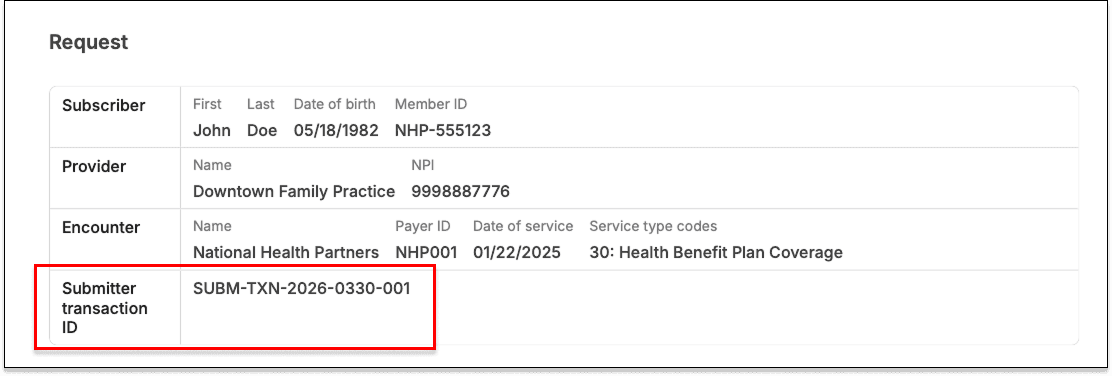
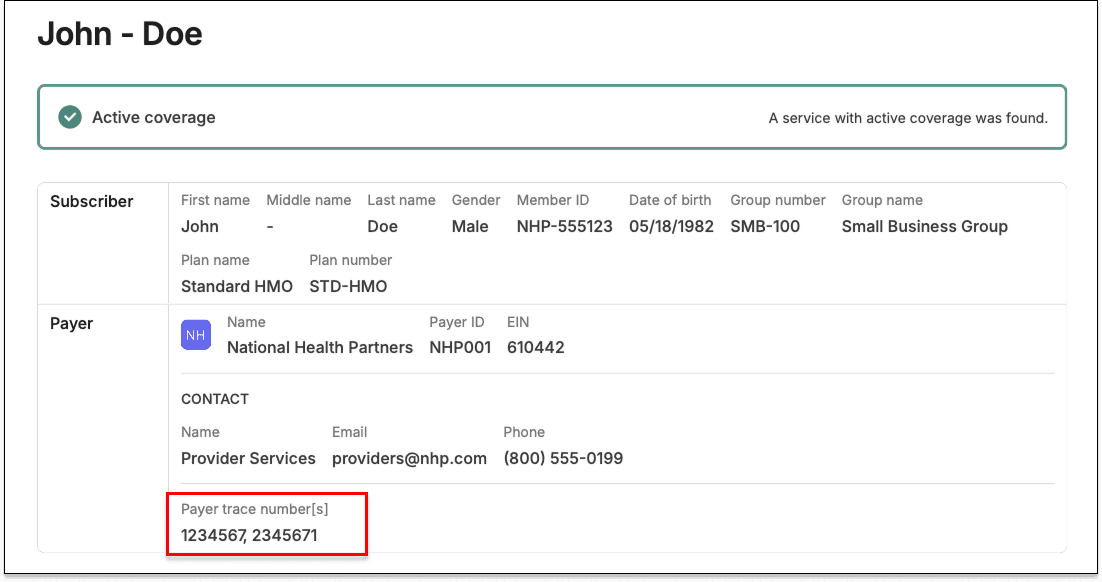
Eligibility PDFs now include submitter transaction IDs and payer trace numbers

Stedi's eligibility PDFs now include the submitter transaction ID and payer trace number when they're present in the eligibility response.

Eligibility check JSON response field271 X12 elementEligibility PDF label
meta.traceIdBHT03 (Submitter Transaction Identifier)Submitter transaction ID
meta.subscriberTraceNumbers[].referenceIdentificationTRN02 (Reference Identification) of Loop 2000C (Subscriber) or Loop 2000D (Dependent)Payer trace number[s]

Both IDs are used to trace eligibility checks across provider and payer systems.

This means you can look up a specific check in your EHR, RCM, or practice management platform, or in the payer's system, using only an eligibility PDF.

You can download eligibility PDFs using the Retrieve Eligibility PDF API endpoint or the Stedi portal.

Submitter transaction IDs

A submitter transaction ID is an identifier you – the submitter – set on an eligibility request. The payer echoes it back in the response.

EHR, RCM, and practice management platforms often use submitter transaction IDs to track eligibility checks.

When present in the response, the submitter transaction ID appears in the Request section at the bottom of the eligibility PDF.

Submitter transaction IDs in eligibility PDFs

Payer trace numbers

A payer trace number is an optional, payer-assigned ID for an eligibility check. Payers can include one or more in the response.

Providers and billers often need to cite payer trace numbers when contacting payer support about a specific eligibility check.

When present in the response, payer trace numbers appear in the Payer row of the summary at the top of the eligibility PDF.

Some payers issue separate trace numbers for the subscriber and a dependent. The PDF lists both, separated by a comma.

Payer trace numbers in eligibility PDFs

Note: Stedi also generates an internal trace number for every check. Eligibility PDFs always exclude Stedi-generated trace numbers.

Claim edit: ICD-10 diagnosis code with pre-implementation service date

Stedi now rejects 837P professional, 837I institutional, and 837D dental claims that pair an ICD-10-CM diagnosis code with a service date before October 1, 2015.

Service dates

In a claim, a service line represents billing for a specific service, such as an office visit or X-ray. The date of service, also called the service date, is the date the service was performed.

Claim typeJSON API fieldX12 element
837P professionalclaimInformation.serviceLines[].serviceDateDTP-03 (Date Time Period) of Loop 2400 (Service Line) with qualifier 472 (Service)
837I institutionalclaimInformation.serviceLines[].serviceDateDTP-03 (Date Time Period) of Loop 2400 (Service Line) with qualifier 472 (Service)
837D dentalclaimInformation.serviceLines[].serviceDateDTP-03 (Date Time Period) of Loop 2400 (Service Line) with qualifier 472 (Service)

Diagnosis codes

Diagnosis codes describe what's wrong with the patient. For example, I10 is the ICD-10-CM code for essential (primary) hypertension.

For services on or after October 1, 2015, HIPAA requires that claims use valid, billable ICD-10-CM codes as diagnosis codes. For services before that date, ICD-9-CM diagnosis codes were used.

Claim typeJSON API fieldX12 element
837P professionalclaimInformation.healthCareCodeInformation[].diagnosisCodeHI01-2 (Industry Code) of HI segment in Loop 2300 (Health Care Diagnosis Code)
837I institutionalclaimInformation.principalDiagnosis.principalDiagnosisCode (principal diagnosis), claimInformation.otherDiagnosisInformationList[][].otherDiagnosisCode (other diagnosis)HI01-2 (Industry Code) of HI segment in Loop 2300 (Health Care Diagnosis Code)
837D dentalclaimInformation.healthCareCodeInformation[].diagnosisCodeHI01-2 (Industry Code) of HI segment in Loop 2300 (Health Care Diagnosis Code)

Each diagnosis code is paired with a qualifier identifying its code set and position. ICD-10-CM codes use ABK (principal diagnosis) or ABF (other diagnosis). ICD-9-CM codes use BK or BF.

For example, the ICD-10-CM code E11.9 (Type 2 diabetes mellitus without complications) submitted as the principal diagnosis carries the ABK qualifier.

Claim typeJSON API fieldX12 element
837P professionalclaimInformation.healthCareCodeInformation[].diagnosisTypeCodeHI01-1 (Code List Qualifier Code) of HI segment in Loop 2300 (Health Care Diagnosis Code)
837I institutionalclaimInformation.principalDiagnosis.qualifierCode (principal diagnosis), claimInformation.otherDiagnosisInformationList[][].qualifierCode (other diagnosis)HI01-1 (Code List Qualifier Code) of HI segment in Loop 2300 (Health Care Diagnosis Code)
837D dentalclaimInformation.healthCareCodeInformation[].diagnosisTypeCodeHI01-1 (Code List Qualifier Code) of HI segment in Loop 2300 (Health Care Diagnosis Code)

How the edit works

If you submit a claim with an ICD-10-CM diagnosis code (qualifier ABK or ABF) and any service line has a date of service before October 1, 2015, the payer may reject the claim.

This edit catches the issue before the claim reaches the payer. It prevents payer rejections, which are slower and delay payment for the provider.

Rejection errors

If you submit a claim using Stedi's Claim Submission API endpoints and the claim fails the edit, you'll get back an error response in real time. The response includes details in the errors array:

{
  "errors": [
    {
      "code": "33",
      "description": "Invalid ICD-10 Diagnosis for Date of Service. ICD-10 diagnosis codes (qualifier ABK, ABF) are valid for dates of services on or after the implementation date of 10/01/2015. Prior to the implementation date, ICD-9 codes (qualifier BK, BF) are typically used. Correct and resubmit.",
      "followupAction": "Please Correct and Resubmit"
    }
  ]
}

If you submit a claim using SFTP and the claim fails the edit, Stedi will reject the claim with a 277CA claim acknowledgment. The acknowledgment will include a related claim status category code, claim status code, and error message:

STC*A7>700*[DATE]*U*[AMOUNT]********Invalid ICD-10 Diagnosis for Date of Service. ICD-10 diagnosis codes (qualifier ABK, ABF) are valid for dates of services on or after the implementation date of 10/01/2015. Prior to the implementation date, ICD-9 codes (qualifier BK, BF) are typically used. Correct and resubmit.~