Changelog

Introducing sorting for the List Enrollments API

You can now control how enrollment records are ordered in List Enrollments API responses using the sortBy query parameter.

Previously, List Enrollments API results were always ordered by createdAt in descending order. That remains the default.

With the new sortBy query parameter, you can now also sort by other fields and set a stable fallback when values are the same. For example, you can sort by statusLastUpdatedAt and fall back to id to ensure consistent, deterministic ordering:

https://enrollments.us.stedi.com/2024-09-01/enrollments?sortBy=statusLastUpdatedAt:desc&sortBy=id:asc

How the sorting works

Each sortBy value uses the property:direction format. If you provide multiple sortBy values, results are sorted in the order they appear.

When you provide a single sortBy value, Stedi automatically adds id as a secondary sort in the same direction. For example, if you provide ?sortBy=updatedAt:desc, Stedi automatically adds id:desc to the query to ensure deterministic results.

To see available sortBy properties, check out our API reference documentation.

Introducing warnings for missing member IDs in eligibility checks

You’ll now get a clear warning in eligibility responses when a required member ID is missing.

Why some payers require member IDs

For eligibility checks, payers can only return coverage when the patient information in the check matches exactly one member in the payer system. To enforce this, many payers require that checks include the patient’s member ID.

When the member ID is required but missing, the payer returns a AAA error, such as 72 (Invalid/Missing Subscriber/Insured ID). These errors are generic and don’t specifically indicate the payer requires a member ID.

Stedi’s new missing member ID warning

Stedi’s new warning indicates the payer requires a member ID for patients in eligibility checks, based on Stedi’s curated sources.

The warning is returned in the warnings array, alongside the AAA error, for eligibility responses from the following endpoints:

For example, the following warning indicates the payer requires the patient’s member ID:

{
  "warnings": [
    {
      "code": "request::270::member_id_required",
      "description": "This payer requires the patient's member ID to be included in eligibility requests."
    }
  ],
  "errors": [
    {
      "code": "72",
      "description": "Invalid/Missing Subscriber/Insured ID",
      ...
    }
  ],
  ...
}

The warning is also shown for eligibility responses in the Stedi portal.

Warning for eligibility responses in the Stedi portal

Eligibility check requirements vary by payer. If Stedi doesn't know if a payer requires a member ID for eligibility checks, no warning is returned.

For more tips and details, check out Stedi’s Eligibility troubleshooting docs.

Claim edit: ZIP or postal code required for U.S. and Canada addresses

Stedi now rejects 837P professional, 837D dental, and 837I institutional claims that include a U.S. or Canadian address without a ZIP or postal code.

X12 states that when an address is in the United States or Canada, a ZIP or postal code is required. If it isn’t, the payer may reject the claim, which can delay payment to the provider.

This edit – the industry term for an automated validation rule – catches the issue before the claim reaches the payer.

Rejection errors

If you submit a claim that fails the edit using Stedi’s JSON or X12 Claim Submission API endpoints, you’ll get back an error response in real time. The response includes details in the errors array:

{
  "errors": [
    {
      "code": "33",
      "description": "Missing Postal Code(s). For U.S. addresses, a postal code must also be included. The postal code is missing for the following address fields: Billing Provider. Correct and resubmit.",
      "followupAction": "Please Correct and Resubmit"
    }
  ]
}

If you submit a claim that fails the edit using SFTP, Stedi will reject the claim with a 277CA claim acknowledgment. The acknowledgment will include a related claim status category code, claim status code, entity identifier code, and error message:

STC*A6>500>HK*[DATE]*U*[AMOUNT]********Missing Postal Code(s). For U.S. and Canadian addresses, a postal code must also be included. The postal code is missing for the following address fields: [Subscriber]. Correct and resubmit.~

Addresses outside the U.S. and Canada

If an address is not in the U.S. or Canada, ensure the claim includes the correct country code for the address.

For example, for an 837P professional claim’s billing provider’s address, you can use the billing.address.countryCode field in JSON 837P Professional Claims API endpoint.

Introducing longer retry windows for batch CSV eligibility checks

You can now control how long Stedi retries checks that failed due to payer connectivity issues when submitting batch checks using a CSV upload in the Stedi portal.

When creating a new CSV batch from the portal’s Batch eligibility checks page, click Advance options to set the Retry duration.

Retry windows can be set from 8 to 24 hours. The default is 8 hours.

For details on how retries for batch eligibility checks work, see our Batch eligibility check docs.

Claim edit: Invalid patient control number

Stedi now rejects 837P professional, 837D dental, and 837I institutional claims that contain a patient control number (PCN) longer than 20 characters.

What is a patient control number?

A patient control number (PCN) is a tracking ID for a claim.

You create a PCN when you submit a claim. The payer sends the ID back in follow-up transactions: claim acknowledgments, Electronic Remittance Advice (ERAs), and claim status checks.

How the edit works

HIPAA-mandated X12 states that PCNs can be up to 20 characters. If you submit a claim with a PCN longer than 20 characters, the payer may reject the claim, which can delay payment to the provider.

This edit – the industry term for an automated validation rule – catches the issue before the claim reaches the payer.

Rejection errors

If you submit a claim that fails the edit using Stedi’s JSON or X12 Claim Submission API endpoints, you’ll get back an error response in real time. The response includes details in the errors array:

{
  "errors": [
    {
      "code": "33",
      "description": "Invalid Patient Control Number. The submitted patient control number, 123456789012345678901234567890, exceeds the maximum allowed length of 20 characters. Correct and resubmit.",
      "followupAction": "Please Correct and Resubmit"
    }
  ]
}

If you submit a claim that fails the edit using SFTP, Stedi will reject the claim with a 277CA claim acknowledgment. The acknowledgment will include a related claim status category code, claim status code, and error message:

STC*A7>21*[DATE]*U*[AMOUNT]********Invalid Patient Control Number. The submitted patient control number, 123456789012345678901234567890, exceeds the maximum allowed length of 20 characters. Correct and resubmit.~

Resolution tips

Follow these best practices when creating PCNs:

  • Stick to 17 characters.
    X12 states patient control numbers can be up to 20 characters. But some payers cut off values longer than 17 characters in ERAs and claim acknowledgments.

  • Use a unique patient control number for each claim.
    If multiple claims have the same patient control number, you may match the claim to the wrong ERA or acknowledgment.

  • Use alphanumeric characters only.
    Patient control numbers can contain both letters and numbers. Avoid special characters. Many payers don’t handle them properly.

  • Use random strings.
    Predictable formats, like {patientInitials}-{DOS}, can create duplicates.

Our recommendation: Use nanoid or a similar library to create a strong, unique 17-character patient control number for each claim.

Filter eligibility checks by NPI in the Stedi portal

You can now filter eligibility checks – grouped as eligibility searches – by NPI on the Eligibility searches page in the Stedi portal.

A National Provider Identifier (NPI) is a unique 10-digit ID assigned to every U.S. healthcare provider by the Centers for Medicare & Medicaid Services (CMS). This filter lets you view eligibility checks associated with a specific provider.

You can now filter eligibility checks – grouped as eligibility searches – by NPI

Introducing API endpoints for enrollment documents

You can now programmatically upload, download, and delete documents for transaction enrollment requests using Stedi’s new Transaction Enrollment API endpoints:

Only PDF documents are supported.

What is transaction enrollment?

Transaction enrollment is the process of registering a provider to exchange a specific type of healthcare transaction with a payer.

Transaction enrollment is always required for Electronic Remittance Advice (ERAs). For other transaction types, like eligibility checks and claim submissions, enrollment requirements vary by payer.

Stedi offers fully managed, API-based transaction enrollment. You can submit and track enrollment requests using Stedi’s Transaction Enrollment API or the Stedi portal, which also supports bulk CSV imports.

When possible, Stedi handles all enrollment paperwork for you and your provider. When we can’t, we give you updates and clear next steps for what’s needed next.

What are enrollment documents?

Enrollment requirements vary by payer. Some payers require additional documents, such as:

  • A form with a wet signature

  • A practice W-9

  • A voided check

In these cases, Stedi updates the enrollment status to PROVIDER_ACTION_REQUIRED and notifies the submitter by email. You can then view next steps and upload the required documents through the Stedi portal or API.

Upload an enrollment document

Previously, you could only upload enrollment documents using the Stedi portal. Now, you can also upload them programmatically using the Upload Enrollment Document endpoint:

  1. Call the Upload Enrollment Document endpoint with the enrollment ID for the enrollment request.

    The enrollment ID is returned in the responses for the Create Enrollment and List Enrollments endpoints. It's also listed at the top of the enrollment's details page in the Stedi portal.

    Include the PDF’s file name, including the .pdf file extension, in the request body’s name field:

    curl --request POST \
      --url "https://enrollments.us.stedi.com/2024-09-01/enrollments/{enrollmentId}/documents" \
      --header "Authorization: <api_key>" \
      --header "Content-Type: application/json" \
      --data '{
        "name": "provider-license.pdf"
      }'

    The endpoint returns a pre-signed URL for uploading the PDF. The URL expires in 24 hours.

    {
      "enrollmentId": "db6675c5-7bg7-4af9-8c68-a54a336d2911",
      "uploadUrl": "https://s3.amazonaws.com/enrollment-documents/db6675c5-7bg7-4af9-8c68-a54a336d2911/provider-license.pdf?X-Amz-Algorithm=AWS4-HMAC-SHA256&X-Amz-Credential=...",
      "documentId": "doc-123e4567-e89b-12d3-a456-426614174000"
    }
  2. Make a PUT request to the pre-signed URL to upload the PDF. Set the Content-Type HTTP request header to application/pdf.

    curl --request PUT \
    --url "<uploadUrl>" \
    --header "Content-Type: application/pdf" \
    --upload-file /path/to/provider-license.pdf

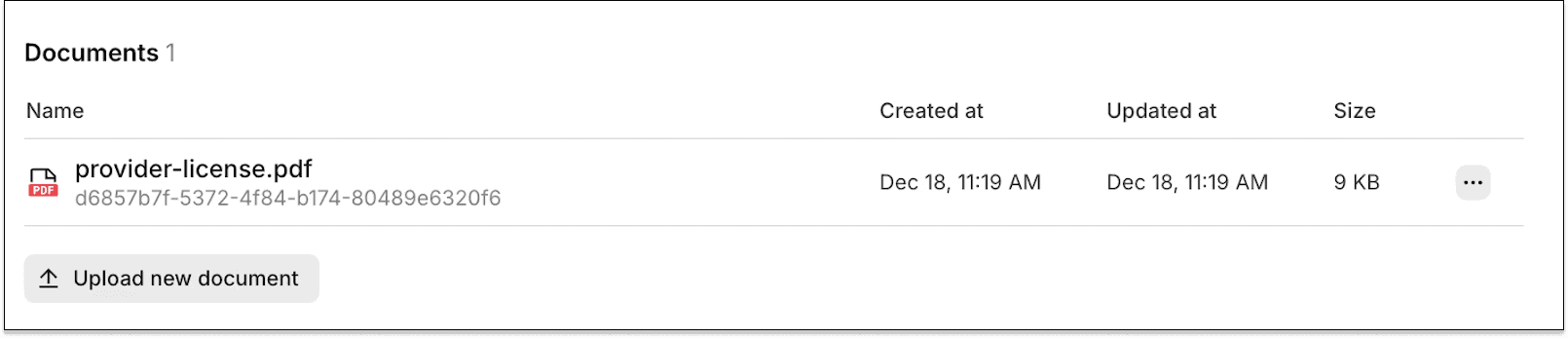
    Uploaded documents are listed on the enrollment's details page in the Stedi portal.

    Uploaded documents in the Stedi portal

Download and delete enrollment documents

In addition to uploading, you can also download and delete previously uploaded documents using the respective Download Enrollment Document and Delete Enrollment Document endpoints.

Get started

Stedi’s Transaction Enrollment API, including the new enrollment document endpoints, is available on Stedi production accounts.

For complete details, check out our API reference documentation.

Stedi now blocks claim attachments for unsupported payers

If you try to submit a claim with electronic attachments to a payer who doesn't support them, Stedi now blocks the request before it reaches the payer. This affects 837P professional, 837D dental, and 837I institutional claims.

Electronic claim attachments let you send supporting documents – like X-rays and medical records – alongside claims in Stedi. Stedi lets you submit claims and claim attachments electronically using JSON API, X12 API, or SFTP.

However, not every payer supports electronic claim attachments. Previously, if you submitted an attachment to a payer who didn’t support them, the payer would reject the attachment as an error downstream. This could delay payment for the provider.

Now, Stedi checks payer support upfront and catches the issue before the claim reaches the payer. That means faster turnaround times for errors – and faster payments for providers.

Errors

If you submit a claim with attachments to an unsupported payer using Stedi's JSON or X12 Claim Submission APIs, you'll receive an error response with a 400 Bad Request HTTP status code and an error message:

{
  "code": "TRANSACTION_TYPE_NOT_SUPPORTED",
  "message": "Payer 62308 (Stedi Payer ID HGJLR) is not configured for Unsolicited Claim Attachment (275). Please check our published payer list or contact Stedi support to resolve."
}

If you submit a claim with attachments to an unsupported payer using SFTP, Stedi will reject the claim with a 277CA claim acknowledgment:

STC*A7:N21*[DATE]*PR*[AMOUNT]********Payer 62308 (Stedi Payer ID HGJLR) is not configured for Unsolicited Claim Attachment (275). Please check our published payer list or contact Stedi support to resolve.~

Check payer support

To avoid errors, check whether a payer supports electronic claim attachments using the Stedi Payer Network site or Stedi’s Payers API.

For example, in a Search Payers API response:

{
  "items": [
    {
      "stediId": "HGJLR",
      "displayName": "Cigna",
      "primaryPayerId": "62308",
      "transactionSupport": {
        "unsolicitedClaimAttachment": "NOT_SUPPORTED", // Electronic claim attachments not supported
        ...
      },
      ...
    },
    ...
  ]
}

Claim edit: A sequela code can’t be the primary ICD-10-CM diagnosis code

Stedi now rejects 837P professional and 837I institutional claims that list a sequela code as the only or primary ICD-10-CM diagnosis code.

ICD-10-CM diagnosis codes

In healthcare claims, diagnosis codes describe what’s wrong with the patient. HIPAA requires that professional and institutional claims only use valid, billable ICD-10-CM codes as diagnosis codes. For example, M54.50 is the ICD-10-CM code for “Low back pain, unspecified.”

A claim can include multiple diagnosis codes, listed in order of importance. The primary diagnosis code is in position 1, the next is in position 2, and so on.

Sequela codes

A sequela code is an ICD-10-CM diagnosis code used to describe a condition that remains after an earlier injury or illness has healed.

For example, M48.40XS (Fatigue fracture of vertebra, site unspecified, sequela of fracture) is a sequela code. Sequela codes always have S as the seventh character.

How the edit works

ICD-10-CM guidelines disallow a sequela code from being used as the primary or only diagnosis on professional or institutional claims. If it is, the payer may reject the claim, which can delay payment for the provider.

This edit – the industry term for an automated validation rule – catches the issue before the claim reaches the payer.

A sequela code can still be billed, as it provides additional context for the payer on why the patient has the current conditions. But those current conditions must be billed as the primary diagnosis, which describes the primary reason for service.

Rejection errors

If you submit a claim that fails the edit using Stedi’s JSON or X12 Claim Submission API endpoints, you’ll get back an error response in real time. The response includes error details in the errors array:

{
  "errors": [
    {
      "code": "33",
      "description": "Invalid use of Sequela Diagnosis code. The submitted diagnosis code, M48.40XS, is a sequela diagnosis (7th character \"S\") and cannot be used as the primary or only diagnosis on a claim. Correct and resubmit.",
      "followupAction": "Please Correct and Resubmit"
    }
  ]
}

If you submit a claim that fails the edit using SFTP, Stedi will reject the claim with a 277CA claim acknowledgment. The acknowledgment will include a related claim status category code, claim status code, and error message:

STC*A7>255*[DATE]*U*[AMOUNT]********Invalid use of Sequela Diagnosis code. The submitted diagnosis code, M4840XS, is a sequela diagnosis (7th character \"S\") and cannot be used as the primary or only diagnosis on a claim. Correct and resubmit.~

Resolution tip

In most cases, you can pass this edit by reordering the diagnosis codes so the current condition comes first and the sequela code(s) are listed afterward.

For example, M54.50 (Low back pain, unspecified) should be listed before the sequela, M48.40XS (Fatigue fracture of vertebra, site unspecified, sequela of fracture). Sequela codes should always accompany a preceding diagnosis code.