How transaction enrollment works for Medicare
Transaction enrollment registers a provider to exchange a specific type of transaction with a payer.
All payers require transaction enrollment for Electronic Remittance Advice (ERAs). Most payers don't require enrollment for eligibility checks or claims.
Medicare is a notable exception. Medicare requires transaction enrollment for eligibility checks, claims, and ERAs. And those enrollments don't all go to the same payer.
If you're a provider or a vendor that processes Medicare transactions, this guide covers which payers to enroll with, how to complete enrollment, and how to fix common Medicare enrollment problems.
What's the difference between Original Medicare and Medicare Advantage?
The Centers for Medicare & Medicaid Services (CMS), a U.S. federal agency, runs Original Medicare. It includes Medicare Part A and Part B.
Medicare Part A covers hospital benefits, like inpatient stays, skilled nursing facility care, and hospice care. Part B covers medical benefits, like doctor visits and preventive care.
Medicare Advantage plans, also called Medicare Part C, are private health plans approved by CMS. They replace Part A and Part B benefits.
Medicare beneficiaries can get their benefits through either Original Medicare or a Medicare Advantage plan, but not both.
Note: In this guide, "Medicare" means Original Medicare unless noted.
For more information, see How to find the right payer for Medicare claims.
What's a MAC?
A Medicare Administrative Contractor (MAC) is a regional payer that CMS contracts with to process claims for Original Medicare. Each MAC covers a set of states or territories, called a jurisdiction.
Providers submit Medicare claims to the MAC and get ERAs from it. Eligibility checks go to CMS, not to a MAC.
To find the jurisdiction for a state or territory, see CMS's MAC lists and maps. Stedi connects to all MACs.
Should a provider complete transaction enrollment with CMS or a MAC?
In most cases, both. CMS and MACs handle different transactions:
-
Enroll with CMS for Medicare eligibility checks (payer ID:
CMS). -
Enroll with the provider's MAC for Medicare claim submissions, ERAs, and other transaction types.
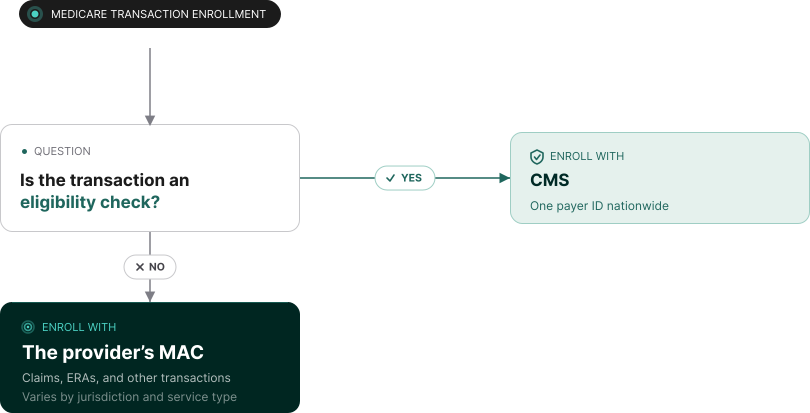
Providers don't need separate transaction enrollments for Part A or Part B eligibility checks.
How does a provider find their MAC?
To find the provider's MAC:
-
Find the provider type. It determines which MAC handles the provider's claims:
-
Home health and hospice (HH+H) MACs – Handle claims from home health agencies and hospices.
-
Durable medical equipment (DME) MACs – Handle claims from DME suppliers. DME is medical equipment that patients keep and use at home, like wheelchairs, oxygen tanks, and CPAP machines.
-
A/B MACs – Handle Medicare Part A and Part B claims from all other providers.
If you're unsure of the provider's type, look up the provider's National Provider Identifier (NPI) in CMS's Medicare Fee-for-Service Public Provider Enrollment dataset. Check the provider type description.
-
-
Find the MAC in CMS's MAC lists and maps. Use the state or territory that applies to the provider type:
-
HH+H MACs – Where the home health agency or hospice is located.
-
DME MACs – Where the patient permanently lives.
-
A/B MACs – Where the provider delivered care. For telehealth visits, use the state or territory where the provider was during the visit, not the patient's home address.
-
-
Find the MAC's payer ID in the Stedi Payer Network or the Payers API.
CMS's map lists each MAC by its contractor name, like Palmetto GBA. In the Stedi Payer Network and Payers API, most MAC payer names use "Medicare" and the state, part, or jurisdiction instead. You can also search for the contractor name.
For example, the MAC for Medicare Part A in Georgia is Palmetto GBA (PGBA). Stedi lists this payer as Medicare Georgia Part A. Other MAC payer names include:
Do Medicare Part A and Part B need separate transaction enrollments?
Yes. A/B MACs have separate payer IDs for Medicare Part A and Part B, like Medicare Georgia Part A and Medicare Georgia Part B.
Providers typically submit institutional claims to Part A payers. Providers typically submit professional claims to Part B payers.
Each transaction type needs its own transaction enrollment, even under the same payer ID. Professional and institutional claims are separate transaction types. For example, a provider sends professional claims to Medicare Georgia Part B. The provider also gets ERAs from it. The provider needs two enrollment requests: one for claims and one for ERAs.
For more detail, see How to find the right payer for Medicare claims.
What's CMS attestation?
CMS attestation, also called HETS EDI Enrollment, confirms that a healthcare clearinghouse, like Stedi, can run Medicare eligibility checks for the provider. A provider who already attested for another clearinghouse still needs to attest for Stedi.
What does a provider need to complete CMS attestation?
-
An active NPI in PECOS – CMS uses the Medicare Provider Enrollment, Chain, and Ownership System (PECOS) to manage active Medicare providers.
Providers get into PECOS through payer enrollment with CMS, a separate process from transaction enrollment. Stedi doesn't handle payer enrollment.
If the NPI in a CMS transaction enrollment request isn't active in PECOS, Stedi sets the enrollment's status to
REJECTED. Stedi then sends instructions to add the NPI to PECOS. -
Electronic claims with a MAC – The provider must already submit Medicare claims electronically with a MAC. This typically requires transaction enrollment with the MAC first. The provider doesn't need to submit claims through Stedi.
-
A PTAN – A Provider Transaction Access Number (PTAN) is a Medicare ID that the provider's MAC assigns when the provider enrolls in Medicare. The provider can find their PTAN in the approval letter from their MAC.
The PTAN is based on the provider's practice location and type of service. A provider can have more than one.
How does a provider complete CMS attestation?
Follow these steps:
-
Submit a transaction enrollment request for eligibility checks under payer ID
CMS. You can submit the enrollment request using the Enrollments API or the Stedi portal, which supports bulk CSV uploads.After you submit the request, Stedi moves the enrollment's status to
PROVIDER_ACTION_REQUIREDwithin a few minutes and adds an enrollment task with instructions.You can find the task in the enrollment's Tasks section in the Stedi portal or the
tasksarray of the Retrieve Enrollment API response. -
Complete CMS attestation with a MAC where the provider submits claims electronically. Use the same billing NPI the provider plans to use for eligibility checks and claims. The provider only needs to attest once per billing NPI.
CMS attestation takes about 5-15 minutes. The provider must complete it. Stedi can't complete it for them.
DME suppliers attest through the Common Electronic Data Interchange (CEDI), the electronic front end for all DME MACs.
For step-by-step instructions for each MAC, see the Stedi Transaction Enrollments Hub.
-
Wait for the enrollment to reach the
LIVEstatus.
CMS attestation is complete when the MAC approves it. Stedi checks CMS's records daily. When CMS shows the NPI as attested, Stedi moves the enrollment's status toLIVE. The provider can run eligibility checks as soon as attestation is complete, even before the status changes.To move the status to
LIVEsooner, mark the attestation task complete in the Stedi portal or the Enrollments API.The daily check still runs. If CMS doesn't show the attestation, Stedi moves the status back to
PROVIDER_ACTION_REQUIRED.
Which NPI should a provider use for Medicare transaction enrollments?
Use the NPI from CMS attestation for the provider's eligibility checks and claims. If the provider bills Medicare under a group NPI, use the group NPI for attestation, eligibility checks, and claims.
If an eligibility check uses a different NPI than the one used for CMS attestation, the check fails with AAA error 41 (Authorization/Access Restrictions).
What does AAA error 41 mean for a Medicare eligibility check?
AAA error 41 (Authorization/Access Restrictions) means one of the following:
-
The provider isn't enrolled with CMS for eligibility checks.
-
The provider hasn't completed CMS attestation.
-
The check uses an NPI that isn't attested. For example, the check uses an individual NPI, but the provider attested with their group NPI.
-
The provider's NPI isn't active in PECOS.
When a CMS eligibility check returns this error, Stedi automatically submits a CMS eligibility enrollment request for the provider. The provider's NPI must be active in the National Plan and Provider Enumeration System (NPPES), CMS's national NPI registry. The provider still needs to complete attestation.
What does a claim rejection with "Invalid Submitter Identifier" mean?
Some MACs assign a submitter ID – an ID that identifies whoever sends the claims – during transaction enrollment.
For these MACs, the submitter ID isn't an NPI. The submitter isn't always the provider. It can be a billing service or other vendor that submits claims for them.
If a claim's submitter ID doesn't match the format the MAC requires, Stedi's claim edit rejects the claim before it reaches the MAC. The edit only validates the ID's format. It doesn't check that the MAC assigned that ID.
Where you set the submitter ID depends on how you submit the claim:
| Submission method | Submitter ID field | X12 element |
|---|---|---|
| Professional Claims API (837P) | submitter.submitterIdentification | NM109 of Loop 1000A (Submitter Name) |
| CMS-1500 API (837P) | submitter.etin | NM109 of Loop 1000A (Submitter Name) |
| Institutional Claims API (837I) | submitter.taxId | NM109 of Loop 1000A (Submitter Name) |
Example claim rejections
If you submit a claim using the Create Professional Claim (CMS-1500) JSON endpoint and the claim fails the edit, you'll get back a 201 response with an errors array in real time:
{
  "errors": [
    {
      "description": "Invalid Submitter Identifier. This payer requires a specific-assigned identifier that begins with AZ followed by 5 or 6 numbers. The submitted value 921545753 does not follow this format and must be confirmed with the payer. Correct and resubmit."
    }
  ]
}
If you submit a claim using Stedi's other Claim Submission API endpoints and the claim fails the edit, you'll get back an error response in real time. The response includes details in the errors array:
{
  "errors": [
    {
      "code": "33",
      "description": "Invalid Submitter Identifier. This payer requires a specific-assigned identifier that begins with AZ followed by 5 or 6 numbers. The submitted value 921545753 does not follow this format and must be confirmed with the payer. Correct and resubmit.",
      "followupAction": "Please Correct and Resubmit"
    }
  ]
}
If you submit a claim using SFTP and the claim fails the edit, Stedi will reject the claim with a 277CA claim acknowledgment. The acknowledgment will include a related claim status category code, claim status code, and error message.
STC*A7>478*[DATE]*U*[AMOUNT]******A7>733>41**Invalid Submitter Identifier. This payer requires a specific-assigned identifier that begins with AZ followed by 5 or 6 numbers. The submitted value 921545753 does not follow this format and must be confirmed with the payer. Correct and resubmit.~How to fix it
Get the payer-assigned submitter ID from the MAC's enrollment or EDI setup materials. Set it in the submitter ID field for your claim submission method and resubmit the claim. In the Professional Claims API, Stedi uses the billing NPI if you leave the field blank.
What does a claim rejection with code A8:496 mean?
A8 is the claim status category code for "Rejected for relational field in error." 496 is the claim status code for "Submitter not approved for electronic claim submissions on behalf of this entity."
For Medicare claims, this means the MAC hasn't approved Stedi as a submitter for the provider's billing NPI. This usually happens because the provider's claims enrollment with the MAC still has the PROVISIONING status.
You see this rejection in a 277CA claim acknowledgment from the MAC.
Example claim rejections
In the 277CA JSON response, the rejection is in claims[].claimStatus:
"claimStatus": {
  ...
  "informationClaimStatuses": [
    {
      "informationStatuses": [
        {
          "healthCareClaimStatusCategoryCode": "A8", // Rejected for relational field in error
          "statusCode": "496" // Submitter not approved
        }
      ],
      "statusInformationEffectiveDate": "20261106",
      "totalClaimChargeAmount": "150"
    }
  ],
  ...
}
In the X12 277CA, the rejection is in Loop 2200D (Claim Status Tracking Number):
STC*A8>496*20261106*U*150~How to fix it
Check the status of the provider's claims enrollment with the MAC in the Stedi portal or the Enrollments API. If the status is PROVISIONING, wait until it's LIVE, then resubmit the claim.
How long does Medicare transaction enrollment take?
Check the activation timeframe using the Stedi Payer Network website or the Payers API.
| Transaction type | Typical activation timeframe | When the provider can use it |
|---|---|---|
| CMS eligibility checks | 1-24 hours | Right after attestation, even before the enrollment's status is LIVE |
| MAC claims and ERAs | 1-6 days for some MACs, 1-4 weeks for others | When the enrollment's status is LIVE |
Next steps
For more information about Medicare claims, see How to find the right payer for Medicare claims.
Get started with Stedi
To get started with Stedi, sign up for a free sandbox account. It takes less than two minutes. No credit card is required.
When you're ready, upgrade to production on our pay-as-you-go plan. There are no monthly minimums or setup fees. You only pay for the transactions you use.