Changelog

Claim edit: Missing claim-level place of service code

Stedi now rejects 837P professional and 837D dental claims that are missing a claim-level place of service code.

How the edit works

In a healthcare claim, a place of service code tells the payer where a service was delivered, such as an office or inpatient facility. Place of service codes can have a significant effect on how much a payer will approve or pay for a claim or service.

X12 standards require that 837P professional and 837D dental claims include a place of service code at the claim level. Place of service codes can also be specified at the service line level but should only be included if they differ from the claim-level code.

Claim-level place of service code

Claim typeJSON API fieldX12 element
837P professionalclaimInformation.placeOfServiceCodeCLM-05-01 (Place of Service Code) of Loop 2300 (Claim Information)
837D dentalclaimInformation.placeOfServiceCodeCLM-05-01 (Place of Service Code) of Loop 2300 (Claim Information)

If a professional or dental claim is missing a claim-level place of service code, the payer may reject the claim.

This edit catches the issue before the claim reaches the payer. It prevents payer rejections, which take longer to resolve and delay payment for the provider.

Rejection errors

If you submit a claim using Stedi's Claim Submission API endpoints and the claim fails the edit, you'll get back an error response in real time. The response includes details in the errors array:

{
  "errors": [
    {
      "code": "33",
      "description": "Missing Place of Service code. A place of service code is required for this claim. Correct and resubmit.",
      "followupAction": "Please Correct and Resubmit"
    }
  ]
}

If you submit a claim using SFTP and the claim fails the edit, Stedi will reject the claim with a 277CA claim acknowledgment. The acknowledgment will include a related claim status category code, claim status code, and error message:

STC*A6>249*[DATE]*U*[AMOUNT]********Missing Place of Service code. A place of service code is required for this claim. Correct and resubmit.~

Claim edit: ZIP or postal code not allowed outside the U.S. and Canada

Stedi now rejects 837P professional, 837D dental, and 837I institutional claims that include a ZIP or postal code in an address outside the U.S. or Canada.

How the edit works

X12 states that ZIP and postal code fields are specific to the U.S. and Canada. If an address in a claim has a country code other than US or CA, it should not contain a ZIP or postal code. If it does, the payer may reject the claim.

This edit catches the issue before the claim reaches the payer. It prevents payer rejections, which take longer to resolve and delay payment for the provider.

Rejection errors

If you submit a claim using Stedi's Claim Submission API endpoints and the claim fails the edit, you'll get back an error response in real time. The response includes details in the errors array:

{
  "errors": [
    {
      "code": "33",
      "description": "Invalid postal code usage. A ZIP Code must only be submitted when the country is US or CA. The submitted address for Subscriber includes a ZIP Code with country code FR. Correct and resubmit.",
      "followupAction": "Please Correct and Resubmit"
    }
  ]
}

If you submit a claim using SFTP and the claim fails the edit, Stedi will reject the claim with a 277CA claim acknowledgment. The acknowledgment will include a related claim status category code, claim status code, entity identifier code, and error message:

STC*A7>500>HK*[DATE]*U*[AMOUNT]******A8>680>HK**Invalid postal code usage. A ZIP Code must only be submitted when the country is US or CA. The submitted address for Subscriber includes a ZIP Code with country code FR. Correct and resubmit.~

Claim edit: Duplicate contract amount on a service line

Stedi now rejects 837P professional and 837D dental claims that report the same contract amount on a service line and at the claim level.

Important: Most claims don't include a contract amount. Submitters send one only when the provider’s contract with the payer requires it. Confirm with the payer before including it.

What is a contract amount?

A contract amount is the dollar amount a payer agreed to pay for a service in their contract with the provider. This amount often differs from the provider’s billed charge amount.

When you submit a claim, you can specify the contract amount at two levels: the claim level and the service line level.

The claim-level contract amount covers the whole claim.

Claim-level contract amount

Claim typeJSON API fieldX12 element
837P professionalclaimInformation.claimContractInformation.contractAmountCN1-02 (Contract Amount) of Loop 2300 (Claim Information)
837D dentalclaimInformation.claimContractInformation.contractAmountCN1-02 (Contract Amount) of Loop 2300 (Claim Information)

The service-line contract amount specifies the contracted dollar amount for a specific service on the claim. A claim can have multiple service-line contract amounts – one for each service.

Service-line contract amount

Claim typeJSON API fieldX12 element
837P professionalclaimInformation.serviceLines[].contractInformation.contractAmountCN1-02 (Contract Amount) of Loop 2400 (Service Line Number)
837D dentalclaimInformation.serviceLines[].contractInformation.contractAmountCN1-02 (Contract Amount) of Loop 2400 (Service Line Number)

How the edit works

A service-line contract amount should not duplicate the claim-level contract amount.

Some payer systems treat service-line contract amounts as an override of the claim-level value. These systems may read a duplicate contract amount at the claim and service line level as a conflicting or erroneous override.

This edit catches the issue before the claim reaches the payer. It prevents payer rejections, which take longer to resolve and delay payment for the provider.

Rejection errors

If you submit a claim using Stedi's Claim Submission API endpoints and the claim fails the edit, you'll get back an error response in real time. The response includes details in the errors array:

{
  "errors": [
    {
      "code": "33",
      "description": "Invalid Service Line Contract Amount. The submitted service-line contract amount on line 1 must not equal the claim-level contract amount, 500. Correct and resubmit.",
      "followupAction": "Please Correct and Resubmit"
    }
  ]
}

If you submit a claim using SFTP and the claim fails the edit, Stedi will reject the claim with a 277CA claim acknowledgment. The acknowledgment will include a related claim status category code, claim status code, and error message:

STC*A7>545*[DATE]*U*[AMOUNT]******A8>710**Invalid Service Line Contract Amount. The submitted service-line contract amount on line 1 must not equal the claim-level contract amount, 500. Correct and resubmit.~

Resolution tip

If a service line has the same contracted amount as the claim, remove the service line’s contract amount. The claim-level amount already applies to every line on the claim.

Claim edit: Invalid EPSDT certification and condition indicator combination

Stedi now rejects 837P professional and 837I institutional claims where the Early and Periodic Screening, Diagnostic, and Treatment (EPSDT) certification indicator and the first EPSDT condition indicator contradict each other.

What are EPSDT certification and condition indicators?

Early and Periodic Screening, Diagnostic, and Treatment (EPSDT) is a mandatory federal Medicaid benefit for children and other beneficiaries under the age of 21. It covers routine checkups and screenings, plus any follow-up care those screenings show the patient needs.

837P professional and 837I institutional claims include dedicated fields for EPSDT services. A payer uses these fields to decide how coverage rules apply and whether to approve the services on the claim:

  • EPSDT Certification Condition Code Applies Indicator, also called the EPSDT certification indicator – A yes/no flag for whether the patient needs follow-up care based on the screening. A value of N indicates the patient does not need follow-up care.

  • EPSDT condition indicators – Two-character codes that describe whether the patient was referred for follow-up care and the outcome of that referral. For example: AV (Referral Available – Not Used), S2 (Under Treatment), or ST (New Services Requested). A value of NU (Not Used) indicates the screening didn’t result in a referral for follow-up care. A claim can contain one or more EPSDT condition indicators.

EPSDT certification indicator

Claim typeJSON API fieldX12 element
837P professionalclaimInformation.epsdtReferral.certificationConditionCodeAppliesIndicatorCRC-02 (Certification Condition Code Applies Indicator) of Loop 2300 (Claim Information)
837I institutionalclaimInformation.epsdtReferral.certificationConditionCodeAppliesIndicatorCRC-02 (Certification Condition Code Applies Indicator) of Loop 2300 (Claim Information)

EPSDT condition indicators

Claim typeJSON API fieldX12 element
837P professionalclaimInformation.epsdtReferral.conditionCodes[]CRC-03 (Condition Indicator) of Loop 2300 (Claim Information)
837I institutionalclaimInformation.epsdtReferral.conditionCodes[]CRC-03 (Condition Indicator) of Loop 2300 (Claim Information)

How the edit works

This edit compares the EPSDT certification indicator against the first EPSDT condition indicator:

  • If the first condition indicator is NU (Not Used), the EPSDT certification indicator must be N.

  • If the EPSDT certification indicator is N, the first condition indicator must be NU.

If the EPSDT certification indicator and first EPSDT condition indicator contradict each other, Stedi rejects the claim. This prevents later payer rejections, which take longer to resolve and delay payment for the provider.

Rejection errors

If you submit a claim using Stedi's Claim Submission API endpoints and the claim fails the edit, you'll get back an error response in real time. The response includes details in the errors array.

If the first condition indicator is NU but the EPSDT certification indicator is not N:

{
  "errors": [
    {
      "code": "33",
      "description": "Invalid EPSDT Condition Indicator. When the EPSDT condition indicator is 'NU' (not used), the EPSDT certification code applies indicator must be 'N' (no). Submitted indicator is 'Y'. Correct and resubmit.",
      "followupAction": "Please Correct and Resubmit"
    }
  ]
}

If the EPSDT certification indicator is N but the first EPSDT condition indicator is not NU:

{
  "errors": [
    {
      "code": "33",
      "description": "Invalid EPSDT Certification Condition Code Applies Indicator. When the EPSDT certification applies indicator is 'N' (no), the EPSDT condition indicator must be 'NU' (not used). Submitted indicator is 'AV'. Correct and resubmit.",
      "followupAction": "Please Correct and Resubmit"
    }
  ]
}

If you submit a claim using SFTP and the claim fails the edit, Stedi will reject the claim with a 277CA claim acknowledgment. The acknowledgment will include a related claim status category code, claim status code, and error message.

If the first condition indicator is NU but the EPSDT certification indicator is not N:

STC*A7>527*[DATE]*U*[AMOUNT]******A8>564**Invalid EPSDT Condition Indicator. When the EPSDT condition indicator is 'NU' (not used), the EPSDT certification code applies indicator must be 'N' (no). Submitted indicator is 'Y'. Correct and resubmit.~

If the EPSDT certification indicator is N but the first EPSDT condition indicator is not NU:

STC*A7>564*[DATE]*U*[AMOUNT]******A8>527**Invalid EPSDT Certification Condition Code Applies Indicator. When the EPSDT certification applies indicator is 'N' (no), the EPSDT condition indicator must be 'NU' (not used). Submitted indicator is 'AV'. Correct and resubmit.~

Resolution tips

To avoid triggering this edit, match the claim’s EPSDT certification indicator and its first EPSDT condition indicator:

  • Use EPSDT certification indicator N with an EPSDT condition indicator of NU (Not Used).

  • Use EPSDT certification indicator Y with an EPSDT condition indicator of AV (Referral Available – Not Used), S2 (Under Treatment), or ST (New Services Requested).

Stedi is now CAQH CORE certified for claims, claim status checks, and ERAs

CAQH CORE has officially certified Stedi for claims, real-time claim status checks, and payment and remittance (ERAs).

Stedi was already CORE certified for eligibility checks. With this certification, we’re now CORE certified for all major HIPAA transaction types.

What is CAQH CORE?

The Council for Affordable Quality Healthcare (CAQH) is a non-profit backed by major health insurers and provider groups. The U.S. Department of Health and Human Services (HHS) designated CAQH as the official authoring entity for the operating rules that govern HIPAA administrative transactions.

HIPAA requires payers, providers, and clearinghouses to exchange transactions using the X12 EDI format. X12 defines the structure of each transaction, but leaves room for interpretation on response content, error handling, connectivity, and system availability. That gap creates inconsistencies that make systems harder to integrate.

CAQH created the Committee on Operating Rules for Information Exchange (CORE) to close that gap. The CORE Operating Rules build on X12 with stricter requirements for data content, standardized error messages, connectivity, and uptime and performance benchmarks. Certification confirms, through independent testing, that a system meets those rules.

What Stedi’s certification covers

Stedi is now CORE certified for:

Why CORE certification matters

CORE certification is one of the few public signals that a clearinghouse's systems behave as expected. It confirms, through independent testing, that we meet defined benchmarks for each transaction type: standardized error codes, connectivity requirements, and uptime and response-time floors. Some payers also require CORE certification before opening a direct EDI connection.

Try Stedi

Start free with a sandbox account. Upgrade to production when you're ready. There are no monthly minimums or setup fees. You only pay for the transactions you use. See our pricing.

Blue Cross NC is now one-click enrollment

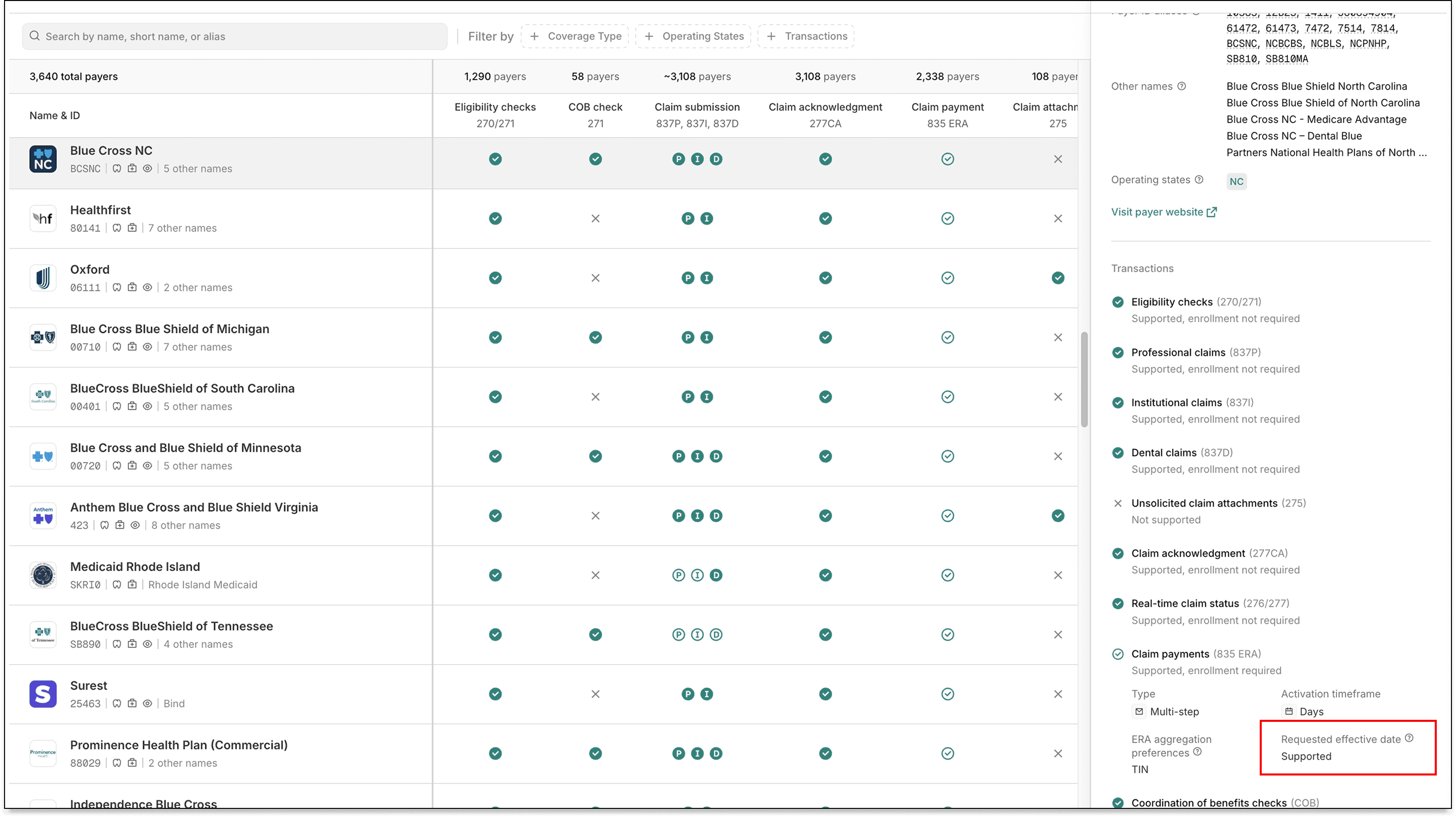
Healthcare payer Blue Cross NC (Payer ID: BCSNC) now supports one-click transaction enrollment for Electronic Remittance Advice (ERAs).

About one-click enrollment

Transaction enrollment is the process of registering a provider to exchange specific healthcare transactions with a payer. Payers always require transaction enrollment for ERAs. For other transactions, it depends on the payer.

Transaction enrollment requirements vary by payer. Some payers may require the submitter to sign PDFs or complete tasks in the payer's portal.

With one-click transaction enrollment, you only need to submit an enrollment request. There are no follow-up steps. Stedi handles everything else.

You can check whether a payer supports one-click enrollment using the Stedi Payer Network or the Payer APIs.

Introducing single sign-on (SSO) and SCIM

Your team can now sign in to Stedi using single sign-on (SSO) and sync accounts automatically with directory sync (SCIM).

What is SSO?

SSO lets Stedi account members sign in to the Stedi portal through an identity provider, such as Okta or OneLogin, instead of using a separate Stedi username and password.

Stedi’s SSO supports SAML and OIDC, the protocols used by all major enterprise identity providers.

What is SCIM?

Directory sync (SCIM) automatically creates and removes Stedi accounts as you add or remove users in your provider. For example, when you deactivate an employee in Okta, SCIM automatically removes their access to Stedi.

Availability

SSO and SCIM are available by request on our custom pricing plan. To enable SSO/SCIM or to learn more about custom pricing, contact us.

To learn more about Stedi SSO and SCIM, see our documentation.

Claim edit: Invalid provider UPIN format

Stedi now rejects 837P professional, 837D dental, and 837I institutional claims that include a Unique Physician Identification Number (UPIN) in an invalid format.

What is a UPIN?

A Unique Physician Identification Number (UPIN) is a legacy identifier previously assigned to providers by the Centers for Medicare & Medicaid Services (CMS).

UPINs were replaced by National Provider Identifiers (NPIs) in 2007. Some payers, including certain state Medicaid payers, still accept a UPIN as an alternate provider identifier. Payers may also populate the UPIN in secondary or tertiary claims they generate for coordination of benefits (COB).

How the edit works

When you submit a claim, you can specify a UPIN for any provider listed on the claim, such as the rendering provider or supervising provider.

All valid UPINs are exactly six characters in one of two layouts:

  • One letter followed by five digits, like A12345 (X99999)

  • Three letters followed by three digits, like ABC123 (XXX999)

If a claim includes a UPIN with an invalid format, the payer may reject the claim.

This edit catches the issue before the claim reaches the payer. It prevents payer rejections, which take longer to resolve and delay payment for the provider.

Rejection errors

If you submit a claim using Stedi's Claim Submission API endpoints and the claim fails the edit, you'll get back an error response in real time. The response includes details in the errors array:

{
  "errors": [
    {
      "code": "33",
      "description": "Invalid Provider UPIN Number. UPINs must follow one of these formats: X99999 (one letter followed by five digits) or XXX999 (three letters followed by three digits). The submitted value '123456789' does not match either format. Correct and resubmit.",
      "followupAction": "Please Correct and Resubmit"
    }
  ]
}

If you submit a claim using SFTP and the claim fails the edit, Stedi will reject the claim with a 277CA claim acknowledgment. The acknowledgment will include a related claim status category code, claim status code, entity identifier code, and error message:

STC*A7>133>DN*[DATE]*U*[AMOUNT]********Invalid Provider UPIN Number. UPINs must follow one of these formats: X99999 (one letter followed by five digits) or XXX999 (three letters followed by three digits). The submitted value '123456789' does not match either format. Correct and resubmit.~

Claim edit: Missing total claim charge amount

Stedi now rejects 837P professional, 837D dental, and 837I institutional claims that are missing the total claim charge amount.

What is the total claim charge amount?

The total claim charge amount is the full dollar amount billed by the provider for a claim, before adjustments or payments.

The total claim charge amount should equal the sum of the individual service line charges. Payers use it to balance a claim by checking its math.

Total claim charge amount

Claim typeJSON API fieldX12 element
837P professionalclaimInformation.claimChargeAmountCLM-02 (Total Claim Charge Amount) of Loop 2300 (Claim Information)
837D dentalclaimInformation.claimChargeAmountCLM-02 (Total Claim Charge Amount) of Loop 2300 (Claim Information)
837I institutionalclaimInformation.claimChargeAmountCLM-02 (Total Claim Charge Amount) of Loop 2300 (Claim Information)

How the edit works

When the total claim charge amount is missing, the payer may reject the claim.

This edit catches the issue before the claim reaches the payer. It prevents payer rejections, which take longer to resolve and delay payment for the provider.

Rejection errors

If you submit a claim using Stedi's Claim Submission API endpoints and the claim fails the edit, you'll get back an error response in real time. The response includes details in the errors array:

{
  "errors": [
    {
      "code": "33",
      "description": "Missing Claim Charge Amount. The total claim charge is required on all claims. Correct and resubmit.",
      "followupAction": "Please Correct and Resubmit"
    }
  ]
}

If you submit a claim using SFTP and the claim fails the edit, Stedi will reject the claim with a 277CA claim acknowledgment. The acknowledgment will include a related claim status category code, claim status code, and error message:

STC*A6>178*[DATE]*U*[AMOUNT]********Missing Claim Charge Amount. The total claim charge is required on all claims. Correct and resubmit.~

Related claim edits

Stedi has another edit that validates the total claim charge amount. See Total claim charges must equal line-level charges.

Introducing a read-only CMS-1500 view for professional claims in the Stedi portal

When you open a professional claim from the Stedi portal’s claims view, details are now shown in a read-only layout that mirrors the CMS-1500 form, also called the HCFA, the standard paper form for professional claims.

CMS-1500 claim view in the Stedi portal

If you use the Stedi portal’s CMS-1500 form to submit professional claims, you can now view a claim in the same form you used to submit it. Previously, the Stedi portal rendered professional claims in a Stedi-specific layout that didn't resemble the submission form.

You can also correct and resubmit a claim from the CMS-1500 claim view. Click Edit and resubmit and select CMS-1500 resubmission. This opens the claim in the editable CMS-1500 form, where you can update and resubmit it.

This change applies to professional claims only. Dental and institutional claims viewed in the Stedi portal still use their existing layouts.

Unmapped X12 paths

Stedi transmits all claims to payers as HIPAA-compliant X12. If you submit professional claims using our JSON APIs or the CMS-1500 form, we handle the translation to X12 for you.

Certain X12 paths don’t map cleanly to the CMS-1500 form and aren’t rendered in the new view. Instead, you can view unmapped X12 paths from the bottom of the CMS-1500 claim view, alongside a link to the EDI tab for the raw 837.

Unmapped X12 paths in the CMS-1500 claim view