

Retrieve claim responses
After submitting claims through SFTP, you can retrieve claim responses at your preferred cadence from the from-stedi directory. You can optionally set up event destinations to get real-time notifications when new responses are available.
Set up event destinations (optional)
Event destinations send real-time notifications to your endpoint when Stedi processes claims, attachments, and responses. You can configure event destinations to monitor your claims pipeline and receive instant alerts when issues occur.
Recommended event types
When creating an event destination for SFTP submission, subscribe to the following event types. Event destinations use thin events - they notify you that a resource changed and include resource IDs, but not the full resource data.
| Event type | Description |
|---|---|
| transaction.processed (strongly recommended for 999s) | Emitted when Stedi processes any transaction, including 999 Implementation Acknowledgments, 277CA claim acknowledgments, and 835 Electronic Remittance Advice (ERA). The event includes the transaction type in relatedResources[].type (for example, transaction.x12.999, transaction.x12.277, or transaction.x12.835).
|
| file.failed (recommended) | Emitted only when Stedi can't read a file as EDI at all, such as a missing envelope or a file that isn't EDI. This is rare, since most malformed files get a TA1 or 999 rejection instead. When you receive a file.failed event, treat the submission as failed, fix any errors in the file, and resubmit. |
| file.processed (optional) | Emitted when Stedi successfully processes a file, both for the claims you submit and the responses Stedi receives. This doesn't indicate whether Stedi delivered the file to the payer, or whether the payer accepted or rejected the claim. |
The following example shows a transaction.processed event for a 999. The relatedResources[].type value of transaction.x12.999 indicates this is a 999 Implementation Acknowledgment.
The following example shows a file.failed event.
Retrieve claim responses
You can retrieve claim responses at your preferred cadence from the from-stedi directory. These responses are in X12 EDI format.
- You'll first receive a 999 Implementation Acknowledgment from Stedi if any transaction in your submission was rejected (including partial rejections). We emit 999s for both claim and claim attachment submissions. We strongly recommend monitoring 999s for rejections.
- Once Stedi accepts your claim, you may receive 277CA claim acknowledgment and 835 Electronic Remittance Advice (ERA) responses.
X12 EDI specifications: 999 | 277 | 835
Monitor for 999 rejections (strongly recommended)
When claim or attachment transactions fail Stedi's validation, Stedi returns a 999 Implementation Acknowledgment within minutes of the file submission. The 999 indicates that at least one transaction in the file was rejected for processing. Other transactions in the same file may still be accepted and sent to the payer.
We strongly recommend monitoring the from-stedi directory for these error 999s that indicate rejections. Otherwise, your claim and attachment submissions may silently fail because Stedi doesn't send rejected transactions to the payer.
By default, you'll only receive 999s when Stedi rejects one or more transactions in a functional group. You can opt in to receive 999s for fully accepted functional groups as well. To update your 999 settings in the Stedi portal:
- Go to the SFTP setup page in your account settings.
- Under 999 settings, select All 999s.
A 999 doesn't indicate whether the payer accepted or rejected your claim. For that information, check the 277CA claim acknowledgment response from the payer.
Interpret 999s
Check AK901 (Functional Group Acknowledge Code). The 999 will contain one AK901 element for each functional group in the file.
- Receipt acknowledgment 999:
AK901is set toAfor Accepted. Stedi accepted all transactions in the functional group for processing and sent them to the payer. - Error 999:
AK901is set to eitherRfor Rejected orPfor Partially Accepted. Stedi rejected at least one transaction in the functional group due to X12 EDI validation errors. For each transaction, the 999 will includeLoop 2000(Transaction Set Response Header). Within that loop, checkIK501(Transaction Set Acknowledgment Code).- Accepted transactions have
IK501set toA. Stedi sends accepted transactions to the payer, so you only need to correct and resubmit the rejected ones. - Rejected transactions have
IK501set toR. For rejected transactions, Stedi lists the validation errors inLoop 2100(Error Identification). You must correct the errors and resubmit.
- Accepted transactions have
Examples
AK901 (Functional Group Acknowledge Code) is set to R if all transactions were rejected, or P if the group was partially accepted:
AK9*P*3*3*1~ ← Partially accepted: 3 transactions submitted, 3 received, 1 accepted (2 rejected)For each rejected transaction, IK501 (Transaction Set Acknowledgment Code) is set to R. The IK3 (Error Identification) and IK4 (Implementation Data Element Note) segments identify where the error occurred. For example:
AK2*837*0002~      ← Responding to transaction 0002
IK3*CLM*22**8~     ← CLM segment at position 22 has element errors
IK4*2*782*1~       ← Element 2 is missing a mandatory value
IK5*R*5~           ← Transaction rejected
277CA claim acknowledgment
The 277CA indicates whether a claim was accepted for processing or rejected due to correctable errors, such as invalid data, missing information, or failure to comply with payer-specific rules.
A rejection is different from a denial. Claims are denied during adjudication, so you'll only see denial statuses in the 835 Electronic Remittance Advice (ERA). A 277CA rejection indicates that the claim never made it to the adjudication step. In these cases, the 277CA will include error codes and descriptions to help you correct the issues before resubmitting the claim.
You may receive multiple 277CAs for each claim you submit. You should monitor these 277CAs to track the claim's status as it moves through Stedi and the payer's systems:
- Clearinghouse: You'll receive the first 277CA from Stedi within about 30 minutes of submitting the claim to indicate whether we have accepted or rejected it. You may receive additional 277CAs as we route the claim to the payer.
- Payer: You may receive one or more 277CAs from the payer. Typically, there is one 277CA that indicates receipt of the claim and a second 277CA that contains summary counts of transactions received, information about accepted transactions, and details for rejected transactions.
Each 277CA typically correlates to one 837 claim. However:
- Some payers may send a single 277CA that references multiple claims.
- Payers sometimes split a single claim into multiple claims during processing. In these cases, you may receive multiple 277CAs from the payer for the original claim you submitted.
- Payers may send another 277CA when they forward a claim to a secondary payer in a coordination of benefits scenario.
- (SFTP only) When you submit a bulk claim, you'll typically receive one 277CA per claim. For example, if you submit a bulk transaction containing information for 10 claims, you'll typically receive 10 separate 277CAs.
Determine sender
To determine whether a 277CA is from a clearinghouse or the payer, check Loop 2100A NM103 (Information Source Name).
You can also find this information in the Stedi portal:
- Go to the claims view.
- Find the associated claim and click it to view the claim timeline.
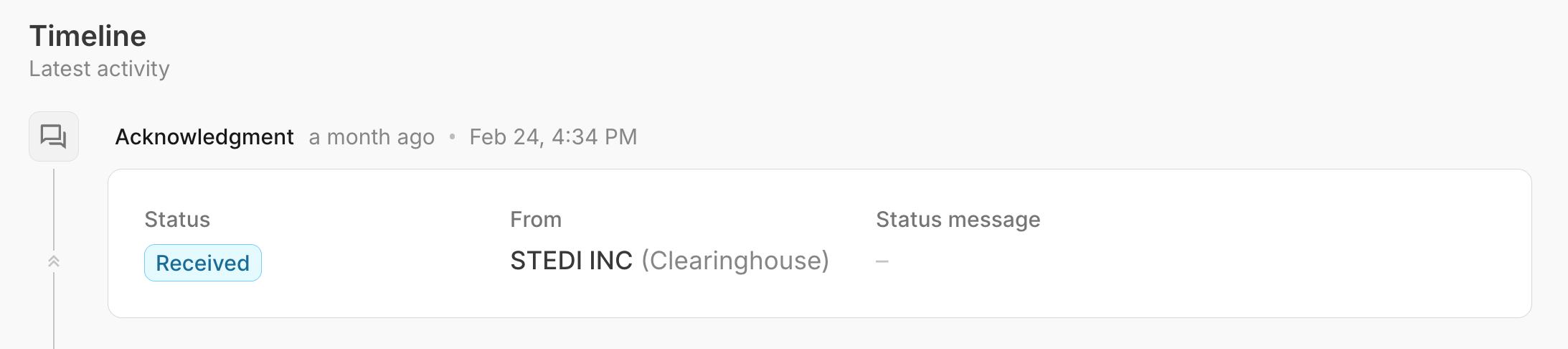
- Find the 277CA in the timeline view. The From field indicates whether the acknowledgment is from Stedi or the payer.
277CA vs. claim status check
The 277CA contains different information than a real-time claim status check. Specifically:
-
277CAs: Tell you whether the payer has received a claim and accepted it for processing. If the claim was rejected, 277CAs tell you why so you can resubmit. They don't indicate whether the claim has been adjudicated or paid.
-
Real-time claim status checks: Tell you the status of a claim that's already been accepted into the payer's system. They provide information about whether the claim has been adjudicated, paid, denied, or is pending further review.
That's why claim status checks can return more Claim Status Category Codes than a 277CA. Specifically, they can return codes in the
Prange for pending claims and codes in theFrange for final claim statuses.
If you're waiting for an ERA, you should first check the related 277CA to confirm that the claim was accepted for processing. If the claim was rejected, you won't receive an ERA because the payer didn't adjudicate the claim.
Then, you can run a real-time claim status check to get updates about the claim's adjudication and payment status.
835 Electronic Remittance Advice (ERA)
Processing ERAs always requires transaction enrollment with the payer.
The ERA contains details about payments for specific services and explanations for any adjustments or denials. The payer only sends ERAs for claims they have accepted for adjudication. If a claim is rejected in a 277CA, there's no adjudication or payment information to report.
Duplicate ERAs
Payers typically send one ERA per claim. However, they may occasionally retransmit identical 835 ERAs. In rare cases, payers may also send multiple different ERAs for the same claim. You should have logic in place to handle both scenarios.
You can identify identical ERAs by comparing the Check or EFT Trace Number. Check TRN02 (Check or EFT Trace Number) in the TRN (Reassociation Trace Number) segment.
Configure file names
You can configure how Stedi names the files you receive in the from-stedi directory. Go to the SFTP setup page in your account settings and select your preferred File naming option: Semantic or UUID only.
Semantic
Semantic filenames include a timestamp, a UUID, and a semantic identifier in the format {TIMESTAMP}_{UUID}_{SEMANTIC_IDENTIFIER}.x12. For example: 20260416124500_f9591145-8343-4bd8-a338-5bcca8ac3baf_999.x12.
-
Timestamp: The UTC timestamp when Stedi processed the file, in YYYYMMDDHHMMSS format. For example:
20260416124500. -
UUID: Stedi's internally generated 36-character identifier for the file. For example:
f9591145-8343-4bd8-a338-5bcca8ac3baf. -
Semantic identifier: Stedi's standardized transaction identifier.
X12 Transaction Set Semantic Identifier TA1 Interchange Acknowledgement TA1 999 Implementation Acknowledgment 999 277CA claim acknowledgment 277CA 835 Electronic Remittance Advice 835
UUID only (legacy)
Filenames only include a unique identifier in the format {UUID}.x12. For example: f9591145-8343-4bd8-a338-5bcca8ac3baf.x12.
Delimiter normalization
Stedi reserves certain characters for delimiters in X12 EDI transactions. When these delimiter characters appear within data values - meaning they're used as content and not as actual delimiters, such as within a subscriber's name - Stedi replaces them to prevent parsing issues. Stedi normalizes delimiters within transaction data as follows:
| Character found in data | Replacement | Stedi's reserved delimiter type it conflicts with |
|---|---|---|
* | | | Element separator |
^ | | | Repetition separator |
` | ' | Component element separator |
~ | | | Segment terminator |
Examples:
O*CONNORbecomesO|CONNORCODE^01becomesCODE|01O`CONNORbecomesO'CONNORMSG~HELLObecomesMSG|HELLO
If you parse raw X12 EDI responses, ensure your parser reads delimiters from the ISA segment instead of assuming fixed delimiters.
Correlate responses with claim
You can use the following identifiers from the original claim to correlate the 277CA and 835 ERA responses.
Entire claim
Use the following identifiers to correlate responses with the original 837 claim.
999s
Use AK102 (Group Control Number). It contains the same value you supplied in the claim's GS06 (Group Control Number). This is why we recommend using a unique value in GS06 for each claim.
277CAs and 835 ERAs
Use Loop 2300 CLM01 (Patient Control Number) from the original claim, if provided.
-
In the 277CA, this number is returned as
Loop 2200D TRN02(Patient Control Number).Some payers batch acknowledgments for multiple claims into a single 277CA. This is more likely if you submitted multiple claims within a single 837 claim envelope. In these cases, the 277CA contains multiple iterations of
Loop 2200D(Claim Status Tracking Number). Use eachTRN02(Patient Control Number) value in the 277CA to correlate it with the original claim. -
In the 835 ERA, this number is returned as
Loop 2100 CLP01(Patient Control Number).
Specific service lines
Use the following identifiers to correlate specific service lines in claim responses with services lines from original 837 claim.
277CAs and 835 ERAs
Use Loop 2400 REF02 (Line Item Control Number) from the original claim, if provided.
- In the 277CA, this number is sometimes returned as
Loop 2220D REF02(Line Item Control Number), but not always. This is because a 277CA only containsLoop 2220D(Service Line Information) when the claim was rejected because of issues with the information provided for the service line. - In the 835 ERA, this number is returned as
Loop 2110 REF02(Line Item Control Number).