

Submit paper claims
Some payers require you to submit claims on paper rather than electronically. Instead of mailing these claims yourself, you can send the claim information to Stedi using an electronic submission workflow with the receiver ID set to PAPER. Stedi then handles printing and mailing the claim to the designated payer on your behalf.
You can submit the following claim types for printing and mailing:
| Claim Type | Submission Methods |
|---|---|
| Professional (CMS-1500 form) | API: Professional Claim JSON | 837P JSON (Legacy) | 837P Raw X12 SFTP: 837P X12 EDI UI: 1500 form |
| Institutional (UB-04 form) | API: 837I JSON | 837I Raw X12 SFTP: 837I X12 EDI |
| Dental (ADA form) | API: 837D JSON | 837D Raw X12 SFTP: 837D X12 EDI |
How it works
Here's the end-to-end paper claims process:
Submit an 837 claim with the receiver ID set to PAPER and the payer's mailing address. For some submission types, you can also include unsolicited 275 claim attachments.
Stedi validates the claim and any attachments before sending them to our print-and-mail partner for processing.
You can monitor progress through the claims view in the Stedi portal. The claim timeline for paper claims shows its print status as the claim moves through staged, queued, printed, and mailed stages. You receive a 277CA claim acknowledgment for every successful submission, and another 277CA when the claim is mailed or when the claim fails.
Once available, you can download the PDF proof showing exactly what was mailed to the payer.
The payer receives the printed claim package and processes it. They typically mail an Explanation of Payment (EOP) for commercial payers or Standard Paper Remittance (SPR) for Medicare and Medicaid back to the provider.
Limitations
Paper claims have the following limitations:
- No test mode: You can submit paper claims in test mode and with a test API key, but Stedi doesn't generate test lifecycle 277CAs, such as a 277CA indicating the test claim was mailed.
- No preview: You can't preview the rendered claim form before submission. Once available, you can download a PDF proof from the Stedi portal.
- No attachments for raw X12 API submission: The raw X12 endpoints (837P Raw X12, 837I Raw X12, 837D Raw X12) don't support paper claims with attachments. Use the JSON APIs, SFTP, or the CMS-1500 UI form instead.
- ERAs typically unavailable: Payers that require paper claim submission usually don't support Electronic Remittance Advice (ERAs). Instead, they typically mail an Explanation of Payment (EOP) for commercial payers or Standard Paper Remittance (SPR) for Medicare and Medicaid back to the provider.
Transaction enrollment
Transaction enrollment isn't required for paper claim submission - it's only required for electronic transactions.
You may still need to complete transaction enrollment for Electronic Remittance Advice (ERAs) if the payer supports them. However, payers that require paper claim submission usually don't support ERAs:
- HIPAA covered entity health plans are required to send ERAs electronically.
- Other health plans may use different formats and communication channels for both claim submissions and remittances.
Submit paper claims
You can submit paper claims through JSON APIs, X12 EDI (through API or SFTP), or the CMS-1500 form in the Stedi portal. All submission methods require you to set the receiver ID to PAPER and include the payer's mailing address. You can also include unsolicited claim attachments with most submission methods.
Paper receiver ID
Stedi uses a special payer ID to route claim submissions for printing and mailing: PAPER (Print and Mail - All Payers). You must submit this as the receiver ID in the claim submission.
For paper claims, the receiver ID determines whether Stedi prints and mails a claim or sends it electronically:
| Name | Location | Description |
|---|---|---|
| Receiver ID |
| Controls the delivery method. |
| Payer ID |
| Identifies the destination payer. |
When the receiver ID is PAPER (or you select By mail in the CMS-1500 form), Stedi bypasses the traditional electronic submission flow and uses the mail-to payer name and mailing address to print and mail a paper claim to the payer.
You must still set the payer ID to the destination payer's ID or alias, if available in the Stedi Payer Network. However, you can also set the payer ID to PAPER when you need to send paper claims to payers outside of the electronic network.
For example, you can set the receiver ID to PAPER while keeping the payer ID as CIGNA. This, along with Cigna's mailing address, tells Stedi to print and mail the claim to Cigna.
JSON API
You can send paper claims through the following JSON endpoints:
Construct your claim request as you normally do. Then, add the following information.
| Property | Description |
|---|---|
receiver.organizationName | The actual payer name, such as Cigna. |
receiver.receiverId | Set to PAPER. This is what tells Stedi to bypass the typical electronic submission flow and instead route this claim to be printed and mailed. |
tradingPartnerName | The mail-to payer name. This is what should be listed on the physical envelope. This information may be different from receiver.organizationName. |
tradingPartnerServiceId | Set this to the destination payer's ID or alias, if available in the Stedi Payer Network. If you're sending claims to payers outside the Payer Network, set this to PAPER. |
payerAddress.address1 | The first line of the street address. This typically contains the building number and street name. |
payerAddress.address2 | The second line of the street address. This is optional, and typically contains the apartment or suite number, if relevant. |
payerAddress.city | The city name. |
payerAddress.state | The state or province code. Only required when the city is in the United States and Canada. |
payerAddress.postalCode | The postal zone or ZIP Code. Exclude punctuation and spaces. |
After you submit the claim, Stedi uses the receiver ID set to PAPER, the payer ID, and the mailing address you provided to route the claim for printing and mailing.
Example: Professional paper claim
The following example sends a professional paper claim to Cigna.
curl --request POST \
  --url "https://healthcare.us.stedi.com/2024-04-01/change/medicalnetwork/professionalclaims/v3/submission" \
  --header "Authorization: <api_key>" \
  --header "Content-Type: application/json" \
  --data '{
  "receiver": {
    "receiverId": "PAPER",
    "organizationName": "CIGNA"
  },
  "tradingPartnerName": "CIGNA",
  "tradingPartnerServiceId": "62308",
  "payerAddress": {
    "address1": "123 Example Street",
    "address2": "STE 100",
    "city": "Mountain View",
    "state": "CA",
    "postalCode": "940433706"
  }
  ... // remaining claim data
}'
Example: Payer not in Stedi's network
The following example sets the tradingPartnerServiceId to PAPER because this payer is outside the Stedi Payer Network.
curl --request POST \
  --url "https://healthcare.us.stedi.com/2024-04-01/change/medicalnetwork/professionalclaims/v3/submission" \
  --header "Authorization: <api_key>" \
  --header "Content-Type: application/json" \
  --data '{
  "receiver": {
    "receiverId": "PAPER",
    "organizationName": "ACME Employer LLC"
  },
  "tradingPartnerName": "ACME Employer LLC",
  "tradingPartnerServiceId": "PAPER",
  "payerAddress": {
    "address1": "987 Example Street",
    "address2": "STE 200",
    "city": "Philadelphia",
    "state": "PA",
    "postalCode": "19192"
  },
  ... // remaining claim data
}'
X12 EDI - API and SFTP
You can send X12 EDI claims through the following methods:
- API endpoints: 837P Raw X12 | 837D Raw X12 | 837I Raw X12
- SFTP: SFTP connection guide
The raw X12 API endpoints don't support paper claims with attachments. Use the JSON APIs, SFTP, or the CMS-1500 UI form instead.
Construct an X12 EDI claim as you normally do. Then, add the following information.
| Location | Elements |
|---|---|
Loop 1000B (Receiver Name) | Set the following paper-specific elements:
|
Loop 2010BB (Payer Name) | Set the following paper-specific elements:
|
After you submit the claim, Stedi uses the receiver ID set to PAPER, the payer ID, and the mailing address you provided to route the claim for printing and mailing.
Example: Professional paper claim
The following example uses:
- The payer payer ID
PAPERinLoop 1000B(Receiver Name)NM109. - Cigna's payer ID from the Stedi Payer Network in
Loop 2010BB(Payer Name)NM109.
ISA...~
GS...~
ST*837*0001*005010X222A1~
...

NM1*40*2*CIGNA*****46*PAPER~                             // Paper payer ID
NM1*PR*2*CIGNA*****PI*62308~                             // Name and payer ID
N3*123 Example Street*STE 100~                           // Mailing address
N4*Mountain View*CA*940433706~

...
SE...~
GE...~
IEA...~
Example: Payer not in Stedi's network
The following example uses:
- The payer payer ID
PAPERinLoop 1000B(Receiver Name)NM109. - The paper payer ID
PAPERinLoop 2010BB(Payer Name)NM109. This lets you submit paper claims to payers outside of the Stedi Payer Network.
ISA...~
GS...~
ST*837*0001*005010X222A1~
...

NM1*40*2*ACME Employer LLC*****46*PAPER~ // Paper payer ID
NM1*PR*2*ACME Employer LLC*****PI*PAPER~ // Name and paper payer ID
N3*987 Example Street*STE 200~           // Mailing address
N4*Philadelphia*PA*19192~

...
SE...~
GE...~
IEA...~
CMS-1500 form UI
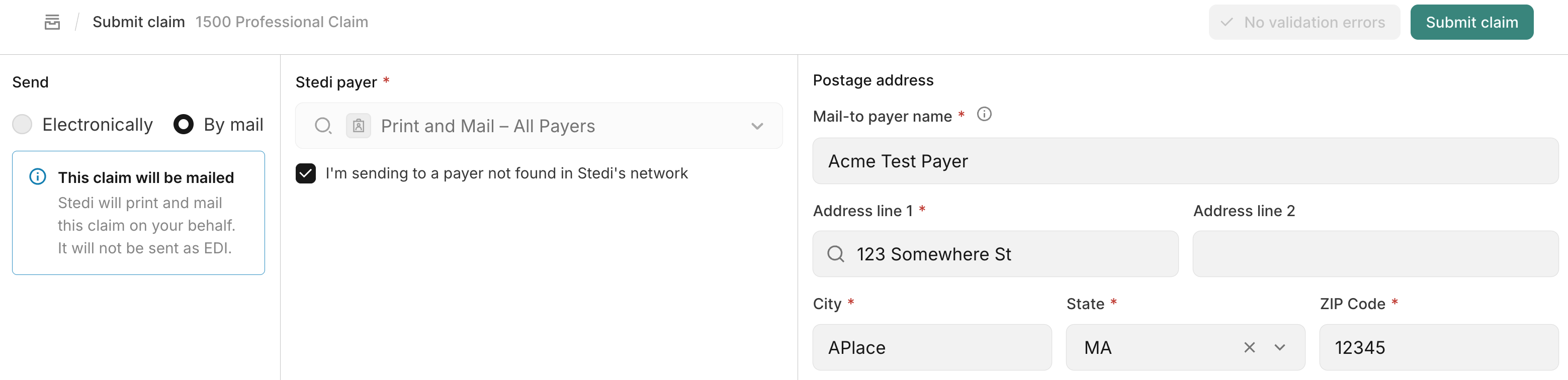
You can submit professional paper claims through the CMS-1500 form UI in the Stedi portal. Within the form, configure these paper-specific settings:
-
In the Send section, select By mail. This expands the UI to show additional fields for the mail-to payer name and payer address.
-
In the Stedi payer dropdown:
- If the payer exists in Stedi's Payer Network, select it from the dropdown.
- If the payer is not in the network, check I'm sending to a payer not found in Stedi's network. Stedi automatically populates the dropdown with the Print and Mail - All Payers option.
-
In the Postage address section:
- Update the Mail-to payer name if necessary. This becomes the addressee on the physical envelope.
- Complete the Payer address fields with the complete mailing address where Stedi sends the claim.
-
For attachments:
- In the Claim attachments section, choose a Report type.
- Attach the file to the submission. Stedi prints the attachment in color and mails it along with the claim to the payer.
After you submit the claim, Stedi uses the paper payer ID and the mailing address you provided to route the claim for printing and mailing.
Paper claim attachments
You can submit unsolicited 275 claim attachments with paper claims through most submission methods. For JSON API submissions, Stedi uses the attachmentId to pair the claim with attachments. For SFTP submissions, Stedi uses the attachment control number. Then, Stedi routes both for printing and mailing.
| Submission method | Supported? |
|---|---|
| JSON APIs | Yes |
| SFTP | Yes* |
| UI (CMS-1500 form) | Yes |
| Raw X12 APIs | No |
*For SFTP submissions, you must submit both the paper 837 claim and 275 attachment in the same interchange. Stedi doesn't support sending paper 837 claims and 275 attachments separately through SFTP or the raw X12 endpoints.
For complete instructions on submitting unsolicited paper claim attachments visit Submit claim attachments.
Track print status
As a paper claim moves through the print-and-mail workflow, it goes through the following statuses:
| Stage | Meaning |
|---|---|
| Staged | Stedi accepted the claim for mailing. |
| Queued | The print-and-mail partner queued the claim for printing. |
| Printed | The print-and-mail partner printed the claim form and any attachments. |
| Mailed | The print-and-mail partner mailed the claim package to the payer. |
| Failed | The claim wasn't mailed. The timeline row shows the reason. |
Stedi mails claim packages within the US using USPS First Class postage. USPS estimates delivery in 1 to 5 days.
The latest print status appears in several locations:
-
Claims view: Shows the status as an icon in the Status column. You can filter by print status.
-
Claim details panel and claim timeline: The Claim details panel displays the current status in the Print status row. The claim timeline shows the progression through each stage.
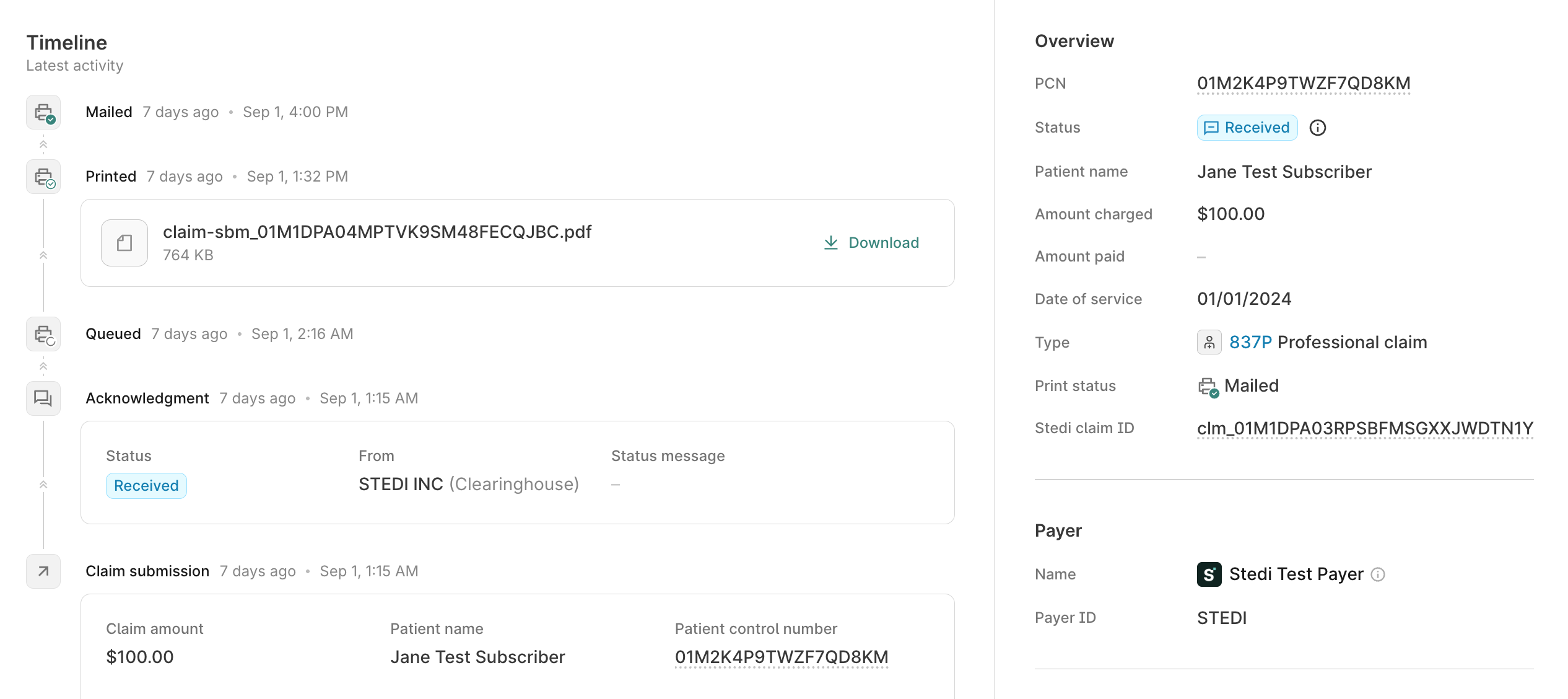
You receive 277CA claim acknowledgments when the claim reaches the Mailed or Failed status.
Responses
When you submit a paper claim, you receive different types of responses than you do for electronic claims. This section explains what to expect.
Receipt confirmation
Immediately after submission, Stedi confirms receipt:
- API: Stedi returns an HTTP response with claim submission details.
- SFTP: Stedi generates a 999 Functional Acknowledgment confirming receipt of the EDI file.
- UI: The portal displays a confirmation message with the submitted claim details.
277CA claim acknowledgments
Stedi generates a 277CA claim acknowledgment with status A1/20 when it accepts a claim for processing and marks the claim's status as Staged. After that, Stedi sends a 277CA when the claim reaches Mailed status or Failed status. Visit Track print status for details on all available statuses.
The following example shows a 277CA with status A0/16 indicating the claim was successfully mailed to the payer.
The following example shows a 277CA with status A7/126 indicating the payer address failed validation and the claim was not mailed.
Resolve address validation failures
An address validation failure means the print-and-mail partner couldn't validate the payer mailing address. Review and correct the payer address, then resubmit the claim with a new claim identifier.
Explanation of Payment (EOP) and Standard Paper Remittance (SPR)
Payers that require paper claim submission usually don't support Electronic Remittance Advice (ERAs). Instead, they typically mail an Explanation of Payment (EOP) for commercial payers or Standard Paper Remittance (SPR) for Medicare and Medicaid back to the provider.
This means you won't receive 835 ERAs through Stedi for paper claims. You'll receive paper EOPs or SPRs by mail from the payer.
PDF proof of mailing
After the print-and-mail partner produces the claim proof, Stedi makes a PDF available in the claims view. The proof represents the printed claim package, including the printed form and any associated attachment pages.
You can download the PDF proof from two locations in the Stedi portal:
-
Claim timeline: Click Download on the Printed row in the claim's timeline.
-
Claim details page: Click Download printed claim on the claim details page.
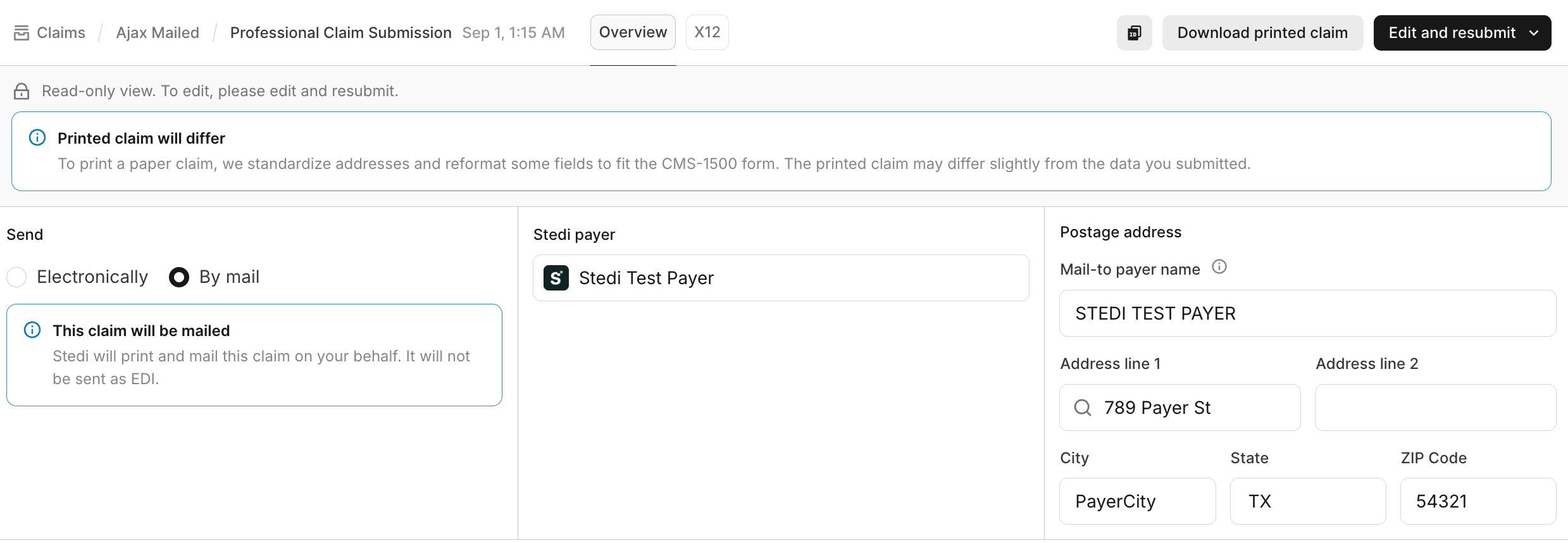
The PDF isn't available immediately at claim submission. You can download the proof only after the print-and-mail partner has printed the claim.
To fit the printed form, Stedi standardizes addresses and reformats some fields. The printed claim can differ slightly from the data you submitted. The claim details page shows a note when this happens.
Best practices
Follow these best practices when submitting paper claims:
- Monitor for 277CA acknowledgments: Watch for the 277CA indicating either successful mailing or address validation failure. You can track additional status updates (queued and printed) in the Stedi portal claims view.
- Treat mailed 277CA as confirmation: Use the mailed 277CA as confirmation that the print-and-mail partner sent the package to the payer.
- Investigate address validation failures promptly: If you receive an address validation failed acknowledgment, resolve the issue and resubmit. If you don't, the claim won't be mailed to the payer.
- Keep PDF proofs: Download and retain the PDF proof from the Stedi portal for audits, appeals, and payer follow-up.