5 ways MSOs can grow RCM with Stedi
A Management Services Organization (MSO) handles back-office tasks – like credentialing, payer contracts, IT, and billing – for provider groups.
MSOs usually manage many independent practices at once. For example, an MSO may run billing for 40 dermatology practices in five states. Each practice has its own name, tax ID, and payer contracts.
The problem is that MSOs still rely on tools built for small practices. Many verify insurance by logging into a separate payer portal for each payer, provider, and location.
That manual work often becomes a bottleneck as the MSO adds more practices and providers. The only way to add more practices is to add more administrative headcount.
Stedi is a headless healthcare clearinghouse and RCM engine. We're built from the ground up for scale and automation. You can use Stedi to build RCM workflows that work the same way for every location, provider, and payer.
If you're an MSO looking to scale without adding headcount, here are five ways Stedi can help.
1. Reach thousands of payers from the Stedi portal
MSOs tend to work across a mix of payers. Each payer's portal works differently. Any standard operating procedure (SOP) you build has to accommodate those differences.
The Stedi portal lets you connect to 3,500+ payers in the Stedi Payer Network – virtually every healthcare payer – in one place.
You don't need a separate procedure for each payer. You can build procedures that work the same way across every payer.

You can use the portal to run insurance discovery checks, check eligibility, submit professional claims, run claim status checks, and track claims (including paper claims) and ERAs.
2. Check coverage before an appointment
MSOs often want to know two things before a patient sees a provider:
- Whether the patient is covered by insurance
- How much the patient owes out of pocket, such as a deductible or copay, for their visit
That information can help avoid denials or lost revenue later in the billing cycle.
Checking benefits a week or even a day before the visit isn't enough. Coverage and benefits can change between the day staff schedules the visit and the day of service.
A real-time eligibility check returns coverage and benefits in 1-3 seconds. You run it the same way for every payer, in the Stedi portal or through Stedi's JSON API.
Agentic Discovery chains an eligibility check, automatic recovery, and an insurance discovery check into one agentic workflow. When a check fails on bad intake data, it automatically retries with corrections. When the patient's coverage is unknown entirely, it falls back to insurance discovery.
An insurance discovery check finds coverage from basic details like the patient's name, date of birth, state, and ZIP code. Most insurance discovery tools find coverage on 15-30% of accounts. Stedi finds coverage on 40-60% of those same accounts – 4x the market average.
Agentic Discovery runs in Stedi Agent, the portal's AI assistant. The agent can also help you look up payer details and get payer IDs from uploaded photos of member ID cards.
3. Onboard a practice's providers and payers
MSOs often have to acquire or onboard new practices. That means new providers, new locations, new tax IDs, and often a new set of payers.
One of the biggest onboarding chores is transaction enrollment, registering a provider to exchange transactions, like Electronic Remittance Advice (ERAs) or eligibility checks, with a payer.
Stedi provides turnkey transaction enrollment. You can submit and track enrollment requests in the Stedi portal – one at a time or using a bulk CSV – or through our Enrollments API. A bulk CSV covers every provider, location, and tax ID at a new practice in one upload.
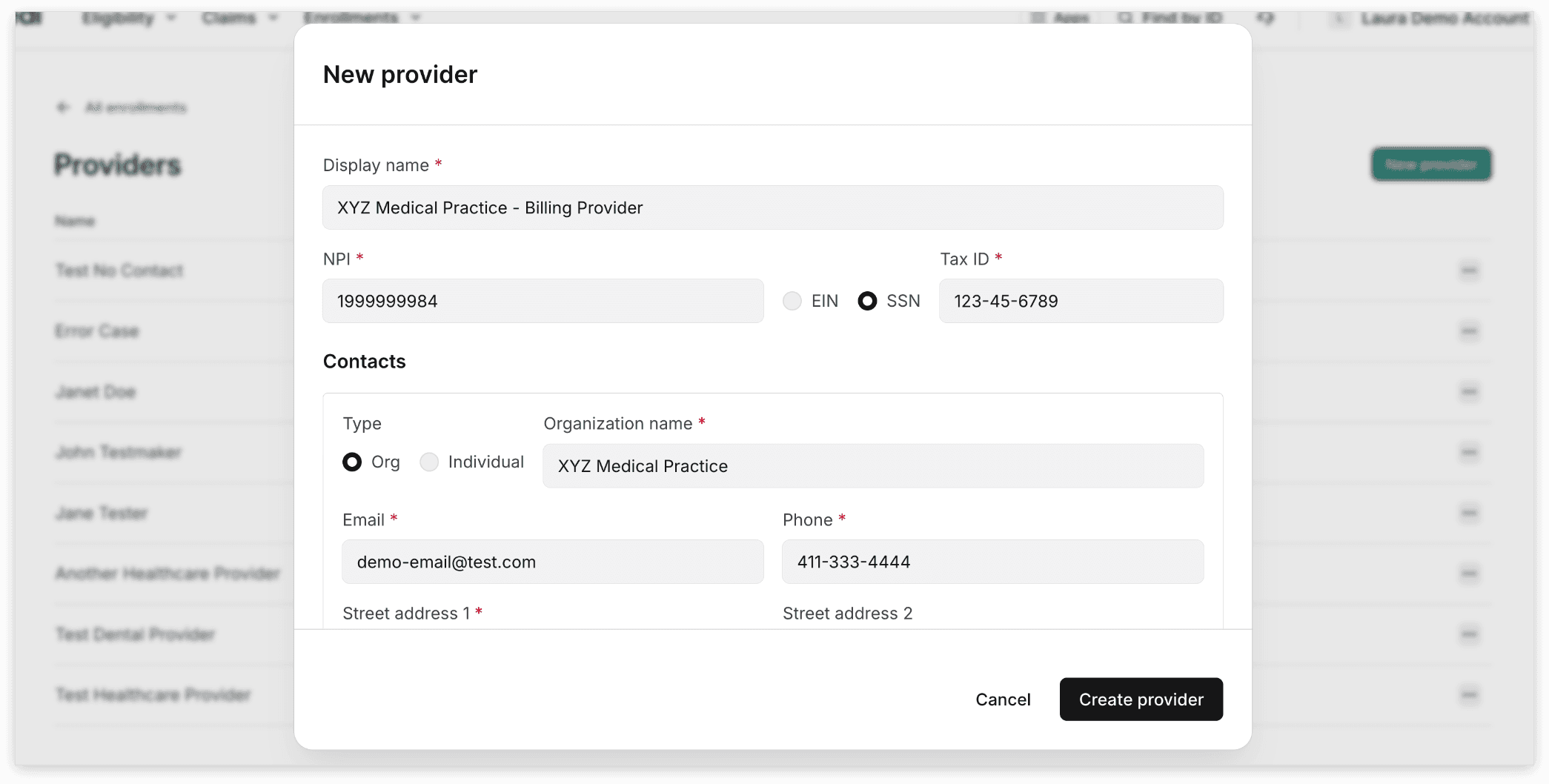
For the 1,500+ payers that support one-click enrollment, that's it. Stedi takes care of the rest for you.
If a payer needs something only the provider can give, like a wet signature or a voided check, Stedi surfaces it as a task you can complete in the portal or through the API.
4. See every claim across every practice
MSOs often want a "single pane of glass" that lets them quickly view claims across every practice they manage. This lets the MSO work denials and spot issues before they turn into write-offs.
The Stedi portal's claims view shows every claim you submit through Stedi, across every location and payer in the account. Each claim shows its processing status, the amount charged, the amount paid, patient responsibility, adjustments, denial reasons, and reversals.
That information comes from the claim's 277CA claim acknowledgments and ERAs. Stedi matches each acknowledgment and ERA to its claim. Nobody on your team needs to match patient control numbers (PCNs) by hand.
Each claim also has a timeline with a card for every submission, 277CA claim acknowledgment, and payment record.

5. Build your own RCM tools with Stedi's APIs
The Stedi portal covers the work your team does by hand. Real automation starts when your own software calls Stedi directly.
Every Stedi feature has an API. You can write scripts, apps, and integrations that run eligibility checks, submit claims, manage enrollments, and read claim records without any manual steps.
Stedi's TypeScript and Python SDKs handle types, retries, and error handling. You only write the parts specific to your MSO.
Stedi is also designed to work well with AI coding agents, like Claude Code and Codex. These tools can cut your integration time. For example, you can use a coding agent to build an insurance verification app with Stedi in less than 30 minutes.
To get started, point your agent at Stedi's plain-text docs and OpenAPI specs. The agent can use test mode and Stedi's mock eligibility check workflow to test the integration end to end, without real patient data or transactions to real payers.
For tips, see How to use Stedi with a coding agent.
Don't want to build it yourself?
Stedi's Platform Partner directory includes a list of EHRs, practice management systems, and RCM tools that build on Stedi.
Get started with Stedi
To get started with Stedi, sign up for a free sandbox account. It takes less than two minutes. No credit card is required.
Sandbox accounts include the Stedi portal, so you can see where your team would work. When you're ready, upgrade to production on our pay-as-you-go plan. There are no monthly minimums or setup fees. You only pay for the transactions you use.