Changelog

Introducing the CMS-1500 Professional Claim API endpoints

You can now submit, validate, and retrieve 837P professional claims through JSON API endpoints that mirror the CMS-1500 paper form.

EndpointWhat it does
Create Professional Claim (CMS-1500) JSONAccepts a claim submission in a CMS-1500 JSON structure, validates the claim using Stedi's database of claim edits, and sends the claim to the payer.
Validate Professional Claim (CMS-1500) JSONValidates the claim using Stedi's database of claim edits without sending the claim to the payer. Returns an empty 200 response if the claim passes Stedi's edits, or an error if it doesn't.
Retrieve Professional Claim (CMS-1500) JSONReturns a submitted claim in the CMS-1500 JSON structure. You can then make corrections to the claim and resubmit it using the Create Professional Claim (CMS-1500) JSON endpoint.

The CMS-1500 – also called the HCFA form – is the standard paper form for professional claims. Every box on the form has a number. Many billers know these numbers. Payers cite them in their own guides. And many AI agents are trained on them.

Until now, only the Stedi portal's professional claim form mirrored the CMS-1500. Our JSON 837P Professional Claim Submission endpoint uses a separate schema.

Now developers and AI agents can apply what they know about the CMS-1500 to Stedi's API. The new endpoints are the same ones that power Stedi's own claim form.

Important: We're not deprecating the JSON 837P Professional Claim Submission endpoint or any other functionality as part of this release. Your existing integrations will continue working.

Watch the 2026 Stedi Keynote announcement:

Request shapes

The new endpoints group fields the same way the CMS-1500 form does. The API reference includes the box number for most fields.

For example, Box 24 – Service lines of the CMS-1500 form is the grid where you list each service you bill. One row of that grid is one object in the serviceLines array.

Box 24 service lines grid on the CMS-1500 form

Test mode support

You can use the Create Professional Claim (CMS-1500) JSON and Retrieve Professional Claim (CMS-1500) JSON endpoints in test mode. You need a test API key for a Stedi production account.

The Validate Professional Claim (CMS-1500) JSON endpoint is not supported in test mode.

Sandbox accounts can't use the CMS-1500 endpoints. To submit test claims, upgrade to a production account.

Limitations

The CMS-1500 endpoints don't support claims for non-primary payers, such as a secondary payer, when the patient is covered by more than one insurance plan. To submit a professional claim to a non-primary payer, use the JSON 837P Professional Claim Submission endpoint, Raw X12 837P Professional Claim Submission endpoint, or SFTP instead.

Availability and pricing

The CMS-1500 endpoints are available on all Stedi production accounts.

Claim retrieval is free. Test claim submissions are free. Production claim submissions and validations are priced per transaction. For pricing, see our Pricing page.

For more details, see our announcement blog.

Introducing the Stedi TypeScript and Python SDKs

We're releasing official software development kits (SDKs) for TypeScript and Python. The SDK packages are available from npm and PyPI.

Previously, Stedi only offered REST APIs. If you wanted language-specific types, retries, or error handling, you had to write your own client. Every customer who integrated with Stedi had to repeat that work.

Now the SDKs do that work for you. You get types, retries, and error handling as part of the SDKs. You only need to write the parts that are specific to your product.

This initial SDK release includes operations covering the following API endpoints:

Watch the 2026 Stedi Keynote announcement:

Get started

Visit the npm and PyPI pages for installation and quickstart instructions.

You'll find runnable, end-to-end examples for every operation in the examples/ directories:

Versioning

The SDKs are generated from our own internal API models, so they stay in lockstep with our REST APIs.

We keep the SDKs backwards compatible within a major version. These changes don't require a new major version:

  • New API operations
  • New optional parameters
  • New fields in responses
  • A change in the order of response properties
  • A mandatory parameter that becomes optional

A breaking change gets a new major version. Previous major versions keep working, but we recommend that you upgrade.

Try Stedi for free

To use the SDKs, you must have a Stedi API key.

To get started, sign up for a free sandbox account. It takes less than two minutes. No credit card is required.

With a sandbox account, you can create a test API key to run predefined mock eligibility checks or set up event destinations.

When you're ready, upgrade to production on our pay-as-you-go plan. There are no monthly minimums or setup fees. You only pay for the transactions you use.

For more details, see our announcement blog.

Paper claims now support dental claims, attachments, and delivery tracking

We're releasing several major improvements that introduce first-class support for paper claim submissions. You can now:

  • Submit dental claims (ADA dental claim form) as paper claims.
  • Send 275 claim attachments with paper claims.
  • Track a paper claim's print status in the Stedi portal's claims view.
  • View a PDF proof of the printed claim package in the Stedi portal.

With paper claims, Stedi prints and mails the claim to any payer for you. You submit them through the same Stedi APIs, SFTP, and Stedi portal UIs you use for electronic claims.

Previously, paper claims covered only professional (CMS-1500) and institutional (UB-04) claims. Attachments weren't supported. You got one 277CA claim acknowledgment when Stedi forwarded the claim for printing. Nothing told you whether the claim reached the mail.

Watch the 2026 Stedi Keynote announcement:

Submit dental paper claims

You can now submit dental claims as paper claims using the following methods:

Attachments for paper claims

You can now submit unsolicited 275 claim attachments as PDFs for paper claims using Stedi's claim form UI (professional claims only), JSON API, or SFTP – the same way you would for an electronic claim.

Stedi pairs the claim with the attachment, prints both, and mails them to the payer together.

Track paper claims

The Stedi portal's claims view now follows each paper claim through print and mail. The claim's timeline adds a row for each print stage, newest first.

Print stages in a paper claim's timeline in the Stedi portal

Print statusWhat it means
StagedStedi accepted the claim for mailing.
QueuedStedi's print-and-mail partner queued the claim for printing.
PrintedThe partner printed the claim form and any attachments.
MailedThe partner mailed the claim package to the payer.
FailedThe claim wasn't mailed. The timeline row shows the reason.

The claims list shows the same status as an icon in the Status column. You can also filter the list by print status.

Print status icons in the Stedi portal's claims list

277CA claim acknowledgments

A paper claim ends in one of two stages. Stedi returns a 277CA claim acknowledgment for each one:

StageWhat it means
MailedThe claim package was mailed to the payer.
FailedThe payer address failed validation, so Stedi didn't mail the claim.

The earlier print stages don't produce a 277CA. You track those in the claims view.

Download PDF proofs

Every printed paper claim now has a PDF of the claim package, including the printed form and any attachment pages. The Printed row in the claim's timeline holds the file.

PDF proof of a printed paper claim

Availability and pricing

Paper claims are available on all Stedi production accounts.

Stedi charges for paper claims per page printed and mailed. The page count depends on the claim type, its service line count, and any attachments.

Claim typeService lines per page
Professional claim (CMS-1500 form)Up to 6
Institutional claim (UB-04 form)Up to 22
Dental claim (ADA dental claim form)Up to 10

A claim spills onto additional pages when its service lines exceed what one form holds. Attachment pages count the same way.

See stedi.com/pricing for per-page rates.

For more details, see our announcement blog.

Claim edit: ICD-9 qualifier after the ICD-10 transition date

Stedi now rejects 837P professional and 837I institutional claims that declare ICD-9 for a service provided on or after October 1, 2015.

ICD-9 qualifiers and service dates

On October 1, 2015, the U.S. healthcare system replaced ICD-9 with ICD-10. Both the diagnosis code sets and the inpatient procedure code sets changed on that date. A payer won't accept a claim that declares ICD-9 for a service on or after that date.

A claim declares its code set with a code list qualifier. The qualifier sits in a Health Care Code Information (HI) segment in Loop 2300, and it introduces the code that follows it. Each HI segment holds up to 12 composites, so a qualifier can also appear in HI02-1 through HI12-1.

Clinical Modification (CM) diagnosis qualifiers in 837P professional claims

ICD-9 qualifierICD-10 qualifierJSON API fieldX12 element
BK (principal diagnosis)ABKclaimInformation.healthCareCodeInformation[].diagnosisTypeCodeHI01-1 (Code List Qualifier Code) of the Health Care Diagnosis Code HI segment in Loop 2300
BF (other diagnosis)ABFclaimInformation.healthCareCodeInformation[].diagnosisTypeCodeHI01-1 (Code List Qualifier Code) of the Health Care Diagnosis Code HI segment in Loop 2300

Clinical Modification (CM) diagnosis qualifiers in 837I institutional claims

ICD-9 qualifierICD-10 qualifierJSON API fieldX12 element
BK (principal diagnosis)ABKclaimInformation.principalDiagnosis.qualifierCodeHI01-1 (Code List Qualifier Code) of the Principal Diagnosis HI segment in Loop 2300
BF (other diagnosis)ABFclaimInformation.otherDiagnosisInformationList[][].qualifierCodeHI01-1 (Code List Qualifier Code) of the Other Diagnosis Information HI segment in Loop 2300
BJ (admitting diagnosis)ABJclaimInformation.admittingDiagnosis.qualifierCodeHI01-1 (Code List Qualifier Code) of the Admitting Diagnosis HI segment in Loop 2300
BN (external cause of injury)ABNclaimInformation.externalCauseOfInjuries[].qualifierCodeHI01-1 (Code List Qualifier Code) of the External Cause of Injury HI segment in Loop 2300
PR (patient's reason for visit)APRclaimInformation.patientReasonForVisits[].qualifierCodeHI01-1 (Code List Qualifier Code) of the Patient's Reason For Visit HI segment in Loop 2300

Procedure Coding System (PCS) qualifiers in 837I institutional claims

ICD-9 qualifierICD-10 qualifierJSON API fieldX12 element
BR (principal procedure)BBRclaimInformation.principalProcedureInformation.qualifierCodeHI01-1 (Code List Qualifier Code) of the Principal Procedure Information HI segment in Loop 2300
BQ (other procedure)BBQclaimInformation.otherProcedureInformationList[][].qualifierCodeHI01-1 (Code List Qualifier Code) of the Other Procedure Information HI segment in Loop 2300

The edit compares the qualifier against a governing date. A date of injury governs when the claim carries one. ICD-9 stays valid for an injury that predates the transition, even when the services came later. Otherwise each service line's own date of service governs.

Date of service

Claim typeJSON API fieldX12 element
837P professionalclaimInformation.serviceLines[].serviceDateDTP-03 (Date Time Period) of Loop 2400 (Service Line) with qualifier 472 (Service)
837I institutionalclaimInformation.serviceLines[].serviceDateDTP-03 (Date Time Period) of Loop 2400 (Service Line) with qualifier 472 (Service)

Date of injury

Claim typeJSON API fieldX12 element
837P professionalclaimInformation.claimDateInformation.accidentDateDTP-03 (Date Time Period) of Loop 2300 (Claim Information) with qualifier 439 (Accident)
837I institutionalclaimInformation.occurrenceInformationList[][] with an accident occurrence code 01-06HI segment in Loop 2300 (Occurrence Information) with qualifier BH

A service date is required on every 837P service line. On an 837I claim it's optional, so the edit falls back to the claim statement date in claimInformation.claimDateInformation.statementEndDate (DTP-03 of Loop 2300 with qualifier 434).

How the edit works

If a claim uses an ICD-9 qualifier and a governing date falls on or after October 1, 2015, the payer may reject the claim.

837D dental claims don't carry ICD-9 qualifiers, so this edit doesn't apply to them.

This edit catches the issue before the claim reaches the payer. It prevents payer rejections, which take longer to resolve and delay payment for the provider.

Rejection errors

If you submit a claim using Stedi's Claim Submission API endpoints and the claim fails the edit, you'll get back an error response in real time. The response includes details in the errors array.

{
  "errors": [
    {
      "code": "33",
      "description": "Invalid ICD-9 Qualifier usage. A code list qualifier indicating ICD-9 can not be used for service dates after 09-30-2015. Submitted qualifier(s): BK. Correct and resubmit.",
      "followupAction": "Please Correct and Resubmit"
    }
  ]
}

The error names every distinct ICD-9 qualifier on the claim.

If you submit a claim using SFTP and the claim fails the edit, Stedi will reject the claim with a 277CA claim acknowledgment. The acknowledgment will include a related claim status category code, claim status code, and error message.

STC*A7>508*[DATE]*U*[AMOUNT]******A7>488**Invalid ICD-9 Qualifier usage. A code list qualifier indicating ICD-9 can not be used for service dates after 09-30-2015. Submitted qualifier(s): BK. Correct and resubmit.~

Resolution tips

This edit checks the qualifier. It doesn't check the code the qualifier introduces. To resolve a rejection, change the qualifier to its ICD-10 counterpart, change the code to an ICD-10 code, or change both.

Related claim edits

Stedi has a mirror edit for the opposite mismatch, an ICD-10 code paired with a service date before the transition. See ICD-10 diagnosis code with pre-implementation service date.

Introducing Event Destination API endpoints

You can now create and manage event destinations using the Event Destination API endpoints:

EndpointWhat it does
Create DestinationCreates a destination and returns its signing secret.
Retrieve DestinationReturns one destination's full configuration and status.
List DestinationsReturns every destination in your account. You can filter by status or eventType.
Update DestinationChanges a destination's name, URL, event types, description, or status.
Delete DestinationPermanently deletes a destination and stops all deliveries.
Retrieve Destination SecretReturns a destination's current signing secret.
Rotate Destination SecretReplaces a destination's signing secret.

Previously, you had to use the Stedi portal to manage event destinations or rotate signing secrets. Now, you can also do both programmatically from an application or script.

If you're a Stedi app developer, you can use these API endpoints to configure event destinations for your providers' accounts.

The new endpoints are available for free on all Stedi production accounts. For more details, see our announcement blog.
Claim edit: Missing organization name

Stedi now rejects 837P professional, 837D dental, and 837I institutional claims that include a non-person entity with no organization name.

Entity types and organization names

In a claim, each entity, such as the billing provider or submitter, is identified as either a person or a non-person using an entity type qualifier. Non-person entities include hospitals, billing organizations, and similar groups.

X12 standards require the organization name when an entity is a non-person. In X12, this is the entity's NM1-03 element. If the organization name is missing, the payer may reject the claim.

This edit catches the issue before the claim reaches the payer. It prevents payer rejections, which take longer to resolve and delay payment for the provider.

How entity type qualifiers are specified

If you use Stedi's JSON Claim Submission API endpoints, Stedi sometimes infers the entity type qualifier. For example, if you provide an organizationName for the billing provider in a JSON 837P Professional Claims API request, the entity is treated as a non-person.

If you provide a firstName and lastName, the entity is treated as a person. Other entities, such as otherPayerBillingProvider, have an explicit entityTypeQualifier field.

If you use X12, you set the entity type qualifier in NM1-02 (Entity Type Qualifier). 1 indicates a person and 2 indicates a non-person entity, such as a hospital or billing organization.

Rejection errors

If you submit a claim using Stedi's Claim Submission API endpoints and the claim fails the edit, you'll get back an error response in real time. The response includes details in the errors array.

{
  "errors": [
    {
      "code": "33",
      "description": "Missing Organizational Name. The organizational name is required when Billing Provider is reported as a non-person by the entity type qualifier 2. Correct and resubmit.",
      "followupAction": "Please Correct and Resubmit"
    }
  ]
}

If you submit a claim using SFTP and the claim fails the edit, Stedi will reject the claim with a 277CA claim acknowledgment. The acknowledgment will include a related claim status category code, claim status code, entity identifier code, and error message.

STC*A6>125>85*[DATE]*U*[AMOUNT]********Missing Organizational Name. The organizational name is required when Billing Provider is reported as a non-person by the entity type qualifier 2. Correct and resubmit.~

Related claim edits

Stedi has companion edits for missing person names. See Claim edit: Missing last name and Claim edit: Missing first name.

Stedi also has an edit for person name fields sent on a non-person entity. See Claim edit: Invalid name for a non-person entity.

Claim edit: Missing patient control number

Stedi now rejects 837P professional, 837D dental, and 837I institutional claims that don't include a patient control number.

Patient control numbers

A patient control number (PCN) is the tracking ID submitters assign to a claim when they submit it. The payer returns the PCN in follow-up transactions – 277CA claim acknowledgments, Electronic Remittance Advice (ERAs), and claim status checks. You use the PCN to match each response to the original claim.

Patient control number

Claim typeJSON API fieldX12 element
837P professionalclaimInformation.patientControlNumberCLM01 (Patient Control Number) of Loop 2300 (Claim Information)
837D dentalclaimInformation.patientControlNumberCLM01 (Patient Control Number) of Loop 2300 (Claim Information)
837I institutionalclaimInformation.patientControlNumberCLM01 (Patient Control Number) of Loop 2300 (Claim Information)

How the edit works

X12 standards require a PCN on every claim. If you submit a claim without a PCN, the payer may reject the claim.

This edit catches the issue before the claim reaches the payer. It prevents payer rejections, which take longer to resolve and delay payment for the provider.

Rejection errors

If you submit a claim using Stedi's Claim Submission API endpoints and the claim fails the edit, you'll get back an error response in real time. The response includes details in the errors array.

{
  "errors": [
    {
      "code": "33",
      "description": "Missing Patient Control Number. A patient control number is required and must be 20 characters or fewer. Correct and resubmit.",
      "followupAction": "Please Correct and Resubmit"
    }
  ]
}

If you submit a claim using SFTP and the claim fails the edit, Stedi will reject the claim with a 277CA claim acknowledgment. The acknowledgment will include a related claim status category code, claim status code, and error message.

STC*A6>481*[DATE]*U*[AMOUNT]********Missing Patient Control Number. A patient control number is required and must be 20 characters or fewer. Correct and resubmit.~

Related claim edits

Stedi has another edit for PCNs longer than 20 characters. See Invalid patient control number.

Introducing the Overview tab for 999 acknowledgments in the Stedi portal

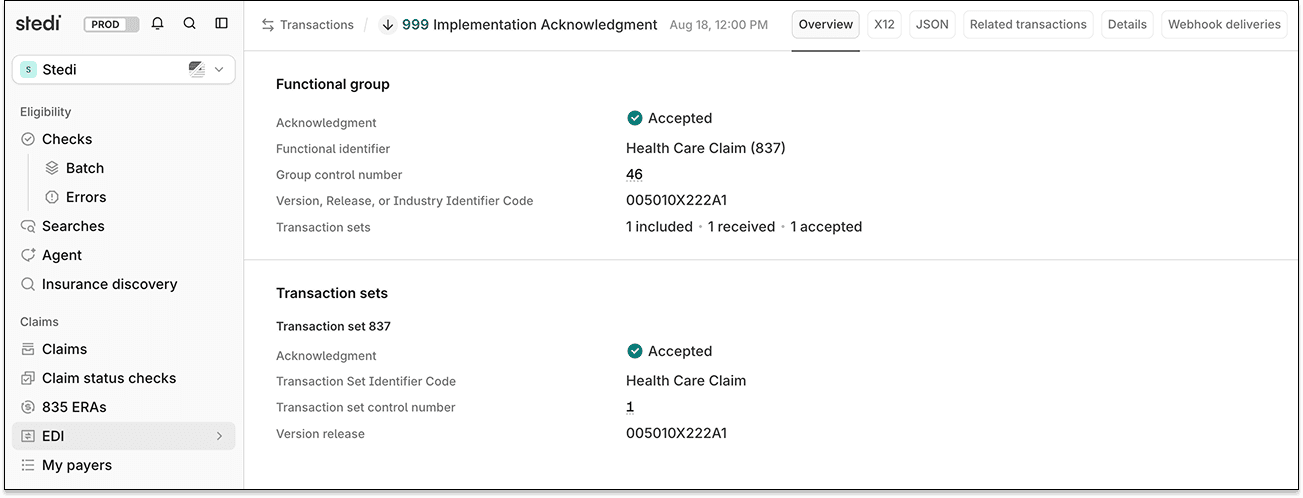
You can now review 999 Implementation Acknowledgments in a new Overview tab on the Stedi portal's Transactions page. The tab shows which transaction sets Stedi accepted, which it rejected, and why, in a human-readable format.

Previously, with only X12 and JSON tabs, you had to locate the AK9 and IK5 segments yourself and look up each error code in the implementation guide.

The Overview tab for a 999 acknowledgment, showing the functional group and transaction set sections

The Overview tab shows:

  • The functional group's identifier, control number, and acknowledgment code, plus how many transaction sets Stedi received and how many it accepted.

  • A section for each transaction set, with its control number and acknowledgment code.

  • For each rejected transaction set, a table of errors listing the X12 address, the error code, and the value that failed validation.

A 999 confirms X12 syntax only. To verify whether the payer accepted your claim, check the 277CA claim acknowledgment.

For more information, see our 999 acknowledgment docs.

Claim edit: Service date outside the statement covers period

Stedi now rejects 837I institutional claims with a service line date outside the claim's statement covers period.

Statement covers periods and service dates

An institutional claim can bill for a range of dates. This range is called the statement covers period. You report the statement covers period at the claim level.

Statement covers period

Claim typeJSON API fieldX12 element
837I institutionalclaimInformation.claimDateInformation.statementBeginDate and claimInformation.claimDateInformation.statementEndDateDTP*434 (Statement Dates) of Loop 2300 (Claim Information)

Service lines can also carry their own service dates. X12 standards require service dates on outpatient service lines when the statement covers period is longer than one day.

Service date

Claim typeJSON API fieldX12 element
837I institutionalclaimInformation.serviceLines.serviceDate and claimInformation.serviceLines.serviceDateEndDTP*472 (Service Date) of Loop 2400 (Service Line)

How the edit works

Each service date on a claim must fall within the statement covers period. If you include a service date outside the statement covers period, the payer may reject the claim.

This edit catches the issue before the claim reaches the payer. It prevents payer rejections, which take longer to resolve and delay payment for the provider.

Rejection errors

If you submit a claim using Stedi's Claim Submission API endpoints and the claim fails the edit, you'll get back an error response in real time. The response includes details in the errors array.

{
  "errors": [
    {
      "code": "33",
      "description": "Invalid Service Date. The service date must fall within the claim's statement dates. The service date, 20241020-20241020, on line 1 falls outside the claim's statement dates of 20241015-20241017. Correct and resubmit.",
      "followupAction": "Please Correct and Resubmit"
    }
  ]
}

If you submit a claim using SFTP and the claim fails the edit, Stedi will reject the claim with a 277CA claim acknowledgment. The acknowledgment will include a related claim status category code, claim status code, and error message.

STC*A7>187**U*******A8>188**Invalid Service Date. The service date must fall within the claim's statement dates. The service date, 20241020-20241020, on line 1 falls outside the claim's statement dates of 20241015-20241017. Correct and resubmit.~

Resolution tips

You have two ways to fix the claim:

  • Widen the statement covers period. Change the begin or end date so it includes the service date.

  • Split the claim. Move the service line to its own claim, with a statement covers period that includes the service date.

Related claim edits

Stedi has another edit for date ranges that start after they end. See Invalid date range.

ERA PDFs now show the crossover carrier's name

Stedi's Electronic Remittance Advice (ERA) PDFs now show the crossover carrier's name in the status line when the payer sends it.

If a patient's care is covered by more than one payer, a payer may forward the claim to the next payer after adjudication. These are called crossover claims. The payer that receives the forwarded claim is the crossover carrier.

Previously, the PDF status line only stated Forwarded to Additional Payer(s) when a claim was forwarded. To find the crossover carrier, you often had to check the underlying ERA or the payer's portal. Now, ERA PDFs show the name in these cases:

ERA PDF status line showing the crossover carrier name

You can download ERA PDFs using the Stedi portal or the ERA PDF API endpoint. For more details, check out our Introducing ERA PDFs blog post.

Pay-as-you-go signups now start at $25

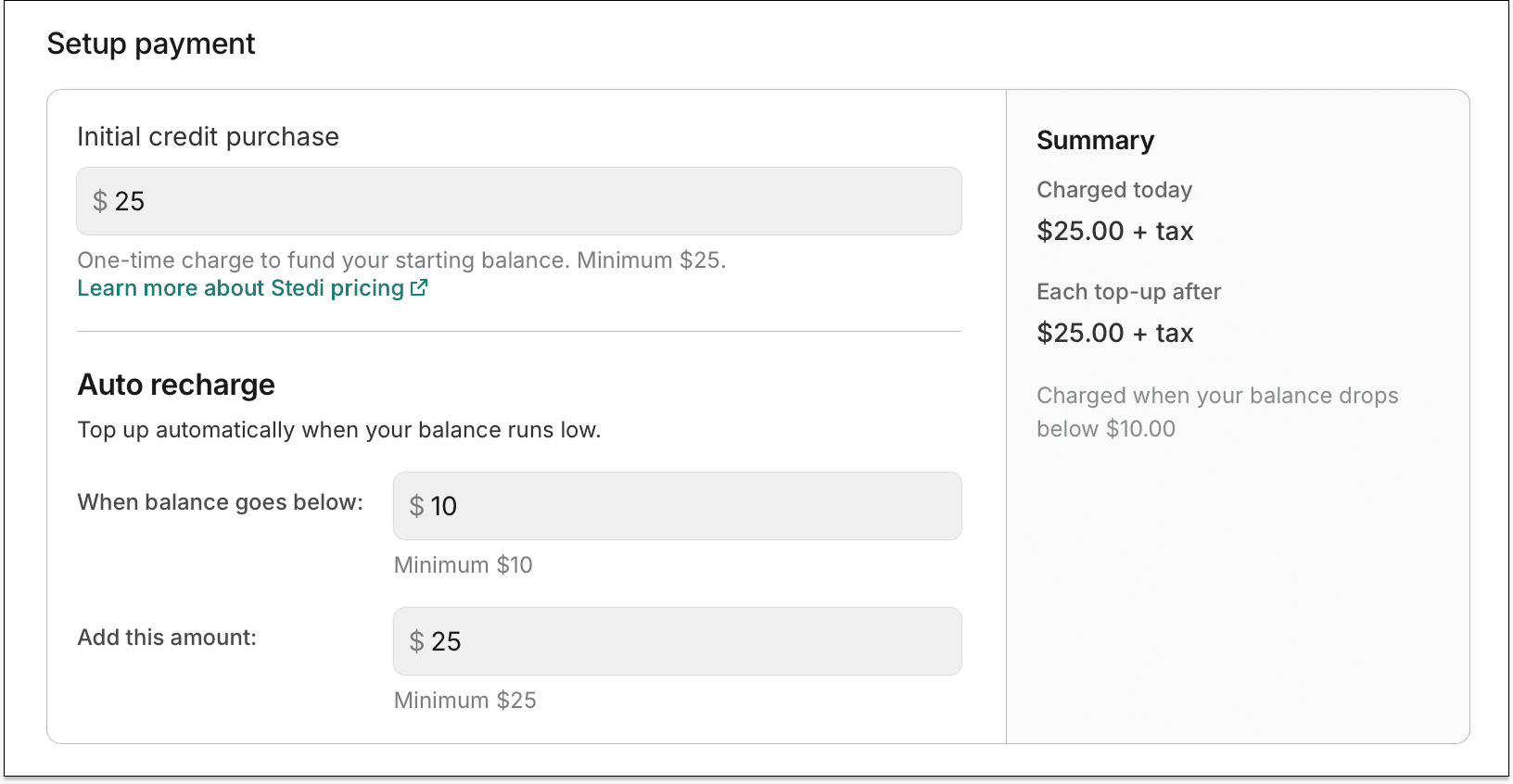
You can now sign up for a production Stedi account for as little as $25.

Stedi's pay-as-you-go plan now only requires a starting balance of $25. Stedi adds $25 to your balance whenever it drops below $10.

Auto recharge settings during signup

Previously, signing up required a $100 starting balance, and Stedi added $100 whenever your balance dropped below $25.

Per-transaction rates stay the same. Each transaction uses your balance at the rate set by its pricing tier. To estimate costs or see all tiers, check our pricing page.

For more details, check out our Pay-as-you-go accounts now start at $25 blog post.

Claim edit: Invalid facility type code on institutional claims

Stedi now rejects 837I institutional claims that contain an invalid facility type code.

Facility type codes

In an institutional claim, the facility type code tells the payer what kind of facility, such as a hospital or a skilled nursing facility, delivered the care.

Facility type code

Claim typeJSON API fieldX12 element
837I institutionalclaimInformation.placeOfServiceCodeCLM05-01 (Facility Type Code) of Loop 2300 (Claim Information)

The National Uniform Billing Committee (NUBC) maintains an official list of valid facility type codes.

Every valid facility type code consists of two digits. The first digit represents the type of facility. The second digit represents the bill classification. For example, 13 indicates a hospital (first digit of 1) outpatient claim (second digit of 3).

How this edit works

Each digit of the facility type code must be in the range of 1 through 9 (inclusive). Facility type codes containing 0 in any position, such as 09 or 80, aren't valid.

If you submit an institutional claim that contains an invalid facility type code, the payer may reject the claim.

This edit catches the issue before the claim reaches the payer. It prevents payer rejections, which take longer to resolve and delay payment for the provider.

Rejection errors

If you submit a claim using Stedi's Claim Submission API endpoints and the claim fails the edit, you'll get back an error response in real time. The response includes details in the errors array.

{
  "errors": [
    {
      "code": "33",
      "description": "Invalid Facility Type Code. The facility type code (bill type) must be two digits with each between 1 and 9. The submitted value, 09, is not a valid code. Correct and resubmit.",
      "followupAction": "Please Correct and Resubmit"
    }
  ]
}

If you submit a claim using SFTP and the claim fails the edit, Stedi will reject the claim with a 277CA claim acknowledgment. The acknowledgment will include a related claim status category code, claim status code, and error message.

STC*A7>228*[DATE]*U*[AMOUNT]********Invalid Facility Type Code. The facility type code (bill type) must be two digits with each between 1 and 9. The submitted value, 09, is not a valid code. Correct and resubmit.~

Related claim edits

Stedi has another edit for invalid place of service codes on professional and dental claims. See Claim edit: Invalid place of service code.

Claim edit: Missing auto accident state or province

Stedi now rejects 837P professional and 837D dental claims that report an auto accident without the state or province where the accident occurred.

Auto accident claims

In a professional or dental claim, the related causes code tells the payer what caused the patient's condition. A claim can carry up to two codes. Valid codes are AA (Auto accident), EM (Employment), and OA (Other accident).

Related causes code

Claim typeJSON API fieldX12 element
837P professionalclaimInformation.relatedCausesCodeCLM11-01 or CLM11-02 (Related Causes Code) of Loop 2300 (Claim Information)
837D dentalclaimInformation.relatedCausesCodeCLM11-01 or CLM11-02 (Related Causes Code) of Loop 2300 (Claim Information)

Per X12 standards, claims that report a related causes code of AA must include the state or province where the auto accident happened.

Auto accident state or province

Claim typeJSON API fieldX12 element
837P professionalclaimInformation.autoAccidentStateCodeCLM11-04 (Auto Accident State or Province Code) of Loop 2300 (Claim Information)
837D dentalclaimInformation.autoAccidentStateCodeCLM11-04 (Auto Accident State or Province Code) of Loop 2300 (Claim Information)

Every state and province has its own laws for who pays after an auto accident. To apply the right rules, the payer needs the state or province that the accident occurred in.

In many states, auto insurance pays before health insurance. Without the state or province, the payer can't tell who pays first.

How the edit works

If you submit a claim with a related causes code of AA but don't include the auto accident state or province, the payer may reject the claim.

This edit catches the issue before the claim reaches the payer. It prevents payer rejections, which take longer to resolve and delay payment for the provider.

Rejection errors

If you submit a claim using Stedi's Claim Submission API endpoints and the claim fails the edit, you'll get back an error response in real time. The response includes details in the errors array.

{
  "errors": [
    {
      "code": "33",
      "description": "Missing Auto Accident State or Province. When the related-cause information indicates an auto-accident, the accident state or province code must be provided. Correct and resubmit.",
      "followupAction": "Please Correct and Resubmit"
    }
  ]
}

If you submit a claim using SFTP and the claim fails the edit, Stedi will reject the claim with a 277CA claim acknowledgment. The acknowledgment will include a related claim status category code, claim status code, and error message.

STC*A6>750*[DATE]*U*[AMOUNT]********Missing Auto Accident State or Province. When the related-cause information indicates an auto-accident, the accident state or province code must be provided. Correct and resubmit.~

Related claim edits

Stedi has another edit for a missing accident date. See Missing accident date.

Introducing filtered claims and ERA list exports in the Stedi portal

You can now export a filtered list of claims or Electronic Remittance Advice (ERAs) as an Excel file (.xlsx) from the Stedi portal.

You can already use the Stedi portal's claims view and ERA view to see a filtered list of claims or ERAs you've processed with Stedi.

Now, you can also export them as a spreadsheet to load them into another system or work them manually. For example, you can use the spreadsheet to analyze trends, reconcile payments, or generate weekly or monthly reports.

For more details, check out our Introducing filtered claims and ERA list exports in the Stedi portal blog post.

Claim edit: Missing billing provider identifier

Stedi now rejects 837P professional and 837D dental claims where the billing provider has no identifier.

Billing provider identifiers

The billing provider is the person or organization, like a clinic or group practice, that will receive payment (if any) for the claim from the payer.

X12 standards require the billing provider's National Provider Identifier (NPI) whenever the provider is eligible for one. Atypical providers – providers without an NPI – are identified by a secondary identifier instead, like a state license number or a payer-assigned provider number.

The billing provider's tax ID doesn't count. A tax ID identifies the business for payment reporting, not the provider that delivered care. A claim carrying only a tax ID still can't be matched to a provider.

Billing identifiers in 837P professional claims

IdentifierJSON API fieldX12 element
NPIbilling.npiNM109 of Loop 2010AA (Billing Provider Name), where NM108 = "XX" (Centers for Medicare and Medicaid Services National Provider Identifier)
State license numberbilling.stateLicenseNumberREF02 of Loop 2010AA (Billing Provider Name), where REF01 = "0B" (State License Number)
Payer-assigned commercial numberbilling.commercialNumberREF02 of Loop 2010BB (Payer Name), where REF01 = "G2" (Provider Commercial Number)
Payer-assigned location numberbilling.locationNumberREF02 of Loop 2010BB (Payer Name), where REF01 = "LU" (Location Number)
UPIN (deprecated)billing.providerUpinNumberREF02 of Loop 2010AA (Billing Provider Name), where REF01 = "1G" (Provider UPIN Number)

Billing identifiers in 837D dental claims

IdentifierJSON API fieldX12 element
NPIbilling.npiNM109 of Loop 2010AA (Billing Provider Name), where NM108 = "XX" (Centers for Medicare and Medicaid Services National Provider Identifier)
State license numberbilling.stateLicenseNumberREF02 of Loop 2010AA (Billing Provider Name), where REF01 = "0B" (State License Number)
Payer-assigned commercial numberbilling.commercialNumberREF02 of Loop 2010BB (Payer Name), where REF01 = "G2" (Provider Commercial Number)
Payer-assigned location numberbilling.locationNumberREF02 of Loop 2010BB (Payer Name), where REF01 = "LU" (Location Number)
UPIN (deprecated)billing.providerUpinNumberREF02 of Loop 2010AA (Billing Provider Name), where REF01 = "1G" (Provider UPIN Number)

How the edit works

Any one of the identifiers above is enough. The edit rejects the claim only when all of them are missing.

If you submit a claim without an identifier for the billing provider, the payer may reject the claim.

This edit catches the issue before the claim reaches the payer. It prevents payer rejections, which take longer to resolve and delay payment for the provider.

Rejection errors

If you submit a claim using Stedi's Claim Submission API endpoints and the claim fails the edit, you'll get back an error response in real time. The response includes details in the errors array.

{
  "errors": [
    {
      "code": "33",
      "description": "Missing Billing Provider identifier. The billing provider must be identified by an NPI when required after the HIPAA NPI mandate, or an applicable secondary provider identifier. Correct and resubmit.",
      "followupAction": "Please Correct and Resubmit"
    }
  ]
}

If you submit a claim using SFTP and the claim fails the edit, Stedi will reject the claim with a 277CA claim acknowledgment. The acknowledgment will include a related claim status category code, claim status code, entity identifier code, and error message.

STC*A6>562>85*[DATE]*U*[AMOUNT]********Missing Billing Provider identifier. The billing provider must be identified by an NPI when required after the HIPAA NPI mandate, or an applicable secondary provider identifier. Correct and resubmit.~

Related claim edits

Stedi has another edit for a missing billing provider tax ID. See Missing billing provider tax ID.

Claim edit: Adjudication date at both the claim and service line level

Stedi now rejects 837P professional, 837D dental, and 837I institutional claims that report a previous payer's adjudication date at both the claim level and the service line level.

Adjudication dates

When a patient has more than one insurance plan, claims go to the primary payer first, then the secondary, and so on. The process is called coordination of benefits (COB).

Claims sent to non-primary payers must report the date on which each previous payer adjudicated – or determined how to pay – the claim. This date is called the adjudication date.

Claim-level adjudication date

Claim typeJSON API fieldX12 element
837P professionalclaimInformation.otherSubscriberInformation[].otherPayerName.otherPayerAdjudicationOrPaymentDateDTP*573 (Claim Check or Remittance Date) of Loop 2330B (Other Payer Name)
837D dentalclaimInformation.otherSubscriberInformation[].otherPayerName.otherPayerAdjudicationOrPaymentDateDTP*573 (Claim Check or Remittance Date) of Loop 2330B (Other Payer Name)
837I institutionalclaimInformation.otherSubscriberInformation[].otherPayerName.otherPayerAdjudicationOrPaymentDateDTP*573 (Claim Check or Remittance Date) of Loop 2330B (Other Payer Name)

Service line adjudication date

Claim typeJSON API fieldX12 element
837P professionalclaimInformation.serviceLines[].lineAdjudicationInformation[].adjudicationOrPaymentDateDTP*573 (Line Check or Remittance Date) of Loop 2430 (Line Adjudication Information)
837D dentalclaimInformation.serviceLines[].lineAdjudicationInformation[].adjudicationOrPaymentDateDTP*573 (Line Check or Remittance Date) of Loop 2430 (Line Adjudication Information)
837I institutionalclaimInformation.serviceLines[].lineAdjudicationInformation[].adjudicationOrPaymentDateDTP*573 (Line Check or Remittance Date) of Loop 2430 (Line Adjudication Information)

How the edit works

Per X12 standards, a claim can report a previous payer's adjudication date at the claim level or on each service line, but not both. When both are present, the payer receiving the claim can't tell which date to use and may reject the claim.

This edit catches the issue before the claim reaches the payer. It prevents payer rejections, which take longer to resolve and delay payment for the provider.

The edit evaluates each previous payer separately, so a claim-level date for one payer and a service line date for a different payer is valid.

Rejection errors

If you submit a claim using Stedi's Claim Submission API endpoints and the claim fails the edit, you'll get back an error response in real time. The response includes details in the errors array.

{
  "errors": [
    {
      "code": "33",
      "description": "Invalid Coordination of Benefits (COB) Structure. The claim-level Check or Remittance Date (20240115) should not be submitted when at least one service line contains COB adjudication information for the same payer. Correct and resubmit.",
      "followupAction": "Please Correct and Resubmit"
    }
  ]
}

If you submit a claim using SFTP and the claim fails the edit, Stedi will reject the claim with a 277CA claim acknowledgment. The acknowledgment will include a related claim status category code, claim status code, entity identifier code, and error message.

STC*A8>516>SEP*[DATE]*U*[AMOUNT]********Invalid Coordination of Benefits (COB) Structure. The claim-level Check or Remittance Date ([CLAIM-LEVEL DATE]) should not be submitted when at least one service line contains COB adjudication information for the same payer. Correct and resubmit.~

The entity identifier code reflects the previous payer's position in the COB sequence: PRP for primary, SEP for secondary, TTP for tertiary, and PR otherwise.

Related claim edits

Stedi has another edit for COB claims that omit a previous payer's adjudication date entirely. See Missing other payer adjudication date in COB claims.

Claim edit: Invalid NPI

Stedi now rejects 837P professional, 837D dental, and 837I institutional claims that contain a provider National Provider Identifier (NPI) that isn't registered in the National Plan and Provider Enumeration System (NPPES).

NPIs

An NPI is a unique, 10-digit identifier for US healthcare providers. The Centers for Medicare & Medicaid Services (CMS) issues NPIs and maintains them in the NPPES.

A claim can include an NPI for every provider it names: billing, referring, rendering, ordering, supervising, and service facility. NPIs can appear at the claim level or on an individual service line.

How the edit works

Payers often check the NPPES to confirm that a provider exists and that the NPI belongs to that provider. If the NPPES doesn't list the NPI, the payer may reject the claim.

This edit checks every provider NPI in the claim against the NPPES before it reaches the payer. That prevents payer rejections, which take longer to resolve and delay payment for the provider.

Rejection errors

If you submit a claim using Stedi's Claim Submission API endpoints and the claim fails the edit, you'll get back an error response in real time. The response includes details in the errors array.

{
  "errors": [
    {
      "code": "33",
      "description": "Invalid National Provider Identifier (NPI). The Billing Provider NPI submitted, 1234567890, is not found within the National Plan and Provider Enumeration System (NPPES). An active NPI is required for claim submission. Correct and resubmit.",
      "followupAction": "Please Correct and Resubmit"
    }
  ]
}

If you submit a claim using SFTP and the claim fails the edit, Stedi will reject the claim with a 277CA claim acknowledgment. The acknowledgment will include a related claim status category code, claim status code, entity identifier code, and error message.

STC*A7>562>85*[DATE]*U*[AMOUNT]********Invalid National Provider Identifier (NPI). The Billing Provider NPI submitted, 1234567890, is not found within the National Plan and Provider Enumeration System (NPPES). An active NPI is required for claim submission. Correct and resubmit.~

Test claims

Stedi runs this edit on production claims only. The edit skips test claims, so you can keep using dummy NPIs when you test.

Related claim edits

Stedi has another edit for NPIs that are registered but deactivated. See Deactivated NPI.

Claim edit: Invalid HIPPS rate code

Stedi now rejects 837I institutional claims that contain an invalid Health Insurance Prospective Payment System (HIPPS) rate code.

HIPPS rate codes

A HIPPS rate code is a five-character alphanumeric code that tells Medicare which payment group applies to a patient.

Skilled nursing facilities, home health agencies, and inpatient rehabilitation facilities report these codes on institutional claims so the payer can calculate reimbursement.

A HIPPS code sits in the service line's procedure code element, but it isn't a procedure code. Providers get the code from a grouper, software that reads the patient's assessment data and returns the code for the payment group the patient falls into.

HIPPS rate code

Claim typeJSON API fieldX12 element
837I institutionalserviceLines[].institutionalService.procedureCodeSV2-02-02 (Product/Service ID) of Loop 2400 (Service Line)

You report a HIPPS code by setting the service line's procedure identifier to HP.

Procedure identifier

Claim typeJSON API fieldX12 element
837I institutionalserviceLines[].institutionalService.procedureIdentifierSV2-02-01 (Product/Service ID Qualifier) of Loop 2400 (Service Line)

How the edit works

The Centers for Medicare & Medicaid Services (CMS) publishes all valid HIPPS rate codes in the HIPPS code set. Each code carries an effective date range. CMS retires codes over time.

When you submit a HIPPS rate code on an institutional claim, Stedi compares it against the CMS HIPPS code set. If the code isn't in the set or wasn't active on the claim's date of service, this edit rejects the claim before it reaches the payer. This prevents payer rejections, which take longer to resolve and delay payment for the provider.

Rejection errors

If you submit a claim using Stedi's Claim Submission API endpoints and the claim fails the edit, you'll get back an error response in real time. The response includes details in the errors array.

If the HIPPS code isn't in the CMS HIPPS code set:

{
  "errors": [
    {
      "code": "33",
      "description": "Invalid HIPPS rate code. The submitted HIPPS code, 11111, on line 1 is not a recognized HIPPS rate code. Correct and resubmit.",
      "followupAction": "Please Correct and Resubmit"
    }
  ]
}

If the HIPPS code exists but wasn't active on the claim's date of service:

{
  "errors": [
    {
      "code": "33",
      "description": "Invalid HIPPS rate code. The submitted HIPPS code, HAEJ1, on line 1 was not active for the date of service. Correct and resubmit.",
      "followupAction": "Please Correct and Resubmit"
    }
  ]
}

If you submit a claim using SFTP and the claim fails the edit, Stedi will reject the claim with a 277CA claim acknowledgment. The acknowledgment will include a related claim status category code, claim status code, and error message.

If the HIPPS code isn't in the CMS HIPPS code set:

STC*A7>513**U*********Invalid HIPPS rate code. The submitted HIPPS code, 11111, on line 1 is not a recognized HIPPS rate code. Correct and resubmit.~

If the HIPPS code exists but wasn't active on the claim's date of service:

STC*A7>513**U*********Invalid HIPPS rate code. The submitted HIPPS code, HAEJ1, on line 1 was not active for the date of service. Correct and resubmit.~

Related claim edits

Stedi has another edit for HCPCS Level II procedure codes that aren't in the CMS code set. See Invalid HCPCS Level II code.

Filter payers by program in the Stedi Payer Network

You can now filter payers by program on the Stedi Payer Network site.

You could already see which insurance programs a payer participates in, such as Medicare or Medicaid, using the Stedi Payer Network and Payers API.

Previously, you could only filter payers by program using the Payers API.

How the filter works

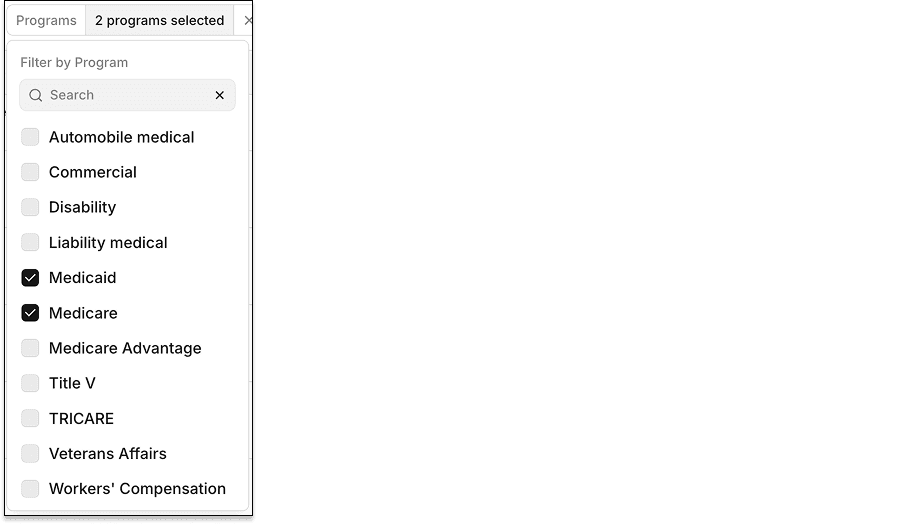
The Payer Network site's Programs filter lets you search the program list or select programs directly. The filter uses OR logic. For example, setting Programs to Medicare and Medicaid returns payers that participate in Medicare, Medicaid, or both.

The Programs filter with Medicaid and Medicare selected

Other filters combine with Programs using AND logic. For example, setting Coverage Type to Dental and Programs to Medicare returns only payers with dental coverage and participate in Medicare.

Claim edit: Field values longer than maximum length

Stedi now rejects 837P professional, 837D dental, and 837I institutional claims with a field value that's longer than the maximum length allowed by X12 standards.

How the edit works

X12 standards set a maximum length for every text field in a claim. For example, the field for the subscriber's first name has a maximum length of 35 characters. The field for the billing provider's name has a maximum length of 60.

If a claim contains a field value that's longer than the maximum length of that field, the payer may reject the claim. This edit catches the issue before the claim reaches the payer. It prevents payer rejections, which take longer to resolve and delay payment for the provider.

Rejection errors

If you submit a claim using Stedi's Claim Submission API endpoints and the claim fails the edit, you'll get back an error response in real time. The response includes details in the errors array.

{
  "errors": [
    {
      "code": "33",
      "description": "Invalid string length. A Subscriber First Name (2010BA/NM1-04) cannot exceed 35 characters. The submitted value contains 40 characters. Correct and resubmit.",
      "followupAction": "Please Correct and Resubmit"
    }
  ]
}

If you submit a claim using SFTP and the claim fails the edit, Stedi will reject the claim with a 277CA claim acknowledgment. The acknowledgment will include a related claim status category code, claim status code, and error message.

STC*A7>481*[DATE]*U*[AMOUNT]********Invalid string length. A Subscriber First Name (2010BA/NM1-04) cannot exceed 35 characters. The submitted value contains 40 characters. Correct and resubmit.~

Rejections on multiple service lines

Stedi checks each service line on its own. If more than one line has an over-long value, you get one rejection per line. Each rejection names the line:

{
  "errors": [
    {
      "code": "33",
      "description": "Invalid string length. A Procedure Modifier (2400/SV1-01-03) on service line 1 cannot exceed 2 characters. The submitted value contains 4 characters. Correct and resubmit.",
      "followupAction": "Please Correct and Resubmit"
    },
    {
      "code": "33",
      "description": "Invalid string length. A Procedure Modifier (2400/SV1-01-03) on service line 2 cannot exceed 2 characters. The submitted value contains 4 characters. Correct and resubmit.",
      "followupAction": "Please Correct and Resubmit"
    }
  ]
}

In a 277CA, each failing line gets its own claim-level STC segment. The line number appears in the error message.