

Claims view
The claims view in the Stedi portal provides insight into your claims processing pipeline. In the claims view, you can:
- Submit claims through the interactive CMS-1500 form or by uploading raw X12 EDI files.
- Review every claim you submit through Stedi and the details of related claim transactions, such as 277CA claim acknowledgments.
- Review a clear timeline of activity for each claim, including resubmissions and responses you receive from Stedi and the payer.
- Understand a claim's current status within the processing pipeline, such as whether the claim has been accepted or rejected.
- Filter submitted claims by key details, such as processed date, status, patient name, and service date(s).
- Review 835 Electronic Remittance Advice (ERAs) and download ERA PDFs.
Submit claims
You can submit claims from the claims view through the interactive CMS-1500 form or by uploading raw X12 EDI files. Manual claim submission is useful for testing, QA, debugging your claims processing pipeline, and handling scenarios that fall outside your normal workflow.
To submit a claim, click Submit claim in the claims view and select one of the following options:
- CMS-1500 form: Submit professional claims through an interactive form. Visit Submit claims for detailed instructions.
- Upload raw X12 file: Upload X12 EDI files for professional, institutional, or dental claims. You can submit multiple claims in a single file. Visit Submit claims for detailed instructions.
Review claims
You can filter, export, and review detailed information about all claims you've submitted through Stedi in the claims view.
Toggle Test mode to ON in the side navigation to review test claims you've submitted.
Filter claims
Click Claims in the side navigation to view a list of the claims you've submitted through Stedi. Available filters include:
| Filter | Description |
|---|---|
| Processed date | When Stedi received each claim. |
| Status | Where a claim is in the processing pipeline. Refer to claim processing status for details on how we determine a claim's status and how to know if action is required to move the claim forward. |
| Type | Claim type - professional, dental, or institutional. |
| Patient control number | The patient control number for the claim, sometimes referred to as the claim ID. You submitted this value in:
|
| Patient name | The patient's first or last name. Supports partial matching. |
| Member ID | The subscriber's member ID for their health plan. |
| Payer | Payer name, ID, or alias. Refer to the Payer Network for a complete list for each payer. |
| Billing provider NPI | The billing provider's NPI. |
| Billing Provider TIN | The billing provider's TIN. |
| Amount charged | Claims with a minimum or maximum charge amount. |
| Amount paid | Claims with a minimum or maximum amount paid. |
| Reversals | Claims with payment reversals or no reversals. |
| Service date | Claims with specific service dates. |
When you apply one or more filters, Stedi displays the total number of claims that match your filter criteria. This count helps you quantify specific scenarios, such as the number of claims in a rejected status from the previous week or the number of claims submitted for a certain billing provider. If a claim is resubmitted and linked to the initial claim record, the original submission and any resubmissions are counted together as one claim.
Export claims list
You can export filtered claims lists to an Excel file (.xlsx) for further analysis or reporting. For example, you can export filtered lists that help you:
- Track claim status over specific time periods.
- Identify rejected claims by payer.
- Reconcile billing records with your practice management system.
- Generate custom reports for specific billing providers or date ranges.
To export a filtered claims list:
- Apply one or more filters to narrow down the claims you want to export. The export button appears once you apply at least one filter.
- Click Export. Stedi disables the export button when the filtered list contains more than 250,000 records. In this case, add more filters to reduce the list size.
- Stedi creates the report and sends you an in-app notification when it's ready.
- The download happens automatically when the report is complete. You can also manually download the report at any time by clicking the bell icon in the side navigation, finding the Download is ready notification, and clicking Download.
Your export file includes the filtered claims list and a metadata tab that includes the export date, the filters you applied, and the number of records.
Export files are available for 30 days from the notification. After 30 days, the download link expires.
Claim timeline
From the claims view, click any claim to review a timeline of its processing activity, including the submission date, when you received 277CA claim acknowledgments from Stedi and the payer, and when you received claim payment information from 835 ERAs.
The timeline view also includes resubmissions for the claim and any associated 277CAs or claim payment information resulting from those resubmissions.
The details panel displays the patient control number (PCN), amount charged, and amount paid.
Hover over a claim payment information card and click See more detail to view the claim payment information details.
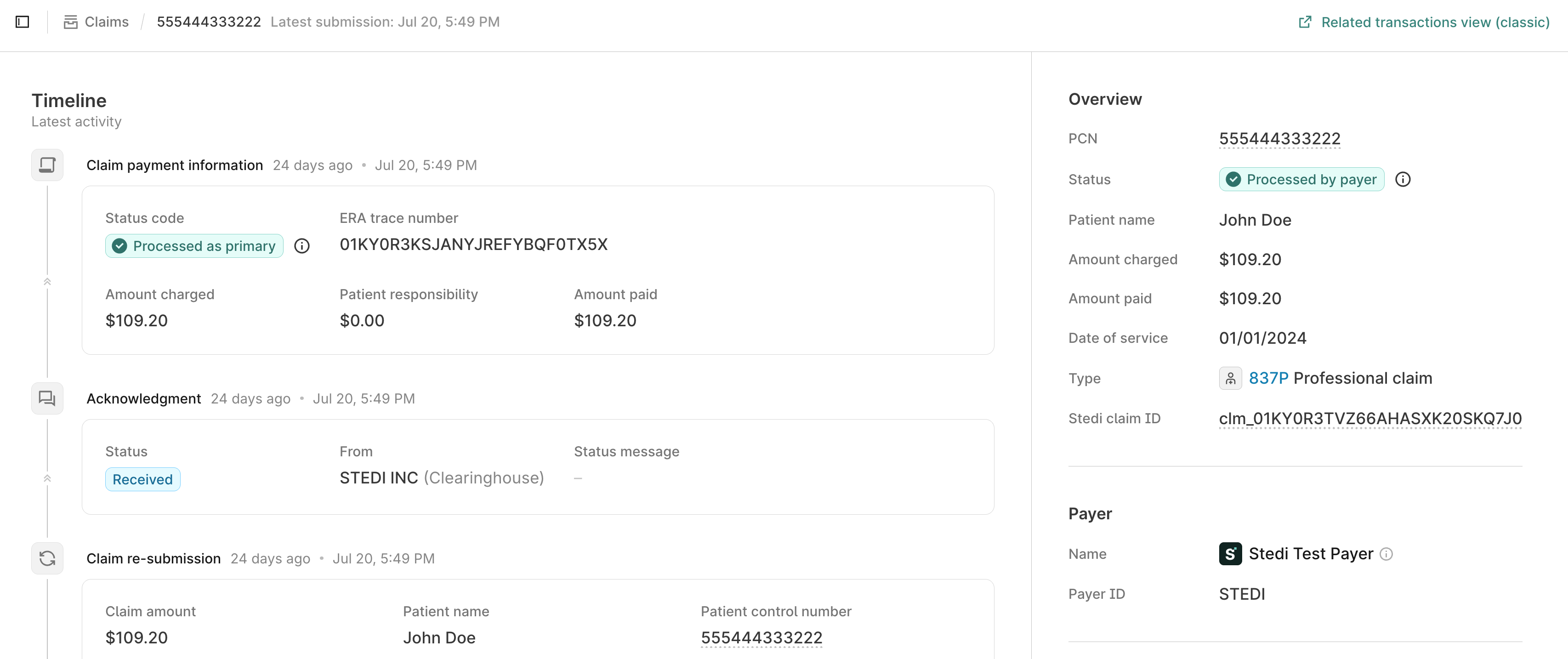
Real-time claim status requests aren't currently included in the timeline.
Transaction details
From a claim's timeline view, hover over a transaction and click See more detail to review a user-friendly summary of key information, such as patient information, service dates, and service line details. You'll also be able to review the raw X12 EDI for the transaction.
Download CMS-1500 claim PDF
You can download a PDF version of professional claims in the CMS-1500 format from both the timeline view and the claim's detail page.
-
From the claims view, click a professional claim to open its timeline.
-
Do one of the following:
- From the timeline view, hover over the claim and click Download CMS-1500 claim PDF.
- Open the claim's detail page and click Download CMS-1500 claim PDF.
-
In the download menu, choose whether to Include CMS-1500 form background. This option is checked by default.
The National Uniform Claim Committee (NUCC) and CMS provide exact specifications for blank CMS-1500 forms, including paper size and ink color. Many provider offices are accustomed to using these pre-printed forms, and their Practice Management System (PMS) applications are designed to print claim data onto them. Generating PDFs with no background allows you to print the claim data directly onto official pre-printed forms.
-
Click Confirm download. The PDF downloads to your computer.
Review 835 ERAs
You can review 835 ERAs by filtering the full list on the 835 ERAs view or finding ERAs for a specific claim from its timeline.
Toggle Test mode to ON in the side navigation to review test ERAs.
Filter ERAs
Click 835 ERAs in the side navigation to view a list of all 835 ERAs in your account. Available filters include:
| Filter | Description |
|---|---|
| Processed date | When Stedi received the ERA. |
| Trace number | The unique identifier the payer assigns to the ERA transaction. In X12 EDI, this is TRN02 (Check or EFT Trace Number).You can use this value to link the ERA with the associated payment, if applicable. For example: When the payment is remitted by check, the trace number is the check number. |
| Total paid | The total amount paid across all claims included in the ERA. |
| Payment date | When the payer issued the payment. |
| Payment method | The method used for payment (such as check or ACH). |
| Payer | Payer name, ID, or alias. Refer to the Payer Network for a complete list for each payer. |
| Payee | The payee's (billing provider's) name. Supports partial matching. |
| Payee NPI | The payee's (billing provider's) National Provider Identifier. |
| Payee Tax ID | The payee's (billing provider's) Tax Identification Number. |
| PCN (Patient Control Number) | A claim's PCN, sometimes referred to as the claim ID. Since an ERA can contain multiple claims, this returns ERAs where any claim matches the specified PCN. This is the same value you submitted on the original claim in:
|
When you apply one or more filters, Stedi displays the total number of ERAs that match your filter criteria. This count helps you quantify specific scenarios, such as the number of ERAs received from a payer in a given month or the total number of ERAs for a specific billing provider.
Export ERA list
You can export filtered ERA lists to an Excel file (.xlsx) for further analysis or reporting. For example, you can export filtered lists that help you:
- Generate monthly payment reports based on payment received date.
- Track reimbursements by payer or billing provider.
- Reconcile payments with your accounting system.
- Analyze payment trends and adjustment patterns across specific time periods.
To export a filtered ERA list:
- Apply one or more filters to narrow down the ERAs you want to export. The export button appears once you apply at least one filter.
- Click Export. Stedi disables the export button when the filtered list contains more than 250,000 records. In this case, add more filters to reduce the list size.
- Stedi creates the report and sends you an in-app notification when it's ready.
- The download happens automatically when the report is complete. You can also manually download the report at any time by clicking the bell icon in the side navigation, finding the Download is ready notification, and clicking Download.
Your export file includes the filtered ERA list and a metadata tab that includes the export date, the filters you applied, and the number of records.
Export files are available for 30 days from the notification. After 30 days, the download link expires.
ERA details
From the 835 ERAs view, click any ERA to review its details. The Overview tab contains key information about the ERA, including:
- Payer and payee information.
- Payment details including payment method, payment date, total paid, and total charged.
- Totals table showing the number of claims, total billed amount, total deductible, and total adjustments across all claims.
- Claim payment information table with one row per claim payment information record. Click any row to view the claim payment information details.
You can also click the X12 tab to review the raw X12 EDI for the transaction in the EDI Inspector. Hover over elements in the EDI to review the corresponding part of the X12 specification.
Claim payment information
The claim payment information details show payment information for a single claim from an 835 ERA. This is different from the ERA details, which shows information for all claims in the ERA.
To access the claim payment information details:
- Click See more detail on a claim payment information card in a claim's timeline.
- Click a claim row in the linked claims table on an ERA detail view.
The Overview tab shows payment details for the specific claim, including:
- Linked claim with a link to view the claim's timeline.
- Claim-level payment information (total charged, total paid, patient responsibility, and adjustments).
- Service line details with line-level payment information and adjustments.
Click the X12 tab to review the Loop 2100 CLP (Claim Payment Information) in the EDI Inspector. Hover over elements in the EDI to review the corresponding part of the X12 specification.
Download ERA PDF
You can download a PDF version of the ERA from its details page.
- Go to the claims view and click 835 ERAs.
- Click the ERA to open its details page.
- Click Download 835 ERA PDF at the top right.
- In the download menu, select your preferences:
- Include Stedi logo in 835 ERA PDF: Adds the Stedi logo to the PDF.
- Download each claim as a separate PDF: Downloads one PDF for each claim included in the ERA. When the ERA contains multiple claims, the PDFs will be provided as a zip file. For example, if the ERA contains 5 claims, you'll download a zip file containing 5 separate PDFs.
- Click Confirm PDF download.
You can also download a PDF for an individual claim payment information record. From the ERA details page, click a row in the claim payment information table to open the claim payment information details, then click Download as PDF at the top right.
Review your payers
The My Payers view shows all payers with which you have exchanged 837 claims or 835 Electronic Remittance Advice (ERAs) through Stedi. You can use this view to:
- Review all the payers with which you've exchanged claim data in a single location.
- Identify payers that have issues with transaction enrollment. If you've sent claims to a payer and haven't received any ERAs within your expected timeframe, you may need to complete transaction enrollment, or there may be issues with an existing enrollment request.
- Verify that your claims processing cycle is working from end-to-end for all your payers.
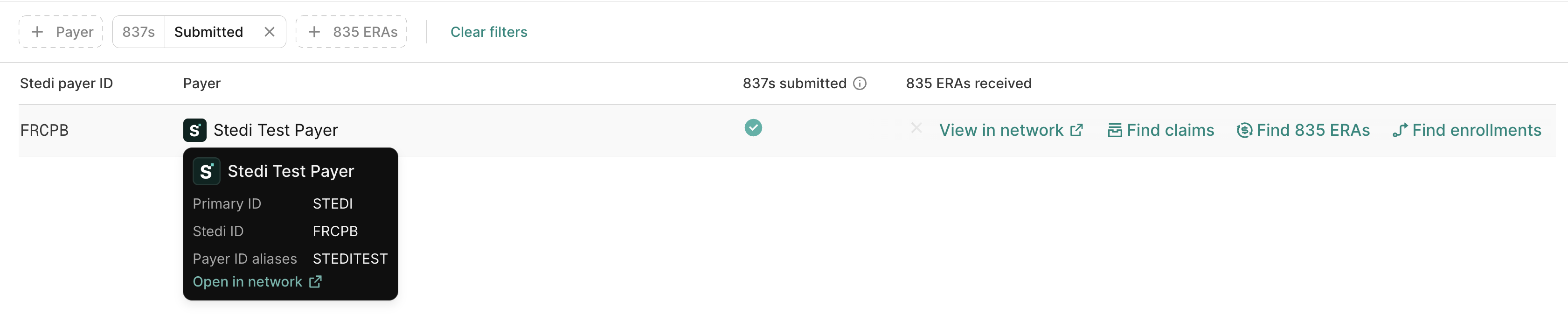
Hover over any payer row to access quick links:
- View in network: View the payer's details in the Payer Network.
- Find claims: View all claims submitted to this payer in the claims view.
- Find 835 ERAs: View all 835 ERAs you received from this payer through Stedi.
- Find enrollments: View all enrollments with this payer.
Filter your payer list
Click the filter options at the top of the My Payers view to filter the list:
| Filter | Description |
|---|---|
| Payer | Filter by payer name, ID or alias. Refer to the Payer Network for a complete list for each payer. |
| 837s | Filter by whether or not you've used Stedi to submit a professional, dental, or institutional claim. |
| 835 ERAs | Filter by whether or not you've received an 835 Electronic Remittance Advice (ERA) from the payer through Stedi. |
Resubmit or cancel claims
You can resubmit or cancel claims from within the claims view.
To resubmit a claim:
- Click the claim you want to resubmit to open its timeline.
- Hover over the claim submission and do one of the following:
- Click Edit and resubmit. This option appears when the last claim submission was rejected by either Stedi or the payer.
- Click See more detail to review the claim's details page, then click Edit and resubmit.
- Select one of the following options:
- CMS-1500 resubmission: Resubmit professional claims through the interactive form. Visit Review and resubmit claims for detailed instructions.
- X12 transaction resubmission: Resubmit professional, institutional, or dental claims through the X12 EDI editor. Visit Review and resubmit claims for detailed instructions.
Claim processing status
The claims view displays each claim's current processing status. These statuses are designed to help you quickly understand whether action is required to move claims forward.
Stedi's claim processing statuses are different from the status codes you receive in 277CAs and in real-time claim status checks:
- 277CAs: Each 277CA contains one or more status category codes that indicate receipt, acceptance or rejection at a specific stage of processing. Stedi evaluates all available 277CAs to determine the claim's current overall processing status.
- Real-time claim status checks: Claim status checks can only provide status information about claims that have been accepted into the payer's adjudication system. Stedi's statuses provide insight both before and after the claim reaches the payer.
Stedi claim status codes
A claim in the Stedi portal can have one of the following processing statuses:
| status | description | What to do |
|---|---|---|
| Submitted | You submitted the claim to Stedi but haven't yet received a 277CA response from Stedi or the payer. | No action needed. Monitor for the next 277CA claim acknowledgment with acceptance or rejection status. |
| Received | The clearinghouse or payer has acknowledged receipt of the claim. This doesn't mean the claim has been accepted for adjudication. | No action needed. Monitor for the next 277CA claim acknowledgment with acceptance or rejection status. |
| Rejected | Either Stedi or the payer rejected the claim before the start of adjudication. This can happen even when the payer has acknowledged receipt. | Review the 277CA claim acknowledgment for error details, correct the claim, and resubmit. |
| Accepted | The payer has accepted the claim into their adjudication system and it's currently being processed or adjudicated. | No action needed. Monitor for the next 277CA claim acknowledgment or the 835 ERA with adjudication details. |
| Processed by payer | The payer completed adjudication and acknowledged responsibility for the claim. This doesn't mean the claim was paid in full, or paid at all. | Review the claim payment information, including the paid amount, patient responsibility, and adjustments, to confirm the reimbursement is correct. |
| Denied | The payer completed adjudication and denied responsibility for the claim. Unlike a rejection, which happens before adjudication, a denial is the payer's decision after reviewing the claim. | Review the claim payment information, including the denial reasons, to decide whether to correct and resubmit the claim or file an appeal. |
| Unknown | Stedi can't determine a single status for this claim, usually because the payer's responses are mixed or incomplete. | Review any 277CA claim acknowledgments and claim payment information to determine the latest outcome. Contact the payer if you need more detail. |
Received vs. Accepted
Many payers send two 277CAs:
- An initial 277CA with
STC01-01(Health Care Claim Status Category Code) set toA1(Acknowledgment/Receipt). Stedi sets the claim status to Received. - A second 277CA with
STC01-01set to an explicit Accepted or Rejected code. Stedi then updates the claim status to Accepted or Rejected accordingly.
However, some payers don't send 277CAs with explicit Accepted codes. In these cases, the claims view keeps the claim in Received status.
If a claim has been in Received status longer than expected, you can run a claim status check to determine its processing status with the payer. You can also contact Stedi support with questions about behavior for particular payers.
How we determine status
Once you submit a claim, you'll receive several 277CA claim acknowledgments from the clearinghouse and the payer that indicate receipt, acceptance, or rejection at various stages of processing. You may also receive 835 Electronic Remittance Advice (ERAs) with payment information after the payer completes adjudication.
Stedi uses the information in 277CAs and 835 ERAs to determine the current status of a claim.
Step 1: Check for 835 ERA
If Stedi has received an 835 ERA with claim payment information for the claim, we use the CLP02 (Claim Status Code) element in the 835 transaction to determine the claim's status. Full code list
- Processed by payer: The payer completed adjudication and acknowledged responsibility for the claim.
- Denied: The payer completed adjudication and denied responsibility for the claim.
- Unknown: The ERA contains mixed or incomplete status information that prevents Stedi from determining a clear status.
If we haven't received any claim payment information for the claim, we proceed to evaluate 277CA claim acknowledgments.
Step 2: Classify each 277CA
We assign each 277CA transaction a submission status based on the STC01-1 (Health Care Claim Status Category Code) status category codes present in the transaction. Full code list
When there are multiple codes present within a 277CA, we evaluate codes in the following priority order:
- Rejected
- Accepted
- Received
- Unknown (unrecognized STC codes)
For example, if a 277CA contains both rejected and received status category codes, we classify the 277CA as rejected.
Step 3: Decide which 277CA reflects the claim's status
Each claim can receive multiple 277CAs from Stedi and the payer as it moves through the processing pipeline. Once we evaluate the status of all existing 277CAs for a claim, we apply the following rules to determine which 277CA reflects the claim's overall status:
- Current submission: We focus on the 277CAs tied to the most-recent 837 submission. If there are no 277CAs for the most recent submission, the claim's status is set to Submitted.
- Terminal outcomes: We prioritize by Rejected --> Accepted --> Received. For example, if any 277CA from Stedi or the payer has a rejected status, we use the 277CA rejection to set the claim status, even if there are other 277CAs with accepted codes. This helps ensure you don't miss required actions to correct and resubmit a rejected claim.
- Payer > Clearinghouse: We prioritize 277CAs from the payer over 277CAs from Stedi or intermediaries. For example, if a claim has a Stedi 277CA with received status codes and a payer 277CA with received status codes, we use the payer's 277CA to set the overall claim status to Received.
- Recency: We use recency as a final tiebreaker to ensure deterministic results. If a claim has multiple 277CAs from the same source with the same status category codes, we first check the effective date listed in the EDI transaction and use the most recent one. If those are the same, we'll use the 277CA that most recently entered Stedi's system.
Examples
The following scenarios illustrate how we use the above rules to determine a claim's status when there are multiple 277CAs.
Scenario 1
You submit a claim to Stedi and receive the following 277CAs:
| Source | Status classification | Effective date |
|---|---|---|
| Stedi | Received | 2026-01-01 |
| Payer | Accepted | 2026-01-02 |
The claim's status would be set to Accepted based on the accepted status category codes in the payer's 277CA.
Scenario 2
You submit a claim to Stedi and receive the following 277CAs:
| Source | Status classification | Effective date |
|---|---|---|
| Payer | Rejected | 2026-01-01 |
| Payer | Received | 2026-01-02 |
This scenario can happen when a payer sends responses out-of-order due to network delays, outage recovery, retries, or batch processes. In this case, the claim's status would be set to Rejected because we prioritize terminal statuses over the timing of the responses.
Reversals
Stedi tracks reversals separately from claim status because the Processed by payer, Denied, and Unknown statuses can include payment reversals.
When you receive a claim payment information record with Loop 2100 CLP02 (Claim Status Code) set to 22 (Reversal of Previous Payment), Stedi flags the associated claim as one with reversals. You can filter for claims with reversals in the claims view to facilitate payment reconciliation workflows.