Eligibility PDF
Stedi generates a PDF with a summary of an eligibility check's request details and a user-friendly version of the benefits response.
If the response contains errors, the PDF displays them with possible resolutions. When an eligibility check returns benefits information, you can use the PDF to determine:
- whether the patient has active coverage with the health plan.
- whether a patient's health plan covers the requested services.
- patient responsibility amounts, such as co-pays and deductibles.
- whether prior authorization is required for specific services.
Download the PDF
To download the PDF:
- Go to the checks view in the Stedi portal.
- Click the eligibility search with the patient information you want to view.
- Click the Download PDF icon at the top of the eligibility check's details page.
PDF structure
The PDF has the following primary sections.
Summary
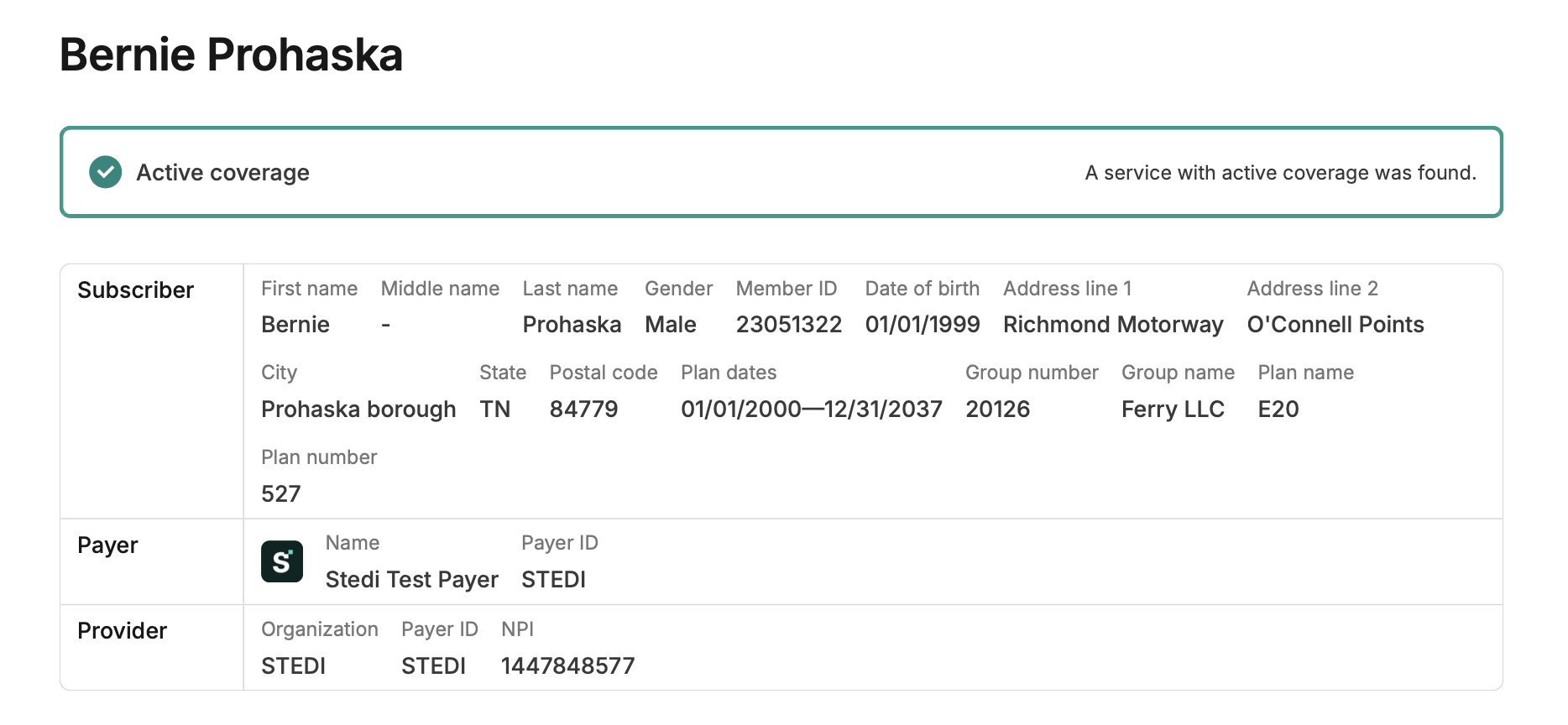
For successful eligibility checks, the summary section at the top clearly indicates whether Stedi found any service type codes (STCs) or procedure codes with active coverage in the response. You can then check the benefits tables to determine which specific services are covered.
The summary section also shows details about the subscriber, payer, and provider. This includes plan details such as when coverage starts, the plan dates, and the group name and number.
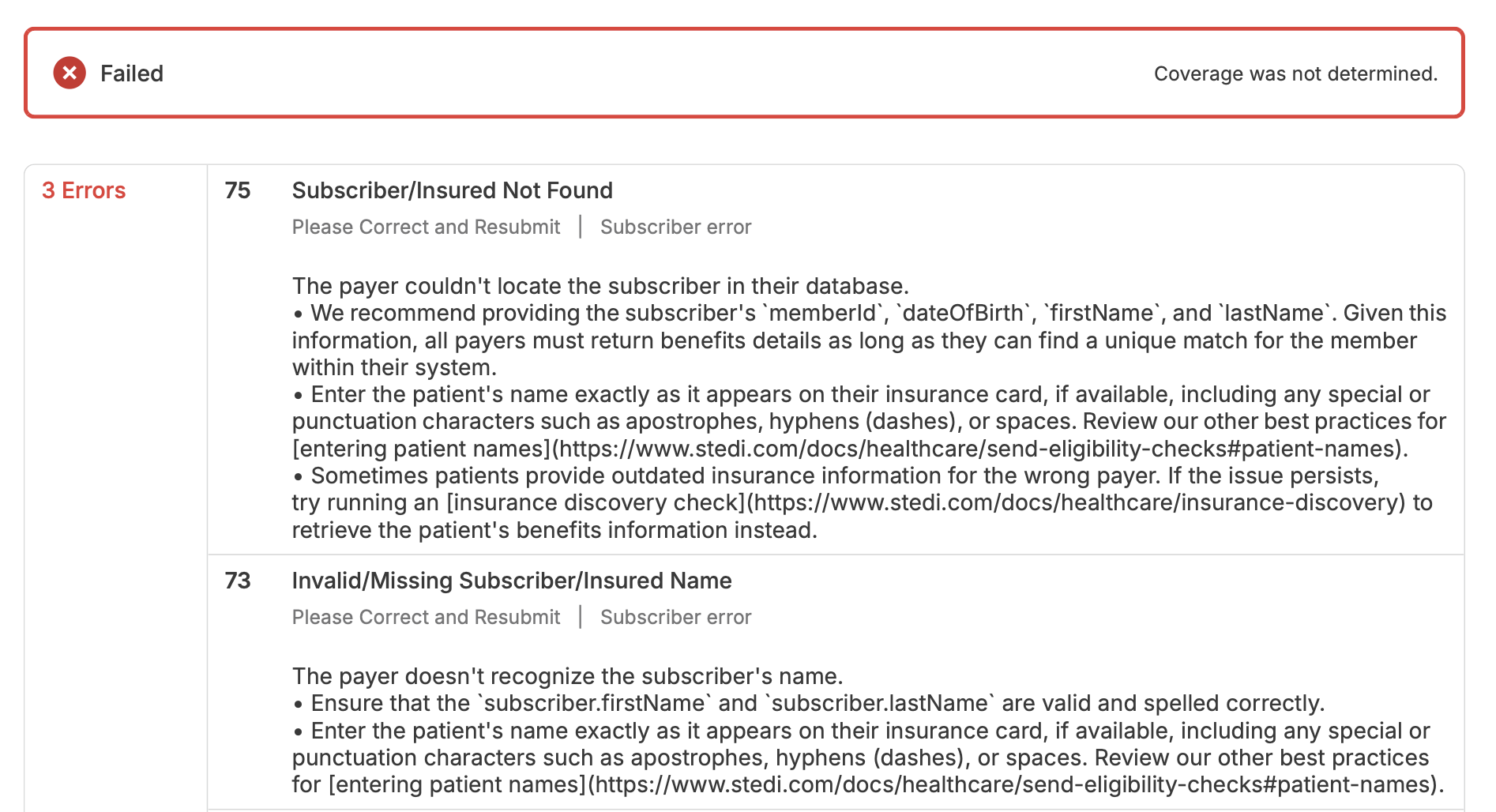
If the eligibility check response contains errors, the summary section indicates that the check was Failed and lists the errors with possible resolutions.
Benefits
The Benefits section contains tables listing all the benefits information returned in the response. Each row in the table corresponds to a specific benefit for a specific service type code (STC) or procedure code.
The benefits are grouped in two ways:
- The first grouping mechanism is the patient's health plan. Many eligibility responses only contain benefits for a single health plan, but some responses include benefits for multiple plans. For example, if the patient has both a primary health plan and a dental plan, the PDF will contain separate sections for each plan.
- Within each health plan section, benefits are further grouped by STC and procedure code.
The following example shows the patient's benefits for STC 30 (Health Benefit Plan Coverage). Note that their plan name E20 is at the top of the section. The PDF notes that this is Plan 1 of 1, meaning that the payer returned information about a single health plan for this patient.
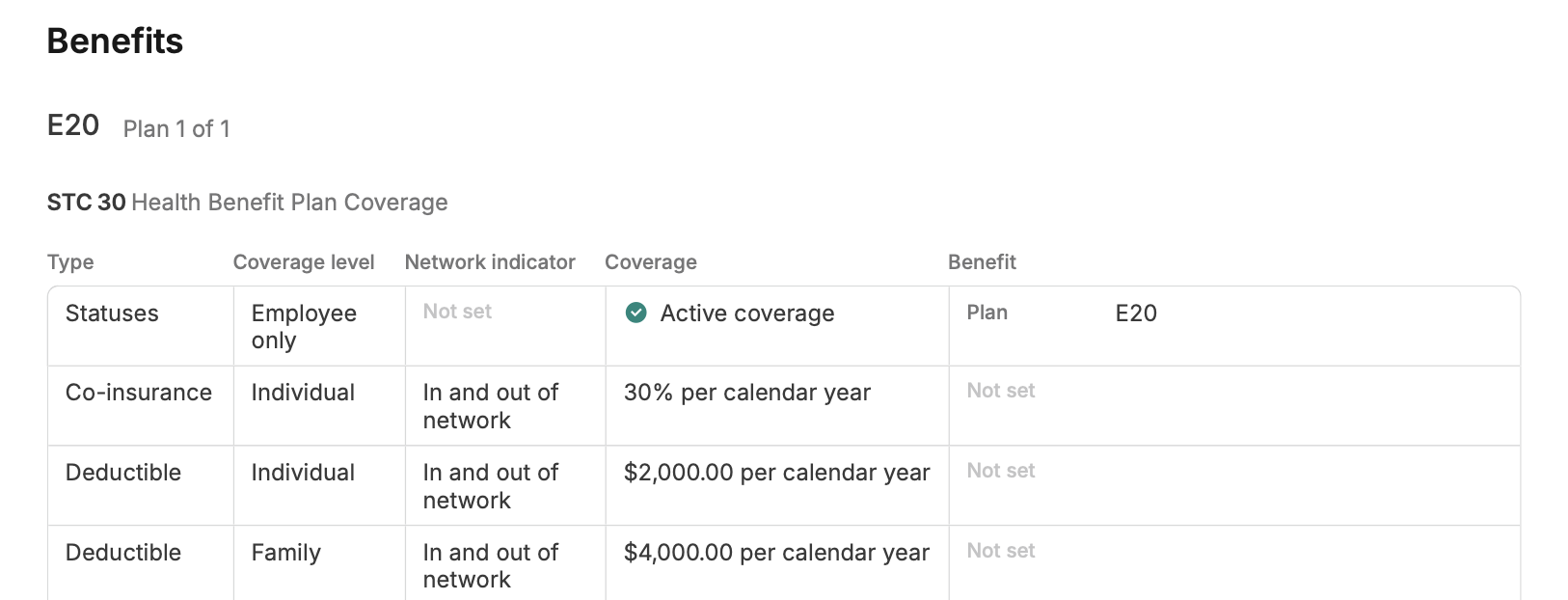
For each STC or procedure code, the columns in the table include:
| Column | Description |
|---|---|
| Type | The type of benefit, such as co-payment, deductible, or prior authorization requirement. |
| Coverage level | The level of coverage for the benefit, such as Individual or Family. |
| Network indicator | Whether the benefit applies to in-network or out-of-network providers. Note that this column only indicates whether the benefit applies to in-network or out-of-network providers in general. It doesn't indicate whether the requesting provider is in-network or out-of-network for the patient. |
| Coverage | The amount or details of the benefit. For rows with the Statuses type, this column lists whether the patient has active coverage for that STC or procedure code. For patient responsibility rows, this column lists the amount the patient is responsible for. For example, a co-payment row may list a $20 co-payment amount. |
| Benefit | Additional details about the benefit. This column includes the plan type, places of service, whether prior authorization is required, and any messages from the payer about the benefit. For example, a co-payment row may include a message that says "waived if admitted to hospital." |
There may be multiple benefits for the same STC and benefit type. For example, a patient may have different co-insurance amounts for in-network and out-of-network providers or for specific services within a broader STC. The Messages field contains notes from the payer, which typically list limitations or conditions that apply to the benefit.
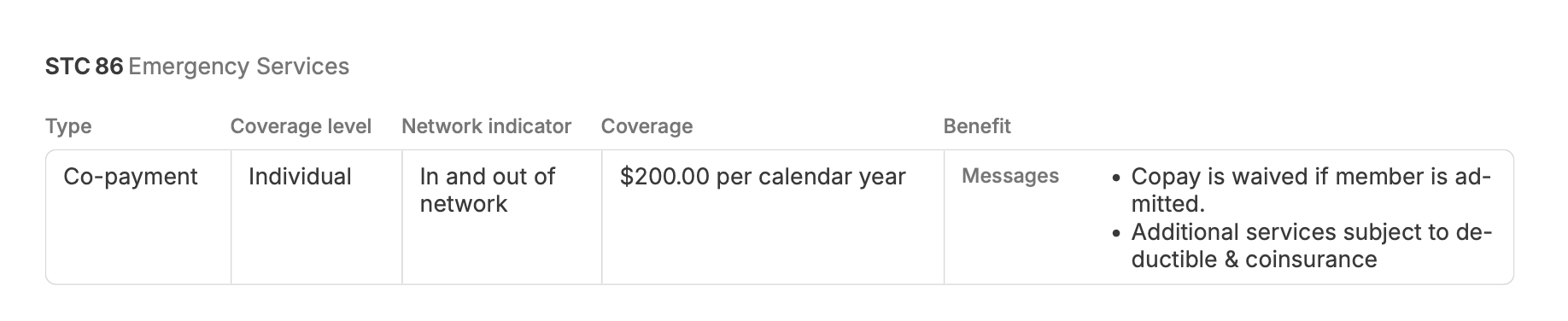
In the following example, the patient has a $200 co-payment for STC 86 (Emergency Services), but the messages indicate that this co-payment is waived if the patient is admitted to the hospital.
Request
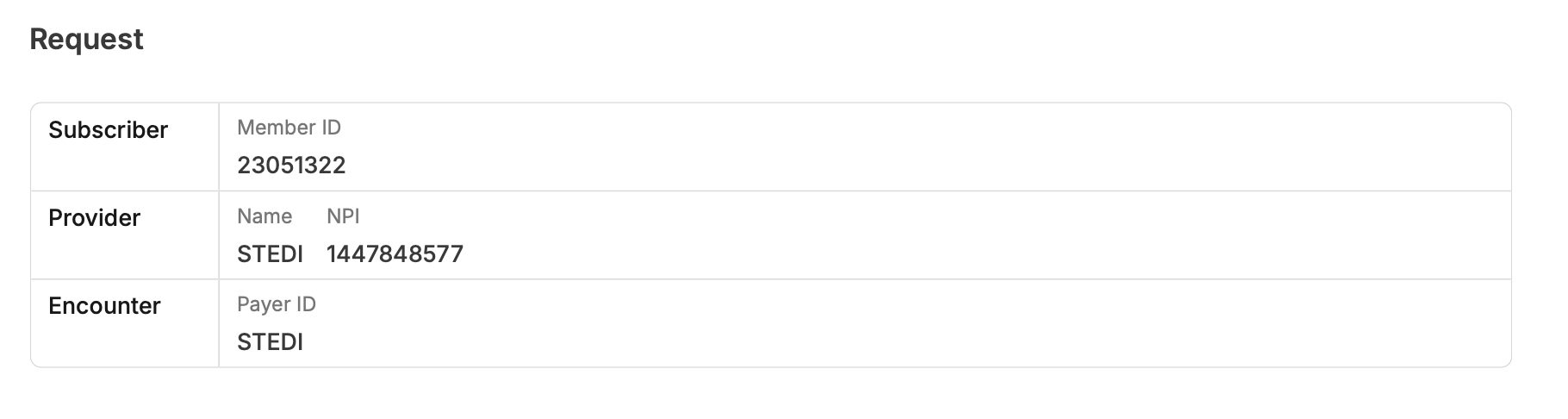
The final Request section provides a human-readable version of the original 270 eligibility check request. This helps you remember what STCs and procedure codes you requested and compare that to the benefits the payer returned in the response.
Interpret the PDF
You can use the information in the PDF to answer important questions about the patient's coverage and financial responsibility for services.
Does the patient have coverage?
The PDF indicates at the top in the Summary section whether there was a service type code (STC) or procedure code with active coverage returned.

Then, you can check to see if there's a Statuses row for the STCs or procedure codes you care about. Typically, only broad STCs (30 and 35 for general medical and dental coverage) will have a status.

Quick reference:
- The patient has coverage when the status is Active coverage for the relevant STC or procedure code. You can also assume the patient has coverage when there is no status, but benefits are listed (such as co-pay or deductible amounts).
- The patient doesn't have coverage when the status is Inactive for an STC or procedure code. You can also assume the patient doesn't have coverage if there are no benefits listed or the payer returned a message indicating that the service isn't covered.
What is the patient's financial responsibility?
Once you've confirmed that the patient has coverage, you may want to understand their financial responsibility for services. For example, you may want to know their co-pay amount for an in-office visit or whether they've met their deductible.
Within each STC or procedure code section, the PDF includes rows for each type of patient responsibility.
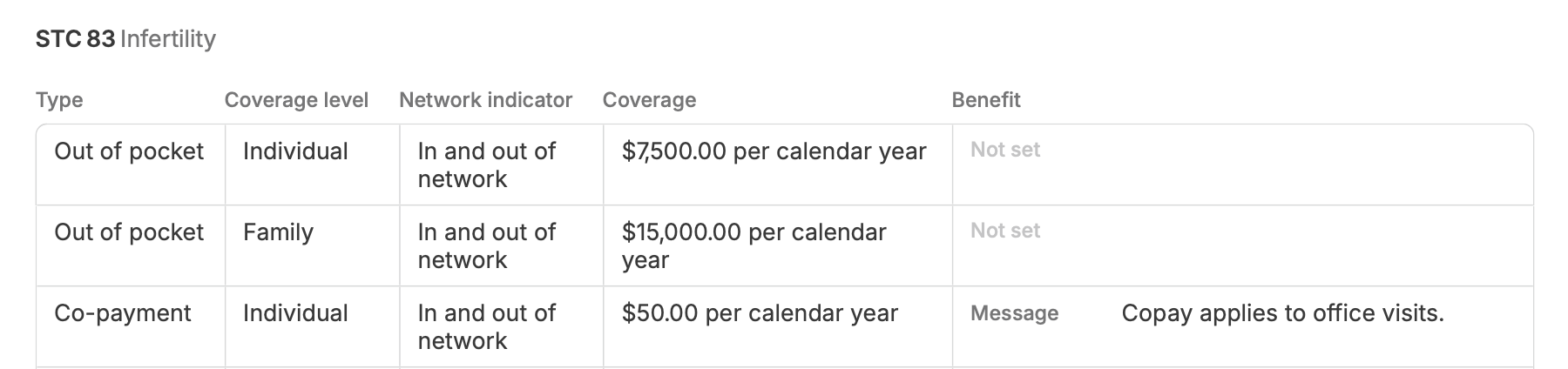
The following example shows that for STC 83 (Infertility), the patient has a yearly out-of-pocket maximum of $7,500 for individual coverage and a $15,000 out-of-pocket maximum for family coverage. They also have a co-payment of $50 for in-office visits for both in- and out-of-network providers.
Is the provider in- or out-of-network?
Unfortunately, you can't reliably answer this question from a standard eligibility response. That means you also can't reliably answer this question from the generated PDF.
Payers typically don't explicitly indicate whether the requesting provider is in- or out-of-network for the patient (though there are some exceptions). The Network indicator field in the table only indicates whether the benefit applies to in-network or out-of-network providers in general. It doesn't tell you whether the requesting provider is in- or out-of-network for the patient.
Some payers do provide additional information about whether the requesting provider is in- or out-of-network. They may do this through either freeform messages or selective inclusion of benefits in the response.
For example, some payers only return out-of-network benefits if the requesting provider is out-of-network. Likewise, if the provider is in-network, they only provide in-network benefits. Stedi doesn't have a complete list of payers that selectively include or exclude benefits based on the provider's network status.
The most reliable way to determine network status is to check directly with the payer or the provider. Note that payers may have different networks for different health plans, such as employer-sponsored plans versus Medicare Advantage, and these networks may have different contact paths.
Is prior authorization required?
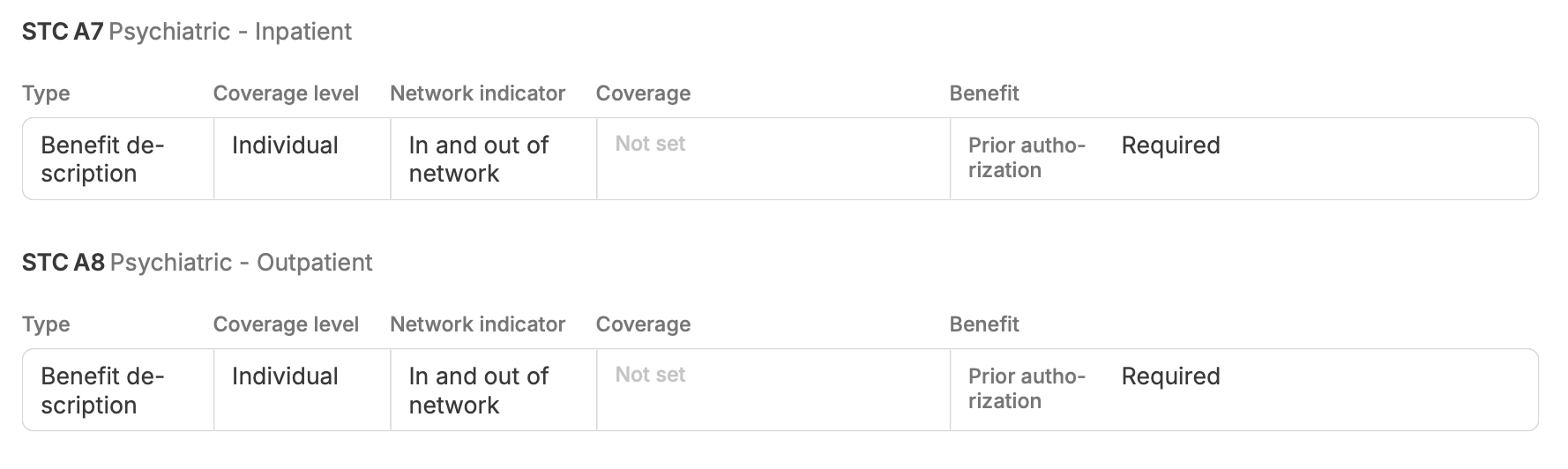
Prior authorization (also called pre-authorization or pre-certification) is a requirement that the patient or their provider must get approval before a payer will cover specific services, procedures, medications, or devices. Without it, the payer may deny claims.
If the payer provides prior authorization information in the eligibility response, it will be listed in the Benefit column for that service or procedure. The payer may also send messages about prior authorization rules.
If the payer doesn't provide prior authorization information for a service or procedure, you can typically assume that prior authorization isn't required.
Payers sometimes send incomplete or inaccurate prior authorization information, and Stedi can't control what they send. An eligibility response isn't a guarantee of payment, so verify requirements with the payer when the response doesn't establish them.
In the following example, the patient requires prior authorization for both STC A7 (Psychiatric - Inpatient) and STC A8 (Psychiatric - Outpatient) services. This rule applies to both in-network and out-of-network providers.