

Find patient insurance
Eligibility checks verify a patient's coverage with a specific payer. But what if you don't know the patient's insurance details or you're not sure whether they have coverage at all? In these situations, you can use an insurance discovery check to search for a patient's active coverage using only their demographic data.
Insurance discovery checks return an array of coverages along with subscriber details and benefits information. These coverages may be active or inactive, and there may be multiple of each type. If an insurance discovery check returns active coverage for the patient, you don't need to perform a follow-up eligibility check. The results include the same benefits information you'd get from running an eligibility check with the payer.
Insurance discovery checks support both medical and dental use cases. You can choose whether to search for coverage with medical or dental payers.
We recommend using insurance discovery checks as a backup when eligibility checks fail or aren't possible. Don't rely on them as your primary method for verifying patient coverage.
Use cases
If you have all the patient's demographic details (first name, last name, date of birth, member ID) and know the payer, running a standard eligibility check with that payer is always the most cost-effective and reliable path. Insurance discovery is the best option if running a standard eligibility check isn't possible.
You may need to perform an insurance discovery check when:
- You don't know the payer, such as when a patient doesn't have their insurance card or can't provide insurance details in an urgent care situation.
- One or more eligibility checks failed with an AAA
75(Subscriber Not Found) or similar error. - The patient's information is incomplete or outdated, such as when the patient can't provide their member ID.
- The coverage on file is no longer active, such as when a member changes employers or loses coverage.
The most common workflows for eligibility checks and insurance discovery are patient intake and claims submission. You can also use insurance discovery checks during revenue recovery. The following flowchart shows how insurance discovery works as part of these workflows:
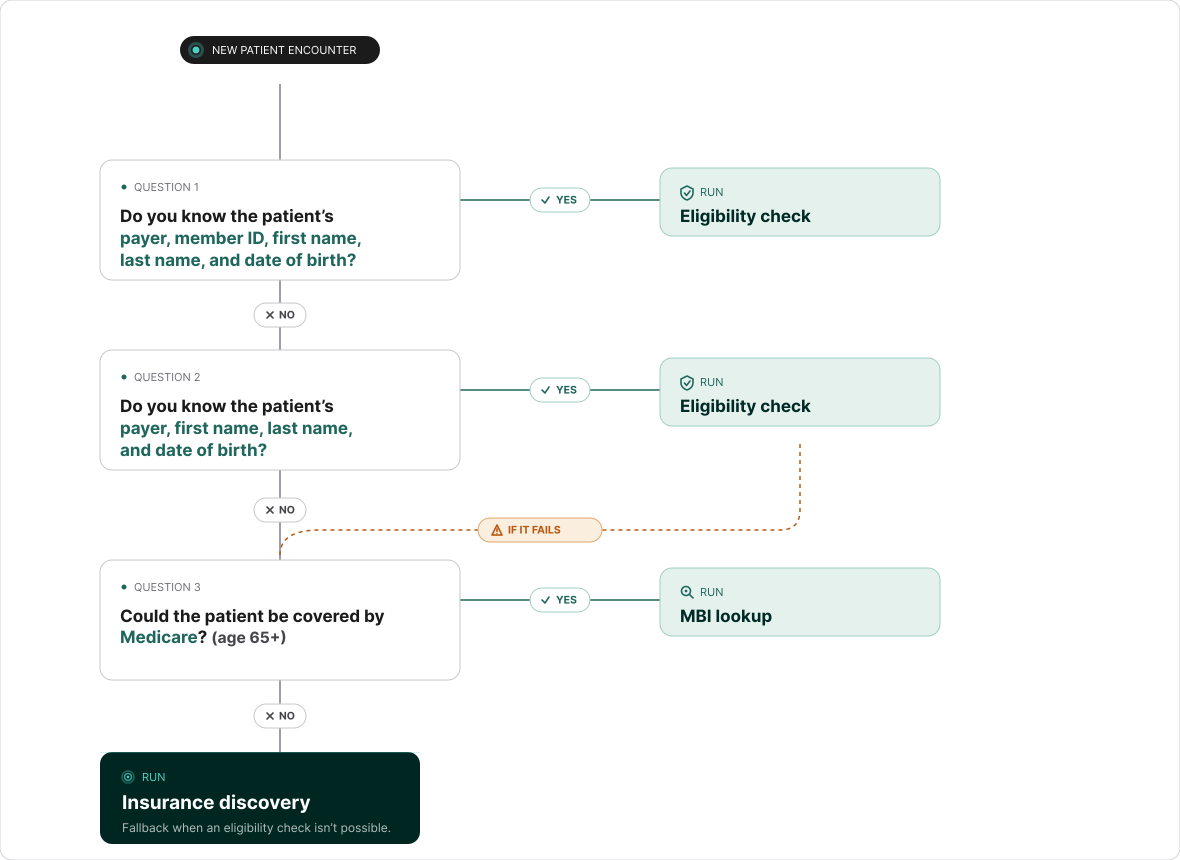
For patients who are likely covered by Medicare, such as those 65 or older, an MBI lookup is a targeted alternative to an insurance discovery check. An MBI lookup returns the patient's Medicare Beneficiary Identifier (MBI) and, if found, the patient's complete eligibility response from Medicare. You can run MBI lookups using only the patient's demographic information and (optionally) Social Security Number (SSN).
Usage notes
- Match rates vary: Insurance discovery checks aren't guaranteed to return a patient's active health plans 100% of the time - especially when the request doesn't include key demographic information like the patient's state or Social Security Number (SSN). Although unlikely, false positives are possible, so you're ultimately responsible for matching results to your own records.
- Limited request types: Insurance discovery checks can only request basic Health Benefit Plan Coverage (service type code
30) or Dental Benefit Plan Coverage (service type code35). If you need specific benefits that aren't returned in the response, run a subsequent eligibility check for that service type or procedure code. - Payers may return additional coverage types: You may receive more coverage types than you requested. For example, when you request dental coverage (service type code
35), payers may return medical coverage (service type code30) or other coverage types in addition to dental. Some national payers return all coverage they have on file, including inactive coverage. Stedi doesn't filter these results - you receive whatever the payer returns. Review the Services in the response benefits table to identify the relevant coverage for your use case. - Coverage is relative to service dates: Insurance discovery checks can only return active coverage for the service dates in the request. For example: A patient starts a new job, and coverage with their new employer starts through Cigna in March 2026. Previously, they had active coverage through UnitedHealthcare (UHC). If you submit an insurance discovery check for a date of service in February 2026, and it succeeds, Stedi returns active coverage for UHC and no coverage for Cigna.
- No payer primacy: Insurance discovery checks can't determine payer primacy. You must either run a coordination of benefits (COB) check or use your own internal logic to determine whether the patient has active coverage with additional payers and which payer is responsible for paying claims (primacy).
- Response time: The p50 latency is ~3.5 seconds and the p90 latency is ~13 seconds, and checks can take up to 120 seconds. The results page refreshes automatically while a check is still processing.
How insurance discovery works
Submit an insurance discovery check through the Create insurance discovery check form in the Stedi portal.
Provide as much patient demographic information as possible, such as first name, last name, DOB, state, and SSN, to increase the chances of finding matching coverage. You'll also include information like the provider's NPI and the date of service, similar to an eligibility check.
Stedi uses the supplied information - alongside its proprietary logic - to find coverage. This process usually takes between 3.5s and 13s.
Stedi returns an array of coverages along with subscriber details and benefits information. A response can include multiple coverages, and each one can be active or inactive, depending on what the payer supplied.
Review each coverage to confirm it's for your patient and active on your date of service. Visit Determine which matches to use for details.
- When a coverage passes these checks, you can use its benefits information to determine the patient's eligibility for services. Since the coverage result comes directly from the payer's 271 response, you don't need to perform a follow-up eligibility check, as the insurance discovery response includes all the necessary benefits information.
- When more than one coverage is active for your patient, visit Handle multiple active coverages to determine the billing order.
- If you need to change the date of service or service type code (STC), run a standard eligibility check with the exact demographic information the insurance discovery check returned.
Run insurance discovery checks
You can run insurance discovery checks in the Stedi portal.
Transaction enrollment
Transaction enrollment isn't required for insurance discovery, but we do strongly recommend it. Enrollment lets Stedi run Medicare Beneficiary Identifier (MBI) lookups as part of the discovery check in addition to checks to other large payers that require enrollment, improving your results.
To enroll, submit an enrollment request for the Stedi Insurance Discovery payer (payer ID: DISCOVERY):
- If you don't already have a provider record in Stedi, create one with the information required for enrollment. Visit Submit enrollment requests for instructions.
- Submit an enrollment request for Real-time eligibility checks using
DISCOVERYas the payer ID (Stedi Insurance Discovery).
Medicaid Provider ID
A Medicaid Provider ID is a unique identification number that state Medicaid programs assign to healthcare providers when they enroll. It's different than a provider's National Provider Identifier (NPI), which the federal government assigns. If a provider works in multiple states, they'll have different Medicaid IDs for each state.
Medicaid Provider IDs aren't required for transaction enrollment with Stedi, but they can enhance insurance discovery check results for certain payers. To add Medicaid Provider IDs to transaction enrollment requests, email enrollments@stedi.com with a CSV file containing the NPI and Medicaid ID(s) for each provider.
Many state Medicaid agencies have a provider lookup tool you can use to find a provider's Medicaid Provider ID. For example, providers practicing in Texas can use the Texas Medicaid & Healthcare Partnership Provider lookup tool to search for enrolled providers. You can also call the state Medicaid agency to request a provider's ID.
Required patient information
Provide as much patient demographic information as possible when submitting insurance discovery checks. The more information you provide, the more likely Stedi is to find matching coverage.
Minimum required
At a minimum, you must provide the patient's:
- First name
- Last name
- Date of birth (DOB)
Recommended
We strongly recommend providing as much of the following additional information as possible:
- State from the current address or previous addresses. This ensures that Stedi's insurance discovery logic finds localized, relevant payers. Without the state, Stedi can only determine coverage from the large, national payers.
- Social Security Number (SSN). For medical use cases, the patient's full SSN is best, but even the last 4 digits of the SSN can help narrow down matching coverage. For dental use cases, providing the SSN is especially important. Many dental payers accept SSN in place of a member ID. When included, Stedi can search with additional dental carriers that accept SSN instead of member ID. If you don't have the subscriber's member ID but can include the SSN, Stedi is more likely to return active dental coverage.
Submit insurance discovery checks
To submit an insurance discovery check:
- Click Insurance discovery in the side navigation to go to the Create insurance discovery check form.
- Enter the provider's NPI.
- Enter as much patient demographic information as possible. Visit Required patient information for guidance.
- (Optional) Search dental payers. The form defaults to Health Benefit Plan Coverage (service type code
30), which searches medical payers. Select Dental Care (service type code35) to search dental payers instead. - Click Submit.
Stedi runs the insurance discovery check and opens the check's detail page.
Review the results
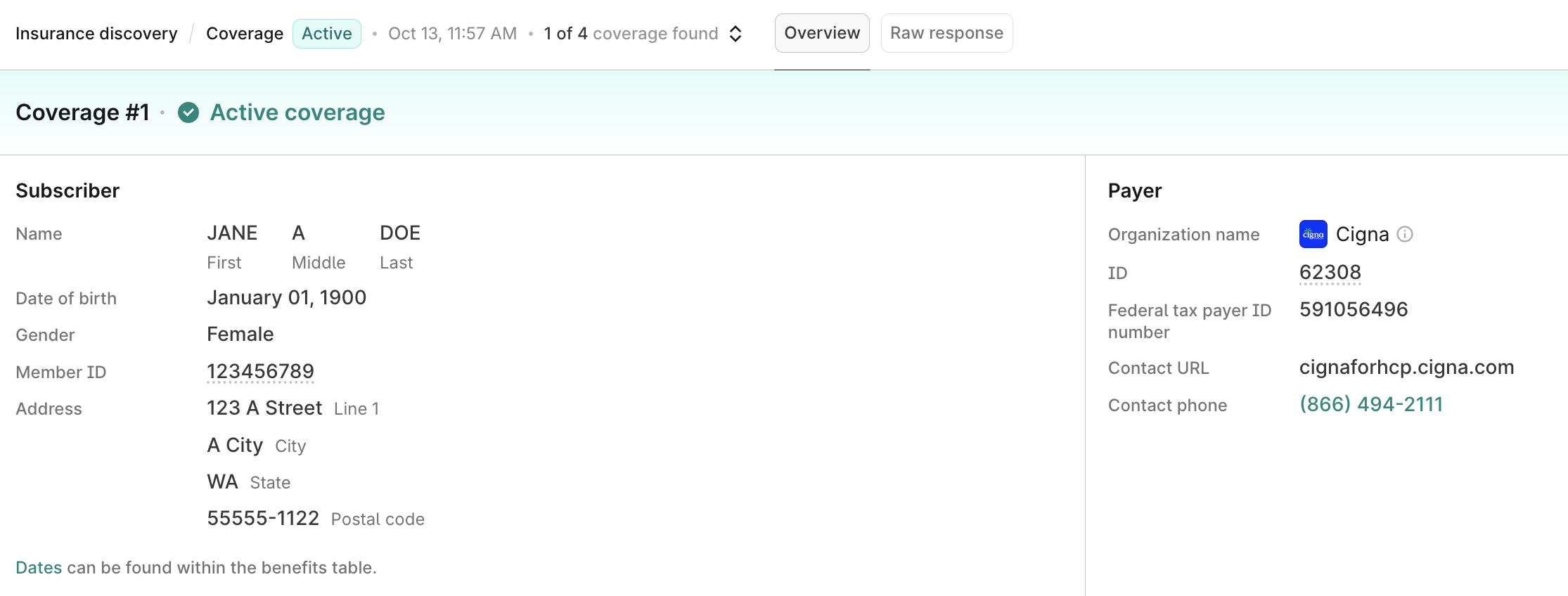
The insurance discovery check's detail page shows one coverage at a time. When a check finds more than one coverage for the patient, Stedi lists the active coverages first, and you can use the dropdown in the header to switch between them.
The page has two tabs: Overview shows a user-friendly format of the coverage details and benefits, and Raw response shows the complete response from the payer.
Each Overview tab includes the following information, when available:
- Status banner: The coverage number and its status, such as Coverage #1 and Active coverage
- Subscriber: Name, date of birth, gender, member ID, and address
- Payer: Organization name, payer ID, federal tax payer ID number, and contact URL and phone number
Always verify the match to ensure that the subscriber or dependent information matches the information you submitted for the patient.
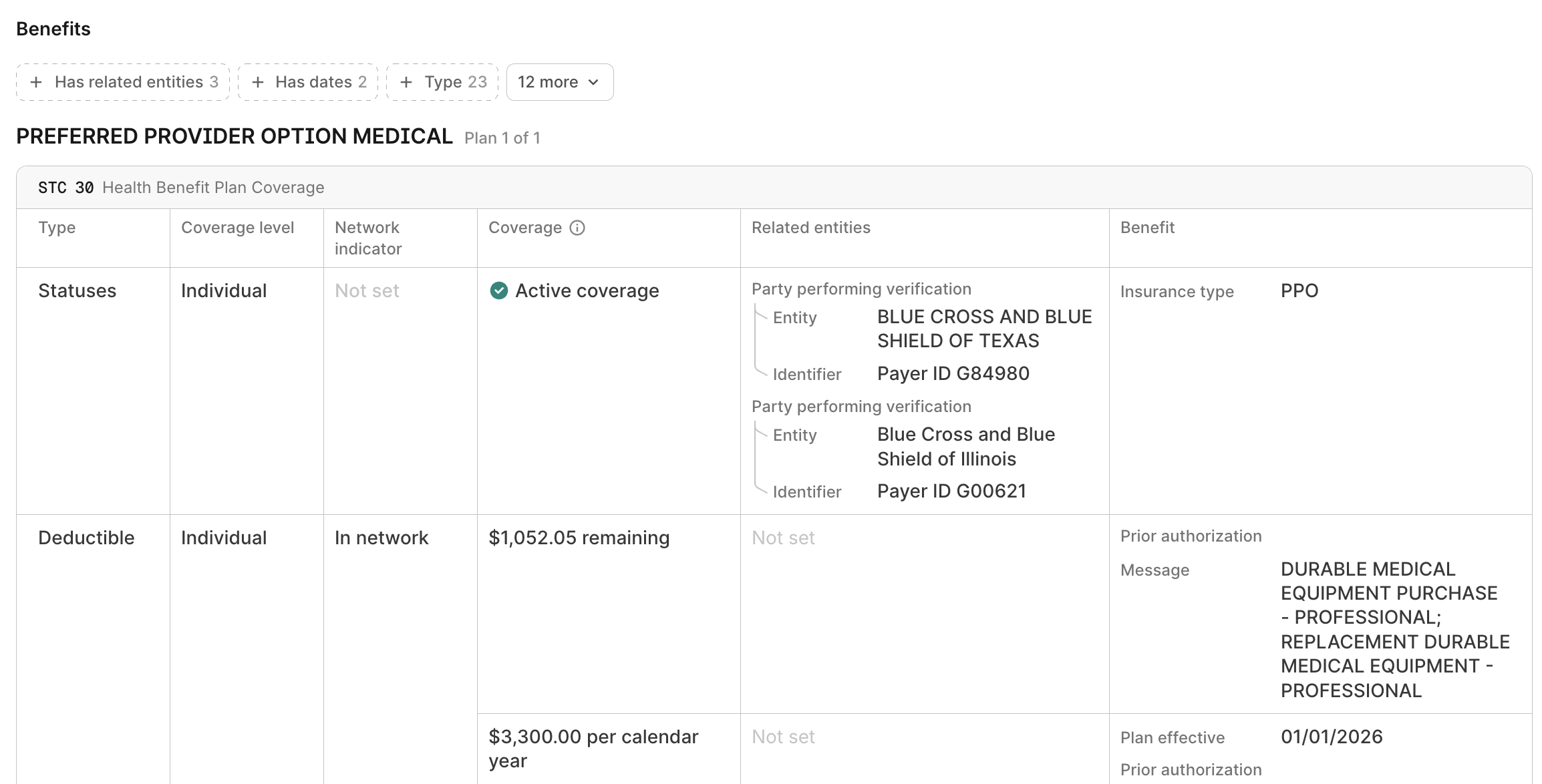
Underneath the overview is a filterable table of the patient's benefits. It's the same table the Stedi portal uses for eligibility checks. Visit Review patient benefits to learn how to determine whether the patient is covered and what they owe.
Unlike eligibility checks, the Stedi portal doesn't list past insurance discovery checks. Stedi opens a check's detail page when you submit it, and nothing in the portal links back to that check afterward. Save the URL if you want to return to it - the page loads for as long as Stedi stores the response.
No matches
Insurance discovery checks can return zero matches for a patient even when they have active coverage.
Common reasons for zero matches include:
- Recommended demographic data, like state or SSN, was missing from the request. Provide as much patient demographic information as possible to increase the chances of finding matching coverage.
- The patient's data doesn't exactly match what the payer has on file. For example, the patient demographics in the request don't match the patient's legal name or date of birth.
- The payer that the patient has doesn't support real-time eligibility checks, which makes it impossible for Stedi to determine coverage.
- The patient has coverage with a payer that supports eligibility checks, but Stedi's insurance discovery system couldn't find the payer.
We're always looking for feedback. If you know the patient has coverage and determined the payer through other means, reach out to Stedi's support team for further investigation.
Determine which matches to use
An insurance discovery check can return multiple coverages. Stedi returns all the coverage it finds for the patient without filtering the results, so more than one coverage doesn't necessarily mean the patient has more than one active plan. A response can include several coverages for the following reasons:
- Some national payers return every plan they have on file, including inactive coverage.
- Payers return coverage types you didn't request, so a check scoped to one service type code can come back with benefits for others.
- Checks match on demographic data, so some coverages aren't your patient.
For every coverage a check returns, verify the match and confirm active coverage on your date of service. When there is more than one active coverage for the patient, you need to determine the billing order (primacy) before you submit a claim.
Verify the match
For each coverage, always verify that the returned subscriber or dependent information matches the demographic information you submitted for the patient. Pay special attention to:
- Name matching: The patient's name must match, though slight variations (like hyphenated or two-part last names) may appear.
- Date of birth: Must match exactly.
- Address: Must match or be a previous address.
- Other details you collected at intake: For example, the patient's gender, ZIP Code, or state.
When the patient is a dependent, the Overview tab lists their details under Dependent and the policyholder's under Subscriber. Their last names don't always match.
Confirm active coverage on your date of service
After you verify the match, confirm that the coverage is active on your date of service.
Scroll to the benefits table, filter by Service or Procedure, and choose the service type code (STC) or procedure code(s) you care about. Then check for the following information:
- Coverage statuses: Check for rows with the Type column set to Statuses. The Coverage column lists the status for the STC or procedure code. Typically, only broad STCs (
30and35for general medical and dental coverage) have a Statuses row. - Dates: Check the Benefit column for plan effective dates, plan eligibility dates, or any other dates the payer returned.
The patient has coverage when a Statuses row shows Active coverage and the date of service falls within the plan's dates. You can also assume the patient has coverage when there's no Statuses row but the table lists benefits for that STC or procedure code, such as co-pay or deductible amounts.
The patient doesn't have coverage when a Statuses row shows Inactive, or when the date of service falls outside the plan's dates. You can also assume the patient doesn't have coverage when the table lists no benefits for that STC or procedure code, or when the payer returned a message indicating that the service isn't covered.
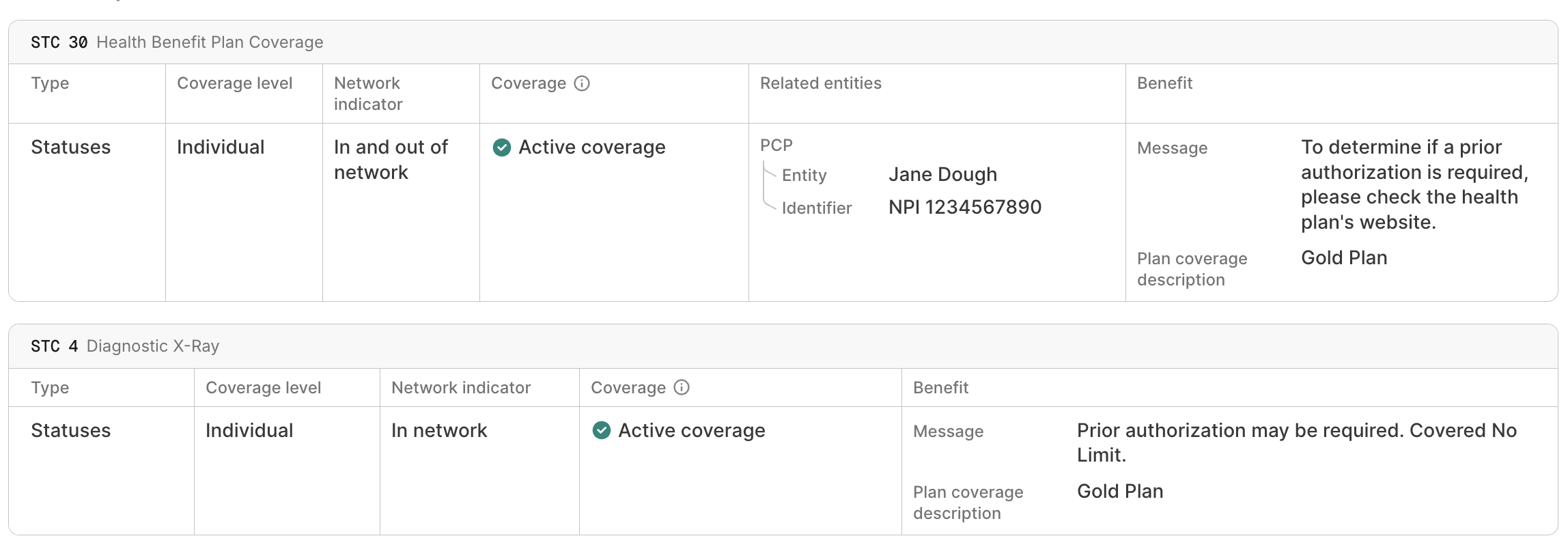
A coverage shows an Active coverage outcome when the payer returned at least one active benefit type for it. However, you must review the benefits table to confirm that the patient has active coverage for the STCs you care about.
When a coverage passes these checks, you can use its benefits details to determine the patient's eligibility for services. You don't need to run a follow-up eligibility check, because insurance discovery results contain the same benefits information.
Handle multiple active coverages
For each coverage Stedi returns, verify the match and confirm active coverage on your date of service.
When more than one coverage is active for your patient, you need to know which payer pays first (primacy) before you submit a claim. Start by identifying every payer in the response, then determine the order.
Identify payers
Insurance discovery checks aren't guaranteed to return every active plan, so treat the payers a check returns as a starting point rather than a complete list.
Each coverage's Overview tab names the payer for that coverage, including the payer ID you use to submit claims.
Payers also report other coverage they know about. Benefits-related entities appear in their own column in the benefits table, and you can narrow the table to them with the Has related entities filter. They commonly designate the patient's primary care provider (PCP), another organization that handles a specific carveout benefit type, or another health plan for the patient (coordination of benefits scenarios). For example, Medicare coverage often names the patient's supplemental plan, and the supplemental plan often names Medicare.

You can run an eligibility check with an additional payer to confirm the coverage and get a member ID for claims.
If no related entities appear and you later receive a claim denial citing coordination of benefits (COB):
- Check the subscriber and dependent details on the Overview tab for demographic information you didn't submit, such as a complete address.
- Run another insurance discovery check with those details. This can surface coverage the first check didn't return.
Determine primacy for billing
Once you've identified all the payers, you need to know the billing order (primacy). Insurance discovery checks don't indicate primacy. You can establish primacy from a prior claim denial or by running a coordination of benefits (COB) check.
Prior claim denial
When you're sure the patient has only two active coverages and one of those payers has already denied a claim citing COB, the other payer is primary.
For example, a check returns active coverage with both Aetna and Cigna, and Aetna denied your claim citing COB. In this case, Cigna is primary:
- Resubmit the claim to Cigna and wait for adjudication.
- Bill Aetna with a secondary claim built from Cigna's 835 Electronic Remittance Advice (ERA). Use the payment and adjustment amounts exactly as the ERA reports them.
COB check
If you're not sure about primacy, run a coordination of benefits (COB) check. COB checks determine primacy across a member's known coverage and report the billing order in the response. A COB check can also return payers that the insurance discovery check didn't. Always set the billing order from a COB response, not from an insurance discovery or eligibility response.
Original Medicare isn't part of the COB database, though many Medicare Advantage plans are. When a patient has Original Medicare, a COB check can't determine the billing order, so you must apply the primacy rules yourself. Visit Payer primacy for the guidelines Stedi follows, including how Medicare coordinates with other plans.
Visit Coordination of benefits (COB) checks for instructions on running a COB check.