Changelog

Claim edit: Missing adjustment amount

Stedi now rejects 837P professional, 837D dental, and 837I institutional claims that include an adjustment reason code without a corresponding adjustment amount.

How the edit works

In a healthcare claim, an adjustment is a dollar amount that reduces what the payer owes the provider. Adjustments can cover things like a contractual write-off or the patient's responsibility, such as a co-pay or deductible.

Payers apply adjustments during adjudication and return them, along with other payment information, to the provider in an Electronic Remittance Advice (ERA). Adjustments are provided at both the claim and service-line level.

In the ERA, each adjustment's dollar amount is paired with a Claim Adjustment Reason Code (CARC). The reason code explains why the adjustment was made.

When billing a secondary or tertiary payer – a process called coordination of benefits (COB) – the provider or their billing system copies the prior payer's adjustments onto the claim.

Each adjustment has a reason code, a dollar amount, and an optional quantity. Not all three are required, but if a reason code is present, the amount must be too.

Claim-level adjustment amount

Claim typeJSON API fieldX12 element
837P professionalclaimInformation.otherSubscriberInformation[].claimLevelAdjustments[].adjustmentDetails[].adjustmentAmountCAS-03, CAS-06, CAS-09, CAS-12, CAS-15, and CAS-18 of Loop 2320 (Other Subscriber Information)
837D dentalclaimInformation.otherSubscriberInformation[].claimLevelAdjustments[].adjustmentDetails[].adjustmentAmountCAS-03, CAS-06, CAS-09, CAS-12, CAS-15, and CAS-18 of Loop 2320 (Other Subscriber Information)
837I institutionalclaimInformation.otherSubscriberInformation.claimLevelAdjustments[].claimAdjustmentDetails[].adjustmentAmountCAS-03, CAS-06, CAS-09, CAS-12, CAS-15, and CAS-18 of Loop 2320 (Other Subscriber Information)

Service line-level adjustment amount

Claim typeJSON API fieldX12 element
837P professionalclaimInformation.serviceLines[].lineAdjudicationInformation[].claimAdjustmentInformation[].adjustmentDetails[].adjustmentAmountCAS-03, CAS-06, CAS-09, CAS-12, CAS-15, and CAS-18 of Loop 2430 (Line Adjudication Information)
837D dentalclaimInformation.serviceLines[].lineAdjudicationInformation[].claimAdjustmentInformation[].adjustmentDetails[].adjustmentAmountCAS-03, CAS-06, CAS-09, CAS-12, CAS-15, and CAS-18 of Loop 2430 (Line Adjudication Information)
837I institutionalclaimInformation.serviceLines[].lineAdjudicationInformation[].lineAdjustment[].claimAdjustmentDetails[].adjustmentAmountCAS-03, CAS-06, CAS-09, CAS-12, CAS-15, and CAS-18 of Loop 2430 (Line Adjudication Information)

If the reason code is copied without the corresponding amount, the payer can't process the adjustment and will reject the claim.

This edit catches the issue before the claim reaches the payer. It prevents payer rejections, which are slower and delay payment for the provider.

Rejection errors

If you submit a claim using Stedi's Claim Submission API endpoints and the claim fails the edit, you'll get back an error response in real time. The response includes details in the errors array:

{
  "errors": [
    {
      "code": "33",
      "description": "Missing Adjustment Amount. When an adjustment reason code is present then a corresponding adjustment amount is required. Impacted adjustment reason code(s) 96. Correct and resubmit.",
      "followupAction": "Please Correct and Resubmit"
    }
  ]
}

If you submit a claim using SFTP and the claim fails the edit, Stedi will reject the claim with a 277CA claim acknowledgment. The acknowledgment will include a related claim status category code, claim status code, and error message:

STC*A6>519*[DATE]*U*[AMOUNT]********Missing Adjustment Amount. When an adjustment reason code is present then a corresponding adjustment amount is required. Impacted adjustment reason code(s) 96. Correct and resubmit.~

FirstCare is now one-click enrollment

Healthcare payer FirstCare (Payer ID: 94998) now supports one-click transaction enrollment for Electronic Remittance Advice (ERAs).

About one-click enrollment

Transaction enrollment is the process of registering a provider to exchange specific healthcare transactions with a payer. Payers always require transaction enrollment for ERAs.

Transaction enrollment requirements vary by payer. Some payers may require the submitter to sign PDFs or complete tasks in the payer's portal.

With one-click transaction enrollment, you only need to submit an enrollment request. There are no follow-up steps. Stedi handles everything else.

You can check whether a payer supports one-click enrollment using the Stedi Payer Network or the Payer APIs.

Health Payment Systems Incorporated is now one-click enrollment

Healthcare payer Health Payment Systems Incorporated (Payer ID: 20270) now supports one-click transaction enrollment for Electronic Remittance Advice (ERAs).

About one-click enrollment

Transaction enrollment is the process of registering a provider to exchange specific healthcare transactions with a payer. Payers always require transaction enrollment for ERAs.

Transaction enrollment requirements vary by payer. Some payers may require the submitter to sign PDFs or complete tasks in the payer's portal.

With one-click transaction enrollment, you only need to submit an enrollment request. There are no follow-up steps. Stedi handles everything else.

You can check whether a payer supports one-click enrollment using the Stedi Payer Network or the Payer APIs.

Introducing requested effective dates for ERA enrollments

You can now set an optional requested effective date on ERA transaction enrollment requests. This date tells the payer when you'd like them to start routing ERAs to Stedi.

A provider can only receive Electronic Remittance Advice (ERAs) from a payer through one clearinghouse at a time. You change that clearinghouse through a transaction enrollment.

Without a predictable start date, you can't tell providers when to expect ERAs at Stedi or when to stop checking for ERAs at their old clearinghouse.

A requested effective date gives you that start date. This makes clearinghouse migrations and provider go-live dates easier to plan.

How requested effective dates work

Requested effective dates are a request to the payer, not a guarantee. The payer, not Stedi, controls when an enrollment takes effect.

Checking payer support

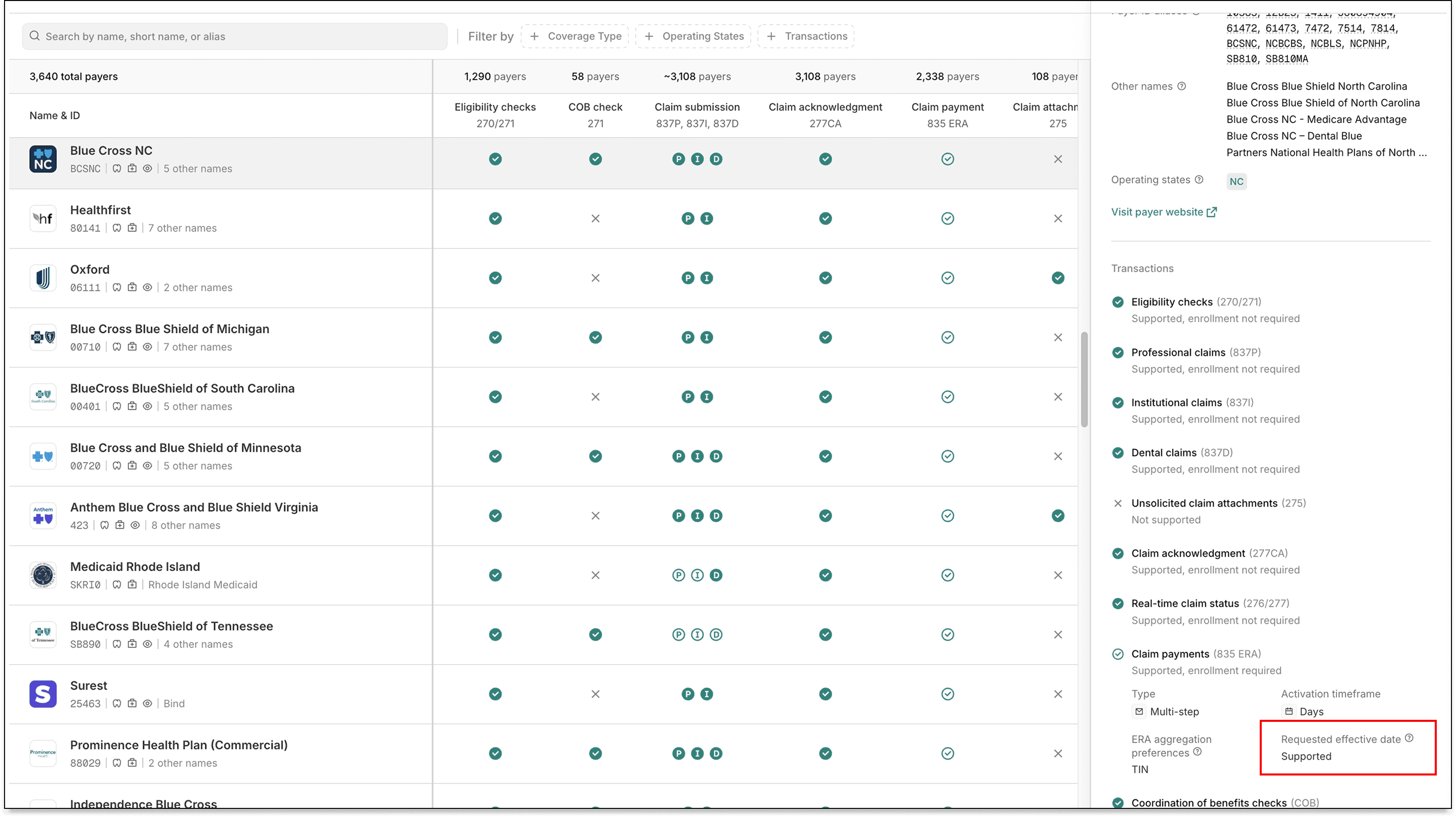
Not all payers support requested effective dates. You can check whether a payer supports them using the Payers API or the Stedi Payer Network before submitting an enrollment request.

In the Stedi Payer Network:

Stedi Payer Network

The field is omitted when Stedi has yet to determine a payer's support for requested effective dates.

In Payers API responses, check the requestedEffectiveDate field in the claimPayment enrollment process to determine support:

{
  "payer": {
    "enrollment": {
      "transactionEnrollmentProcesses": {
        "claimPayment": {
          "requestedEffectiveDate": "SUPPORTED", // Payer supports requested effective dates for ERA enrollments
          ...
        }
      },
      ...
    },
    ...
  }
}

Enrollments API

Setting a requested effective date

You can now pass an optional requestedEffectiveDate field in Create Enrollment API requests. The date uses YYYYMMDD format and can be today or any date up to 6 months from now.

{
  "transactions": {
    "claimPayment": {
      "enroll": true // ERA enrollment
    }
  },
  "requestedEffectiveDate": "20260601", // Requested effective date
  ...
}

On DRAFT enrollments, omitting the requestedEffectiveDate field leaves the value empty. For enrollments in the STEDI_ACTION_REQUIRED status, the requested effective date defaults to the submission date.

If the payer explicitly doesn't support requested effective dates, Stedi rejects the request.

Updating existing enrollments

You can update a DRAFT enrollment’s requestedEffectiveDate using an Update Enrollment API request.

Viewing requested effective dates

The Retrieve Enrollment API and List Enrollments API responses return requestedEffectiveDate on each enrollment record. For example, in a Retrieve Enrollment response:

{
  "id": "db6675c5-7be7-4af9-8c68-a54a336d2911",
  "requestedEffectiveDate": "20260601",
  ...
}

Filtering and sorting by requested effective dates

The List Enrollments API also accepts new query parameters to filter and sort by requested effective date:

  • Use requestedEffectiveDateFrom and requestedEffectiveDateTo to filter enrollments with a requested effective date in a given range

  • Use sortBy=requestedEffectiveDate:asc or sortBy=requestedEffectiveDate:desc to sort results by requested effective date

For example, the following request returns enrollments with a Q2 2026 requested effective date, sorted from earliest to latest:

curl --request GET \
  --url "https://enrollments.us.stedi.com/2024-09-01/enrollments?requestedEffectiveDateFrom=20260401&requestedEffectiveDateTo=20260630&sortBy=requestedEffectiveDate:asc" \
  --header "Authorization: <api_key>"

Stedi portal

Requested effective dates appear in the enrollments list view.

Enrollments list view

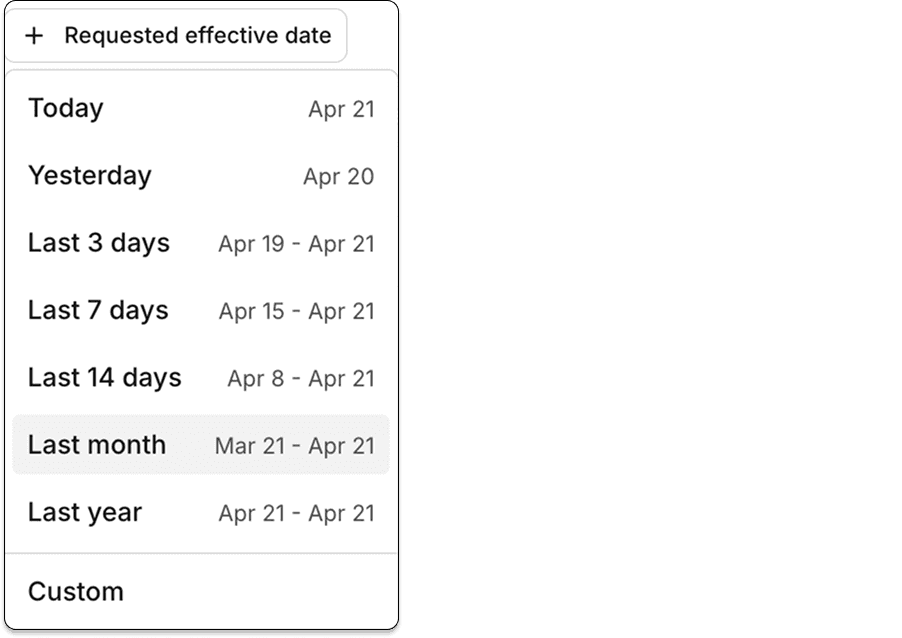
You can filter enrollments by requested effective date.

Filter enrollments by requested effective date

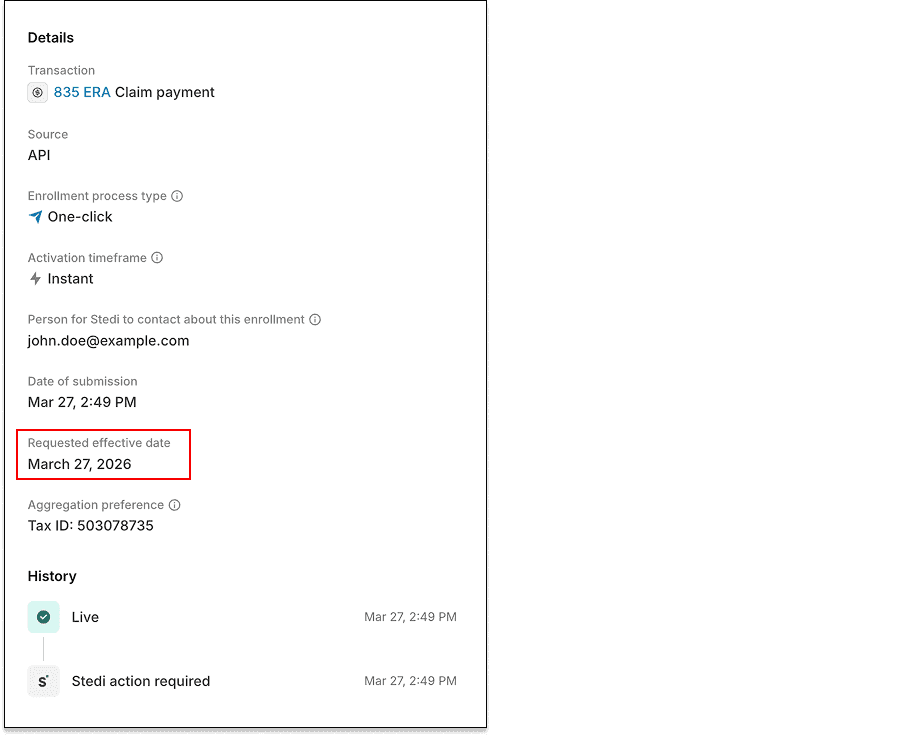
They also appear, when applicable, on each enrollment's detail page in the Stedi portal.

Enrollment detail page

Availability

Transaction enrollment is free on all Stedi plans.

To learn more, check out our transaction enrollment docs.

Point C is now one-click enrollment

Healthcare payer Point C (Payer ID: 22823) now supports one-click transaction enrollment for Electronic Remittance Advice (ERAs).

About one-click enrollment

Transaction enrollment is the process of registering a provider to exchange specific healthcare transactions with a payer. Payers always require transaction enrollment for ERAs.

Transaction enrollment requirements vary by payer. Some payers may require the submitter to sign PDFs or complete tasks in the payer's portal.

With one-click transaction enrollment, you only need to submit an enrollment request. There are no follow-up steps. Stedi handles everything else.

You can check whether a payer supports one-click enrollment using the Stedi Payer Network or the Payer APIs.

San Francisco Health Plan is now one-click enrollment

Healthcare payer San Francisco Health Plan (Payer ID: SFHP1) now supports one-click transaction enrollment for Electronic Remittance Advice (ERAs).

About one-click enrollment

Transaction enrollment is the process of registering a provider to exchange specific healthcare transactions with a payer. Payers always require transaction enrollment for ERAs.

Transaction enrollment requirements vary by payer. Some payers may require the submitter to sign PDFs or complete tasks in the payer's portal.

With one-click transaction enrollment, you only need to submit an enrollment request. There are no follow-up steps. Stedi handles everything else.

You can check whether a payer supports one-click enrollment using the Stedi Payer Network or the Payer APIs.

Blue Cross Blue Shield of South Carolina is now one-click enrollment

Blue Cross Blue Shield of South Carolina (Payer ID: 00401) now supports one-click transaction enrollment for Electronic Remittance Advice (ERAs).

About one-click enrollment

Transaction enrollment is the process of registering a provider to exchange specific healthcare transactions with a payer. Payers always require transaction enrollment for ERAs.

Transaction enrollment requirements vary by payer. Some payers may require the submitter to sign PDFs or complete tasks in the payer's portal.

With one-click transaction enrollment, you only need to submit an enrollment request. There are no follow-up steps. Stedi handles everything else.

You can check whether a payer supports one-click enrollment using the Stedi Payer Network or the Payer APIs.

Claim edit: Invalid taxonomy code

Stedi now rejects 837P professional, 837D dental, and 837I institutional claims that include a provider taxonomy code with an invalid format.

How the edit works

A taxonomy code identifies a provider's classification and specialization, such as cardiology or orthodontics.

Taxonomy codes are defined by the National Uniform Claim Committee (NUCC) and follow a strict format: exactly 10 alphanumeric characters, ending with the letter X.

If a claim contains a taxonomy code that doesn’t follow the format, the payer may reject the claim.

This edit catches the issue before the claim reaches the payer. It prevents payer rejections, which are slower and delay payment for the provider.

Rejection errors

If you submit a claim using Stedi's Claim Submission API endpoints and the claim fails the edit, you'll get back an error response in real time. The response includes details in the errors array:

{
  "errors": [
    {
      "code": "33",
      "description": "Invalid Taxonomy Code. The taxonomy code for Billing Provider does not meet the required format. Taxonomy codes must be 10 alphanumeric characters ending with 'X'. Correct and resubmit.",
      "followupAction": "Please Correct and Resubmit"
    }
  ]
}

If you submit a claim using SFTP and the claim fails the edit, Stedi will reject the claim with a 277CA claim acknowledgment. The acknowledgment will include a related claim status category code, claim status code, entity identifier code, and error message:

STC*A7>145>85*[DATE]*U*[AMOUNT]******A7>569**Invalid Taxonomy Code. The taxonomy code for Billing Provider does not meet the required format. Taxonomy codes must be 10 alphanumeric characters ending with 'X'. Correct and resubmit.~

Introducing pagination for the List Payers API

You can now paginate List Payers API responses using the pageSize and pageToken query parameters.

Stedi's Payer Network includes thousands of payers. Previously, List Payers responses always included all of them in one response. The pageSize parameter lets you retrieve them in smaller pages. The pageToken parameter lets you navigate pages using cursor-based pagination.

If you omit pageSize, the List Payers API still returns all payers in a single response. Existing integrations aren't affected.

How to paginate List Payers responses

Pass pageSize in your List Payers API request. The value must be 10 or greater.

curl --request GET \
  --url "https://healthcare.us.stedi.com/2024-04-01/payers?pageSize=100" \
  --header "Authorization: <api_key>"

If more results are available, the response includes a nextPageToken.

{
  "items": [...],
  "nextPageToken": "yrZ3we9982etYlMgmw==" // Pass this as pageToken in your next request
}

Pass nextPageToken as the pageToken parameter to retrieve the next page:

curl --request GET \
  --url "https://healthcare.us.stedi.com/2024-04-01/payers?pageSize=100&pageToken=yrZ3we9982etYlMgmw==" \
  --header "Authorization: <api_key>"

When the response contains no nextPageToken, you've retrieved the last page.

For more information, see our List Payers API reference.

Introducing aggregation preferences for ERA enrollments

You can now set an aggregation preference – NPI or tax ID (TIN) – on ERA transaction enrollment requests. The preference tells the payer how you’d like them to group payment information in ERAs.

Selecting the right aggregation preference means ERAs arrive grouped the way your billing system expects. Without it, mismatched grouping can require manual reconciliation to match payments to providers or practices.

What is ERA aggregation?

An Electronic Remittance Advice (ERA) contains payment and adjudication information for one or more claims. Providers use ERAs for payment reconciliation, where they match claims to their payments.

Payers group the information inside an ERA and route ERAs based on one of two identifiers in the related claims:

  • Tax identification number (TIN) – A 9-digit tax ID, either a Social Security Number (SSN) or Employer Identification Number (EIN).

  • National Provider Identifier (NPI) – A 10-digit ID assigned to individual providers and organizations.

TIN vs. NPI-based aggregation

TINs are sometimes shared across multiple billing providers within the same organization. For example, a clinic may submit claims for several doctors using a single TIN.

NPIs always uniquely identify a single provider entity, either an individual provider or an organization. For example, a doctor employed by multiple clinics may use the same NPI to submit claims across multiple TINs.

Most payers default to TIN-based aggregation. For more background, see How payers route ERAs.

How aggregation preferences work

Aggregation preferences are a request to the payer, not a guarantee. The payer, not Stedi, controls how ERAs are grouped and routed.

Checking payer support

Not all payers support both aggregation types. You can check which types a payer supports using the Payers API or the Stedi Payer Network before submitting an enrollment request.

In the Stedi Payer Network:

In Payers API responses, the supportedAggregationPreferences field lists the supported types. The field is omitted when Stedi has yet to determine a payer's supported aggregation types.

{
  "payer": {
    "enrollment": {
      "transactionEnrollmentProcesses": {
        "claimPayment": {
          "supportedAggregationPreferences": ["NPI", "TIN"], // Payer supports ERA aggregation by NPI and TIN
          ...
        }
      }
    },
    ...
  }
}

Enrollments API

Setting aggregation preferences

You can now pass the optional aggregationPreference object in Create Enrollment API requests. In almost all cases, the NPI or TIN should belong to the provider being enrolled.

To request NPI-based aggregation, provide an NPI in the aggregationPreference.npi property. For example, in a Create Enrollment API request body:

{
  "transactions": {
    "claimPayment": {
      "enroll": true    // ERA enrollment
    }
  },
  "aggregationPreference": {
    "npi": "1234567890" // Aggregate by the provided NPI
  },
  ...
}

To request TIN-based aggregation, use the aggregationPreference.taxId property:

{
  "transactions": {
    "claimPayment": {
      "enroll": true    // ERA enrollment
    }
  },
  "aggregationPreference": {
    "taxId": "999888777" // Aggregate by the provided tax ID (TIN)
  },
  ...
}

The aggregationPreference object is only supported for ERA transaction enrollments.

Updating existing enrollments

You can update the aggregationPreference object using an Update Enrollment API request if the enrollment is in the DRAFT status.

Payer support for aggregation preference

Before accepting an enrollment request, Stedi checks whether the payer supports the provided aggregationPreference. If not, Stedi rejects the request with an error.

If you omit the aggregationPreference field, the payer’s default aggregation method is used.

Viewing aggregation preferences

The Retrieve Enrollment API and List Enrollment API responses now return the submitted aggregationPreference object in enrollment records. For example, in a Retrieve Enrollment API response:

{
  "id": "db6675c5-7be7-4af9-8c68-a54a336d2911",
  "aggregationPreference": {
    "npi": "1234567890"
  },
  ...
}

The object is omitted for enrollments created before this feature was available.

Stedi portal

You can now use the optional TIN or NPI selectors to indicate an aggregation preference when creating an ERA enrollment request in the Stedi portal. By default, the TIN and NPI values in the selectors belong to the provider being enrolled.

Each ERA enrollment’s details page shows the aggregation preference.

Availability

Transaction enrollment is free on all Stedi plans.

To learn more, check out our transaction enrollment docs.